
Programming our Black Jack Game will be a success only if the game mechanics make sense and work similar to the real world. What I mean by this is users know the Black Jack game and are familiar with how it works, so our game must work the same or users will lose interest and not play.
Let lay out the rules.
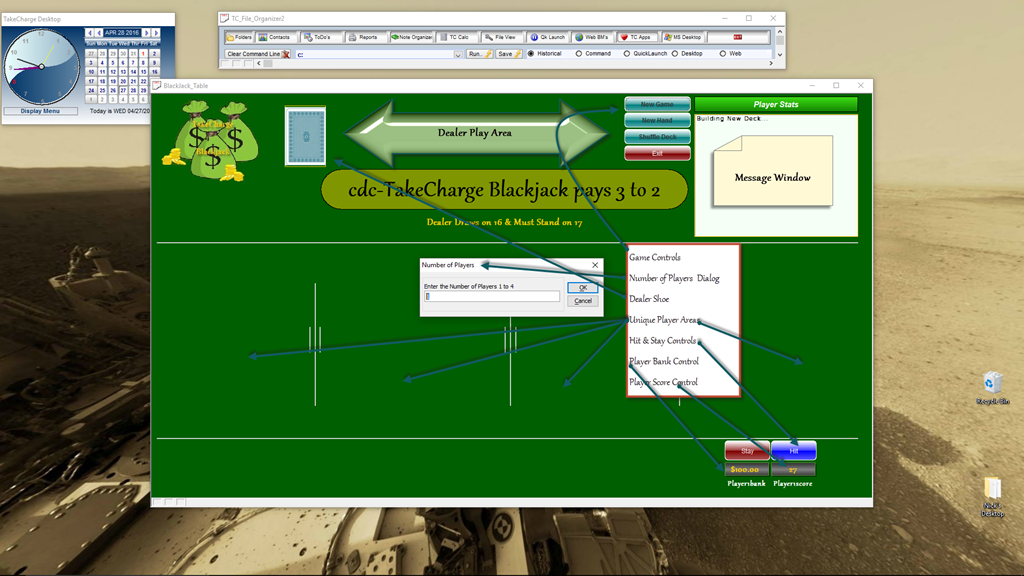
1. A new game starts and New decks of cards are brought into play and shuffled. Our New Game button. Our control prompts for the number of players and adds a new deck for each player which is then shuffled.
2. Each player has a bank of chips to play with. Our New Game button sets each players bank to $100.00 and the dealer to $1,000.00.
3. Each Player must place a bet before the cards are dealt. After the decks are shuffled a Place Bet Dialog box is displayed and allows each player to place their bet.
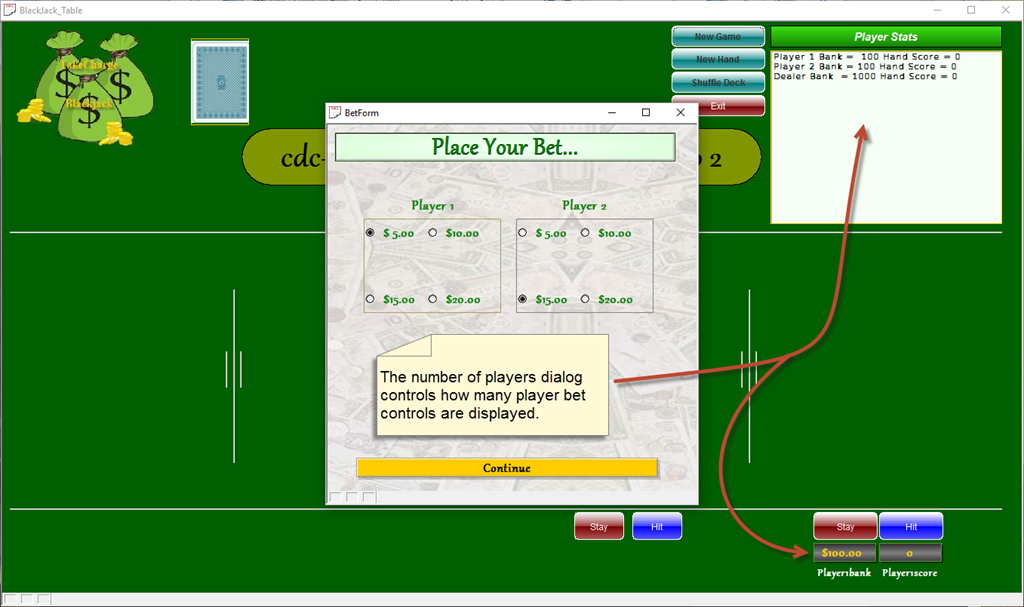
4. Once all bets are entered, the dealer deals cards. First card for each player left to right (from the dealers view) then dealer followed by the second card. When our Place Bet dialog closes the program displays a deal cards button which then deals the cards in the same order.
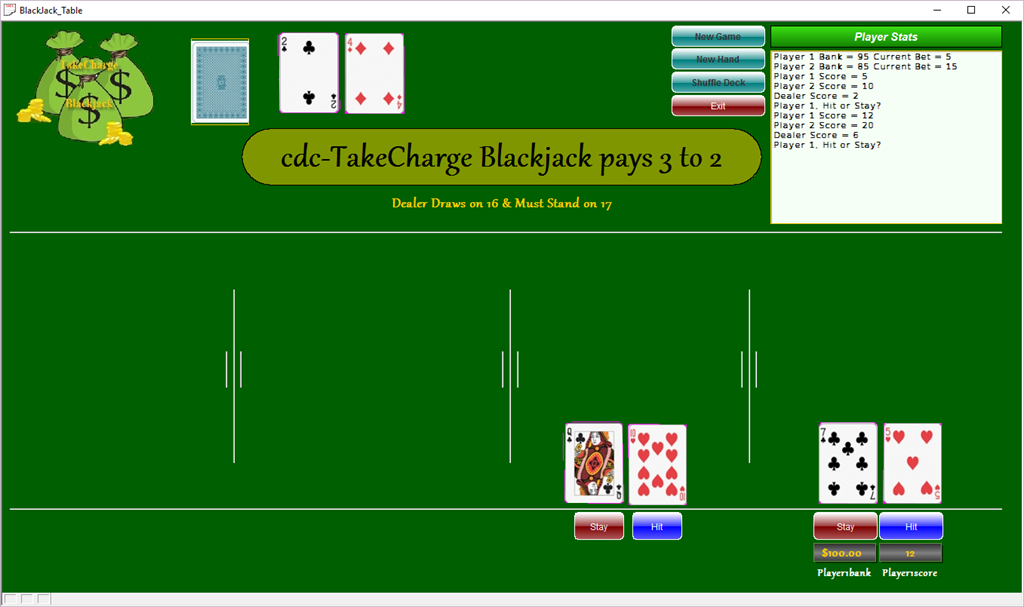
5. Once the cards are dealt the dealer waits for player one to decide if they will take a card or stay. (Typically scratching the felt means take a card and waving the hand over the cards means stay. The dealer then moves to player two, or if only one player is at the table the dealer must then take cards or stay based on house rules. In our game, if player 1 takes a card they click HIT and the card is displayed above the original two cards in player 1’s position. (Look we won!)
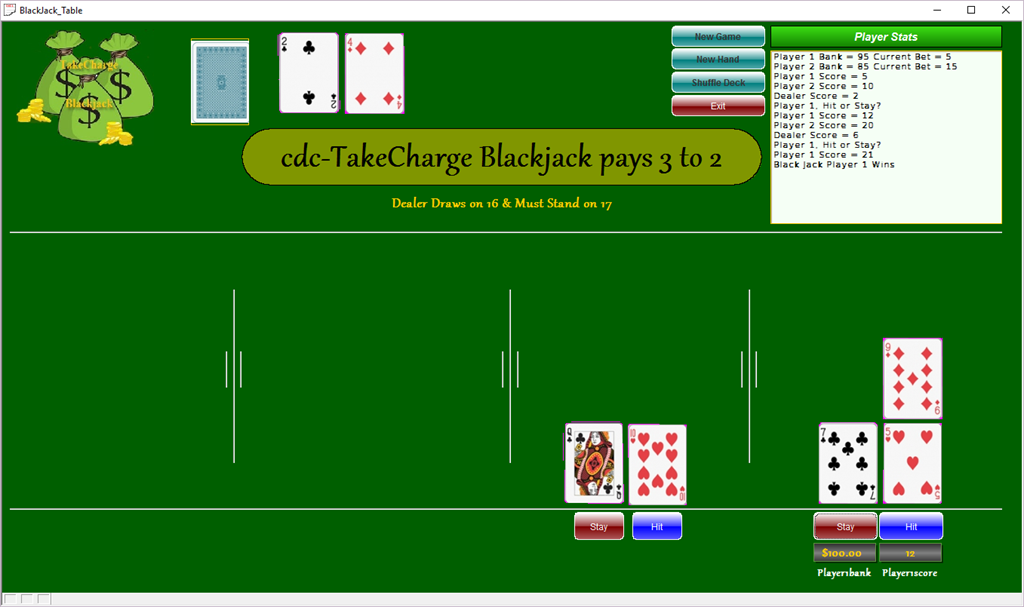
If player 1’s score is 21 or if they click STAY then the control moves to player 2 etc.. After each player finishes the house automatically draws or stays based on the rule of must draw at 16 or less and must stay at 17.
We have already looked at much of the code but I have made several changes in order to make the mechanics work correctly so I am going to repost all code to date.
New Game Control:
'Date Created: 23-Mar-2016 10:14:25 AM
'Last Updated: 26-Apr-2016 11:10:28 AM
'Created By  : NLaws
'Updated By  : NLaws
parentform.commit()
DIM SHARED dScore as N
DIM SHARED p1Score as N
DIM SHARED p2Score as N
DIM SHARED p3Score as N
DIM SHARED p4Score as N

DIM SHARED dBank as N
DIM SHARED p1Bank as N
DIM SHARED p2Bank as N
DIM SHARED p3Bank as N
DIM SHARED p4Bank as N

dim SHARED gCard as N
gCard = 0

dScore = 0
p1Score = 0
p2Score = 0
p3Score = 0
p4Score = 0

dBank = 0
p1Bank = 0
p2Bank = 0
p3Bank = 0
p4Bank = 0

p1Bet = 0
p2Bet = 0
p3Bet = 0
p4Bet = 0

text35.text = "Building New Deck..."
t = table.open("tc_gamedeck")
t.zap(.t.)
t.close()
xretry:
'dim xDecks as N
dim i as N
dim ii as N
dim xSuit as C
dim xPosInDeck as N
dim prmpt_title as c
dim prmpt_prompt as c
dim prmpt_default as c

prmpt_title = "Number of Players"
prmpt_prompt = "Enter the Number of Players 1 to 4"
prmpt_default = "1"


Dim SHARED xNbrofPlayers as N
xNbrofPlayers = ui_get_number(prmpt_title,prmpt_prompt,prmpt_default)
xbasic_wait_for_idle()
text35.text = text35.text + crlf() + "Setting up " + Alltrim(Str(xNbrofPlayers)) + "Players ..."

DIM SHARED xDecks AS N
xDecks = xNbrofPlayers
DIM i as N
gt = table.open("tc_gametable")
gt.fetch_first()
FOR i = 1 TO xNbrofPlayers
    gt.change_begin()
    gt.nbrofplayers = xNbrofPlayers
    IF i = 1 THEN
        gt.player1bank = 100.00
        gt.player1score = 0
        gt.dealerbank = 1000.00
        gt.dealerscore = 0
        gt.nbrofdecks = xDecks
        dBank = gt.dealerbank
        dScore = gt.dealerscore
        p1Bank = gt.player1bank
        p1Score = gt.player1score
    ELSE IF i = 2 THEN
        gt.player2bank = 100.00
        gt.player2score = 0
        p2Bank = gt.player2bank
        p2Score = gt.player2score
    ELSE IF i = 3 THEN
        gt.player3bank = 100.00
        gt.player3score = 0
        p3Bank = gt.player3bank
        p3Score = gt.player3score
    ELSE IF i = 4 THEN
        gt.player4bank = 100.00
        gt.player4score = 0
        p4Bank = gt.player4bank
        p4Score = gt.player4score
    END IF
    gt.change_end(.t.)
NEXT
gt.close()


xbasic_wait_for_idle()
text35.text = text35.text + crlf() + "Building Initial Deck ..."

FOR i = 1 TO xNbrofPlayers
    DIM Append as P

    a_tbl = table.open("tc_gamedeck")
    append.t_db = "tc_masterdeck"
    append.m_key = ""
    append.t_key = ""
    append.m_filter = ""
    append.t_filter = ""
    append.type = "All"
    append.m_count = 6
    append.m_field1 = "SUITS"
    append.m_exp1 = "@TC_MASTERDECK->SUITS"
    append.m_field2 = "CARDS"
    append.m_exp2 = "@TC_MASTERDECK->CARDS"
    append.m_field3 = "CARDVALUE"
    append.m_exp3 = "@TC_MASTERDECK->CARDVALUE"
    append.m_field4 = "NBROFDECKS"
    append.m_exp4 = "VAR->xNbrofPlayers"
    append.m_field5 = "CARDSTOPLAY"
    append.m_exp5 = "VAR->xNbrofPlayers"
    append.m_field6 = "POSITIONINDECK"
    IF i = 1 THEN
        append.m_exp6 = "@TC_MASTERDECK->POSITIONINDECK"
    ELSE IF i = 2 THEN
        append.m_exp6 = "@TC_MASTERDECK->POSITIONINDECK+52"
    ELSE IF i = 3 THEN
        append.m_exp6 = "@TC_MASTERDECK->POSITIONINDECK+104"
    ELSE
        append.m_exp6 = "@TC_MASTERDECK->POSITIONINDECK+156"
    END IF
    append.t_count = 0
    a_tbl.append()
    a_tbl.close()
Next

xbasic_wait_for_idle()
text35.text = text35.text + crlf() + "Preparing to Shuffel " + Alltrim(Str(xNbrofPlayers)) + "Decks ..."
script_play("ShuffleDeck")
xbasic_wait_for_idle()

script_play("AssigningPlayers")
xbasic_wait_for_idle()
text35.text = ""
dim i as N
FOR i = 1 TO xNbrofPlayers
    IF i = 1 THEN
        text35.text = "Player 1 Bank =  " + p1Bank + " Hand Score = " + P1Score + crlf()
    ELSE IF i = 2 THEN
        text35.text = text35.text + "Player 2 Bank = " + p2Bank + " Hand Score = " + P2Score + crlf()
    ELSE IF i = 3 THEN
        text35.text = text35.text + "Player 3 Bank = " + p3Bank +" Hand Score = " + P3Score + crlf()
    ELSE IF i = 4 THEN
        text35.text = text35.text + "Player 4 Bank = " + p4Bank +" Hand Score = " + P4Score + crlf()
    END IF
NEXT

text35.text = text35.text + "Dealer Bank  = " + DBank +" Hand Score = " + DScore + crlf()
xbasic_wait_for_idle()
button13.push()
The code which changed is highlighted.
We now call shuffleDeck which has also changed.
'Date Created: 14-Mar-2016 10:55:02 AM
'Last Updated: 07-Apr-2016 10:56:43 AM
'Created By  : NLaws
'Updated By  : NLaws

dim deckshuffel as N
dim cardshuffel as N
Dim newOrder as N
newOrder = 1

a_tbl = table.open("tc_gamedeck")
update.fields = 1
update.field1 = "SHUFFLED"
update.expr1 = ".f."
a_tbl.update()
a_tbl.close()

xbasic_wait_for_idle()

IF val(time("m")) > 52 THEN
    deckshuffel = round(val(time("m"))-8/4,0)
ELSE
    deckshuffel = round(val(time("m"))/4,0)
END IF
IF deckshuffel = r_nbr THEN
    deckshuffel = r_nbr + 3
END IF
r_nbr = deckshuffel
xbasic_wait_for_idle()
text35.text = text35.text + crlf() + "Shuffeling Deck " + Alltrim(Str(deckshuffel)) + " times ..."

cardshuffel = deckshuffel


t = table.open("tc_gamedeck")
shuffelagain:
t.fetch_first()
t.batch_begin()
WHILE .not. t.fetch_eof()
    IF t.shuffled = .f. THEN
        IF t.recno() = cardshuffel THEN
            t.change_begin()
            t.positionindeck = newOrder
            t.shuffled = .t.
            t.change_end(.t.)
            newOrder = newOrder + 1
            cardshuffel = cardshuffel + deckshuffel
        END IF
    ELSE
        cardshuffel = cardshuffel + deckshuffel
    END IF
    t.fetch_next()
END WHILE
t.batch_end()
deckshuffel = deckshuffel - 1
cardshuffel = deckshuffel
xbasic_wait_for_idle()
IF deckshuffel > 0 THEN
    goto shuffelagain
END IF
t.close()
xbasic_wait_for_idle()
parentform.Refresh_Layout()
xbasic_wait_for_idle()
gCard = 0
text35.text = text35.text + crlf() + "Thanks for waiting ... Lets Play!"

End
and Assigning Players
'Date Created: 23-Mar-2016 10:49:55 AM
'Last Updated: 19-Apr-2016 03:25:55 PM
'Created By  : NLaws
'Updated By  : NLaws


IF xNbrofPlayers = 4 THEN
    button3.Show()
    button4.show()
    button5.Show()
    button6.Show()
    button7.show()
    button8.Show()
ELSE IF xNbrofPlayers = 3 THEN
    button3.Show()
    button4.Show()
    button5.Show()
    button6.Show()
    button7.Hide()
    button8.Hide()
ELSE IF xNbrofPlayers = 2 THEN
    button3.Show()
    button4.Show()
    button5.Hide()
    button6.Hide()
    button7.Hide()
    button8.Hide()
END IF
This script simply shows or hides player controls based on the xNbrofPlayers dialog.
Finally our script pushes button13
parentform.commit()
script_play("Clear_BJ_Brd")
xLen = xNbrofPlayers
ui_freeze(.t.)
form.load("BetForm","dialog","","center","center")
BetForm.Activate()
BetForm.Show()
BetForm.close()
ui_freeze(.f.)

xbasic_wait_for_idle()
p1Bank = p1Bank - p1Bet
p2Bank = p2Bank - p2Bet
p3Bank = p3Bank - p3Bet
p4Bank = p4Bank - p4Bet

dScore = 0
p1Score = 0
p2Score = 0
p3Score = 0
p4Score = 0

xbasic_wait_for_idle()
text35.text = ""
dim i as N
FOR i = 1 TO xNbrofPlayers
    IF i = 1 THEN
        text35.text = "Player 1 Bank = " + p1Bank + " Current Bet = " + P1Bet + crlf()
    ELSE IF i = 2 THEN
        text35.text = text35.text + "Player 2 Bank = " + p2Bank + " Current Bet = " + P2Bet + crlf()
    ELSE IF i = 3 THEN
        text35.text = text35.text + "Player 3 Bank = " + p3Bank +" Current Bet = " + P3Bet + crlf()
    ELSE IF i = 4 THEN
        text35.text = text35.text + "Player 4 Bank = " + p4Bank +" Current Bet = " + P4Bet + crlf()
    END IF
NEXT
xbasic_wait_for_idle()
parentform.Refresh_Layout()
Button17.Show()
This code is new and is attacked to a hidden button on our form. When the button is pushed from the parent script it displays our bet dialog form which pauses the application input until the players click continue. Then control is passed back to our script and processes our bet and bank controls. Finally our array displays the proper message based on xNbrofPlayers.
Notice this script first calls Clear_BJ_Brd which is also new.
parentform.commit()
dim i as N
dim ii as N
FOR i = 1 TO xNbrofPlayers
    FOR ii = 1 TO 6
        eval("P"+Alltrim(str(i,1,0))+"POS"+Alltrim(str(ii,1,0))+".Default.Hbitmap.Bmpfile") = "[PathAlias.ADB_Path]\CardGames\Cards\TransP.png"
    NEXT ii
NEXT i

Dealerp1.Default.Hbitmap.Bmpfile  = "[PathAlias.ADB_Path]\CardGames\Cards\TransP.png"
Dealerp2.Default.Hbitmap.Bmpfile  = "[PathAlias.ADB_Path]\CardGames\Cards\TransP.png"
Dealerp3.Default.Hbitmap.Bmpfile  = "[PathAlias.ADB_Path]\CardGames\Cards\TransP.png"
Dealerp4.Default.Hbitmap.Bmpfile  = "[PathAlias.ADB_Path]\CardGames\Cards\TransP.png"
Dealerp5.Default.Hbitmap.Bmpfile  = "[PathAlias.ADB_Path]\CardGames\Cards\TransP.png"
Dealerp6.Default.Hbitmap.Bmpfile  = "[PathAlias.ADB_Path]\CardGames\Cards\TransP.png"
xbasic_wait_for_idle()
parentform.Refresh_Layout()
In this script we use a nested array to set the Bitmap file to TransP.png for each card image per player. Because I = 1 to xNbrofPlayers it only processes images for players based on the variable xNbrofPlayers.
Now there are still some final tweaks needed to finalize the bank and bet controls but they simply will update the objects on the form.
Deal Hand
This button control is displayed after the bet control is done.
'Date Created: 15-Mar-2016 11:54:34 AM
'Last Updated: 25-Apr-2016 12:09:36 PM
'Created By  : NLaws
'Updated By  : NLaws

dim SHARED xPos as N
xPos = 1
script_play("OnePlayer")
IF xNbrofPlayers = 2 THEN
    script_play("PlayerTwo")
ELSE IF xNbrofPlayers = 3 THEN
    script_play("PlayerTwo")
    sleep(5/10)
    script_play("PlayerThree")
ELSE IF xNbrofPlayers = 4 THEN
    script_play("PlayerTwo")
    sleep(5/10)
    script_play("PlayerThree")
    sleep(5/10)
    script_play("PlayerFour")
END IF
script_play("Dealer")

xPos = 2
script_play("OnePlayer")
IF xNbrofPlayers = 2 THEN
    script_play("PlayerTwo")
ELSE IF xNbrofPlayers = 3 THEN
    script_play("PlayerTwo")
    sleep(5/10)
    script_play("PlayerThree")
ELSE IF xNbrofPlayers = 4 THEN
    script_play("PlayerTwo")
    sleep(5/10)
    script_play("PlayerThree")
    sleep(5/10)
    script_play("PlayerFour")
END IF
script_play("Dealer")
xPos = 3


BlackJackTable2:Cardback.Object.Visible  = .f.
Button17.Hide()
parentform.Repaint()
In this onPush code we use the if else if function to call the proper scripts based on the value of xNbrofPlayers. Each of the scripts are the same except for the position code and the animation code to place each card. Here is the code for OnePlayer.
'Date Created: 30-Mar-2016 10:48:15 AM
'Last Updated: 26-Apr-2016 10:21:18 AM
'Created By  : NLaws
'Updated By  : NLaws

dim SHARED sCount as N
sCount = 1

BlackJackTable2:Cardback.Object.Always_on_top  = .t.
BlackJackTable2:Cardback.Object.Left  = 2.7
BlackJackTable2:Cardback.Object.Top  = .1
BlackJackTable2:Cardback.Object.Visible  = .t.
xbasic_wait_for_idle()

dim stepL as N
dim stepD as N
StepL = .188
StepD = .108

continue:
IF gCard + (xNbrofPlayers * 3) < 50 * xNbrofPlayers THEN
    gCard = gCard + 1
ELSE
    script_play("ShuffleDeck")
    goto continue
END IF

nextstep:
IF sCount < 50 THEN
    IF xPos = 1 THEN
        BlackJackTable2:Cardback.Object.Left  = BlackJackTable2:Cardback.Object.Left + StepL
        BlackJackTable2:Cardback.Object.Top  = BlackJackTable2:Cardback.Object.Top + StepD
    ELSE
        BlackJackTable2:Cardback.Object.Left  = BlackJackTable2:Cardback.Object.Left + StepL-.012
        BlackJackTable2:Cardback.Object.Top  = BlackJackTable2:Cardback.Object.Top + StepD
    END IF
    sCount = sCount + 1
    xbasic_wait_for_idle()
    parentform.Refresh_Layout()
    sleep(.5/10)
    goto nextstep
ELSE
    goto done
END IF
done:
xbasic_wait_for_idle()
dim xcard as C
dim delt as C
delt = table.external_record_content_get("tc_gamedeck", "Alltrim(Cards) + '-of-' + Alltrim(Suits) + ':' + CardValue", "positionindeck","positionindeck = Var->gCard")
xcard = word(delt,1,":",1)
IF xPos = 1 THEN
    topparent:P1pos1.Default.Hbitmap.Bmpfile  = "[PathAlias.ADB_Path]\CardGames\Cards\\"+Alltrim(xCard)+".png"
    topparent:P1pos1.Object.Always_on_top  = .t.
    BlackJackTable2:p1pos1.Refresh()
    p1Score = p1Score + val(word(delt,2,":",1))
ELSE
    topparent:P1pos2.Default.Hbitmap.Bmpfile  = "[PathAlias.ADB_Path]\CardGames\Cards\\"+Alltrim(xCard)+".png"
    topparent:P1pos2.Object.Always_on_top  = .t.
    BlackJackTable2:p1pos2.Refresh()
    p1Score = p1Score + val(word(delt,2,":",1))
    t = table.current()
    t.change_begin()
    t.player1Score = p1Score
    t.change_end(.t.)
END IF
text35.text = text35.text + "Player 1 Score = " + p1Score + crlf()
IF p1Score = 21 THEN
    text35.text = text35.text + "Black Jack Player 1 Wins"
END IF
parentform.Repaint()
Notice we now use the function word() to set the value of the card and suit as well as the card value and the other changes are highlighted.
The final code we need to review is for the Hit and Stay controls. This code is new and listed below.
Our code is attached to the onPush event of button2
'Date Created: 07-Apr-2016 06:54:34 AM
'Last Updated: 26-Apr-2016 10:22:31 AM
'Created By  : NLaws
'Updated By  : NLaws

dim SHARED sCount as N
sCount = 1

BlackJackTable2:Cardback.Object.Always_on_top  = .t.
BlackJackTable2:Cardback.Object.Left  = 2.7
BlackJackTable2:Cardback.Object.Top  = .1
BlackJackTable2:Cardback.Object.Visible  = .t.
xbasic_wait_for_idle()

dim stepL as N
dim stepD as N
StepL = .188
StepD = .108

continue:
IF gCard < 52 * xNbrofPlayers THEN
    gCard = gCard + 1
ELSE
    script_play("ShuffleDeck")
    goto continue
END IF

nextstep:
IF sCount < 50 THEN
    IF xPos = 3 THEN
        BlackJackTable2:Cardback.Object.Left  = BlackJackTable2:Cardback.Object.Left + StepL
        BlackJackTable2:Cardback.Object.Top  = BlackJackTable2:Cardback.Object.Top + StepD-.024
    ELSE IF xPos = 4 THEN
        BlackJackTable2:Cardback.Object.Left  = BlackJackTable2:Cardback.Object.Left + StepL-.012
        BlackJackTable2:Cardback.Object.Top  = BlackJackTable2:Cardback.Object.Top + StepD - .024
    ELSE IF xPos = 5 THEN
        BlackJackTable2:Cardback.Object.Left  = BlackJackTable2:Cardback.Object.Left + StepL
        BlackJackTable2:Cardback.Object.Top  = BlackJackTable2:Cardback.Object.Top + StepD - .036
    ELSE IF xPos = 6 THEN
        BlackJackTable2:Cardback.Object.Left  = BlackJackTable2:Cardback.Object.Left + StepL-.012
        BlackJackTable2:Cardback.Object.Top  = BlackJackTable2:Cardback.Object.Top + StepD - .048
    END IF
    sCount = sCount + 1
    xbasic_wait_for_idle()
    parentform.Refresh_Layout()
    sleep(.5/10)
    goto nextstep
ELSE
    goto done
END IF
done:
xbasic_wait_for_idle()
dim xcard as C
dim luval as C
luval = table.external_record_content_get("tc_gamedeck", "CardValue + ':' +Alltrim(Cards) + '-of-' + Alltrim(Suits)", "positionindeck","positionindeck = Var->gCard")
xCard = word(luval,2,":",1)

IF xPos = 3 THEN
    topparent:P1pos3.Default.Hbitmap.Bmpfile  = "[PathAlias.ADB_Path]\CardGames\Cards\\"+Alltrim(xCard)+".png"
    topparent:P1pos3.Object.Always_on_top  = .t.
    BlackJackTable2:p1pos3.Refresh()
ELSE IF xPos = 4
    topparent:P1pos4.Default.Hbitmap.Bmpfile  = "[PathAlias.ADB_Path]\CardGames\Cards\\"+Alltrim(xCard)+".png"
    topparent:P1pos4.Object.Always_on_top  = .t.
    BlackJackTable2:p1pos4.Refresh()
ELSE IF xPos = 5
    topparent:P1pos5.Default.Hbitmap.Bmpfile  = "[PathAlias.ADB_Path]\CardGames\Cards\\"+Alltrim(xCard)+".png"
    topparent:P1pos5.Object.Always_on_top  = .t.
    BlackJackTable2:p1pos5.Refresh()
ELSE IF xPos = 6
    topparent:P1pos6.Default.Hbitmap.Bmpfile  = "[PathAlias.ADB_Path]\CardGames\Cards\\"+Alltrim(xCard)+".png"
    topparent:P1pos6.Object.Always_on_top  = .t.
    BlackJackTable2:p1pos6.Refresh()
END IF
BlackJackTable2:Cardback.Object.Visible  = .f.
t = table.current()
t.change_begin()
t.PLAYER1SCORE = p1Score
t.change_end(.t.)
xPos = xPos + 1
p1Score = p1Score + val(word(luval,1,":",1))
text35.text = text35.text + "Player 1 Score = " + p1Score + crlf()
IF p1Score = 21 THEN
    text35.text = text35.text + "Black Jack Player 1 Wins"
    button1.push()
END IF
parentform.Repaint()
The primary purpose of this code is to place the new card in the proper place on the player board. We use two controls to do this. The variable xPos and the property value of the image properties. xPos tells the computer which image properties to set which then displays the card in the proper place. You may also take note of the manner we set the steps for our card animation. The card images for each player are stacked in two columns. On the initial deal the step is set to place each card in the proper column. Here we use the same formula only we adjust the step based on the new row for each card. The result is cool and effective.
The final code for our review is the onPush event of our Stay button.
parentform.commit()
IF xNbrofPlayers = 1 THEN
    script_play("DealerDraw")
ELSE
    xPos = 3

END IF
Here we simply use the value of xNbrofPlayers to determine if the code branches to the dealer or the next player. Our DealerDraw code is here.
'Date Created: 21-Apr-2016 07:42:11 AM
'Last Updated: 26-Apr-2016 11:04:08 AM
'Created By  : NLaws
'Updated By  : NLaws
nextcard:
IF dScore <= 16 THEN
    dim SHARED sCount as N
    sCount = 1

    BlackJackTable2:Cardback.Object.Always_on_top  = .t.
    BlackJackTable2:Cardback.Object.Left  = 2.7
    BlackJackTable2:Cardback.Object.Top  = .1
    BlackJackTable2:Cardback.Object.Visible  = .t.
    xbasic_wait_for_idle()

    dim stepL as N
    StepL = .13

    continue:
    IF gCard < 52 * xNbrofPlayers THEN
        gCard = gCard + 1
    ELSE
        script_play("ShuffleDeck")
        goto continue
    END IF

    nextstep:
    IF sCount < 15 THEN
        IF xPOS = 3 THEN
            BlackJackTable2:Cardback.Object.Left  = BlackJackTable2:Cardback.Object.Left + StepL+.03
        ELSE IF xPos = 4 THEN
            BlackJackTable2:Cardback.Object.Left  = BlackJackTable2:Cardback.Object.Left + StepL+.04
        ELSE IF xPos = 5 THEN
            BlackJackTable2:Cardback.Object.Left  = BlackJackTable2:Cardback.Object.Left + StepL+.05
        ELSE IF xPos = 6 THEN
            BlackJackTable2:Cardback.Object.Left  = BlackJackTable2:Cardback.Object.Left + StepL+.06
        END IF
        sCount = sCount + 1
        xbasic_wait_for_idle()
        parentform.Refresh_Layout()
        sleep(.5/10)
        goto nextstep
    ELSE
        goto done
    END IF
    done:
    xbasic_wait_for_idle()
    dim xcard as C
    dim delt as C
    delt = table.external_record_content_get("tc_gamedeck", "Alltrim(Cards) + '-of-' + Alltrim(Suits) + ':' + CardValue", "positionindeck","positionindeck = Var->gCard")
    xcard = word(delt,1,":",1)
    dScore = dScore + val(word(delt,2,":",1))

    IF xPos = 3 THEN
        topparent:DealerP3.Default.Hbitmap.Bmpfile  = "[PathAlias.ADB_Path]\CardGames\Cards\\"+Alltrim(xCard)+".png"
        topparent:DealerP3.Object.Always_on_top  = .t.
        BlackJackTable2:DealerP3.Refresh()
    ELSE IF xPos = 4
        topparent:DealerP4.Default.Hbitmap.Bmpfile  = "[PathAlias.ADB_Path]\CardGames\Cards\\"+Alltrim(xCard)+".png"
        topparent:DealerP4.Object.Always_on_top  = .t.
        BlackJackTable2:DealerP4.Refresh()
    ELSE IF xPos = 5
        topparent:DealerP5.Default.Hbitmap.Bmpfile  = "[PathAlias.ADB_Path]\CardGames\Cards\\"+Alltrim(xCard)+".png"
        topparent:DealerP5.Object.Always_on_top  = .t.
        BlackJackTable2:DealerP5.Refresh()
    ELSE IF xPos = 6
        topparent:DealerP6.Default.Hbitmap.Bmpfile  = "[PathAlias.ADB_Path]\CardGames\Cards\\"+Alltrim(xCard)+".png"
        topparent:DealerP6.Object.Always_on_top  = .t.
        BlackJackTable2:p1pos6.Refresh()
    END IF
    BlackJackTable2:Cardback.Object.Visible  = .f.
    t = table.current()
    t.change_begin()
    t.DEALERSCORE = dScore

    t.change_end(.t.)
    xPos = xPos + 1
    text35.text = text35.text + "Dealer Score = " + dScore + crlf()
    IF dScore = 21 THEN
        text35.text = text35.text + "Black Jack Dealer Wins"
        goto newhand
    ELSE IF dScore <= 16 THEN
        goto nextcard
    END IF
    parentform.Repaint()
END IF
end
newhand:
In this script the code loops until the dealer has a value greater than 16 (House rules) then it stops. The rest of the code is just like the player code only it uses the dealer play area for the image locations.
Well that is a lot to look at and I hope I did not present too much is this session. Our final look at our game program will be in the next session then we will start a new session on a topic which will help all developers. As always thanks for stopping by. I know your time is important and I hope I added value to your day.
 Custome Database Design with Alpha Software
Leave a comment