
Welcome back. In this session we are looking at the deal, but before we do; lets look at our design document to see what we have accomplished so far and what still needs to be done.
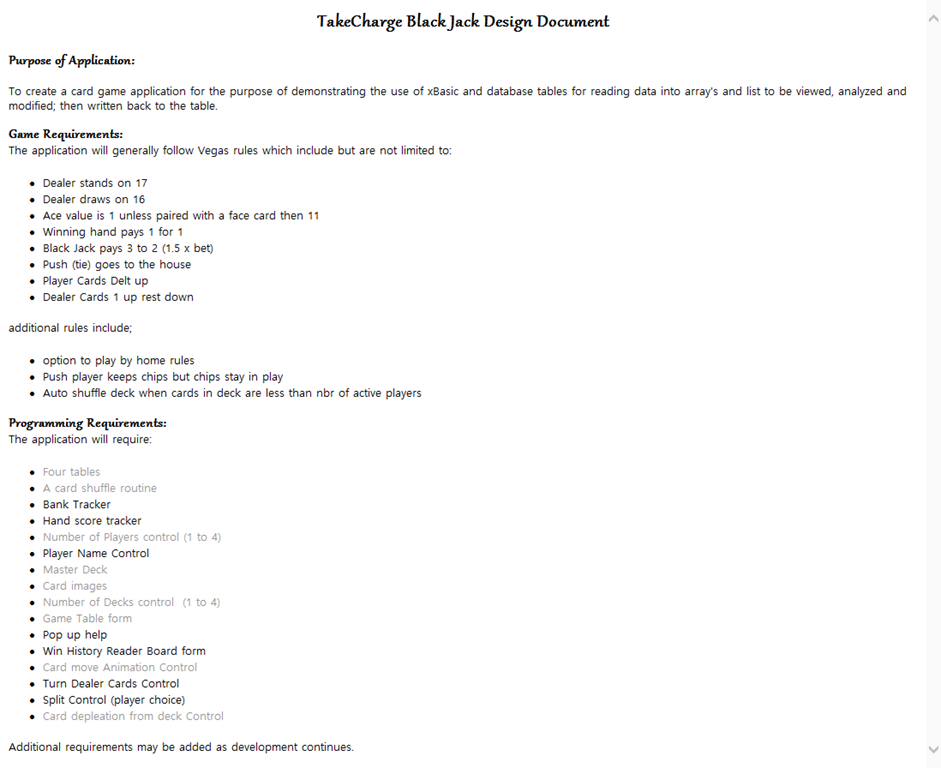
As you can see, we are moving right along and should be done in a few more sessions. Now lets look at the deal control.
Dealing initial hand:
When a new hand is dealt, the program will deal a card to the first position for each player in the game then to the dealer. Next it deals a card to the second position for each player followed by the dealer. In our design doc it says the dealer will get one card up and the rest down which is backwards. It’s one card down and the rest up. The image below does not reflect the card down for the dealer but does show the initial deal for selected players.
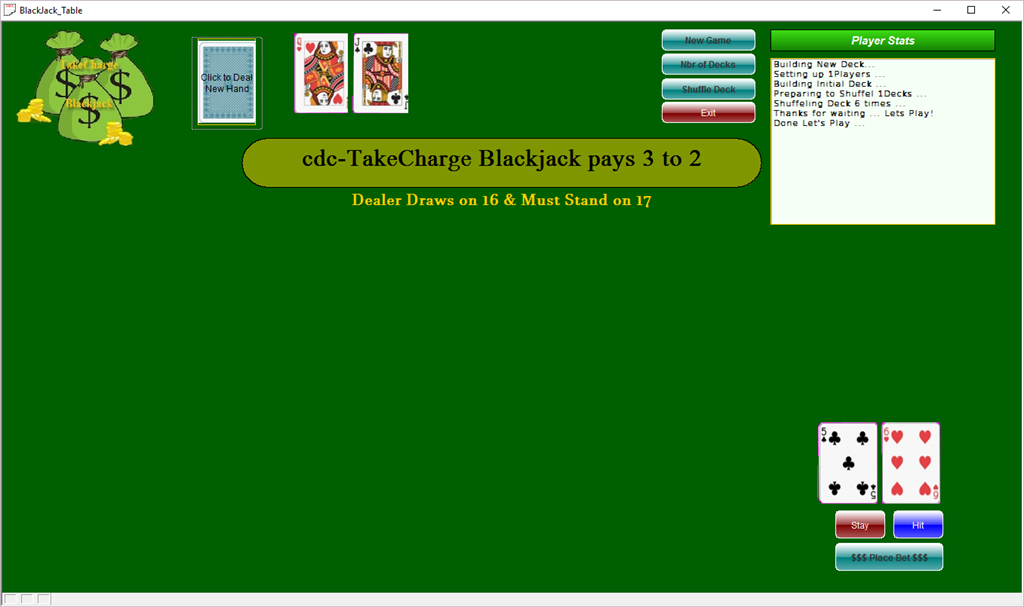
On this hand the dealer will stay and the player will lose unless he draws a Ten, jack, Queen, King or a series of cards that add up to ten. It turns out the player loses because card 5 in the deck is the four of diamonds and card 6 is the 10 of diamonds
11 + 14 = 25 Busted!
Our code for the deal starts with our transparent button onPush event which is over our dealer shoe.
'Date Created: 15-Mar-2016 11:54:34 AM
'Last Updated: 31-Mar-2016 07:22:28 AM
'Created By  : NLaws
'Updated By  : NLaws
dim SHARED gCard as N
dim SHARED xPos as N
gCard = 0
xPos = 1
script_play("OnePlayer")
if xNbrofPlayers = 2 then
    script_play("PlayerTwo")
else if xNbrofPlayers = 3 then
    script_play("PlayerTwo")
    sleep(5/10)
    script_play("PlayerThree")
else if xNbrofPlayers = 4 then
    script_play("PlayerTwo")
    sleep(5/10)
    script_play("PlayerThree")
    sleep(5/10)
    script_play("PlayerFour")
end if
script_play("Dealer")

xPos = 2
script_play("OnePlayer")
if xNbrofPlayers = 2 then
    script_play("PlayerTwo")
else if xNbrofPlayers = 3 then
    script_play("PlayerTwo")
    sleep(5/10)
    script_play("PlayerThree")
else if xNbrofPlayers = 4 then
    script_play("PlayerTwo")
    sleep(5/10)
    script_play("PlayerThree")
    sleep(5/10)
    script_play("PlayerFour")
end if
script_play("Dealer")


BlackJackTable2:Cardback.Object.Visible  = .f.
parentform.Repaint()
Because the initial code only deals the first two positions for each player and the dealer, I simply set the variable to xPos = 1 or 2 then run the same series of scripts. The variable xNbrofPlayers is a shared variable which is set when a new game is started. This value is store and used for each deal of each hand until a new game is started again. Our software uses a simple if else statement to determine the number of players and runs the appropriate scripts. We are looking at onePlayer only.
'Date Created: 30-Mar-2016 10:48:15 AM
'Last Updated: 31-Mar-2016 07:22:23 AM
'Created By  : NLaws
'Updated By  : NLaws

dim SHARED sCount as N
sCount = 1

BlackJackTable2:Cardback.Object.Always_on_top  = .t.
BlackJackTable2:Cardback.Object.Left  = 2.7
BlackJackTable2:Cardback.Object.Top  = .1
BlackJackTable2:Cardback.Object.Visible  = .t.
xbasic_wait_for_idle()

dim stepL as N
dim stepD as N
StepL = .188
StepD = .108

gCard = gCard + 1

nextstep:
if sCount < 50 then
    if xPos = 1 then
        BlackJackTable2:Cardback.Object.Left  = BlackJackTable2:Cardback.Object.Left + StepL
        BlackJackTable2:Cardback.Object.Top  = BlackJackTable2:Cardback.Object.Top + StepD
    else
        BlackJackTable2:Cardback.Object.Left  = BlackJackTable2:Cardback.Object.Left + StepL-.012
        BlackJackTable2:Cardback.Object.Top  = BlackJackTable2:Cardback.Object.Top + StepD
    end if
    sCount = sCount + 1
    xbasic_wait_for_idle()
    parentform.Refresh_Layout()
    sleep(.5/10)
    goto nextstep
else
    goto done
end if
done:
xbasic_wait_for_idle()
dim xcard as C
xCard = table.external_record_content_get("tc_gamedeck", "Alltrim(Cards) + '-of-' + Alltrim(Suits)", "positionindeck","positionindeck = Var->gCard")
if xPos = 1 then
    topparent:P1pos1.Default.Hbitmap.Bmpfile  = "[PathAlias.ADB_Path]\CardGames\Cards\\"+Alltrim(xCard)+".png"
    topparent:P1pos1.Object.Always_on_top  = .t.
    BlackJackTable2:p1pos1.Refresh()
else
    topparent:P1pos2.Default.Hbitmap.Bmpfile  = "[PathAlias.ADB_Path]\CardGames\Cards\\"+Alltrim(xCard)+".png"
    topparent:P1pos2.Object.Always_on_top  = .t.
    BlackJackTable2:p1pos2.Refresh()
end if
parentform.Repaint()
We looked at the basic animation code already but I am showing it again since I modified the code to show multiple card placements. Each card dealt goes to a predetermined position on the board so to automate the movement we take the end position left and top attribute values and subtract the beginning left and top values. The answer is divided by the number of steps we want to display on the screen then we use a simple loop with a count down to 0 which stops the loop.
Our dealer code works the same, but it does not require a top position since the dealer paly area is parallel to the card shoe. Here is the code.
'Date Created: 30-Mar-2016 11:38:56 AM
'Last Updated: 31-Mar-2016 07:29:04 AM
'Created By : NLaws
'Updated By : NLaws

dim SHARED sCount as N
sCount = 1

BlackJackTable2:Cardback.Object.Always_on_top = .t.
BlackJackTable2:Cardback.Object.Left = 2.7
BlackJackTable2:Cardback.Object.Top = .1
BlackJackTable2:Cardback.Object.Visible = .t.
xbasic_wait_for_idle()
dim stepL as N
StepL = .13

gCard = gCard + 1
nextstep:
if sCount < 15 then
 if xPOS = 1 then
 BlackJackTable2:Cardback.Object.Left = BlackJackTable2:Cardback.Object.Left + StepL
 else
 BlackJackTable2:Cardback.Object.Left = BlackJackTable2:Cardback.Object.Left + StepL+.01
 end if
 sCount = sCount + 1
 xbasic_wait_for_idle()
 parentform.Refresh_Layout()
 sleep(.5/10)
 goto nextstep
else
 goto done
end if
done:
xbasic_wait_for_idle()
dim xcard as C
xCard = table.external_record_content_get("tc_gamedeck", "Alltrim(Cards) + '-of-' + Alltrim(Suits)", "positionindeck","positionindeck = Var->gCard")
if xPos = 1 then
 topparent:DealerP1.Default.Hbitmap.Bmpfile = "[PathAlias.ADB_Path]\CardGames\Cards\\"+Alltrim(xCard)+".png"
 topparent:DealerP1.Object.Always_on_top = .t.
 BlackJackTable2:DealerP1.Refresh()
else
 topparent:DealerP2.Default.Hbitmap.Bmpfile = "[PathAlias.ADB_Path]\CardGames\Cards\\"+Alltrim(xCard)+".png"
 topparent:DealerP2.Object.Always_on_top = .t.
 BlackJackTable2:DealerP2.Refresh()
end if
parentform.Repaint()
As more players are added to the game; the same code runs with a different final position for the cards.
In our next session we will look at the code for tracking the player scores and determining the winner of each hand. We will also look at the dealer control which determines when the dealer draws a card or not. Hope to have you join us.


Leave a Reply