
A key component to our project application is to list all objects in the application development queue. We could simply provide data tables with a data entry form and have the user manually enter all the object information, but in truth that would not be a good solution since everyone today wants everything instantly. So we will use A5 Enumerations.
Wikipedia defines enumeration as
An enumeration is a complete, ordered listing of all the items in a collection. The term is commonly used in mathematics and computer science to refer to a listing of all of the elements of a set.
In Alpha Software their enum functions list everything with the exception of form objects ( at least I have not found a function to do that yet. ). We will not need to use all of the enum functions because our intent is not to replace the control panel, rather to link multiple control panels together. Here is the list of enums we will use.
- A5.Script_Enum()
- A5.Form_Enum()
- A5.Browse_Enum()
- A5.Bitmap_Enum()
- A5.Label_Enum()
- A5.Letter_Enum()
- A5.Report_Enum()
- A5.Table_Enum()
- A5.Set_Enum()
There are more enumerations you can use such as, Operations, Menu’s, toolbars etc. but as stated above we will not include them at this time. Once we run an enumeration we need to put the result some where. I created the following tables to store and retrieve our enumerations.
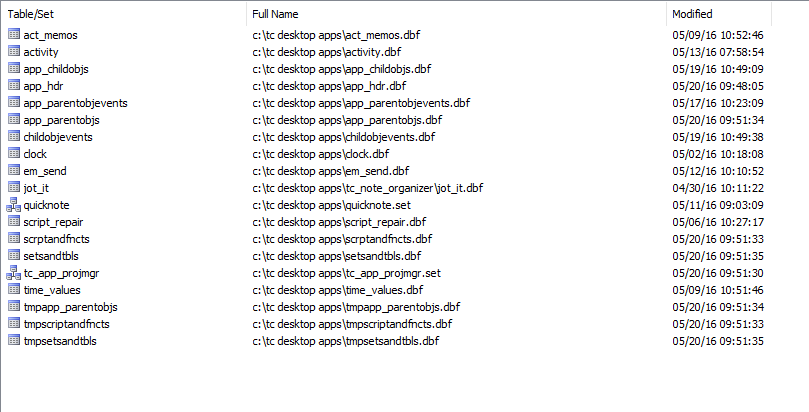
Now you can probably guess that the tables which make up our project module are
- App_Hdr
- App_ParentObjs
- App_ParentObjsEvents
- ChildObjects
- ChildObjEvents
- ScriptandFncts
- SetsandTbls
and you would be correct. Each table has a linking ID, a type field, a Name Field, Description Field. Those which will house our code also have memo fields.
I created an initial set so I could visually see how the data collected will fit together.
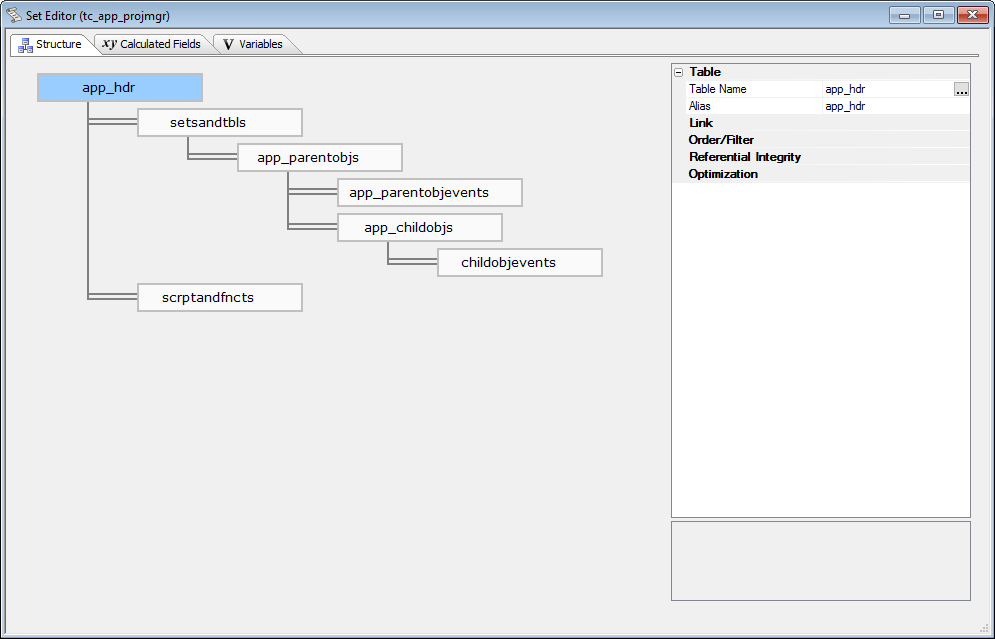
With this layout I was able to create our first form view which links all objects in the set to the parent record which is the application name.
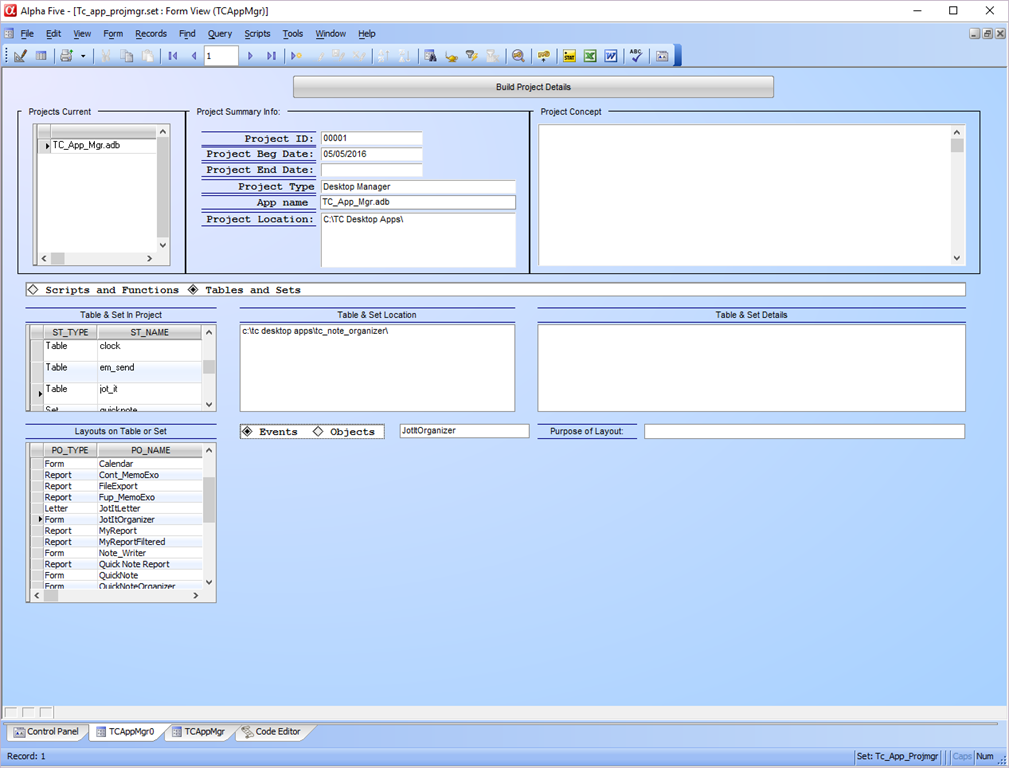
This form is self explanatory so I will not get into it just now, also, it will most likely change quite a bit. What we do want to look at is the code which populates our tables automatically. For now this code is stored on the onPush event of our button labeled ‘Build Project Details’. Here it is.
'Date Created: 18-May-2016 11:26:34 AM
'Last Updated: 20-May-2016 09:50:59 AM
'Created By  : NLaws
'Updated By  : NLaws
parentform.commit()
tbl = table.open("tmpscriptandfncts")
tbl.zap(.t.)
tbl.close()
dim xAppID as C
xAppID = AppID.text

dim list1 as C
list1 = a5.script_Enum(2)
t = table.open("tmpscriptandfncts")
t.fetch_first()
for each scr in list1
    t.enter_begin()
    t.sf_id = xAppID
    t.sf_name = scr
    t.sf_type = "SCRIPT"
    t.sf_code = script_load(Var->scr)
    t.enter_end()
next
t.close()

DIM Append as P

a_tbl = table.open("scrptandfncts")
append.t_db = "tmpscriptandfncts"
append.m_key = "Sf_Name"
append.t_key = "Sf_Name"
append.m_filter = ""
append.t_filter = ""
append.type = "Unique, replace existing"
append.m_count = 5
append.m_case1 = "EITHER"
append.m_field1 = "SF_ID"
append.m_exp1 = "@TMPSCRIPTANDFNCTS->SF_ID"
append.m_case2 = "EITHER"
append.m_field2 = "SF_NAME"
append.m_exp2 = "@TMPSCRIPTANDFNCTS->SF_NAME"
append.m_case3 = "EITHER"
append.m_field3 = "SF_TYPE"
append.m_exp3 = "@TMPSCRIPTANDFNCTS->SF_TYPE"
append.m_case4 = "EITHER"
append.m_field4 = "SF_DESC"
append.m_exp4 = "@TMPSCRIPTANDFNCTS->SF_DESC"
append.m_case5 = "EITHER"
append.m_field5 = "SF_CODE"
append.m_exp5 = "@TMPSCRIPTANDFNCTS->SF_CODE"
append.t_count = 0
a_tbl.append()
a_tbl.close()

tbl = table.open("tmpapp_parentobjs")
tbl.zap(.t.)
tbl.close()

list1 = a5.Form_Enum(2)
tf = table.open("tmpapp_parentobjs")
tf.fetch_first()
for each scr in list1
    tf.enter_begin()
    tf.o_id = xAppID
    tf.app_id = xAppID
    tf.po_name = scr
    tf.po_type = "Form"
    tf.enter_end()
next

list1 = a5.Browse_Enum(2)
for each scr in list1
    tf.enter_begin()
    tf.o_id = xAppID
    tf.app_id = xAppID
    tf.po_name = scr
    tf.po_type = "Browse"
    tf.enter_end()
next

list1 = a5.Bitmap_Enum(2)
for each scr in list1
    tf.enter_begin()
    tf.o_id = xAppID
    tf.app_id = xAppID
    tf.po_name = scr
    tf.po_type = "Bitmap"
    tf.enter_end()
next

list1 = a5.Label_Enum(2)
for each scr in list1
    tf.enter_begin()
    tf.o_id = xAppID
    tf.app_id = xAppID
    tf.po_name = scr
    tf.po_type = "Label"
    tf.enter_end()
next

list1 = a5.Letter_Enum(2)
for each scr in list1
    tf.enter_begin()
    tf.o_id = xAppID
    tf.app_id = xAppID
    tf.po_name = scr
    tf.po_type = "Letter"
    tf.enter_end()
next

list1 = a5.Report_Enum(2)
for each scr in list1
    tf.enter_begin()
    tf.o_id = xAppID
    tf.app_id = xAppID
    tf.po_name = scr
    tf.po_type = "Report"
    tf.enter_end()
next
tf.close()

DIM Append as P

a_tbl = table.open("app_parentobjs")
append.t_db = "tmpapp_parentobjs"
append.m_key = "Po_Name"
append.t_key = "Po_Name"
append.m_filter = ""
append.t_filter = ""
append.type = "Unique only"
append.m_count = 5
append.m_field1 = "O_ID"
append.m_exp1 = "@TMPAPP_PARENTOBJS->O_ID"
append.m_field2 = "APP_ID"
append.m_exp2 = "@TMPAPP_PARENTOBJS->APP_ID"
append.m_field3 = "PO_NAME"
append.m_exp3 = "@TMPAPP_PARENTOBJS->PO_NAME"
append.m_field4 = "PO_TYPE"
append.m_exp4 = "@TMPAPP_PARENTOBJS->PO_TYPE"
append.m_field5 = "PO_DESC"
append.m_exp5 = "@TMPAPP_PARENTOBJS->PO_DESC"
append.t_count = 0
a_tbl.append()
a_tbl.close()

tbl = table.open("tmpsetsandtbls")
tbl.zap(.t.)
tbl.close()
dim xFile as C
list1 = a5.Table_Enum(4)
tt = table.open("tmpsetsandtbls")
tt.fetch_first()
for each scr in list1
    xFile = file.filename_parse(scr,"n")
    tt.enter_begin()
    tt.st_id = "00001"
    tt.st_name = xFile
    tt.st_location = file.filename_parse(scr,"dp")
    tt.st_type = "Table"
    tt.enter_end()
next
list1 = a5.Set_Enum()
for each scr in list1
    xFile = file.filename_parse(scr,"n")
    tt.enter_begin()
    tt.st_id = "00001"
    tt.st_name = xFile
    tt.st_location = file.filename_parse(scr,"dp")
    tt.st_type = "Set"
    tt.enter_end()
next
tt.close()

DIM Append as P

a_tbl = table.open("setsandtbls")
append.t_db = "tmpsetsandtbls"
append.m_key = "St_Name"
append.t_key = "St_Name"
append.m_filter = ""
append.t_filter = ""
append.type = "Unique only"
append.m_count = 5
append.m_field1 = "ST_ID"
append.m_exp1 = "@TMPSETSANDTBLS->ST_ID"
append.m_field2 = "ST_NAME"
append.m_exp2 = "@TMPSETSANDTBLS->ST_NAME"
append.m_field3 = "ST_TYPE"
append.m_exp3 = "@TMPSETSANDTBLS->ST_TYPE"
append.m_field4 = "ST_DESC"
append.m_exp4 = "@TMPSETSANDTBLS->ST_DESC"
append.m_field5 = "ST_LOCATION"
append.m_exp5 = "@TMPSETSANDTBLS->ST_LOCATION"
append.t_count = 0
a_tbl.append()
a_tbl.close()

browse3.refresh()
browse2.refresh()
browse1.refresh()
xbasic_wait_for_idle()
parentform.Refresh_Layout()
You may have noticed the table names starting with tmp. These are result tables which will be emptied and repopulated each time the button is pushed. Once the tables are repopulated an append using unique only moves the code to our actual tables. This allows us to provide a simple method for adding new events to our project manager. Later on we will have to add a feature to update changes made to our objects simply by a button click as well.
Lets break down this code.
tbl = table.open("tmpscriptandfncts")
tbl.zap(.t.)
tbl.close()
dim xAppID as C
xAppID = AppID.text

dim list1 as C
list1 = a5.script_Enum(2)
t = table.open("tmpscriptandfncts")
t.fetch_first()
for each scr in list1
    t.enter_begin()
    t.sf_id = xAppID
    t.sf_name = scr
    t.sf_type = "SCRIPT"
    t.sf_code = script_load(Var->scr)
    t.enter_end()
next
t.close()
The first enumeration we use is a5.script_enum() with the flag setting of 2 which returns the Script Name. (search a5.script_enum to see all possible flag outputs.) We zap our temp table then dim a character variable for our list
list1
We set list1 to equal a5.script_enum(). This populates our list with each script in our control panel. Now we open our tmp table and start the enter. The only thing you need to pay attention to at this point is the line
t.sf_code = scirpt_load(Var->scr)
As we step through our list using For..Each…Next the above line places the script code stored in our library into our memo field in our table. Here is an example of how the code is outputted.
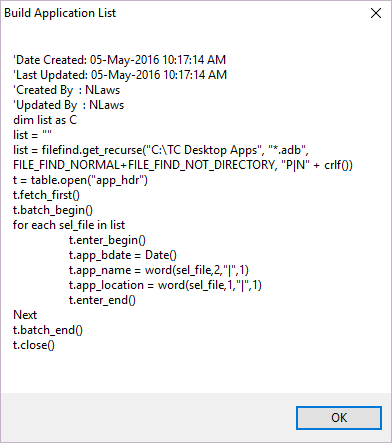
Each script can be viewed simply by selecting the script name in our browse window.
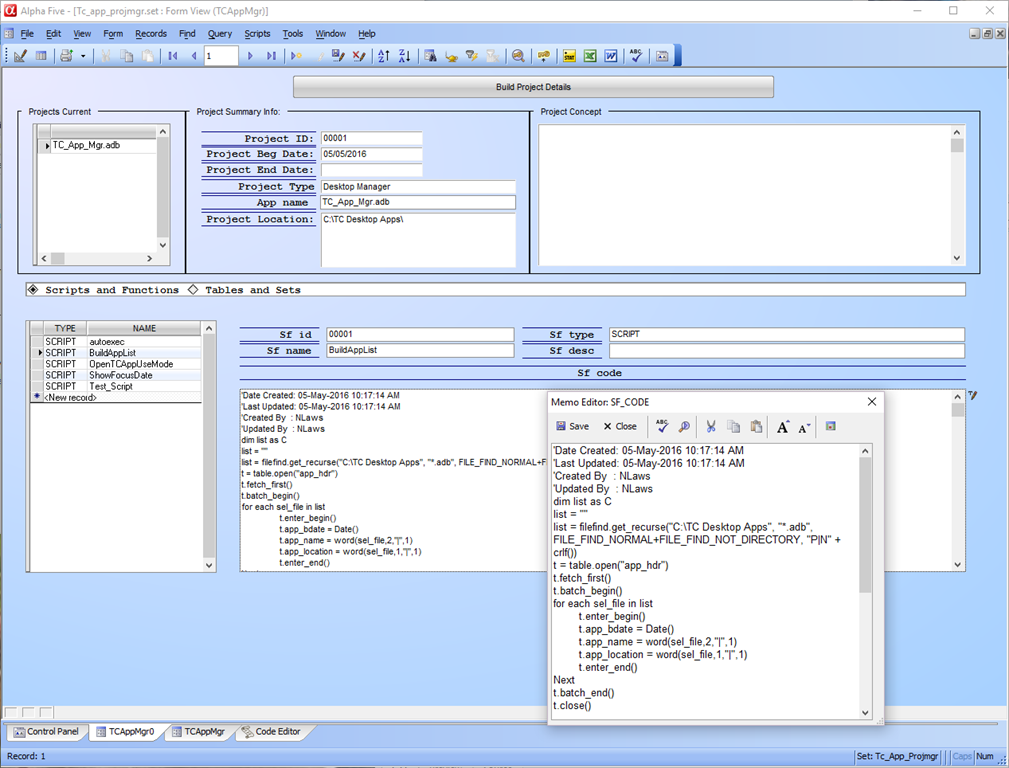
Next we append the data to our final table using Unique, replace existing. This will keep our library up to date by the simple click of a button.
Parent objects are slightly more involved. They can be forms, saved browses, reports, labels, images and letters. This is why we run each of the enumerations listed above. To avoid multiple opening and closing of the tmp table we open the table at the beginning of our script and add each enumeration list one after the other and when the last is entered, we then close the table and append the entire list to our storage table.
Finally we use this same procedure to add in our tables and sets. So there you have it. We now need to design a user friendly for and add in a few update buttons as well as a routine for easily accessing a scripts code for edit purposes. That will be in our next lesson.
 Custome Database Design with Alpha Software
Leave a comment