
The primary focus for today’s session is how to animate the cube moves. If you saw my lesson on Having Fun with Graphics: Pong you know we can move objects on the screen by changing their position property value. We are not going to do that here. Instead we are changing the color value of the button objects based on the direction a cube face is turned.
In addition to this we are going to look at some of the changes I have made to the application to help the user to learn how to solve a magic cube. These changes include
- Fly Over Effects
- Recording moves and building a move Library
- Using a dialog box to capture user input
- building a list array from external table values
That is a lot to cover so we may not get to all of it in this session but we will cover all of it. So before we start watch this short video showing the new features so when we go over the code it will make sense to you.
Lots of cool stuff so lets get started.
Animating Cube Moves:
On a real cube, each time a face is turned it effects each cell on the face and the row of each touching face. In the image below
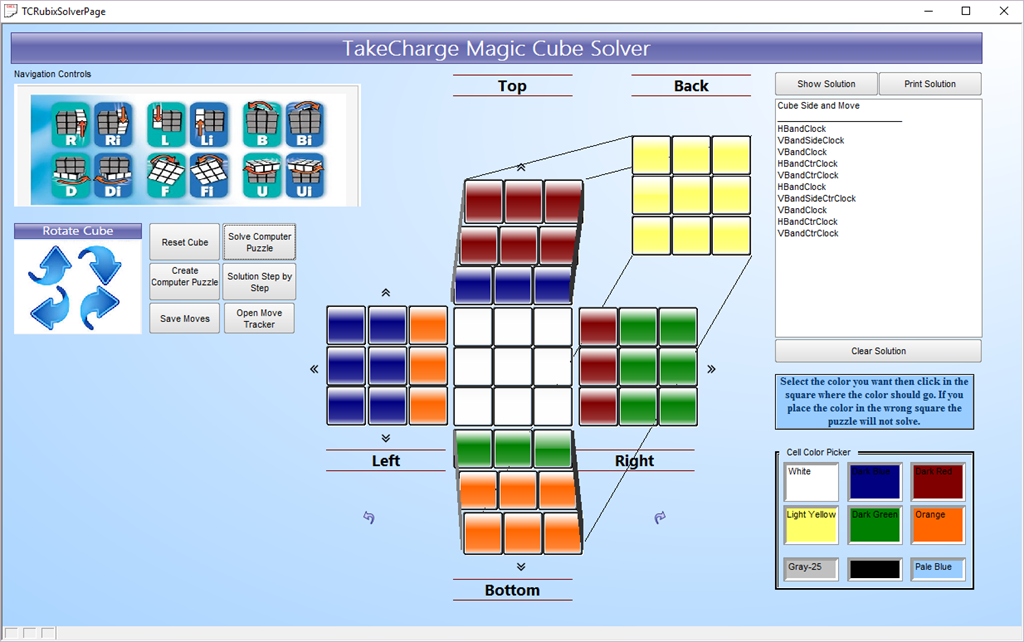
I clicked ‘F’ which rotates the front panel clockwise and in turn shifts each top row on each side. Here is the code for that move.
'Date Created: 05-Feb-2016 11:00:52 AM
 'Last Updated: 03-Mar-2016 11:09:48 AM
 'Created By  : NLaws
 'Updated By  : NLaws
t = table.current() t.change_begin()'Rotate Front Clockwise t.FRCell1 = vFRCell7 t.FRcell2 = vFRcell4 t.FRcell3 = vFRcell1t.FRcell4 = vFRcell8 t.FRcell6 = vFRcell2t.FRCell7 = vFRCell9 t.FRcell8 = vFRcell6 t.FRcell9 = vFRcell3'Turn Rows t.LFCell3 = vDNCell1 t.LFcell6 = vDNCell2 t.LFcell9 = vDNCell3t.RGcell1 = vUPcell7 t.RGcell4 = vUPcell8 t.RGcell7 = vUPcell9t.UPcell7 = vLFcell9 t.UPcell8 = vLFcell6 t.UPcell9 = vLFcell3t.DNcell1 = vRGcell7 t.DNcell2 = vRGcell4 t.DNcell3 = vRGcell1 t.change_end(.t.)'Set Vars for Front Face vFRcell1 = t.frCell1 vFRcell2 = t.frcell2 vFRcell3 = t.frcell3 vFRcell4 = t.frCell4 vFRcell6 = t.frcell6 vFRcell7 = t.frcell7 vFRcell8 = t.frCell8 vFRcell9 = t.frcell9'Set Vars for Adjacent Rows vLFcell3 = t.lfcell3 vLFcell6 = t.lfcell6 vLFcell9 = t.lfcell9 vRGcell1 = t.rgcell1 vRGcell4 = t.rgcell4 vRGcell7 = t.rgcell7 vUPcell7 = t.UPcell7 vUPcell8 = t.UPcell8 vUPcell9 = t.UPcell9 vDNcell1 = t.DNcell1 vDNcell2 = t.DNcell2 vDNcell3 = t.DNcell3'ReAssign Colors eval("CFRcell1.Fill.Color") = vFRCell1 eval("CFRcell2.Fill.Color") = vFRCell2 eval("CFRcell3.Fill.Color") = vFRCell3 eval("CFRcell4.Fill.Color") = vFRCell4 eval("CFRcell6.Fill.Color") = vFRCell6 eval("CFRcell7.Fill.Color") = vFRCell7 eval("CFRcell8.Fill.Color") = vFRCell8 eval("CFRcell9.Fill.Color") = vFRCell9 eval("CLFcell3.Fill.Color") = vLFCell3 eval("CLFcell6.Fill.Color") = vLFCell6 eval("CLFcell9.Fill.Color") = vLFCell9eval("CRGcell1.Fill.Color") = vRGCell1 eval("CRGcell4.Fill.Color") = vRGCell4 eval("CRGcell7.Fill.Color") = vRGCell7eval("CUPcell7.Fill.Color") = vUPCell7 eval("CUPcell8.Fill.Color") = vUPCell8 eval("CUPcell9.Fill.Color") = vUPCell9eval("CDNcell1.Fill.Color") = vDNCell1 eval("CDNcell2.Fill.Color") = vDNCell2 eval("CDNcell3.Fill.Color") = vDNCell3'Log Move if movestate = "Move" then mt = table.open("tcrubixmoves") mt.enter_begin() mt.movbtnname = "Cube Front Right" mt.cFace = Var->vSquare mt.rtnbtnname = "Cube Front Left" mt.enter_end() mt.close() end if
The first thing the code does is set our table pointer to the current table. We put the table into change mode then set the value of each affected field to the current value stored in the variable for the field moving to the new location. Now that sounds more complicated then it is. On the front face current cell 7 (represented by vFrCell7) is assigned to cell 1 because the face is turning clockwise.
(t.FRCell1 = vFRCell7)
Once the table field values are set we save the table and end the edit. Next we reverse the process and assign the changed table values back to the variables so they will be correct on the next move. Then we set the color value for each cell object on the form by passing the variable to the fill color property value
CFRcell1.Fill.Color = vFRCell1
Please note, in the script above I originally intended to pass variable names to the object which would require using the eval function but have since decide not to. The code above would be the correct way to write the line without the eval function. To understand the object naming you have to reference the original design document, so here it is again.
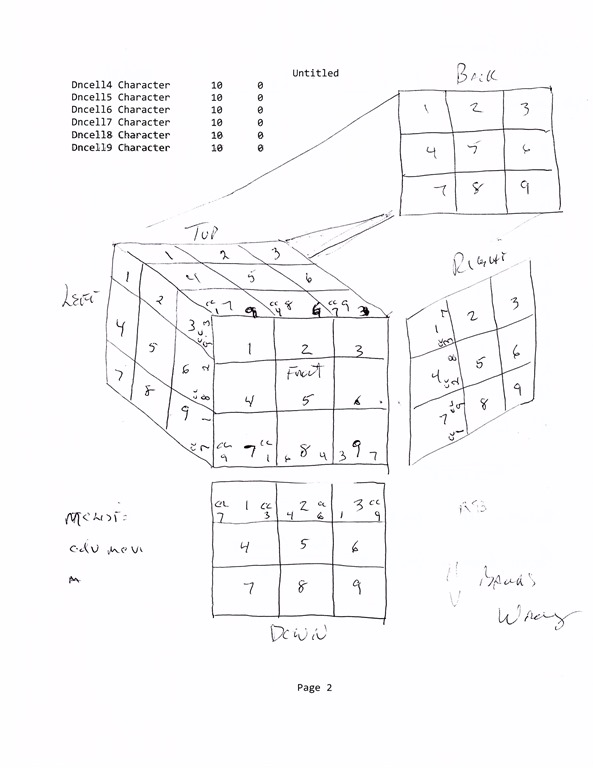
The final part of the script is used to log the move in our move table. These values are used to build our move library and allow the user to see what moves have been made so they can fix any mistakes.
Each possible move is written as a script and named to represent the move happening when executed. The scripts are;
Cube Back Left
Cube Back Right
Cube Btm Left
Cube Btm Right
Cube Front Left
Cube Front Right (shown above)
Cube Left Left
Cube Left Right
Cube Right Left
Cube Right Right
Cube Top Left
Cube Top Right
VBandClock
VBandCtrClock
HBandClock
HBandCtrClock
VBandSideClock
VBandSideCtrClock
Each of these scripts are set up exactly like the example above only the affected objects are different. When we rotate the cube we simply call each of the scripts that make up the move. For example;
'Date Created: 13-Feb-2016 10:49:11 AM
 'Last Updated: 13-Feb-2016 10:57:29 AM
 'Created By  : NLaws
 'Updated By  : NLaws
 script_play("Cube Left Left")
 script_play("VBandClock")
 script_play("Cube Right Right")
rotates the cube up.
Save Move Dialog:
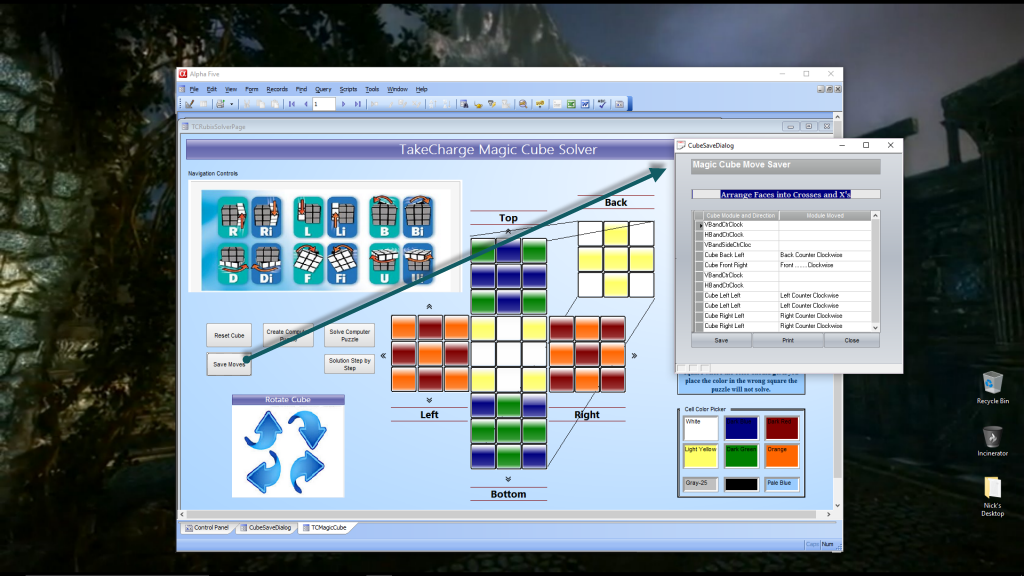
In the image above I created a cube pattern then saved the moves so I can repeat the pattern any time I want. I am using a bound form and loading it as a dialog. The code on the onPush event of our button is;
'Date Created: 03-Feb-2016 04:03:22 PM
 'Last Updated: 23-Feb-2016 12:17:35 PM
 'Created By  : NLaws
 'Updated By  : NLaws
 t = table.open("hist_mc_movesdialog")
 t.zap(.t.)
 t.close()
 DIM Append as P
a_tbl = table.open("hist_mc_movesDialog") append.t_db = "tcrubixmoves" append.m_key = "" append.t_key = "" append.m_filter = "" append.t_filter = "" append.type = "All" append.m_count = 3 append.m_field1 = "MOVBTNNAME" append.m_exp1 = "@TCRUBIXMOVES->MOVBTNNAME" append.m_field2 = "CFACE" append.m_exp2 = "@TCRUBIXMOVES->CFACE" append.m_field3 = "RTNBTNNAME" append.m_exp3 = "@TCRUBIXMOVES->RTNBTNNAME" append.t_count = 0 a_tbl.append() a_tbl.close()form.load("CubeSaveDialog","dialog","","right","middle") CubeSaveDialog.Activate() CubeSaveDialog.Show() CubeSaveDialog.close()
When you load a form as a dialog focus is restricted to the dialog form only. This insures the user completes the required action before continuing. After the user enters the title for the saved moves and clicks Save, the following code runs on the onPush event of the Save Button.
parentform.commit()
t = table.current()
t.fetch_first()
t.batch_begin()
while .NOT. t.fetch_EOF()
t.change_begin()
t.recordeddate = Date()
t.movedesc = Var->xMoveDesc
t.steps = “Step “+Alltrim(padl(ltrim(str(recno(),3,0)),2,”0”))
t.change_end(.t.)
t.fetch_next()
t.batch_end()
end while
When they close the form the following code runs storing our move into the library.
'Date Created: 23-Feb-2016 12:11:30 PM
 'Last Updated: 23-Feb-2016 12:13:19 PM
 'Created By  : NLaws
 'Updated By  : NLaws
 parentform.commit()
 DIM Append as P
a_tbl = table.open("hist_mc_moves") append.t_db = "hist_mc_movesdialog" ON ERROR GOTO ERROR23022016121059645 append.m_key = "" append.t_key = "" append.m_filter = "" append.t_filter = "" append.type = "All" append.m_count = 6 append.m_field1 = "RECORDEDDATE" append.m_exp1 = "@HIST_MC_MOVESDIALOG->RECORDEDDATE" append.m_field2 = "STEPS" append.m_exp2 = "@HIST_MC_MOVESDIALOG->STEPS" append.m_field3 = "MOVEDESC" append.m_exp3 = "@HIST_MC_MOVESDIALOG->MOVEDESC" append.m_field4 = "MOVBTNNAME" append.m_exp4 = "@HIST_MC_MOVESDIALOG->MOVBTNNAME" append.m_field5 = "CFACE" append.m_exp5 = "@HIST_MC_MOVESDIALOG->CFACE" append.m_field6 = "RTNBTNNAME" append.m_exp6 = "@HIST_MC_MOVESDIALOG->RTNBTNNAME" append.t_count = 0'Prompt for confirmation before running the Operation....... dim rec_count as nrec_count = a5_get_records_in_query("hist_mc_movesdialog",append.t_filter,-1,.f.) message_text = "A maximum of "+rec_count + " record(s) will be appended from 'hist_mc_movesdialog', to 'hist_mc_moves'. "+crlf(2)+ "OK to proceed?" operation_result=ui_msg_box("Append Operation",message_text,UI_OK_CANCEL+ UI_FIRST_BUTTON_DEFAULT+ UI_INFORMATION_SYMBOL) If operation_result <> ui_ok_selected then end end if a_tbl.append() GOTO CONTINUE23022016121059645 ERROR23022016121059645: ON ERROR GOTO 0 ui_msg_box("Error","Error running Append Operation"+crlf()+error_text_get()) END CONTINUE23022016121059645: a_tbl.close()'Display a dialog box showing the results of the Operationdim args as sql::arguments if eval_valid("arguments") then if typeof(arguments) = "P" then args = arguments end if end ifa5_append_op_result(a_records_processed,a_records_total,a_records_violated, "hist_mc_moves","Append Operation Result",args)'If the Operation is run from within a Form or Browse, then refresh the window if is_object(topparent.this) then if topparent.Class() = "form" .or. topparent.class() = "browse" then topparent.Refresh_layout() end if end if xbasic_wait_for_idle() parentform.close()
In this script I used Alpha Software high level append operation then converted it to xBasic with the conformation code included. I did this so you can see how it works. Now that we have our saved moves, lets look at the code to recall those moves.
Open Move Tracker:
The onPush event for the Open Move Tracker button is;
'Date Created: 03-Feb-2016 04:03:22 PM
 'Last Updated: 03-Mar-2016 07:50:24 AM
 'Created By  : NLaws
 'Updated By  : NLaws
form.load("TC_MC_MoveTracker","dialog","","right","middle") TC_MC_MoveTracker.Activate() TC_MC_MoveTracker.Show() TC_MC_MoveTracker.close()if CName <> "" then movestate = "Return" dim record_count as N t = table.open("tcrubixmoves") t.fetch_first() record_count = t.records_get() t.fetch_last() for i = 1 TO record_count eval("script_play('"+Alltrim(t.rtnbtnname)+"')") sleep(4/10) xbasic_wait_for_idle() t.fetch_prev() next i movestate = "Move" button5.push() xbasic_wait_for_idle() parentform.Refresh_Layout() end if
In this example I am loading my form as a dialog first. Since nothing runs except the dialog form the code called out after the form load will not run until the dialog form is closed and I use a simple if statement to test if the code needs to run at all. CName is a global variable I use to test conditions. If it is blank, the code does not run and it does if not blank. That value gets set based on user interaction with the form.
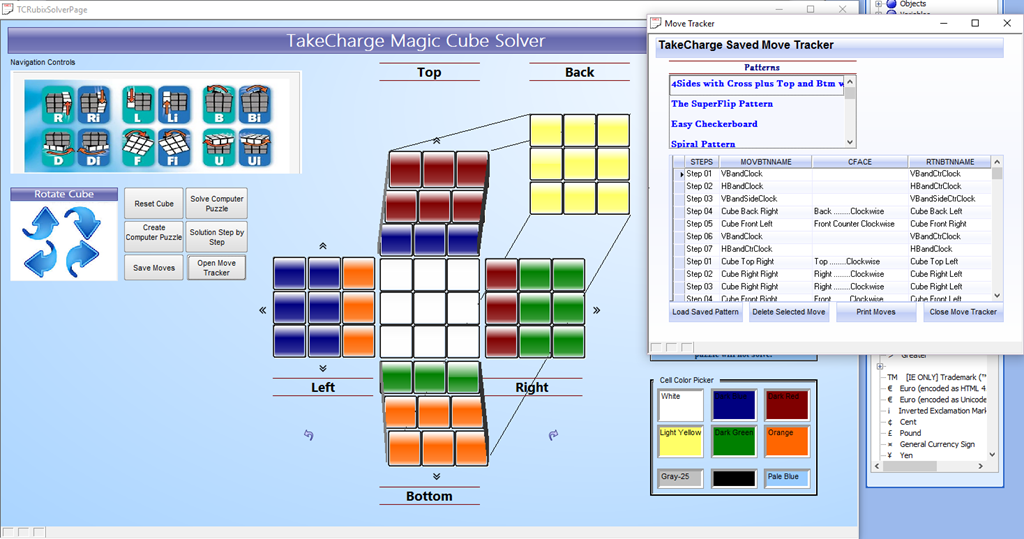
The onInit event of our form runs the following;
'Date Created: 02-Mar-2016 08:06:22 AM
 'Last Updated: 02-Mar-2016 08:06:22 AM
 'Created By  : NLaws
 'Updated By  : NLaws
 MoveList = table.external_record_content_GET("hist_mc_moves", "MoveDesc","Recno()")
if wdv = 0 then wdv = 1 else wdv = 0 end if
Fairly simple, MoveList is a variable which represents the records in our table. Each saved pattern has multiple moves and we do not want to see repeat values in our list. I filter out duplicates on my list objects choices tab.
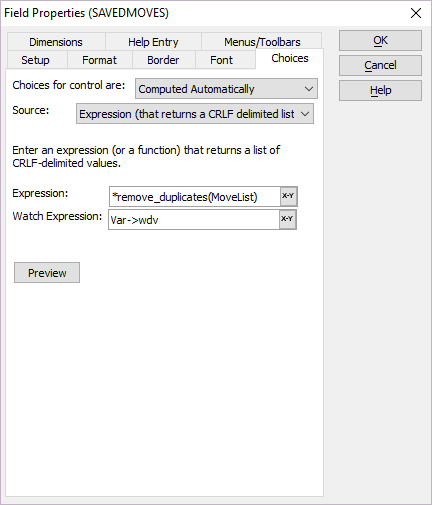
I use the remove_duplicates function in my expression and I get a nice clean list.
This session is starting to get long so I will end for today. In our next session we will look at our code to query our records based on our list choice and how the records are loaded into an upside down table array then run on our Magic Cube form. As always thanks for stopping by and I hope you will return to see the conclusion of this lesson.


Leave a Reply