
Hello Everyone and Happy New Year
This session was supposed to be about our desktop tape calculator and I am currently writing that lesson but I recently had a customer request which I found interesting and wanted to share.
The customer has an application which has migrated form DOS to their current version of Alpha Software v10.5. Along the way they have had several different developers work on their application all of which had different programming styles and approaches. One area where this showed up was in the note portions of their application. They have customer notes, accounting notes, collection notes, service ticket notes and the list goes on.
In itself, having many note fields is not unusual but the many developers have created these fields as text objects, plain memo’s, and rich text memo’s. Because they are different types, the data entry is slightly different for each and the developers have created different controls and forms for each and many are combined on the same data entry screens.
This has led to the users creating data entry errors, losing important notes and a great deal of frustration. My task was to convert all of the notes to a single format and data entry process. Since the various note fields were integrated through their entire application as well as many reports it would have been very expensive for them to pay for a total conversion. So I took another approach.
On each form I hid the various memo fields and replaced with a single rich text object which would call the requested memo field through a radio choice and display the different note types by converting them all to plain text. If the user needed to edit the note, they would click an edit button and the code would pop up an xDialog box with a multi-line text object which they could use to edit the note. When closed the corrected note would then be written back to the rich text object and the original field for future reference. If they were writing a new note, the software would create a new record in the note and memo table assigning the correct linking values then opened the xDialog note writer form. When closed, the code would fetch the new record and write in the note then attach it to the richtext object to display on the screen. This approach eliminated the need to change any reports, and I did not have to search through thousands of lines of code searching for note field references or calls.
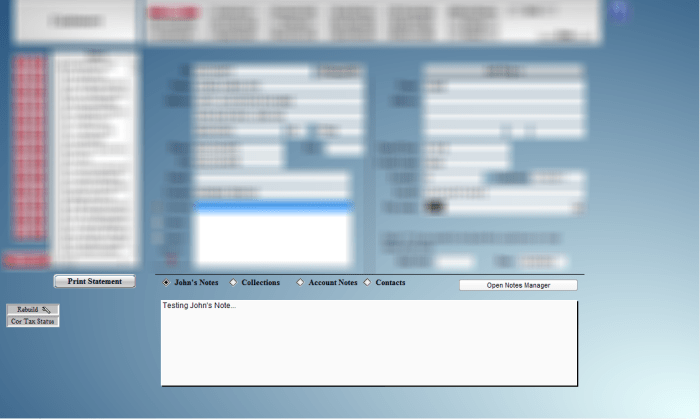 The above image shows the rich text object with the radio choices which identify the note field and displays the results. The code for the open Note Manager button is displayed below.
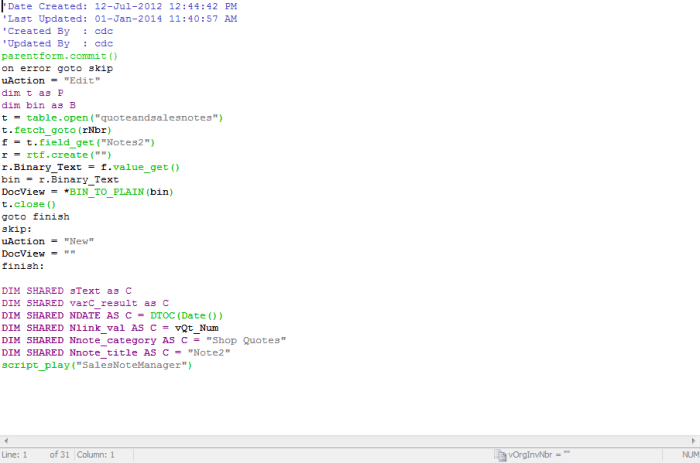 The first thing this code does is check for an existing note. If it exist, the note is fetched converted to plain text and assigned to the global variable DocView. If the note does not exist then an error is returned whcih we capture with the on error event and tell the xDialog box we will be creating a new record. We assign some new shared variables which will tell the xDialog box where to write the result when the dialog is closed then we call the script which builds the dialog on the screen.
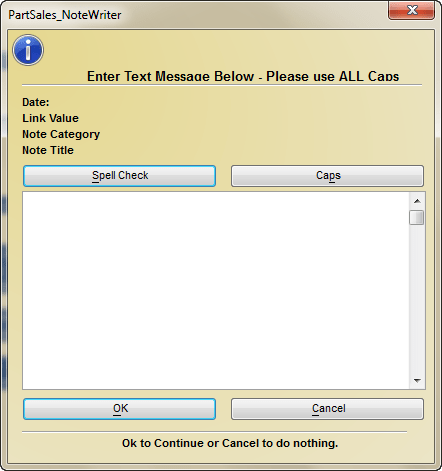
Below is the code for the xDialog Note Writer:
'Date Created: 01-Jan-2014 11:34:06 AM
'Last Updated: 02-Jan-2014 01:59:57 PM
'Created By  : cdc
'Updated By  : cdc
DIM form_name as C
if is_object(topparent.this) then
    form_name = topparent.name()+".this"
else
    form_name = ""
end if
DELETE expression_result
expression_result = eval("DocView",form_name)
sText = convert_type(expression_result,"C")
heading_string = "Enter Text Message Below - Please use ALL Caps"
footer_string = "Ok to Continue or Cancel to do nothing."
ok_button_label = "&OK"
cancel_button_label = "&Cancel"
sc_button_label = "&Spell Check"
caps_button_label = "Ca&ps"
Delete XdialogStyle
dim XDialogStyle as p
XDialogStyle.AccentColor = "#237+232+211"
XDialogStyle.Color = "#230+216+142"
varC_result = ui_dlg_box("PartSales_NoteWriter",<<%dlg%
{image=$sys_information};
{Windowstyle=Gradient Radial Top Left}
{region}
{font= arial, 10, b }
{SP=15}{text=65,1:heading_string};
{SP=2}{line=1,0};
{endregion};
{region}
{font= arial, 8, b }
{SP=2}Date: |{text=25,1:Ndate};
{SP=2}Link Value |{text=55,1:Nlink_val};
{SP=2}Note Category |{text=55,1:Nnote_category};
{SP=2}Note Title |{text=55,1:Nnote_title};
{endregion};
{region}
{font= arial, 8, }
{SP=2}<37=sc_button_label!SPELL CHECK> <37=caps_button_label!CAPS>;
{SP=2}[%MW%.80,15sText]
{endregion};
{region}
{SP=2}<*37=ok_button_label!OK> <37=cancel_button_label!CANCEL>
{endregion};
{region}
{SP=2}{line=1,0};
{font= arial, 8, b }
{SP=22}{text=55,1:footer_string};
{endregion};
%dlg%,<<%code%
if a_dlg_button = "SPELL CHECK" then
    DocView = a5_eval_expression(a5_spellcheckstring(sText))
    xbasic_wait_for_idle()
    sText = DocView
    a_dlg_button = ""
else if a_dlg_button = "CAPS" then
    sys_send_keys("{CAPSLOCK}")
    a_dlg_button = ""
else if a_dlg_button = "OK" then
    DocView =  sText
else if a_dlg_button = "CANCEL" then
uAction = ""
end if
%code%)
if uAction = "" then
    end
end if

'DocView = a5_eval_expression(a5_spellcheckstring(DocView))
'xbasic_wait_for_idle()
if uAction = "Edit" then
    if Nnote_category = "Part Quotes" then
        Part_Quotes:Rtf1.Rtf.Plain_text  = DocView
        dim t as P
        dim fld as P
        dim rtf as P
        t = table.open("quoteandsalesnotes")
        t.fetch_goto(rNbr)
        t.change_begin()
        fld = t.field_get("Notes2")
        rtf = :rtf.create(DocView)
        fld.value_put(rtf.binary_text)
        t.change_end(.t.)
        t.close()
    else if Nnote_category = "Part Sales" then
        dim t as P
        dim fld as P
        dim rtf as P
        t = table.open("quoteandsalesnotes")
        t.fetch_goto(rNbr)
        t.change_begin()
        if Nnote_title = "Note2" then
            Part_Sales:Rtf1.Rtf.Plain_text  = DocView
            fld = t.field_get("Notes2")
            rtf = :rtf.create(DocView)
            fld.value_put(rtf.binary_text)
        else
            Part_Sales:Rtf2.Rtf.Plain_text  = DocView
            t.acc_notes = DocView
        end if
        t.change_end(.t.)
        t.close()
    else if Nnote_category = "Shop Quotes" then
        Shop_Quotes:Rtf1.Rtf.Plain_text  = DocView
        dim t as P
        dim fld as P
        dim rtf as P
        t = table.open("quoteandsalesnotes")
        t.fetch_goto(rNbr)
        t.change_begin()
        fld = t.field_get("Notes2")
        rtf = :rtf.create(DocView)
        fld.value_put(rtf.binary_text)
        t.change_end(.t.)
        t.close()
    else if Nnote_category = "Shop Orders" then
        dim t as P
        dim fld as P
        dim rtf as P
        t = table.open("quoteandsalesnotes")
        t.fetch_goto(rNbr)
        t.change_begin()
        if Nnote_title = "Note2" then
            Shop_Orders:Rtf1.Rtf.Plain_text  = DocView
            fld = t.field_get("Notes2")
            rtf = :rtf.create(DocView)
            fld.value_put(rtf.binary_text)
        else if Nnote_title = "Accounting Note" then
            Shop_Orders:Rtf2.Rtf.Plain_text  = DocView
            t.acc_notes = DocView
        else if Nnote_title = "Failure Note" then
            Shop_Orders:Rtf3.Rtf.Plain_text  = DocView
            t.stcallnote = DocView
        else if Nnote_title = "Technician Note" then
            Shop_Orders:Rtf4.Rtf.Plain_text  = DocView
            t.tech_notes = DocView
        end if
        t.change_end(.t.)
        t.close()
    end if
else
    if Nnote_category = "Part Quotes" then
        Part_Quotes:Rtf1.Rtf.Plain_text  = DocView
        dim t as P
        dim fld as P
        dim rtf as P
        t = table.open("quoteandsalesnotes")
        t.enter_begin()
        t.invoice_no = vQt_Num
        t.quote_num = vQt_Num
        fld = t.field_get("Notes2")
        rtf = :rtf.create(DocView)
        fld.value_put(rtf.binary_text)
        t.enter_end(.t.)
        rNbr = t.recno()
        t.close()
    else if Nnote_category = "Part Sales" then
        dim t as P
        dim fld as P
        dim rtf as P
        t = table.open("quoteandsalesnotes")
        t.enter_begin()
        t.invoice_no = vOrgInvNbr
        t.quote_num = vQt_Num
        if Nnote_title = "Note2" then
            Part_Sales:Rtf1.Rtf.Plain_text  = DocView
            fld = t.field_get("Notes2")
            rtf = :rtf.create(DocView)
            fld.value_put(rtf.binary_text)
        else
            Part_Sales:Rtf2.Rtf.Plain_text  = DocView
            t.acc_notes = DocView
        end if
        t.enter_end(.t.)
        rNbr = t.recno()
        t.close()
    else if Nnote_category = "Shop Quotes" then
        Shop_Quotes:Rtf1.Rtf.Plain_text  = DocView
        dim t as P
        dim fld as P
        dim rtf as P
        t = table.open("quoteandsalesnotes")
        t.enter_begin()
        t.invoice_no = vOrgInvNbr
        t.quote_num = vQt_Num
        fld = t.field_get("Notes2")
        rtf = :rtf.create(DocView)
        fld.value_put(rtf.binary_text)
        t.enter_end(.t.)
        rNbr = t.recno()
        t.close()
    else if Nnote_category = "Shop Orders" then
        dim t as P
        dim fld as P
        dim rtf as P
        t = table.open("quoteandsalesnotes")
        t.enter_begin()
        t.invoice_no = vOrgInvNbr
        t.quote_num = vQt_Num
        if Nnote_title = "Note2" then
            Shop_Orders:Rtf1.Rtf.Plain_text  = DocView
            fld = t.field_get("Notes2")
            rtf = :rtf.create(DocView)
            fld.value_put(rtf.binary_text)
        else if Nnote_title = "Accounting Note" then
            Shop_Orders:Rtf2.Rtf.Plain_text  = DocView
            t.acc_notes = DocView
        else if Nnote_title = "Failure Note" then
            Shop_Orders:Rtf3.Rtf.Plain_text  = DocView
            t.stcallnote = DocView
        else if Nnote_title = "Technician Note" then
            Shop_Orders:Rtf4.Rtf.Plain_text  = DocView
            t.tech_notes = DocView
        end if
        t.enter_end(.t.)
        rNbr = t.recno()
        t.close()
    end if
end if

end
When I completed this customer request I sent it up without any text formatting since it was a simple text object. Within 15 minutes, I received a call stating they must have spell check. That’s when the project came to a screeching halt and prompted me to write this blog.
The function Alpha Software uses for spell check is a5_spellcheckstring() and the help says to write it as shown below.
a5_spellcheckstring(DocView,”text”,.f.)
Well no surprise that does not work. This function is actually designed for rich text objects and is expected to be used with pointer variables. The client wanted all rich text formatting removed from their notes and all notes set to Ariel 8 all caps. If I converted the writer to a rich text object the users would once again start picking their own fonts and sizes for their notes defeating the work completely. So I had to find a way to make the object spell check work.
In help it stated the object spell checker will check
- forms
- fields
- records
This did me no good since I was checking a text object variable in a xDialog box. So I went back to spellcheckstring.
I found that if you write the function as
a5_spellcheckstring(DocView);
leaving off the Pointer reference to text; the function would spell check a text string which I have stored in DocView. Then using
a5_eval_expression()
I was able to return the correct text to the variable and the spell check worked. The code on the spell check button is shown below.
if a_dlg_button = "SPELL CHECK" then
    DocView = a5_eval_expression(a5_spellcheckstring(sText))
    xbasic_wait_for_idle()
    sText = DocView
    a_dlg_button = ""
sText is the multi-line text object on the xDialog box
See below
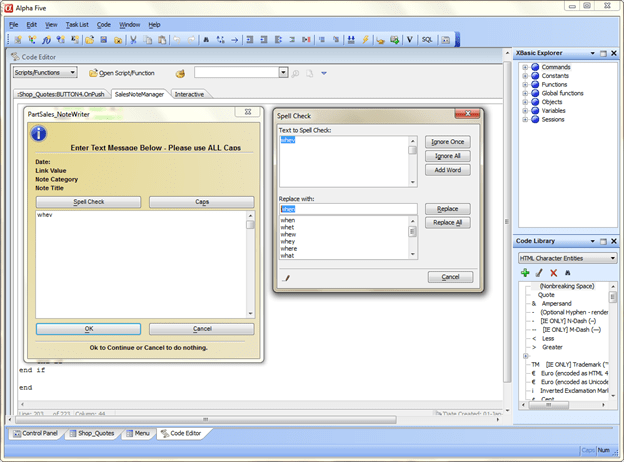
Needless to say the customer was very happy. End of story.
Well that’s it for today’s session. I hope you found it informative. In our next session I will discuss our Tape Calculator and how it fits into our desktop. Hope you will stop back. Thanks again for stopping by and Remember, if you need help with an Alpha Software application or wish to inquire about a custom application for your business go to our website
and inquire or contact
NLawson@cdc-TakeCharge.com
Have a great day.
 Custome Database Design with Alpha Software
Leave a comment