
Hello everyone
At the end of lesson three, I said we would work on a CAD Design style application but it is taking some time to put together so in the mean time, I thought I would post this fun and useful lesson. To start, watch this short video to see the widget work and to get an overview of what we will be learning.
Well I have to say that is very cool. Now lets look at how it is done.
First lets look at the form
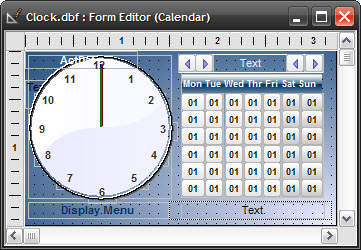 Each object on the form is a standard Alpha Software form object.
- Lines – hands of the clock
- Text box – Clock face and messages
- Buttons – Calendar and Navigation
- Hot Spot – Navigation
In addition to these objects, we need several variables to process our property changes. By using variables, we are able to modify the property value with code which is passed based on current conditions of the form or through user interaction.
To use these objects we will rely heavily on the Object Explorer in the form design screen.
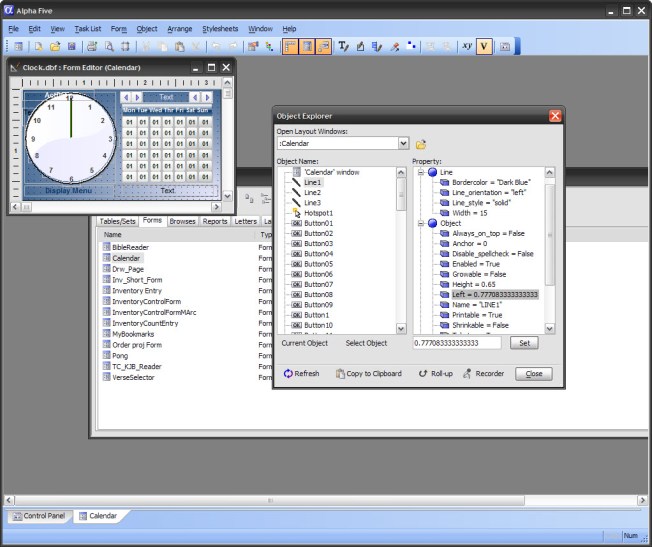 I have discussed the use of the object explorer several times now so I will not go into great detail at this time. Just be assured everything I did can be done here.
The form
Our form is 3.45 inches in Width and 2.225 inches in height. I chose this size because a Widget needs to be small and take up as little desktop real estate as possible; otherwise it is just an application. You can easily set these values on the form properties Window tab or in the Object explorer. The form has ‘OnInit’ code and ‘OnTimer’ code and the Timer Interval is 1 second. We will discuss the code below.
The Calendar
The Calendar consist of forty two buttons for days of week and month and four navigation buttons to change the month and year. It also has two text boxes which display the current date and the activity date.
The Clock
The Clock has lines for the hands, and a text box for the face and the numerals. That is all.
The Variables
Some variables are declared on the form as Session Variables they are
- xyear = 0
- xTime = “”
- xhour 0
- xMin = 0
- xSec = 0
- hStep = 0
- xMnth = “Jan”
The rest are declared in the code pages. We will examine the code in the OnInit event first.
'Date Created: 02-May-2013 02:29:59 PM
'Last Updated: 10-May-2013 07:45:03 AM
'Created By  : cdc
'Updated By  : cdc

dim SHARED xCStartL as N
dim SHARED xCStartT as N
dim SHARED xCStartW as N
dim SHARED xCStartH as N
dim SHARED MxCStartL as N
dim SHARED MxCStartT as N
dim SHARED MxCStartW as N
dim SHARED MxCStartH as N
dim SHARED HxCStartL as N
dim SHARED HxCStartT as N
dim SHARED HxCStartW as N
dim SHARED HxCStartH as N
dim global prev_butt as c
dim shared startnum as n
dim shared startdate as d
dim daynum as c
dim shared BtnList[42] as c
dim i as n
dim currentday as c

Calendar:text15.text = time("0h:0m:0s:a ")
Calendar:text15.Refresh()
xTime = Calendar:text15.text
xHour = val(left(word(xTime,1,":",1),2))*5
xMin = val(word(xTime,2,":",1))
xSec = val(left(word(xTime,3,":",1),2))

xCStartL = topparent:line1.object.Left
xCStartT = topparent:line1.object.Top
xCStartW = topparent:line1.object.Width
xCStartH = topparent:line1.object.Height
MxCStartL = topparent:line2.object.Left
MxCStartT = topparent:line2.object.Top
MxCStartW = topparent:line2.object.Width
MxCStartH = topparent:line2.object.Height
HxCStartL = topparent:line3.object.Left
HxCStartT = topparent:line3.object.Top
HxCStartW = topparent:line3.object.Width
HxCStartH = topparent:line3.object.Height
startdate = ctod(padl(alltrim(str(month(ActDate))),2,"0")+"/01/"+alltrim(str(year(ActDate))))
startnum = dow(ctod(padl(alltrim(str(month(ActDate))),2,"0")+"/01/"+alltrim(str(year(ActDate)))))-1
The first thing we did was declare our additional variables and build our text string for the current time. Then we convert the time string to units of hour minute and second. We assign the initial position of our clock hands to our variables and then we set our values for start date and startnum based on ActDate. (Note: ActDate and cDayDate are global variables set in the autoexec script when the application loads.)
Next we define our buttons for our calendar. Here we use an array to step through the buttons and assign the proper day of month to the correct button on the form. This can only be accomplished because of a cool feature in Alpha Software called eval(). By using eval we are able to build a text string for the button properties then convert the string back to xBasic code. Very cool and useful. Once the labels are correctly set we use a little math to determine if the buttons are in the current month or not. Then we set our month day and year variables and use those to create our next text string.
FOR i = 1 to 42 step 1
    daynum = padl(alltrim(str(i)),2,"0")
    eval("Button"+daynum+".text") = alltrim(str(day(startdate-startnum+i)))
    BtnList[i] = dtoc(startdate-startnum+i)
    if month(startdate-startnum+i) = month(startdate)
        eval("Button"+daynum+".font.color") = "dark green"
    else
        eval("Button"+daynum+".font.color") = "gray-50"
    end if
    if day(startdate-startnum+i) = day(ActDate) .and.month(startdate-startnum+i) = month(ActDate)
        eval("Button"+daynum+".Border.Style")  = "Small-Rounded-Indented"
        eval("Button"+daynum+".Activate()")
    end if
NEXT

xyear = year(ActDate)
xmnth = Date_format(ActDate,"MON")
aday = day(actDate)
Calendar:text17.text = Alltrim(xMnth)+" "+aday+" "+Alltrim(str(xyear))

topparent:text16.text = "Today is "+time("W ",Date())+dtoc(date())
parentform.resynch()
Finally we set the position of the minute and hour hands on our clock. First we set the minutes. As I mentioned in the video, you cannot draw a diagonal line in Alpha Software. Instead you set two points of a rectangle and Alpha Software draws the line for you. To figure this out I needed to know the size and position of my text box representing the clock face. By knowing the size and position I am able to determine the center of my clock and the radius. Now I know how big to make the hands. Next I had to determine the orientation of the lines at each position on the clock face. On each quarter hour the hands are at a resting position either vertical or horizontal. As the hands sweep between the quarters the orientation changes.
- 1 to 14 – Orientation is bottom left – top right
- 16 to 29 – ” is top left – bottom right
- 31 to 44 – ” is bottom left to top right
- 46 to 59 – ” is top left to bottom right
I could post the trig needed to figure the points of the rectangle as the hands sweep but I will not bore you. A simple solution is to figure one position change manually and assign the difference to a variable to use as a modifier of the line properties. Put it all together and the minute hand is painted on the screen.
The hour is a little more complicated. Not only does it need to move to each appointed hour, but it must step five times between each hour. To accomplish this I created the variable hstep. In order to make the code simple, I converted the hours to units of 60 so it would match the minutes and seconds. Next I look at where the hour hand is currently and based on that move it to the correct hour then apply the step of
Round(xMin/12,0) – Finds the current minute position divides by twelve to give me the step for the hour hand between hours. Sounds complicated, it was.
Once the hstep is defined I simply use it as the multiplier for the placement of my rectangle points.
'Process Minutes Hand Sweep
minutes:
if xMin = 0 then
    Calendar:Line2.Line.Line_orientation  = "left"
    Calendar:line2.object.Left = MxCStartL
    Calendar:line2.object.Top = MxCStartT
    Calendar:line2.object.Width = MxCStartW
    Calendar:line2.object.Height = MxCStartH
else if xMin >= 1 .and. xMin <= 14 then
    Calendar:Line2.Line.Line_orientation  = "bottomleft-topright"
    Calendar:line2.object.Left = MxCStartL
    Calendar:line2.object.Top = MxCStartT + (.0385 * xMin)
    Calendar:line2.object.Width = MxCStartW + (.0385 * xMin)
    Calendar:line2.object.Height = MxCStartH - (.0385 * xMin)
else if xMin = 15 then
    Calendar:Line2.Line.Line_orientation  = "Bottom"
    Calendar:line2.object.Left = MxCStart
    Calendar:line2.object.Top = MxCStartT +.65
    Calendar:line2.object.Width = MxCStartW + .63953
    Calendar:line2.object.Height = MxCStartH - .63953
else if xMin >= 16 .and. xMin <= 29 then
    Calendar:Line2.Line.Line_orientation  = "topleft-bottomright"
    Calendar:line2.object.Left = MxCStartL
    Calendar:line2.object.Top = (MxCStartT + .65)
    Calendar:line2.object.Width = (MxCStartW + .63953) - (.0385 * (xMin-15))
    Calendar:line2.object.Height = (MxCStartH - .63953) + (.0385 * (xMin-15))
else if xMin= 30 then
    Calendar:Line2.Line.Line_orientation  = "left"
    Calendar:line2.object.Left = MxCStartL
    Calendar:line2.object.Top = MxCStartT + .65
    Calendar:line2.object.Width = MxCStartW
    Calendar:line2.object.Height = MxCStartH
else if xMin >= 31 .and. xMin < 45 then
    Calendar:Line2.Line.Line_orientation  = "bottomleft-topright"
    Calendar:line2.object.Left = MxCStartL - (.0385 * (xMin-30))
    Calendar:line2.object.Top = MxCStartT + .65
    Calendar:line2.object.Width = MxCStartW + (.0385 * (xMin-30))
    Calendar:line2.object.Height = MxCStartH - (.0385 * (xMin-30))
else if xMin = 45 then
    Calendar:Line2.Line.Line_orientation  = "Top"
    Calendar:line2.object.Left = xCStartL - .65
    Calendar:line2.object.Top = xCStartT + .65
    Calendar:line2.object.Width = xCStartW +.65
    Calendar:line2.object.Height = xCStartH - .63953
else if xMin > 45 .and. xMin <= 59 then
    Calendar:Line2.Line.Line_orientation  = "topleft-bottomright"
    Calendar:line2.object.Left = (MxCStartL - .65) + (.0385 * (xMin - 45))
    Calendar:line2.object.Top = (MxCStartT + .65) - (.0385 * (xMin - 45))
    Calendar:line2.object.Width = (MxCStartW + .63953) - (.0385 * (xMin-45))
    Calendar:line2.object.Height = (MxCStartH - .63953) + (.0385 * (xMin-45))
end if
if xHour = 0 .or. xHour = 60 then
    hstep = 1
else if xHour = 5 then
    hstep = 5 + round(xMin/12,0)
else if xHour = 10 then
    hstep = 10 + round(xMin/12,0)
else if xHour = 15 then
    hstep = 1 + round(xMin/12,0)
else if xHour = 20 then
    hstep = 5 + round(xMin/12,0)
else if xHour = 25 then
    hstep = 10 +round(xMin/12,0)
else if xHour = 30 then
    hstep = 1 +round(xMin/12,0)
else if xHour = 35 then
    hstep = 5 +round(xMin/12,0)
else if xHour = 40 then
    hstep = 10 +round(xMin/12,0)
else if xHour = 45 then
    hstep = 1 +round(xMin/12,0)
else if xHour = 50 then
    hstep = 5 +round(xMin/12,0)
else if xHour = 55 then
    hstep = 10 +round(xMin/12,0)
end if

if (xHour = 60 .or. xHour = 0) .and. xMin = 0 then
    Calendar:Line3.Line.Line_orientation  = "left"
    Calendar:line3.object.Left = HxCStartL
    Calendar:line3.object.Top = HxCStartT
    Calendar:line3.object.Width = HxCStartW
    Calendar:line3.object.Height = HxCStartH
else if (xHour = 60 .or. xHour = 0) then
    Calendar:Line3.Line.Line_orientation  = "bottomleft-topright"
    Calendar:line3.object.Left = HxCStartL
    Calendar:line3.object.Top = HxCStartT + (.0385 * hstep)
    Calendar:line3.object.Width = HxCStartW + (.0385 * hstep)
    Calendar:line3.object.Height = HxCStartH - (.0385 * hstep)
else if xHour >= 1 .and. xHour <= 14 then
    Calendar:Line3.Line.Line_orientation  = "bottomleft-topright"
    Calendar:line3.object.Left = HxCStartL
    Calendar:line3.object.Top = HxCStartT + (.0385 * hstep)
    Calendar:line3.object.Width = HxCStartW + (.0385 * hstep)
    Calendar:line3.object.Height = HxCStartH - (.0385 * hstep)
else if xHour = 15 .and. xMin = 0 then
    Calendar:Line3.Line.Line_orientation  = "Bottom"
    Calendar:line3.object.Left = HxCStart
    Calendar:line3.object.Top = HxCStartT +.65
    Calendar:line3.object.Width = HxCStartW + .63953
    Calendar:line3.object.Height = HxCStartH - .63953
else if xHour = 15 then
    Calendar:Line3.Line.Line_orientation  = "topleft-bottomright"
    Calendar:line3.object.Left = HxCStartL
    Calendar:line3.object.Top = (HxCStartT + .65)
    Calendar:line3.object.Width = (HxCStartW + .63953) - (.0385 * hstep)
    Calendar:line3.object.Height = (HxCStartH - .63953) + (.0385 * hstep)
else if xHour > 15 .and. xHour < 30 then
    Calendar:Line3.Line.Line_orientation  = "topleft-bottomright"
    Calendar:line3.object.Left = HxCStartL
    Calendar:line3.object.Top = (HxCStartT + .65)
    Calendar:line3.object.Width = (HxCStartW + .63953) - (.0385 * hstep)
    Calendar:line3.object.Height = (HxCStartH - .63953) + (.0385 * hstep)
else if xHour= 30 .and. xMin = 0 then
    Calendar:Line3.Line.Line_orientation  = "left"
    Calendar:line3.object.Left = HxCStartL
    Calendar:line3.object.Top = HxCStartT + .65
    Calendar:line3.object.Width = HxCStartW
    Calendar:line3.object.Height = HxCStartH
else if xHour = 30 then
    Calendar:Line3.Line.Line_orientation  = "bottomleft-topright"
    Calendar:line3.object.Left = HxCStartL - (.0385 * hstep)
    Calendar:line3.object.Top = HxCStartT + .65
    Calendar:line3.object.Width = HxCStartW + (.0385 * hstep)
    Calendar:line3.object.Height = HxCStartH - (.0385 * hstep)
else if xHour >= 31 .and. xHour < 45 then
    Calendar:Line3.Line.Line_orientation  = "bottomleft-topright"
    Calendar:line3.object.Left = HxCStartL - (.0385 * hstep)
    Calendar:line3.object.Top = HxCStartT + .65
    Calendar:line3.object.Width = HxCStartW + (.0385 * hstep)
    Calendar:line3.object.Height = HxCStartH - (.0385 * hstep)
else if xHour = 45 .and. xMin = 0 then
    Calendar:Line3.Line.Line_orientation  = "Top"
    Calendar:line3.object.Left = HxCStartL - .60953
    Calendar:line3.object.Top = HxCStartT + .65
    Calendar:line3.object.Width = HxCStartW +.60953
    Calendar:line3.object.Height = HxCStartH - .63953
else if xHour = 45 then
    Calendar:Line3.Line.Line_orientation  = "topleft-bottomright"
    Calendar:line3.object.Left = (HxCStartL - .60953) + (.0385 * hstep)
    Calendar:line3.object.Top = (HxCStartT + .65) - (.0385 * hstep)
    Calendar:line3.object.Width = (HxCStartW + .60953) - (.0385 * hstep)
    Calendar:line3.object.Height = (HxCStartH - .63953) + (.0385 * hstep)
else if xHour > 45 .and. xHour <= 59 then
    Calendar:Line3.Line.Line_orientation  = "topleft-bottomright"
    Calendar:line3.object.Left = (HxCStartL - .60953) + (.0385 * hstep)
    Calendar:line3.object.Top = (HxCStartT + .65) - (.0385 * hstep)
    Calendar:line3.object.Width = (HxCStartW + .60953) - (.0385 * hstep)
    Calendar:line3.object.Height = (HxCStartH - .63953) + (.0385 * hstep)
end if
Now lets look at the calendar button code and we will save the on timer for last. In order to know which day of the month we are on when the user clicks a button we need to use another very cool feature of Alpha Software which is ‘This’. When working with object and you don’t know the name of the object then ‘This’ tells Alpha Software what object you are referring to. In our example, we determine which button in the list of 42 that was clicked and return the number of the button.
Right(this.object.name,2) and assign it to our variable selBtn
Next we again use the eval function to get the property text value for the selected button. If the text value is greater then 7 and the button name is less then 7 the date is for the previous month, then we check for next month. If neither of those two choices work then we select the date for the current month. Now we simply use the text to define ActDate, rerun our array and build our calendar. Finally we run ShowFocusDate which is our xDialog form shown in the video.
'Date Created: 02-May-2013 02:24:32 PM
'Last Updated: 09-May-2013 02:50:39 PM
'Created By  : cdc
'Updated By  : cdc
dim selBtn as C
selBtn = Right(this.object.name,2)

if val(right(this.object.name,2)) <= 7 .and. val(eval("Button"+selBtn+".text")) > 7 then
    amonth = str(month(ActDate)-1)
    aDay = Str(val(eval("Button"+selBtn+".text")))
    ayear = Str(year(Date_LastDayOfPreviousMonth(ActDate)))
else if val(right(this.object.name,2)) >= 28 .and. val(eval("Button"+selBtn+".text")) <= 17 then
    amonth = str(month(month_end(ActDate)+1))
    aDay = Str(val(eval("Button"+selBtn+".text")))
    ayear = Str(year(month_end(ActDate)+1))
    ActDate = amonth+"/"+aDay+"/"+ayear
else
    amonth = str(month(ActDate))
    aDay = Str(val(eval("Button"+selBtn+".text")))
    ayear = Str(year(ActDate))
    ActDate = amonth+"/"+aDay+"/"+ayear
end if
ActDate = amonth+"/"+aDay+"/"+ayear
topparent:ActDate.refresh()
topparent:text17.text = Alltrim(Date_Format(ActDate,"MON"))+" "+Alltrim(aday)+" "+Alltrim(str(xyear))
startdate = ctod(padl(alltrim(str(month(ActDate))),2,"0")+"/01/"+alltrim(str(year(ActDate))))
startnum = dow(ctod(padl(alltrim(str(month(ActDate))),2,"0")+"/01/"+alltrim(str(year(ActDate)))))-1

FOR i = 1 to 42 step 1
    daynum = padl(alltrim(str(i)),2,"0")
    eval("Button"+daynum+".text") = alltrim(str(day(startdate-startnum+i)))
    BtnList[i] = dtoc(startdate-startnum+i)
    if month(startdate-startnum+i) = month(startdate)
        eval("Button"+daynum+".font.color") = "dark red"
    else
        eval("Button"+daynum+".font.color") = "gray-50"
    end if
    if day(startdate-startnum+i) = day(ActDate) .and.month(startdate-startnum+i) = month(ActDate)
        eval("Button"+daynum+".Border.Style")  = "Small-Rounded-Indented"
        eval("Button"+daynum+".Activate()")
    end if
NEXT
parentform.Refresh_Layout()
xbasic_wait_for_idle()
script_play("ShowFocusDate")
The final code we will review is the OnTimer event.
'Date Created: 03-May-2013 06:28:52 PM
'Last Updated: 10-May-2013 07:44:39 AM
'Created By  : cdc
'Updated By  : cdc
Calendar:text15.text = time("0h:0m:0s:a ")
Calendar:text15.Refresh()
xTime = Calendar:text15.text
xHour = val(word(xTime,1,":",1))*5
xMin = val(word(xTime,2,":",1))
xSec = val(left(word(xTime,3,":",1),2))

'Process Seconds Hand Sweep
seconds:
if xSec > 59 .and. xSec <= 0 then
    Calendar:Line1.Line.Line_orientation  = "left"
    Calendar:line1.object.Left = xCStartL
    Calendar:line1.object.Top = xCStartT
    Calendar:line1.object.Width = xCStartW
    Calendar:line1.object.Height = xCStartH
else if xSec >= 1 .and. xSec <= 14 then
    Calendar:Line1.Line.Line_orientation  = "bottomleft-topright"
    Calendar:line1.object.Left = xCStartL
    Calendar:line1.object.Top = xCStartT + (.0385 * xSec)
    Calendar:line1.object.Width = xCStartW + (.0385 * xSec)
    Calendar:line1.object.Height = xCStartH - (.0385 * xSec)
else if xSec = 15 then
    Calendar:Line1.Line.Line_orientation  = "Bottom"
    Calendar:line1.object.Left = xCStart
    Calendar:line1.object.Top = xCStartT +.65
    Calendar:line1.object.Width = xCStartW + .63953
    Calendar:line1.object.Height = xCStartH - .63953
else if xSec >= 16 .and. xSec <= 29 then
    Calendar:Line1.Line.Line_orientation  = "topleft-bottomright"
    Calendar:line1.object.Left = xCStartL
    Calendar:line1.object.Top = (xCStartT + .65)
    Calendar:line1.object.Width = (xCStartW + .63953) - (.0385 * (xSec-15))
    Calendar:line1.object.Height = (xCStartH - .63953) + (.0385 * (xSec-15))
else if xSec= 30 then
    Calendar:Line1.Line.Line_orientation  = "left"
    Calendar:line1.object.Left = xCStartL
    Calendar:line1.object.Top = xCStartT + .65
    Calendar:line1.object.Width = xCStartW
    Calendar:line1.object.Height = xCStartH
else if xSec >= 31 .and. xSec < 45 then
    Calendar:Line1.Line.Line_orientation  = "bottomleft-topright"
    Calendar:line1.object.Left = xCStartL - (.0385 * (xSec-30))
    Calendar:line1.object.Top = xCStartT + .65
    Calendar:line1.object.Width = xCStartW + (.0385 * (xSec-30))
    Calendar:line1.object.Height = xCStartH - (.0385 * (xSec-30))
else if xSec = 45 then
    Calendar:Line1.Line.Line_orientation  = "Top"
    Calendar:line1.object.Left = xCStartL - .65
    Calendar:line1.object.Top = xCStartT + .65
    Calendar:line1.object.Width = xCStartW +.65
    Calendar:line1.object.Height = xCStartH - .63953
else if xSec > 45 .and. xSec <= 59 then
    Calendar:Line1.Line.Line_orientation  = "topleft-bottomright"
    Calendar:line1.object.Left = (xCStartL - .65) + (.0385 * (xSec - 45))
    Calendar:line1.object.Top = (xCStartT + .65) - (.0385 * (xSec - 45))
    Calendar:line1.object.Width = (xCStartW + .65) - (.0385 * (xSec-45))
    Calendar:line1.object.Height = (xCStartH - .63953) + (.0385 * (xSec-45))
end if

'Process Minutes Hand Sweep
if xMin = 0 then
    Calendar:Line2.Line.Line_orientation  = "left"
    Calendar:line2.object.Left = MxCStartL
    Calendar:line2.object.Top = MxCStartT
    Calendar:line2.object.Width = MxCStartW
    Calendar:line2.object.Height = MxCStartH
else if xMin >= 1 .and. xMin <= 14 then
    Calendar:Line2.Line.Line_orientation  = "bottomleft-topright"
    Calendar:line2.object.Left = MxCStartL
    Calendar:line2.object.Top = MxCStartT + (.0385 * xMin)
    Calendar:line2.object.Width = MxCStartW + (.0385 * xMin)
    Calendar:line2.object.Height = MxCStartH - (.0385 * xMin)
else if xMin = 15 then
    Calendar:Line2.Line.Line_orientation = "Bottom"
    Calendar:line2.object.Left = MxCStart
    Calendar:line2.object.Top = MxCStartT +.65
    Calendar:line2.object.Width = MxCStartW + .63953
    Calendar:line2.object.Height = MxCStartH - .63953
else if xMin >= 16 .and. xMin <= 29 then
    Calendar:Line2.Line.Line_orientation  = "topleft-bottomright"
    Calendar:line2.object.Left = MxCStartL
    Calendar:line2.object.Top = (MxCStartT + .65)
    Calendar:line2.object.Width = (MxCStartW + .63953) - (.0385 * (xMin-15))
    Calendar:line2.object.Height = (MxCStartH - .63953) + (.0385 * (xMin-15))
else if xMin= 30 then
    Calendar:Line2.Line.Line_orientation  = "left"
    Calendar:line2.object.Left = MxCStartL
    Calendar:line2.object.Top = MxCStartT + .65
    Calendar:line2.object.Width = MxCStartW
    Calendar:line2.object.Height = MxCStartH
else if xMin >= 31 .and. xMin < 45 then
    Calendar:Line2.Line.Line_orientation  = "bottomleft-topright"
    Calendar:line2.object.Left = MxCStartL - (.0385 * (xMin-30))
    Calendar:line2.object.Top = MxCStartT + .65
    Calendar:line2.object.Width = MxCStartW + (.0385 * (xMin-30))
    Calendar:line2.object.Height = MxCStartH - (.0385 * (xMin-30))
else if xMin = 45 then
    Calendar:Line2.Line.Line_orientation  = "Top"
    Calendar:line2.object.Left = xCStartL - .65
    Calendar:line2.object.Top = xCStartT + .65
    Calendar:line2.object.Width = xCStartW +.65
    Calendar:line2.object.Height = xCStartH - .63953
else if xMin > 45 .and. xMin <= 59 then
    Calendar:Line2.Line.Line_orientation  = "topleft-bottomright"
    Calendar:line2.object.Left = (MxCStartL - .60953) + (.0385 * (xMin - 45))
    Calendar:line2.object.Top = (MxCStartT + .65) - (.0385 * (xMin - 45))
    Calendar:line2.object.Width = (MxCStartW + .60953) - (.0385 * (xMin-45))
    Calendar:line2.object.Height = (MxCStartH - .63953) + (.0385 * (xMin-45))
end if
'Process Hour Hand Sweep
if xHour = 0 .or. xHour = 60 then
    hstep = 1
else if xHour = 5 then
    hstep = 5 + round(xMin/12,0)
else if xHour = 10 then
    hstep = 10 + round(xMin/12,0)
else if xHour = 15 then
    hstep = 1 + round(xMin/12,0)
else if xHour = 20 then
    hstep = 5 + round(xMin/12,0)
else if xHour = 25 then
    hstep = 10 +round(xMin/12,0)
else if xHour = 30 then
    hstep = 1 +round(xMin/12,0)
else if xHour = 35 then
    hstep = 5 +round(xMin/12,0)
else if xHour = 40 then
    hstep = 10 +round(xMin/12,0)
else if xHour = 45 then
    hstep = 1 +round(xMin/12,0)
else if xHour = 50 then
    hstep = 5 +round(xMin/12,0)
else if xHour = 55 then
    hstep = 10 +round(xMin/12,0)
end if

if (xHour = 60 .or. xHour = 0) .and. xMin = 0 then
    Calendar:Line3.Line.Line_orientation  = "left"
    Calendar:line3.object.Left = HxCStartL
    Calendar:line3.object.Top = HxCStartT
    Calendar:line3.object.Width = HxCStartW
    Calendar:line3.object.Height = HxCStartH
    if cDayDate <> Date() then
        cDayDate = Date()
        ActDate = Date()
        Calendar:hotspot1.push()
    end if
else if (xHour = 60 .or. xHour = 0) then
    Calendar:Line3.Line.Line_orientation  = "bottomleft-topright"
    Calendar:line3.object.Left = HxCStartL
    Calendar:line3.object.Top = HxCStartT + (.0385 * hstep)
    Calendar:line3.object.Width = HxCStartW + (.0385 * hstep)
    Calendar:line3.object.Height = HxCStartH - (.0385 * hstep)
else if xHour >= 1 .and. xHour <= 14 then
    Calendar:Line3.Line.Line_orientation  = "bottomleft-topright"
    Calendar:line3.object.Left = HxCStartL
    Calendar:line3.object.Top = HxCStartT + (.0385 * hstep)
    Calendar:line3.object.Width = HxCStartW + (.0385 * hstep)
    Calendar:line3.object.Height = HxCStartH - (.0385 * hstep)
else if xHour = 15 .and. xMin = 0 then
    Calendar:Line3.Line.Line_orientation  = "Bottom"
    Calendar:line3.object.Left = HxCStart
    Calendar:line3.object.Top = HxCStartT +.65
    Calendar:line3.object.Width = HxCStartW + .63953
    Calendar:line3.object.Height = HxCStartH - .63953
else if xHour = 15 then
    Calendar:Line3.Line.Line_orientation  = "topleft-bottomright"
    Calendar:line3.object.Left = HxCStartL
    Calendar:line3.object.Top = (HxCStartT + .65)
    Calendar:line3.object.Width = (HxCStartW + .63953) - (.0385 * hstep)
    Calendar:line3.object.Height = (HxCStartH - .63953) + (.0385 * hstep)
else if xHour > 15 .and. xHour < 30 then
    Calendar:Line3.Line.Line_orientation  = "topleft-bottomright"
    Calendar:line3.object.Left = HxCStartL
    Calendar:line3.object.Top = (HxCStartT + .65)
    Calendar:line3.object.Width = (HxCStartW + .63953) - (.0385 * hstep)
    Calendar:line3.object.Height = (HxCStartH - .63953) + (.0385 * hstep)
else if xHour= 30 .and. xMin = 0 then
    Calendar:Line3.Line.Line_orientation  = "left"
    Calendar:line3.object.Left = HxCStartL
    Calendar:line3.object.Top = HxCStartT + .65
    Calendar:line3.object.Width = HxCStartW
    Calendar:line3.object.Height = HxCStartH
else if xHour = 30 then
    Calendar:Line3.Line.Line_orientation  = "bottomleft-topright"
    Calendar:line3.object.Left = HxCStartL - (.0385 * hstep)
    Calendar:line3.object.Top = HxCStartT + .65
    Calendar:line3.object.Width = HxCStartW + (.0385 * hstep)
    Calendar:line3.object.Height = HxCStartH - (.0385 * hstep)
else if xHour >= 31 .and. xHour < 45 then
    Calendar:Line3.Line.Line_orientation  = "bottomleft-topright"
    Calendar:line3.object.Left = HxCStartL - (.0385 * hstep)
    Calendar:line3.object.Top = HxCStartT + .65
    Calendar:line3.object.Width = HxCStartW + (.0385 * hstep)
    Calendar:line3.object.Height = HxCStartH - (.0385 * hstep)
else if xHour = 45 .and. xMin = 0 then
    Calendar:Line3.Line.Line_orientation  = "Top"
    Calendar:line3.object.Left = xCStartL - .60953
    Calendar:line3.object.Top = xCStartT + .65
    Calendar:line3.object.Width = xCStartW +.60953
    Calendar:line3.object.Height = xCStartH - .63953
else if xHour = 45 then
    Calendar:Line3.Line.Line_orientation  = "topleft-bottomright"
    Calendar:line3.object.Left = (HxCStartL - .60953) + (.0385 * hstep)
    Calendar:line3.object.Top = (HxCStartT + .65) - (.0385 * hstep)
    Calendar:line3.object.Width = (HxCStartW + .60953) - (.0385 * hstep)
    Calendar:line3.object.Height = (HxCStartH - .63953) + (.0385 * hstep)
else if xHour > 45 .and. xHour <= 59 then
    Calendar:Line3.Line.Line_orientation  = "topleft-bottomright"
    Calendar:line3.object.Left = (HxCStartL - .60953) + (.0385 * hstep)
    Calendar:line3.object.Top = (HxCStartT + .65) - (.0385 * hstep)
    Calendar:line3.object.Width = (HxCStartW + .60953) - (.0385 * hstep)
    Calendar:line3.object.Height = (HxCStartH - .63953) + (.0385 * hstep)
end if
Not much to discuss here, it adds in the second hand sweep then runs the same code that is on the OnInit event for the minutes and hour sweep.
There you have it. Now we did not discuss the hotspot or the navigation buttons, but you can easily do those on your own.
Well that’s it for today. I hope you found this lesson helpful and I hope you enjoy the rest of this series. I will post the CAD lessons as soon as I can.
Remember, if you need help with an Alpha Software application or wish to inquire about a custom application for your business go to our website
and inquire or contact
NLawson@cdc-TakeCharge.com
Have a great day.
 Custome Database Design with Alpha Software
Leave a reply to Incorporating xBasic in Form Design: 08 | Alpha Software How to guide.. Cancel reply