
Today we are looking as code for security controls of the app IE: Log In, New menu look and latest on our Drafting Module.
Lets start with the Security code at the Log in screen.
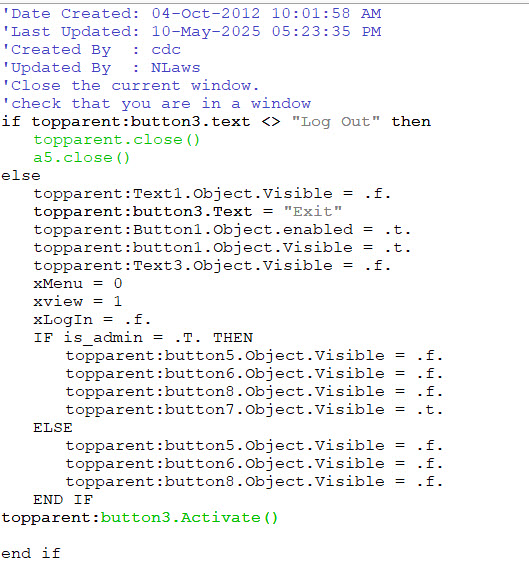
This is the button in the upper right corner of the screen and it sets the initial value. for each button.
Next we run an autoexec script to assign our global variables and to load the form.

The user clicks Log-IN and the screen changes adding two security levels as well as a link to setup users.
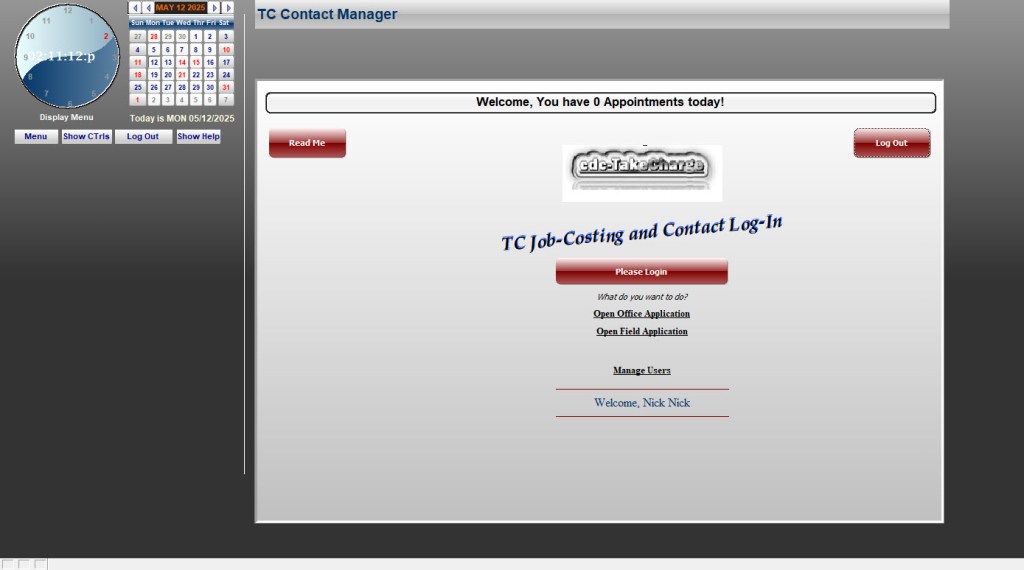
The code to set the security levels is as follows;
dim prmpt_title as c
dim prmpt_prompt as c
dim prmpt_default as c
dim prmpt_mask as c
DIM goodtogo as L
DIM user_password as C
DIM stored_password AS C
Dim stored_level as L
Dim GLOBAL is_admin as L
Dim Global xDept as C
Dim user_ID as C

goodtogo = .F.
user_name = ""
user_password = ""
user_id = ""

prmpt_title = "Password"
prmpt_prompt = "Enter your password"
prmpt_default = ""
prmpt_mask = "*"

vpassword = ui_get_password(prmpt_title,prmpt_prompt,prmpt_default,prmpt_mask)
IF vpassword = "" THEN
	END
END IF

tbl = table.open("sys_login")
tbl.index_primary_put("User_Password")
tbl.fetch_first()
WHILE .not. tbl.fetch_EOF()
	IF tbl.tr_password = VAR->vPassword THEN
		stored_password = VAR->vPassword
		user_password = tbl.tr_password
		xDept = tbl.department
		if xDept = "Manager" then
		    xDept = "Supervisor"
		end if
		vUser = alltrim(tbl.TR_FAMILIAR)
		Lii = left(tbl.Tr_First_Name,1)+left(tbl.Tr_Last_Name,1)
		user_ID = tbl.tr_ID
		stored_level = tbl.TR_administrator
		goto open
	END IF
	tbl.fetch_next()
END WHILE
open:
SELECT
	CASE len(alltrim(stored_password)) = 0
		ui_msg_box("Password Not Valid","You must enter a valid password for access."+crlf()+crlf()+"Please try again.")
		End
	CASE else
		IF stored_password <> alltrim(user_password) THEN
			ui_msg_box("Password Not Valid","That password does not match current users."+crlf()+crlf()+"Please try again.")
			End
		ELSE
			goodtogo = .T.
			IF stored_level = .T. THEN
				is_admin = .T.
			ELSE
				is_admin = .F.
			END IF

		END IF
END SELECT

IF goodtogo = .t. THEN
	xLogin = .t.
	TCCalendar:showmenu.Show()
	TCCalendar:ctrls.Show()
	TCCalendar:logout.show()
	TCCalendar:hlpbutton.show()
	topparent:Text4.Text = "Welcome, "+vUser
	topparent:Text4.Object.Visible = .T.
	topparent:button3.Text = "Log Out"
	topparent:button1.Object.Visible = .t.
	topparent:Button1.Object.enabled = .t.
	topparent:Text3.Object.Visible = .T.
	IF is_admin = .T. THEN
		topparent:button5.Object.Visible = .T.
		topparent:button6.Object.Visible = .T.
		topparent:button7.Object.Visible = .T.
		'topparent:button8.Object.Visible = .T.
	ELSE
		IF  XDept = "Supervisor" THEN
			topparent:button5.Object.Visible = .T.
			topparent:button6.Object.Visible = .F.
			topparent:button7.Object.Visible = .T.
		ELSE IF xDept = "Office" THEN
			topparent:button5.Object.Visible = .T.
		ELSE IF xDept = "Field"
			topparent:button6.Object.Visible = .T.
		ELSE IF xDept = "Shop"
			topparent:button7.Object.Visible = .F.
		END IF
	END IF
	topparent:button3.Activate()
END IF
text4.text=text4.text+" "+vUser
tbl.close()
Next let’s look at the New Menu. It’s easy to use the genie to create a button which opens a form for the requested table but doing a xdialog can be more daunting. Lest look at the xdialog I am using for the report menu.
'Date Created: 30-Oct-2012 09:38:35 AM
'Last Updated: 11-May-2025 08:33:17 AM
'Created By  : cdc
'Updated By  : NLaws
'
dim Shared prchoice as C
DIM SHARED sng_multi as C
DIM SHARED varC_result as C
ok_button_label = "&Continue"
cancel_button_label = "&Cancel"
Delete XdialogStyle
dim XDialogStyle as p
XDialogStyle.AccentColor = "White"
XDialogStyle.Color = "#127+127+127"
prchoice = ""
varC_result = ui_dlg_box("Inventory Rpts Print Dialog",<<%dlg%
{Windowstyle=Gradient Radial Bottom Right}
;
{line=1,0};
;
{sp=5}{region}(sng_multi:Inv Grouped by Vendor);
{sp=5}{region}(sng_multi:Inv Missing True Cost);
{sp=5}{region}(sng_multi:Inv Needs All Stocking);
{sp=5}(sng_multi:Inv on Hand for All Ve);
{sp=5}(sng_multi:InvCountSheet);
{sp=5}(sng_multi:InvOnHandStocked);
{endregion};
;
{endregion};
{line=1,0};
{region}
;
<*25=ok_button_label!CONTINUE> <25=cancel_button_label!CANCEL>
{endregion};
%dlg%,<<%code%
if a_dlg_button = "Continue" then
	prchoice =  sng_multi
else
End
end if

%code%)
if prchoice = "" then
   End
end if

if prchoice = "Inv Grouped by Vendor" then
query.filter = ""
query.order = ""
prompt_result = ui_get_print_or_preview("Print")
	If prompt_result = "Print" then
	:Report.Print("InvGroupedbyVendor",query.filter,query.order)
	else prompt_result = "Preview" then
	:Report.Preview("InvGroupedbyVendor",query.filter,query.order)
	end if
else if prChoice = "Inv Missing True Cost" then
	query.filter = ""
	query.order = ""
	'Prompt user whether to print, or preview the layout. Set default to Print
	prompt_result = ui_get_print_or_preview("Print")
	If prompt_result = "Print" then
		:Report.Print("Inv Missing True Cost",query.filter,query.order)
	Else if prompt_result = "Preview" then
		:Report.Preview("Inv Missing True Cost",query.filter,query.order)
	End if


else if prchoice = "Inv Needs All Stocking" then
	query.filter = ""
	query.order = ""
	prompt_result = ui_get_print_or_preview("Print")
	If prompt_result = "Print" then
		:Report.Print("Inv. Needs all Stocking",query.filter,query.order)
	Else if prompt_result = "Preview" then
		:Report.Preview("Inv. Needs all Stocking",query.filter,query.order)
	End if
else if prchoice = "Inv on Hand for All Ve"
	query.filter = ""
	query.order = ""
	'Prompt user whether to print, or preview the layout. Set default to Print
	prompt_result = ui_get_print_or_preview("Print")
	If prompt_result = "Print" then
	:Report.Print("Inv. on Hand for all Ve",query.filter,query.order)
	Else if prompt_result = "Preview" then
		:Report.Preview("Inv. on Hand for all Ve",query.filter,query.order)
	End if
else if prchoice = "InvCountSheet"
	query.filter = ""
	query.order = ""
	'Prompt user whether to print, or preview the layout. Set default to Print
	prompt_result = ui_get_print_or_preview("Print")
	If prompt_result = "Print" then
	:Report.Print("InvCountSheet",query.filter,query.order)
	Else if prompt_result = "Preview" then
		:Report.Preview("InvCountSheet",query.filter,query.order)
	End if
else if prchoice = "InvOnHandStocked"
	query.filter = ""
	query.order = ""
	'Prompt user whether to print, or preview the layout. Set default to Print
	prompt_result = ui_get_print_or_preview("Print")
	If prompt_result = "Print" then
	:Report.Print("InvOnHandStocked",query.filter,query.order)
	Else if prompt_result = "Preview" then
		:Report.Preview("InvOnHandStocked",query.filter,query.order)
	End if
End if

END
There is a lot there but it is fairly straight forward. xDialog is liner by design;
- 1. name and set your shared variables
- 2 Set the properties of your xdialog form. Name and the declare the xdialog variables.
- varC_result = ui_dlg_box(“Inventory Rpts Print Dialog”,<<%dlg%
{Windowstyle=Gradient Radial Bottom Right}
;
{line=1,0}; - 3. Set your radio choice options these all need to be set between the start and end of your dialog code block
- Dialog”,<<%dlg%….radio choices…..%code%)
- 4. The user choice is passed to the variable from the radio choice as prchoice. (you can name it whatever you wish but the variable type must match the data selected .IE “Number var to number value”
- 5. Final Step write code to process the choice.
- Report.Print(“InvOnHandStocked”,query.filter,query.order)
Else if prompt_result = “Preview” then
:Report.Preview(“InvOnHandStocked”,query.filter,query.order)
The last code we will look at is our drawing module.
dim FHorz as N
dim BHorz as N
dim LVer as N
dim Rver as N
dim FDis as N
dim LDis as N
dim BDis as N
dim RDis as N

dim Project_Elevation as B
dim ptr as P

t = table.open("fp_mesurements")
t.fetch_first()
while .NOT. t.fetch_eof()
	if t.drw_subject = "House Front View" then
		FHorz = t.fhorz
	else if t.drw_subject = "Left Side View" then
		Lver = t.bhorz
	else if t.drw_subject = "House Back View" then
		BHorz = t.fhorz
	else
		RVer = t.bhorz
	end if
	t.fetch_next()
end while
t.close()
ui_bitmap_create("test",11,8.5)
ui_bitmap_draw("test",<<%code%
set_brush("white")
inner_Rect(0,0,11,8.5)
set_pen("black")
inner_Rect(0,0,11,8.5)
'
line(1,Var->BHorz,Var->FHorz,BHorz) 'Horizontal Bottom Front View
line(Var->FHorz,1,Var->FHorz,BHorz)'Vertical right Left Side View
line(1,1,Var->FHorz,1)'Horizontal Top Back View
line(1,Var->BHorz,1,1)'Vertical Left Right Side View
'line(1,Var->BHorz,Var->FHorz,Var->BHorz) 'Horizontal Bottom Front View
'line(Var->FHorz,1,Var->FHorz,BHorz)'Vertical right Left Side View
'line(1,1,Var->FHorz,1)'Horizontal Top Back View
'line(1,Bhorz,1,1)'Vertical Left Right Side View

'

'set_pen("Gray-80")
set_font("Verdana,10,", "Gray-80", "gray-25")
text("Project Drawing External View ", 1., .25, "Left")
text("Scale  1/8 inch = 1 Foot", 1., .5, "Left")
text("Project Proposal Date '"+ DTOC(Date()) +"'", 1., .75, "Left")
text("Front ", 4.9, 7.5, "Left")
text("Left View ", .25, 3.75, "Left")
text("Right View ", 9., 3.75, "Left")
text("Back View ", 5., .75, "Left")
text("46'6", 4.9, 7.80, "Left")
text("36' ", .25, 3.5, "Left")
text("36' ", 9.25, 3.5, "Left")
text("46'6", 5., .5, "Left")
%code%)
project_elevation = ui_bitmap_save("test")
ptr = file.create("c:\project_elevation.bmp", FILE_RW_EXCLUSIVE)
ptr.writeb(project_elevation)
ptr.close()
ui_dlg_box("","{image=test}")
ui_bitmap_drop("test")
'

query.filter = ""
query.order = ""


:Report.SaveAs("Jobcosting_Fp_Report","PDF",query.filter,query.order,"C:\project_elevation.pdf",.F.)
Using the drawing functions provided by Alpha Software and variables to pass the needed ‘xy’ points from the project browse table, we can now draw scaled line drawings in our app just by recording what we measured. Very cool!
Well that is enough for today. Leave a comment on what you think so far and if yo need help with an existing application we are available to help you.
Have a great day and week.
Nick Lawson
713 417-6831
natn0525@gmail.com
 Custome Database Design with Alpha Software
Leave a comment