

In this current age of application development it is not enough to create an application which looks good and does what it was intended to do, it must also be fast. In Alpha Software when you create a table or set you will most likely create one or more index’s for controlling your data view. In fact even if you do not create an index, Alpha Software will do so automatically based on expected needs.
In one respect this is great because fetching and retrieving records becomes easy for both the developer (you) and the user. However as your application is scaled up with the growth of your business fetching and retrieving records will slow down. For example say you have an invoicing and inventory application where your invoice header table has grown to 80,000 plus records and the invoice items table holds and average of ten items per invoice that means the child table in the set will have at least 800,000 records. Now place that application on a central server with at least 20 workstations all accessing the application at the same time fetching updating adding and deleting records based on your predefined index’s. Each index will be updated and refreshed with each change, addition or subtraction of the parent and or child record which gets slower and slower based on the size and access of the table and or set. My solution to this problem is to allow Alpha Software to create the minimum needed index’s and then use queries to fetch, sort and display data on the form.
To compare the two methods I will use a application I created on this blog several years ago; January 2013 to be exact; The King James Bible Reader. (To review that lesson click Here.) In the original application I created three tables; verses, chapters and books. Verses contained a list of each verse in the bible, chapters each chapter and books each book and each record in the specific table had a memo field with the selected text. For example in the verses table Genesis 01-01 the memo field had only the single verse, in chapters it had all verses for Genesis chapter 01 and in books it had the entire book of Genesis in the memo field. I did this to insure the data would display quickly based on using index’s and high level append and posting operations. In this new setup I only need the verses table and a single rich text object to display the records by user choice and it actually works faster. Below is an image of our new form using four variables to edit and control our data queries.
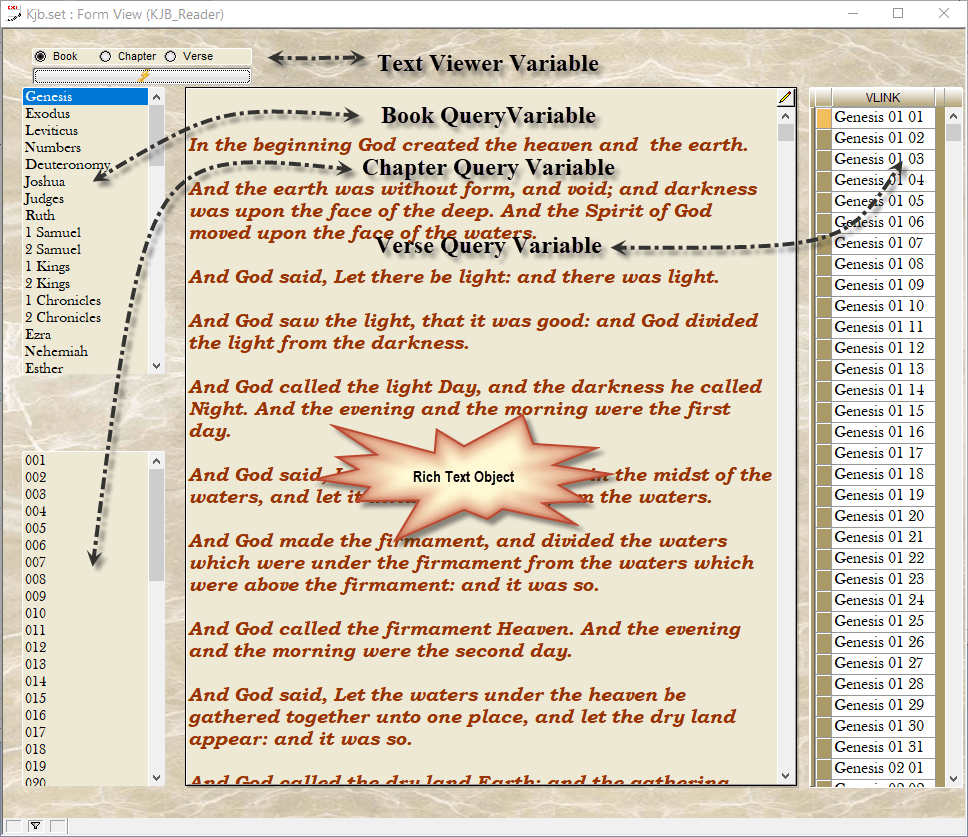
This form is plain vanilla compared to our original Form
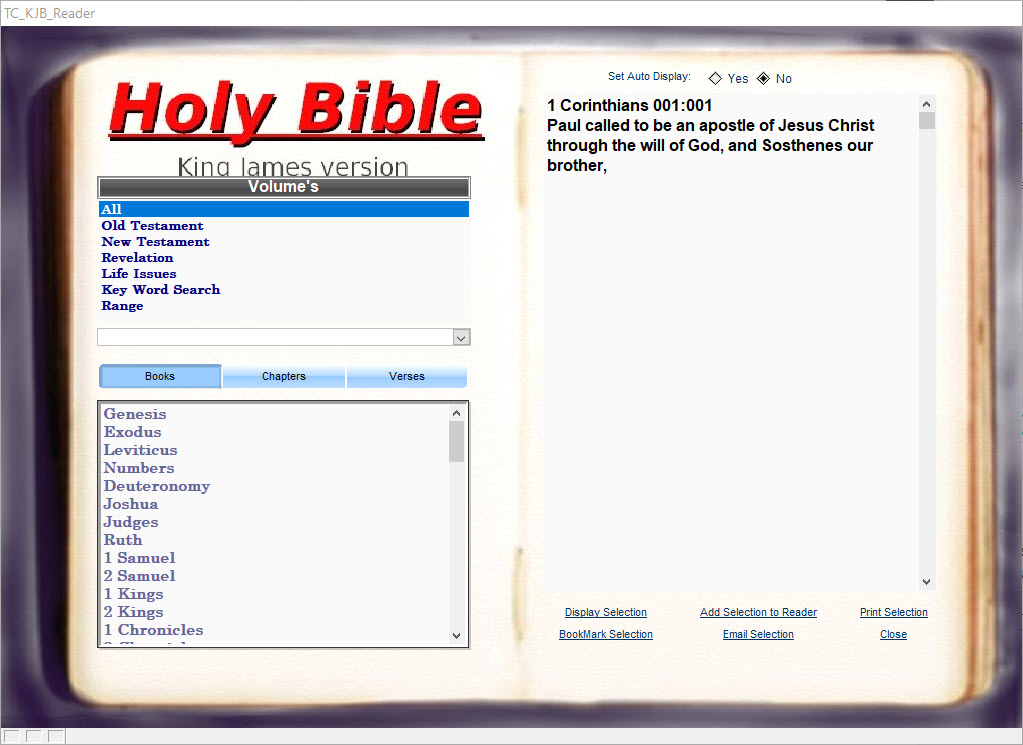
but this exercise in not about form rather function.
In the original the user would select the volume then either book chapter or verse then click Display Selection or Add Selection in order to see the selection in the Reader. In the background the code would select the table then either append the requested memo field to the reader table using replace or post the selected memo field to add the memo field to current memo in the reader. This worked fine as written but it required a lot of code to do a simple process and it was not very fast. Looking at our new form you can see we use four form variables with a few local variables to do the processing and it will now display the entire bible in the rich text object in the amount of time it used to take to display a single life issue in the old application.
Lets start with the form design.
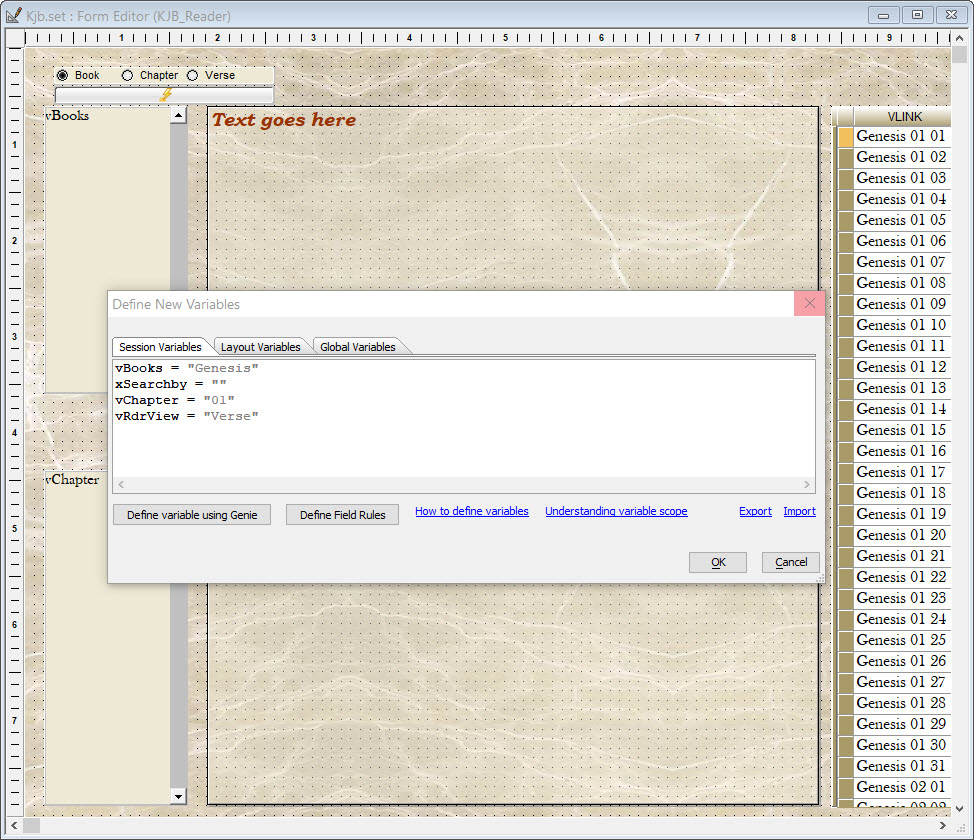
This form is bound to the verses table (Does not need to be it is just what I chose to do.)
On the right of the form is a browse view of the verse link field for each verse in the Bible. The center of the form holds the Rich Text object which I dragged onto the form from the Form Toolbox. On the Left are the variables I use to control the data via queries. In the image above, you can see I placed the book variable on the form as a List Object computed automatically with values from a table or set.

The Chapter variable is a list object populated using xBasic (shown above)
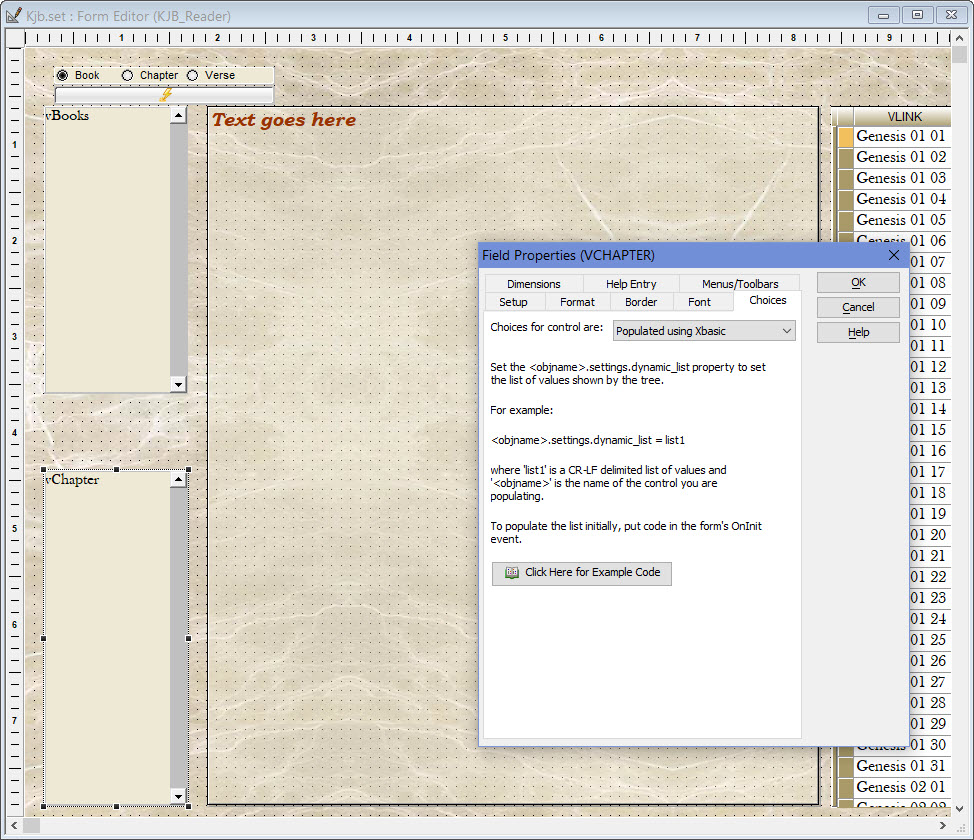
and our radio choice is a radio object populated manually. Now lets look at the code on these objects,
The button below our radio choice runs three separate routines based on the radio choice the user makes.
if vRdrView = "Book" then
	dim xchp as C
	dim cNbr as C
	xflt = Var->vBooks
	xflt = "Bookname = '" + xflt + "'"
	records_found = topparent.queryrun(Var->xflt,"","","No","",.f.)
	'xcount = count(Verses->vLink,GRP->Grand)
	xchp = ""
	vChapter = ""
	KJB_Reader:Tables:verses.Batch_Begin()
	KJB_Reader:Tables:verses.Fetch_First()
	while .NOT. KJB_Reader:Tables:verses.Fetch_Eof()
		cNbr = KJB_Reader:Tables:verses.CHAPTER
		if xchp = cNbr then
			vChapter = vChapter
		else
			IF KJB_Reader:Tables:verses.CHAPTER = "001" then
				vChapter = KJB_Reader:Tables:verses.CHAPTER +crlf()
			else
				vChapter = vChapter + KJB_Reader:Tables:verses.CHAPTER +crlf()
			end if
		end if
		xText = KJB_Reader:Tables:verses.KJB_BY_VERSE
		xReader = xReader + crlf() + crlf() + word(xtext,2,crlf(),1)
		xchp = KJB_Reader:Tables:verses.CHAPTER
		KJB_Reader:Tables:verses.Fetch_Next()
	end while
	KJB_Reader:Tables:verses.Batch_End()
	KJB_Reader:rtf1.rtf.plain_text = xReader
	DIM pObj AS P

	pObj = topparent:vChapter.this
	pObj.settings.dynamic_list = vChapter + <<%str%
	%str%
	topparent:Vchapter.Settings.Unique_keys  = .t.
else if vRdrView = "Chapter" then
	xflt = "Bookname = '" + VBooks + "'.and. Chapter = '" + VChapter + "'"
	records_found = topparent.queryrun(Var->xflt,"","","No","",.f.)

	KJB_Reader:Tables:verses.Batch_Begin()
	KJB_Reader:Tables:verses.Fetch_First()
	while .NOT. KJB_Reader:Tables:verses.Fetch_Eof()
		xText = KJB_Reader:Tables:verses.KJB_BY_VERSE
		xReader = xReader + crlf() + crlf() + word(xtext,2,crlf(),1)
		KJB_Reader:Tables:verses.Fetch_Next()
	end while
	KJB_Reader:Tables:verses.Batch_End()
	KJB_Reader:rtf1.rtf.plain_text = xReader
else
	KJB_Reader:Rtf1.Rtf.Rtf_text  = " "
	KJB_Reader:rtf1.Refresh()
	t = table.current()
	xText = t.kjb_by_verse
	xText = word(xtext,2,crlf(),1)
	topparent:Rtf1.Rtf.Rtf_text  = "{\rtf1\ansi \deff0{\colortbl;\red153\green51\blue0;}{\fonttbl{\f0\fswiss Tahoma;}{\f1\fnil Bookman Old Style;}}{{\b \i \f1 \cf1 \fs28'"+  Var->xtext + "'\par }}}"
end if
The first option is book. Looking at the code you can see we use another local variable xFlt (xfilter)
which we first assign the variable of vBooks. Then we modify xFlt by adding the second call where we set xflt equal to xflt wrapped in a text string.
xflt = Var->vBooks
xflt = "Bookname = '" + xflt + "'"
records_found = topparent.queryrun(Var->xflt,"","","No","",.f.)
in this example xflt becomes
Bookname = “Genesis”
now that is passed to our form object query and our records are fetched but we are not done yet. Next I am using a very fast form tables method to fetch through the child records processing only the records controlled by the form index. Once a parent record is fetched in Alpha Software, the software automatically knows which child records satisfy the key index for the child records. Using the table method here I only fetch through the records tagged as Genesis in our table.
	xchp = ""
	vChapter = ""
	KJB_Reader:Tables:verses.Batch_Begin()
	KJB_Reader:Tables:verses.Fetch_First()
	while .NOT. KJB_Reader:Tables:verses.Fetch_Eof()
		cNbr = KJB_Reader:Tables:verses.CHAPTER
		if xchp = cNbr then
			vChapter = vChapter
		else
			IF KJB_Reader:Tables:verses.CHAPTER = "001" then
				vChapter = KJB_Reader:Tables:verses.CHAPTER +crlf()
			else
				vChapter = vChapter + KJB_Reader:Tables:verses.CHAPTER +crlf()
			end if
		end if
		xText = KJB_Reader:Tables:verses.KJB_BY_VERSE
		xReader = xReader + crlf() + crlf() + word(xtext,2,crlf(),1)
		xchp = KJB_Reader:Tables:verses.CHAPTER
		KJB_Reader:Tables:verses.Fetch_Next()
	end while
	KJB_Reader:Tables:verses.Batch_End()
	KJB_Reader:rtf1.rtf.plain_text = xReader
	DIM pObj AS P

	pObj = topparent:vChapter.this
	pObj.settings.dynamic_list = vChapter + <<%str%
	%str%
	topparent:Vchapter.Settings.Unique_keys  = .t.
Using this method compiles our verses very fast and adds then to the plain text property of our rich text object. At the same time it automatically updates our vChapter dynamic list. and compiles our requested verses.
Next is the option for Chapters.
else if vRdrView = "Chapter" then
	xflt = "Bookname = '" + VBooks + "'.and. Chapter = '" + VChapter + "'"
	records_found = topparent.queryrun(Var->xflt,"","","No","",.f.)

	KJB_Reader:Tables:verses.Batch_Begin()
	KJB_Reader:Tables:verses.Fetch_First()
	while .NOT. KJB_Reader:Tables:verses.Fetch_Eof()
		xText = KJB_Reader:Tables:verses.KJB_BY_VERSE
		xReader = xReader + crlf() + crlf() + word(xtext,2,crlf(),1)
		KJB_Reader:Tables:verses.Fetch_Next()
	end while
	KJB_Reader:Tables:verses.Batch_End()
	KJB_Reader:rtf1.rtf.plain_text = xReader
Since the chapter variable list is already created I only need to query the records by the user selection and compile the verses and add then to the rich text object. Again we use the table method to process the request in a nano second.
Our final option is the verse choice.
else
	KJB_Reader:Rtf1.Rtf.Rtf_text  = " "
	KJB_Reader:rtf1.Refresh()
	t = table.current()
	xText = t.kjb_by_verse
	xText = word(xtext,2,crlf(),1)
	topparent:Rtf1.Rtf.Rtf_text  = "{\rtf1\ansi \deff0{\colortbl;\red153\green51\blue0;}{\fonttbl{\f0\fswiss Tahoma;}{\f1\fnil Bookman Old Style;}}{{\b \i \f1 \cf1 \fs28'"+  Var->xtext + "'\par }}}"
end if
Here I am not compiling multiple verses just sending the user selection to the rich text object and notice I did not use plain Text but rather RTF_Text. This is not necessary. I just did it to show you how it would need to be written if you wanted to go that route.
The user opens the form, selects the data view they want, clicks the button and based on their selection the correct book or chapter or verse is displayed. Very simple and very powerful.
The code for each user choice is also on the onChange event of our list objects. Just the code for Books is on the onChange event for the vBook list, chapter code in the onChange event of vChapter list object and verse on verse. By doing that the user can switch between books if books is selected, just by picking a new book in the list. The same goes for chapters and verses.
I hope you find this exercise useful. In our next session I will show how to use queries to find a specific record in an external table and load the form to that record as well as some other cool features.
As always, if you are a programmer looking to farm out some work, a current business with an Alpha Software application which needs some TLC or someone new to programming in Alpha Software and need help just drop me a line. All work is guaranteed and prices are reasonable. Send a request to :
NLawson@cdc-TakeCharge.com
or call and leave a message at:
713 417-6831
Thank you for your time.
 Custome Database Design with Alpha Software
Leave a comment