
March 13th 2017
Hello everyone. Hope you had a nice weekend. This morning I received a report design request which I never had before so I thought I would share the solution with you. A customer called and said they wanted a duplicate copy of their Parts quote report which did not show Part Numbers. In itself this is not such a strange request but I don’t like to duplicate reports if the report layout can be controlled by code. IN addition the report has custom color bands in the detail. See below.
 To honor their request I have three choices
- Make a duplicate report and add a second print button to the quote form.
- Modify the Print button on the form to prompt for the proper report
- Write code which will modify the report layout on the fly.
I chose option three.
The color bands on the report are controlled by a calculated field on the report which sets a variable to odd or even. For those who are not sure how to do that here is the calculation.
flag_color = iif(mod(calc->run_cnt,2)=0,"even","odd")
The calculated field is then placed over the detail line of the report and a color equation is set. Here is the equation to color each alternate band.
case(calc->Flag_Color="even","White on white",.T.,"Dirty White on Dirty White")
Now if I change the calculated field color equation only I will get the wrong result because it does not address individual fields. If I set an equation for the individual field only I get the following which is incorrect.

Notice the color band is lost on the field we are affecting. The solution I came up with is to create a variable which I can pass to the report which adjust the Part field color equation taking in consideration both the variable selected by the user and the color band equation. Here is the code
case(Var->DocView="Hide".and.calc->Flag_Color="even","White on white",Var->DocView="Hide".and.calc->Flag_Color="odd","Dirty White on Dirty White",.T.,"black on white")
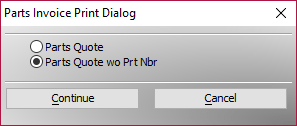
The onPush event of our print button sets the value of DocView via the use of a dialog box. Here is the dialog box and the code for the print button
'Date Created: 21-Nov-2016 11:45:41 AM
'Last Updated: 13-Mar-2017 07:54:31 AM
'Created By : NLaws
'Updated By : NLaws
'
dim Shared prchoice as C
DIM SHARED sng_multi as C
DIM SHARED varC_result as C
ok_button_label = "&Continue"
cancel_button_label = "&Cancel"
Delete XdialogStyle
dim XDialogStyle as p
XDialogStyle.AccentColor = "White"
XDialogStyle.Color = "#127+127+127"
prchoice = ""
varC_result = ui_dlg_box("Parts Invoice Print Dialog",<<%dlg%
{Windowstyle=Gradient Radial Bottom Right}
;
{line=1,0};
;
{sp=5}{region}(sng_multi:Parts Quote);
{sp=5}(sng_multi:Parts Quote wo Prt Nbr);
{endregion};
;
{endregion};
{line=1,0};
{region}
;
<*25=ok_button_label!CONTINUE> <25=cancel_button_label!CANCEL>
{endregion};
%dlg%,<<%code%
if a_dlg_button = "Continue" then
 prchoice = sng_multi
else
End
end if

%code%)
if prchoice = "" then
 End
end if
if prchoice = "Parts Quote wo Prt Nbr" then
 DocView = "Hide"
end if


dim record_number as N
record_number = current_record_number()
query.filter = "recno() = " + record_number
query.order = ""

prompt_result = ui_get_print_or_preview("Print")
If prompt_result = "Print" then
 :Report.Print("Parts Quote",query.filter,query.order)
Else if prompt_result = "Preview" then
 :Report.Preview("Parts Quote",query.filter,query.order)
End if
if prchoice = "Parts Quote wo Prt Nbr" then
 DocView = ""
end if
Now my customer gets the desired result. See below.
 and I did not need to create an unnecessary duplicate report.
That’s all for today. If you own a business and need help with your Alpha Software program, contact us. Are rates are reasonable and our work is guaranteed.
Phone:713 417-6831
EMail: NLawson@cdc-takecharge.com
 Custome Database Design with Alpha Software
Leave a comment