
March 10th 2017
Hello everyone. In my last post I said I might try to create a method of setting up a ad hoc chess board so the user can practice specific chess scenarios. I decided to go ahead with this idea.
The first thing I needed to do is add a new menu option to my menu.

If you have been following along you know the menu is a dialog form and therefor easy to modify. I simply added another option to my radio object then added that choice to the condition statement.
Here is the code which runs when the Custom Game is selected.
else if xchoice = "Custom Game" then
    button10.show()
    xCGame = "Custom"
    DIM Append as P

    a_tbl = table.open("tblgrid")
    append.t_db = "BLANKBOARD"
    append.m_key = "Ranknbr"
    append.t_key = "Ranknbr"
    append.m_filter = ""
    append.t_filter = ""
    append.type = "Unique, replace existing"
    append.m_count = 46
    append.m_case1 = "EITHER"
    append.m_field1 = "RANKNBR"
    append.m_exp1 = "@BLANKBOARD->RANKNBR"
    append.m_case2 = "EITHER"
    append.m_field2 = "A"
    append.m_exp2 = "@BLANKBOARD->A"
    append.m_case3 = "EITHER"
    append.m_field3 = "B"
    append.m_exp3 = "@BLANKBOARD->B"
    append.m_case4 = "EITHER"
    append.m_field4 = "C"
    append.m_exp4 = "@BLANKBOARD->C"
    append.m_case5 = "EITHER"
    append.m_field5 = "D"
    append.m_exp5 = "@BLANKBOARD->D"
    append.m_case6 = "EITHER"
    append.m_field6 = "E"
    append.m_exp6 = "@BLANKBOARD->E"
    append.m_case7 = "EITHER"
    append.m_field7 = "F"
    append.m_exp7 = "@BLANKBOARD->F"
    append.m_case8 = "EITHER"
    append.m_field8 = "G"
    append.m_exp8 = "@BLANKBOARD->G"
    append.m_case9 = "EITHER"
    append.m_field9 = "H"
    append.m_exp9 = "@BLANKBOARD->H"
    append.m_case10 = "EITHER"
    append.m_field10 = "AIMG"
    append.m_exp10 = "@BLANKBOARD->AIMG"
    append.m_case11 = "EITHER"
    append.m_field11 = "BIMG"
    append.m_exp11 = "@BLANKBOARD->BIMG"
    append.m_case12 = "EITHER"
    append.m_field12 = "CIMG"
    append.m_exp12 = "@BLANKBOARD->CIMG"
    append.m_case13 = "EITHER"
    append.m_field13 = "DIMG"
    append.m_exp13 = "@BLANKBOARD->DIMG"
    append.m_case14 = "EITHER"
    append.m_field14 = "EIMG"
    append.m_exp14 = "@BLANKBOARD->EIMG"
    append.m_case15 = "EITHER"
    append.m_field15 = "FIMG"
    append.m_exp15 = "@BLANKBOARD->FIMG"
    append.m_case16 = "EITHER"
    append.m_field16 = "GIMG"
    append.m_exp16 = "@BLANKBOARD->GIMG"
    append.m_case17 = "EITHER"
    append.m_field17 = "HIMG"
    append.m_exp17 = "@BLANKBOARD->HIMG"
    append.m_case18 = "EITHER"
    append.m_field18 = "AN"
    append.m_exp18 = "@BLANKBOARD->AN"
    append.m_case19 = "EITHER"
    append.m_field19 = "BN"
    append.m_exp19 = "@BLANKBOARD->BN"
    append.m_case20 = "EITHER"
    append.m_field20 = "CN"
    append.m_exp20 = "@BLANKBOARD->CN"
    append.m_case21 = "EITHER"
    append.m_field21 = "DN"
    append.m_exp21 = "@BLANKBOARD->DN"
    append.m_case22 = "EITHER"
    append.m_field22 = "EN"
    append.m_exp22 = "@BLANKBOARD->EN"
    append.m_case23 = "EITHER"
    append.m_field23 = "FN"
    append.m_exp23 = "@BLANKBOARD->FN"
    append.m_case24 = "EITHER"
    append.m_field24 = "GN"
    append.m_exp24 = "@BLANKBOARD->GN"
    append.m_case25 = "EITHER"
    append.m_field25 = "HN"
    append.m_exp25 = "@BLANKBOARD->HN"
    append.m_case26 = "EITHER"
    append.m_field26 = "PIP"
    append.m_exp26 = "@BLANKBOARD->PIP"
    append.m_case27 = "EITHER"
    append.m_field27 = "PIPB"
    append.m_exp27 = "@BLANKBOARD->PIPB"
    append.m_case28 = "EITHER"
    append.m_field28 = "RANKV"
    append.m_exp28 = "@BLANKBOARD->RANKV"
    append.m_case29 = "EITHER"
    append.m_field29 = "RANKVB"
    append.m_exp29 = "@BLANKBOARD->RANKVB"
    append.m_case30 = "EITHER"
    append.m_field30 = "DBLD"
    append.m_exp30 = "@BLANKBOARD->DBLD"
    append.m_case31 = "EITHER"
    append.m_field31 = "DBLDB"
    append.m_exp31 = "@BLANKBOARD->DBLDB"
    append.m_case32 = "EITHER"
    append.m_field32 = "BLKD"
    append.m_exp32 = "@BLANKBOARD->BLKD"
    append.m_case33 = "EITHER"
    append.m_field33 = "BLKDB"
    append.m_exp33 = "@BLANKBOARD->BLKDB"
    append.m_case34 = "EITHER"
    append.m_field34 = "ISO"
    append.m_exp34 = "@BLANKBOARD->ISO"
    append.m_case35 = "EITHER"
    append.m_field35 = "ISOB"
    append.m_exp35 = "@BLANKBOARD->ISOB"
    append.m_case36 = "EITHER"
    append.m_field36 = "MOB"
    append.m_exp36 = "@BLANKBOARD->MOB"
    append.m_case37 = "EITHER"
    append.m_field37 = "MOBB"
    append.m_exp37 = "@BLANKBOARD->MOBB"
    append.m_case38 = "EITHER"
    append.m_field38 = "CAPTURE"
    append.m_exp38 = "@BLANKBOARD->CAPTURE"
    append.m_case39 = "EITHER"
    append.m_field39 = "MOVEVALUE"
    append.m_exp39 = "@BLANKBOARD->MOVEVALUE"
    append.m_case40 = "EITHER"
    append.m_field40 = "WHITEVAL"
    append.m_exp40 = "@BLANKBOARD->WHITEVAL"
    append.m_case41 = "EITHER"
    append.m_field41 = "BLACKVAL"
    append.m_exp41 = "@BLANKBOARD->BLACKVAL"
    append.m_case42 = "EITHER"
    append.m_field42 = "SCORE"
    append.m_exp42 = "@BLANKBOARD->SCORE"
    append.m_case43 = "EITHER"
    append.m_field43 = "CHECK"
    append.m_exp43 = "@BLANKBOARD->CHECK"
    append.m_case44 = "EITHER"
    append.m_field44 = "CHECKMATE"
    append.m_exp44 = "@BLANKBOARD->CHECKMATE"
    append.m_case45 = "EITHER"
    append.m_field45 = "FIRSTMOVE"
    append.m_exp45 = "@BLANKBOARD->FIRSTMOVE"
    append.m_case46 = "EITHER"
    append.m_field46 = "CASTLE"
    append.m_exp46 = "@BLANKBOARD->CASTLE"
    append.t_count = 0
    a_tbl.append()
    a_tbl.close()
    script_play("CorralPieces")
end if
End
TblGrid is the table I use to build my Array of the chess board, so to start with a clean slate I need to blank the fields in the table. Next I run the script CorralPieces which fills in the capture corral for both white and black. Below is the result and the actual code.
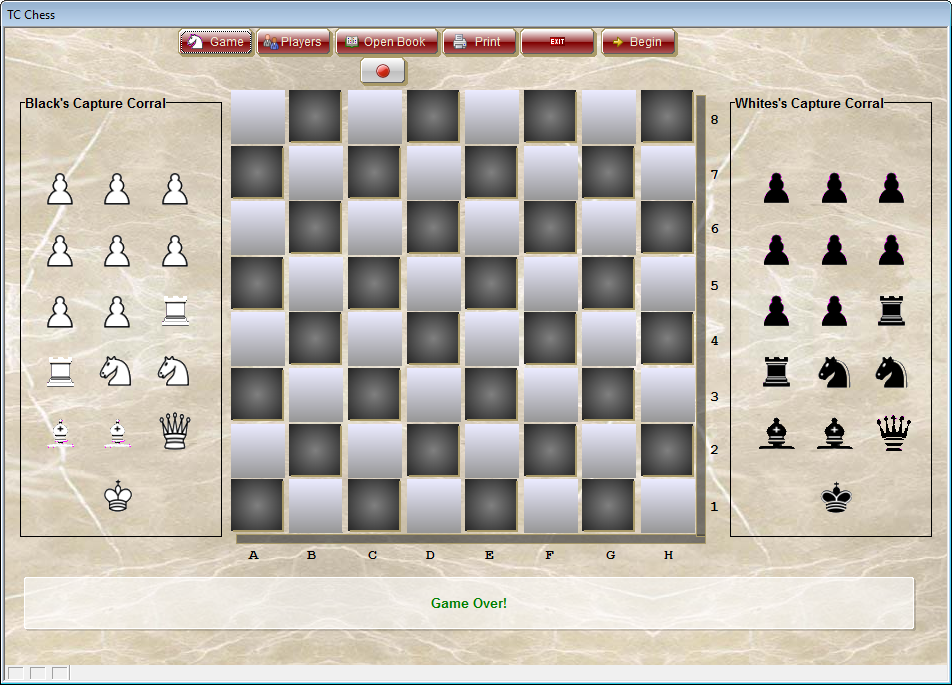
CorralPieces Code:
'Date Created: 02-Mar-2017 11:23:59 AM
'Last Updated: 02-Mar-2017 11:23:59 AM
'Created By  : NLaws
'Updated By  : NLaws
for i = 1 to 16 step 1
    if i <= 8
        eval("BC"+Alltrim(str(i))+".Default.Hbitmap.Bmpfile") = "[PathAlias.ADB_Path]\Engine\Images"+chr(92)+Alltrim("Pawn White Trans")+".png"
        eval("topparent:BC"+Alltrim(str(i))+".Refresh()")
    else if i = 9 .or. i = 10 then
        eval("BC"+Alltrim(str(i))+".Default.Hbitmap.Bmpfile") = "[PathAlias.ADB_Path]\Engine\Images"+chr(92)+Alltrim("Rook White Trans")+".png"
        eval("topparent:BC"+Alltrim(str(i))+".Refresh()")
    else if i = 11 .or. i = 12 then
        eval("BC"+Alltrim(str(i))+".Default.Hbitmap.Bmpfile") = "[PathAlias.ADB_Path]\Engine\Images"+chr(92)+Alltrim("Knight White Trans")+".png"
        eval("topparent:BC"+Alltrim(str(i))+".Refresh()")
    else if i = 13 .or. i = 14 then
        eval("BC"+Alltrim(str(i))+".Default.Hbitmap.Bmpfile") = "[PathAlias.ADB_Path]\Engine\Images"+chr(92)+Alltrim("Bishop White Trans")+".png"
        eval("topparent:BC"+Alltrim(str(i))+".Refresh()")
    else if i = 15 then
        eval("BC"+Alltrim(str(i))+".Default.Hbitmap.Bmpfile") = "[PathAlias.ADB_Path]\Engine\Images"+chr(92)+Alltrim("Queen White Trans")+".png"
        eval("topparent:BC"+Alltrim(str(i))+".Refresh()")
    else if i = 16 then
        eval("BC"+Alltrim(str(i))+".Default.Hbitmap.Bmpfile") = "[PathAlias.ADB_Path]\Engine\Images"+chr(92)+Alltrim("King White Trans")+".png"
        eval("topparent:BC"+Alltrim(str(i))+".Refresh()")
    end if
Next i

for i = 1 to 16 step 1
    if i <= 8
        eval("WC"+Alltrim(str(i))+".Default.Hbitmap.Bmpfile") = "[PathAlias.ADB_Path]\Engine\Images"+chr(92)+Alltrim("Pawn Black Trans")+".png"
        eval("topparent:WC"+Alltrim(str(i))+".Refresh()")
    else if i = 9 .or. i = 10 then
        eval("WC"+Alltrim(str(i))+".Default.Hbitmap.Bmpfile") = "[PathAlias.ADB_Path]\Engine\Images"+chr(92)+Alltrim("Rook Black Trans")+".png"
        eval("topparent:WC"+Alltrim(str(i))+".Refresh()")
    else if i = 11 .or. i = 12 then
        eval("WC"+Alltrim(str(i))+".Default.Hbitmap.Bmpfile") = "[PathAlias.ADB_Path]\Engine\Images"+chr(92)+Alltrim("Knight Black Trans")+".png"
        eval("topparent:WC"+Alltrim(str(i))+".Refresh()")
    else if i = 13 .or. i = 14 then
        eval("WC"+Alltrim(str(i))+".Default.Hbitmap.Bmpfile") = "[PathAlias.ADB_Path]\Engine\Images"+chr(92)+Alltrim("Bishop black Trans")+".png"
        eval("topparent:WC"+Alltrim(str(i))+".Refresh()")
    else if i = 15 then
        eval("WC"+Alltrim(str(i))+".Default.Hbitmap.Bmpfile") = "[PathAlias.ADB_Path]\Engine\Images"+chr(92)+Alltrim("Queen Black Trans")+".png"
        eval("topparent:WC"+Alltrim(str(i))+".Refresh()")
    else if i = 16 then
        eval("WC"+Alltrim(str(i))+".Default.Hbitmap.Bmpfile") = "[PathAlias.ADB_Path]\Engine\Images"+chr(92)+Alltrim("King Black Trans")+".png"
        eval("topparent:WC"+Alltrim(str(i))+".Refresh()")
    end if
Next i
parentform.Refresh_Layout()
This code is fairly simple, I set an array with 16 values and “i” represents the corral square location. When “i” equals the position value the image property for the square is assigned using the eval function.
This array runs twice once for White and once for Black.
If you look at the image you will notice a new button at the top of the board.
Begin
Once the player assigns pieces to the board, clicking begin tells the system to build the table grid and the analyze move table. We will examing that code in a minute. The image below shows a sample of a custom game.
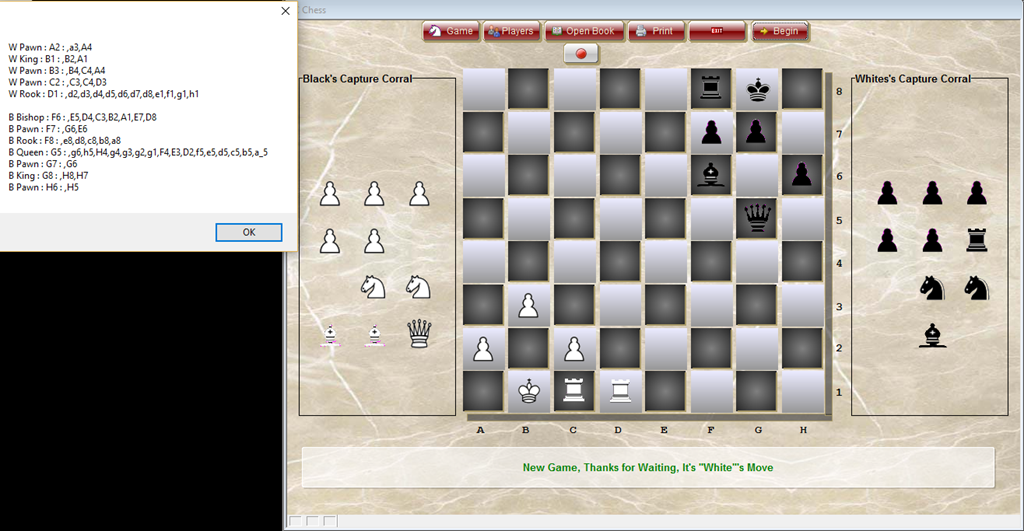
The list box on the left shows what the program sees as available moves and looking at the layout of the board you can see it is correct. Now the question is how did I do it.
It starts with the placement of the piece on the board. The code is in a script oddly enough called ‘PlacePiece’ and is run in the onPush event of the board square selected. Here is the code.
'Date Created: 02-Mar-2017 01:33:16 PM
'Last Updated: 03-Mar-2017 11:30:04 AM
'Created By  : NLaws
'Updated By  : NLaws

cObjNm = Current_object()
vMove = lower(Alltrim(eval(cObjNm+".Object.Name")))
rNbr = val(Right(Alltrim(vMove),1))
dim ni as N
ni = val(Right(Alltrim(word(rtnPiece,3,":",1)),len(Alltrim(word(rtnPiece,3,":",1)))-2))
xPiece = expiece

t = table.open("tblgrid")
t.fetch_goto(rNbr)
MoveVal = val(Right(vMove,1))
t.change_begin()

if Left(word(rtnPiece,3,":",1),1) = "B" Then
    if ni = 1 .or. ni = 2 .or. ni = 3 .or. ni = 4 .or. ni = 5 .or. ni = 6 .or. ni = 7 .or. ni = 8 then
        eval("t."+Left(Alltrim(vMove),1)) = "W Pawn"
    else if ni = 9 .or. ni = 10 then
        eval("t."+Left(Alltrim(vMove),1)) = "W Rook"
    else if ni = 11 .or. ni = 12 then
        eval("t."+Left(Alltrim(vMove),1)) = "W Knight"
    else if ni = 13 .or. ni = 14  then
        eval("t."+Left(Alltrim(vMove),1)) = "W Bishop"
    else if ni = 15  then
        eval("t."+Left(Alltrim(vMove),1)) = "W Queen"
    else if ni = 16  then
        eval("t."+Left(Alltrim(vMove),1)) = "W King"
    end if
else
    if ni = 1 .or. ni = 2 .or. ni = 3 .or. ni = 4 .or. ni = 5 .or. ni = 6 .or. ni = 7 .or. ni = 8 then
        eval("t."+Left(Alltrim(vMove),1)) = "B Pawn"
    else if ni = 9 .or. ni = 10 then
        eval("t."+Left(Alltrim(vMove),1)) = "B Rook"
    else if ni = 11 .or. ni = 12 then
        eval("t."+Left(Alltrim(vMove),1)) = "B Knight"
    else if ni = 13 .or. ni = 14  then
        eval("t."+Left(Alltrim(vMove),1)) = "B Bishop"
    else if ni = 15  then
        eval("t."+Left(Alltrim(vMove),1)) = "B Queen"
    else if ni = 16  then
        eval("t."+Left(Alltrim(vMove),1)) = "B King"
    end if
end if

eval("t."+Left(Alltrim(vMove),1)+"Img") = xPiece
t.change_end(.t.)
t.close()


'____________________________________________
eval(rtnPiece+".default.hbitmap.bmpfile") = "[PathAlias.ADB_Path]\Engine\Images\Blank Trans.png"

dim list as C
list = <<%a%
A
B
C
D
E
F
G
H
%a%
dim WPiece[8] as P
WPiece.initialize_from_table("tblgrid")

for each xcol in List
    dim i as N
    FOR i = 1 to 8 step 1
    if i = 5 .and. xcol = "A"
        cObjNm = xcol+"_"+i
    else
        cObjNm = xcol+i
    end if
    if eval("WPiece["+i+"]."+xcol) = "Black King"
        BKingPos = cObjNm
    else if eval("WPiece["+i+"]."+xcol) = "White King"
        WKingPos = cObjNm
    end if
    xPiece = eval("WPiece["+i+"]."+xcol+"Img")
    eval(cObjNm+".default.hbitmap.bmpfile")  = "[PathAlias.ADB_Path]\Engine\Images\\"+xPiece+".png"
    'eval(cObjNm+".Refresh()")
    Next i
Next


parentform.Refresh_Layout()
xend:
There are two portions to this code first is to assign the selected piece to the selected square. When the player selects a piece in the corral the onPush code assigns image name and piece name to variables which are then passed to the script above. The variable rtnPiece is used to derive the integer value of our corral piece which is then assigned to our tblgrid. The second part of our script is the initializing of our board grid from our table then the form is refreshed showing the piece selected.
Below is the onPush code for our corral Piece.
‘Date Created: 03-Sep-2014 12:33:49 PM
‘Last Updated: 02-Mar-2017 01:40:57 PM
‘Created By : cdc
‘Updated By : NLaws
dim SHARED rtnPiece as C
dim SHARED expiece as C
if xCGame = "Custom" then
 rtnPiece = current_object()
 expiece = file.filename_parse(eval(rtnPiece+".default.hbitmap.bmpfile"),"n")
else
 rtnPiece = current_object()
 if eval(rtnPiece+".default.hbitmap.bmpfile") = "[PathAlias.ADB_Path]\Engine\Images\Blank Trans.png"
 goto xend
 else

end if
xend:
There is a second part to this onPush event as well which has to do with a pawn getting to the opponents home row. I took it out because I am in the middle of changing how it works and I did not want to confuse anyone.
The final piece we need to look at is the onPush event of our button ‘Begin’
'Date Created: 02-Sep-2014 11:07:07 AM
'Last Updated: 07-Mar-2017 11:24:38 AM
'Created By  : cdc
'Updated By  : NLaws
'DIM Shared  PlayerTurn as c
DIM choice_list as c
dim SHARED CanMove as C
choice_list = <<%txt%
"White"
"Black"
%txt%

xMoveNbr = 1
MoveVal = 0
xDo = "Select"
Gtype = "WHBH"
xRate = "FBF"
xPause = .t.
RGM1 = ""
RGM2 = ""
RGM3 = ""
RGM4 = ""

'ui_msg_box("","White Val: "+WhiteVal+crlf()+"black Val: "+BlackVal+crlf()+"____________"+crlf()+"Score   : "+xScore)

WCastleKS = .t.
BCastleKS = .t.
WCastleQS = .t.
BCastleQS = .t.
BCheckW = .f.
WCheckB = .f.
WKingPos = "E1"
BKingPos = "E8"
cPieceNm = ""
xPiece = ""
xMove = ""
WCanMove = ""
BCanMove = ""
OrigPos = ""
NewPOS = ""
SelPiece = ""
CurrPiece = ""
Capture = ""
OppCkLoc = ""
tmove = ""
vMove = ""
AttackSqs = ""
WAttackSqs = ""
BAttackSqs = ""
MoveList = ""
WMoveList = ""
BMoveList = ""
WCanMove = ""
BCanMove = ""
CkList = ""
PrevFrom = ""
PrevMove = ""
OPos = ""
'Zap piecemoves
dim tablename as c
tablename = "piecemoves"
dim prompt_for_confirmation  as l
prompt_for_confirmation = .f.
'check if the table exists
dim table_filename as c
table_filename = table.filename_get(tablename)
if file.exists(table_filename) = .f. then
    ui_msg_box("Error","Table not found: '" + tablename + "'.",UI_STOP_SYMBOL)
else
    'check if table is in use
    if table.in_use(table_filename) = .t. then
        ui_msg_box("Error","Table '"+tablename+"' cannot be Zapped (i.e. emptied) because it is in use.",UI_STOP_SYMBOL)
    else
        dim tbl as p
        dim flag_ok_to_zap as l
        flag_ok_to_zap = .t.
        if prompt_for_confirmation = .t. then
            dim prompt_result as n
            prompt_result = ui_msg_box("Warning","Are you sure that you want to Zap '"+tablename+"'?",ui_yes_no_cancel+ui_question_symbol)
            if prompt_result <> ui_yes_selected then
                flag_ok_to_zap = .f.
            end if
        end if

        if flag_ok_to_zap = .t. then
            tbl = table.open(tablename)
            tbl.zap(.t.)
            tbl.pack()
            tbl.close()
        end if
    end if
end if
'Zap Capture Table
tbl = table.open("capturetbl")
tbl.zap(.t.)
tbl.pack()
tbl.close()

dim SHARED CanMove as C
Playerturn = "White"
script_play("ActiveCHPiece")
xbasic_wait_for_idle()
PlayerTurn = "Black"
script_play("ActiveCHPiece")
xbasic_wait_for_idle()


dim cnt as N
dim xdata as C
tam = table.open("an_move")
tam.fetch_first()
tam.batch_begin()
while .not. tam.fetch_eof()
    tam.change_begin()
    tam.sqdata = ""
    tam.wpiece = ""
    tam.wfrom = ""
    tam.wto = ""
    tam.wprtk = ""
    tam.wmoves = ""
    tam.wattack = ""
    tam.wstatus = "Open"
    for each sqd in WCanMove
        if Alltrim(tam.sq) = lower(Alltrim(word(sqd,2,":",1))) then
            tam.sqdata = word(sqd,1,":",1)
            tam.wStatus = "Control"
            tam.wpiece = word(sqd,1,":",1)
            tam.wfrom = word(sqd,2,":",1)
            dim wm as C
            wm = Right(Alltrim(word(sqd,3,":",1)),len(Alltrim(word(sqd,3,":",1)))-1)
            tam.wmoves = Var->wm
        end if
        Cnt = Occurs(",",sqd)
        for i = 1 to Cnt + 1
            if tam.Sq = word(sqd,i+1,",",1)
                xdata = word(sqd,1,":",1)+":"+word(sqd,2,":",1)+"-"
                tam.sqdata = Alltrim(tam.sqdata)+Var->xdata+"&"
            end if
        Next i
    Next
    tam.change_end(.t.)
tam.fetch_next()
end while
tam.fetch_first()
while .not. tam.fetch_eof()
    tam.change_begin()
    tam.bpiece = ""
    tam.bfrom = ""
    tam.bto = ""
    tam.bprtk = ""
    tam.bmoves = ""
    tam.battack = ""
    tam.bstatus = "Open"
    for each sqd in BCanMove
        if Alltrim(tam.sq) = lower(Alltrim(word(sqd,2,":",1))) then
            tam.sqdata = word(sqd,1,":",1)
            tam.bStatus = "Control"
            tam.bpiece = word(sqd,1,":",1)
            tam.bfrom = word(sqd,2,":",1)
            dim bm as C
            bm = Right(Alltrim(word(sqd,3,":",1)),len(Alltrim(word(sqd,3,":",1)))-1)
            tam.bmoves = Var->bm
        end if
        Cnt = Occurs(",",sqd)
        for i = 1 to Cnt + 1
            if tam.Sq = word(sqd,i+1,",",1)
                xdata = word(sqd,1,":",1)+":"+word(sqd,2,":",1)+"-"
                tam.sqdata = Alltrim(tam.sqdata) + Var->xdata
            end if
        Next i
    Next
    tam.change_end(.t.)
tam.fetch_next()
end while
tam.batch_end()
tam.close()

dim defaultValue as c
defaultValue = "\"White\""
PlayerTurn = ui_get_list2("Select Player to Start",defaultValue,choice_list,1,.t.)
xDo = "Select"
BPip = tablesum("an_move",".t.","PiiecesB")
WPIP = tablesum("an_move",".t.","Piecesw")
BMob = tablesum("an_move",".t.","MobB")
WMob = tablesum("an_move",".t.","MobW")
BBrdRank = tablesum("an_move",".t.","RankB")
WBrdRank = tablesum("an_move",".t.","RankW")
WPVal = tablesum("an_move",".t.","PValW")
BPVal = tablesum("an_move",".t.","PValB")
BFork = tablesum("an_move",".t.","BFork")
WFork = tablesum("an_move",".t.","WFork")
WCheck = tablesum("an_move",".t.","WCheck")
BCheck = tablesum("an_move",".t.","BCheck")
WhiteVal = WPip+WMob+WBrdRank+WPVal+WFork+WCheck
BlackVal = BPip+BMob+BBrdRank+BPVal+BFork+BCheck
xScore = WhiteVal-BlackVal
text1.text = "New Game, Thanks for Waiting, It's "+PlayerTurn+"'s Move"
xCGame = "CustomPlay"
I am not going to review all the pieces of this script. All you need to know is it takes the initial piece move analysis and fills out the analysis table allowing the game to progress as if it reached the current state by playing from the beginning of a game. Working out this routine has been a revelation. My original code for starting a new game and maintaining the pieces on the board as the game progressed is huge; well over 5000 lines of code. Using the approach above I believe I can widdle the code down to less than a 1000 lines of code. Cool!
That’s all for today. If you own a business and need help with your Alpha Software program, contact us. Are rates are reasonable and our work is guaranteed.
Phone:713 417-6831
EMail: NLawson@cdc-takecharge.com
 Custome Database Design with Alpha Software
Leave a comment