
February 24, 2017
Hello everyone. In my last post I demonstrated how to create an Alpha software app using xBasic code and how to attach an external library to your current app. Today I want to continue along those lines and look at the new process for building the code library and using the Project Viewer to display and organize the Project script library.
Let’s start by looking at the code used to build our script table. Once I connect the code library to our Project Manager. I open the Project Tracker form. Next I select the project I just linked to our Project Manager then click update. (see image below)

Update will build a new temp table of all scripts in the project manager including the scripts from TC Games. It then appends the temp table to our actual table using unique replace existing updating any changes to scripts already stored as well as adding new ones. Here is the code.
'Date Created: 22-Feb-2017 07:47:25 AM
'Last Updated: 23-Feb-2017 09:14:05 AM
'Created By  : NLaws
'Updated By  : NLaws
'parentform.commit()
tbl = table.open("tmpscriptandfncts")
tbl.zap(.t.)
tbl.close()
dim xAppID as C
xAppID = App_ID.text

dim list1 as C
dim xf as C
list1 = a5.script_Enum(4)
t = table.open("tmpscriptandfncts")
t.fetch_first()
for each scr in list1
    t.enter_begin()
    xf = file.filename_parse(word(Var->scr,2,"@",1),"n")
    t.sf_appname = Var->xf
    t.sf_name = Right(word(scr,1,"@",1),len(word(scr,1,"@",1))-7)
    if t.sf_appname = "tc_app_mgr" then
        t.sf_id = "00001"
    else
        t.sf_id = xAppID
    end if
    t.sf_location = word(scr,2,"@",1)
    t.sf_type = "SCRIPT"
    t.sf_code = script_load(Right(word(scr,1,"@",1),len(word(scr,1,"@",1))-7))
    t.enter_end()
next
t.close()

DIM Append as P

a_tbl = table.open("scrptandfncts")
append.t_db = "tmpscriptandfncts"
append.m_key = "Sf_ID+SF_NAME"
append.t_key = "Sf_ID+SF_NAME"
append.m_filter = ""
append.t_filter = ""
append.type = "Unique, replace existing"
append.m_count = 6
append.m_case1 = "EITHER"
append.m_field1 = "SF_ID"
append.m_exp1 = "@TMPSCRIPTANDFNCTS->SF_ID"
append.m_case2 = "EITHER"
append.m_field2 = "SF_NAME"
append.m_exp2 = "@TMPSCRIPTANDFNCTS->SF_NAME"
append.m_case3 = "EITHER"
append.m_field3 = "SF_TYPE"
append.m_exp3 = "@TMPSCRIPTANDFNCTS->SF_TYPE"
append.m_case4 = "EITHER"
append.m_field4 = "SF_CODE"
append.m_exp4 = "@TMPSCRIPTANDFNCTS->SF_CODE"
append.m_case5 = "EITHER"
append.m_field5 = "SF_LOCATION"
append.m_exp5 = "@TMPSCRIPTANDFNCTS->SF_LOCATION"
append.m_case6 = "EITHER"
append.m_field6 = "APP_NAME"
append.m_exp6 = "@TMPSCRIPTANDFNCTS->SF_APPNAME"
append.t_count = 0
a_tbl.append()
a_tbl.close()
It takes just a minute to run and when done the user simply removes the Code Library from the Project Manager Application.
The original routine I wrote for this was close to a 1000 lines of code this is 64. Big difference. So now I have my scripts and what do I do with it. If you have been programming in Alpha Software for any length of time you may remember the Code Library Document Writer they sold (which did not work great). I now do the same using
- file.create()
- file.open
- file.seek
- file.write_line
- memo_write_to_file(filename, MEMO_APPEND)
- file.close
Before I show you how it’s done lets look at the Project Viewer.
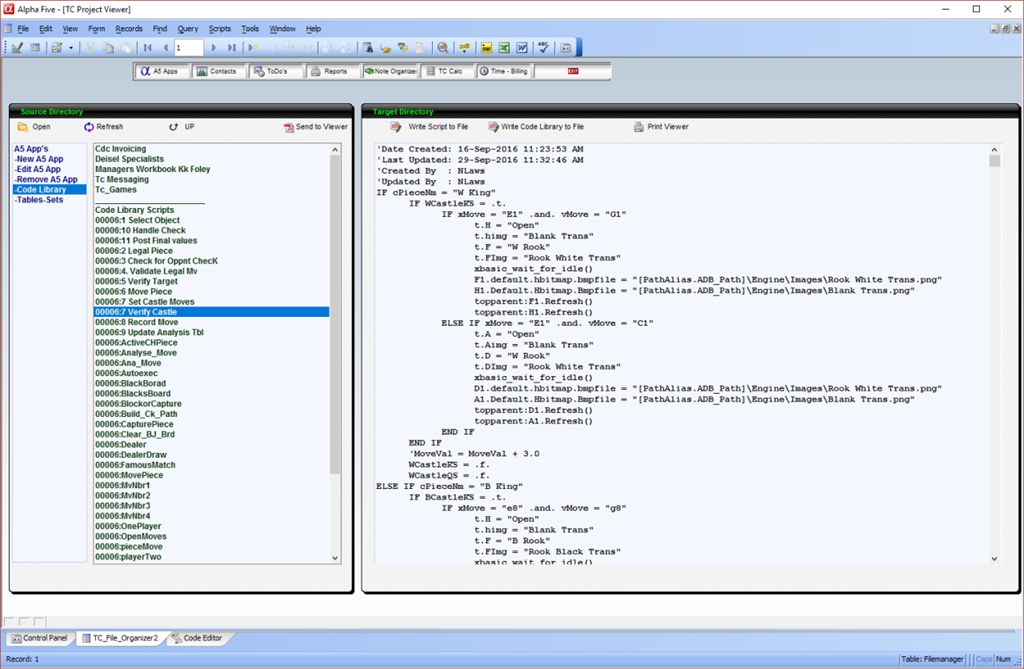
Now when the viewer loads, the Projects are listed in the right pane of the left panel. The user selects a project then clicks ‘Code Library’ in the left pane. This redisplays the right pane to include all scripts for the selected project just appended to the script table. Then the user selects a script and it is displayed in the right panel. Here is the protion of the code on the onChange event of the vsrlist object which displays the scripts for the selected project.
else if vSrList = "-Code Library" then
    DocView  = DocView + crlf() +"_______________________"+ crlf() \
    + "Code Library Scripts"+ crlf() + table.external_record_content_GET("scrptandfncts", "SF_ID +':' + SF_Name", "SF_Name","SF_ID = '"+word(Var->mySelect,1,":",1)+"'")
At the botton of the onchange event the watch variable for vStartDir is changed causing the pane to reload with the new values.
The onChange code for displaying the selected script is
else if vSrList = "-Code Library" then
    if left(mySelect,1) = "0" then

    else
        CName = mySelect
    end if
    dim t as P
    dim c_ID as C
    dim cMemo as C
    c_ID = ""
    c_ID = word(vStartDir.value,1,":",1)
    sf = table.open("scrptandfncts")
    sf.fetch_first()
    while .not. sf.fetch_eof()
        if sf.sf_id+":"+sf.sf_Name = vStartDir then
            CMemo = sf.sf_code
            f = table.open("filemanager")
            f.change_begin()
            f.codememo = sf.sf_code
            f.change_end()
            f.close()
        end if
    sf.fetch_next()
    end while
    sf.close()
Now if you look at the image above, on the left side above the viewer pane are two buttons.
- Write Script to file
- Write Code Library to file
The first sends the memo field on our viewer to a file using the file function methods mentioned above and the second writes all scripts in our script table to a file. Below is the code for the OnPush event of both
Write Script to file
'Date Created: 24-Feb-2017 07:43:42 AM
'Last Updated: 24-Feb-2017 07:56:08 AM
'Created By  : NLaws
'Updated By  : NLaws
dim tbl as P
dim fptr as P
tbl = table.current()
'Save current record if not in view mode.
if (tbl.mode_get()<> 0) then
    'parent.commit()
end if
tbl.fetch_first()
filename = A_DB_CURRENT_PATH + "memos.txt"
fptr = file.create(filename, FILE_RW_EXCLUSIVE)
fptr.close()
while .not. tbl.fetch_eof()
    fptr = file.open(filename, FILE_RW_EXCLUSIVE)
    'Next 2 lines position insertion point at end of file
    size = fptr.bytes_get()
    fptr.seek(size)
    fptr.write_line("")
    fptr.write_line("Program ID: " + word(mySelect,1,":",1)+ " - Script Name: " + word(mySelect,2,":",1))
    fptr.write_line("___________________________________________")
    fptr.write_line("")
    fptr.close()
    tbl.codememo.memo_write_to_file(filename, MEMO_APPEND)
    tbl.fetch_next()
end while
sys_open(filename)
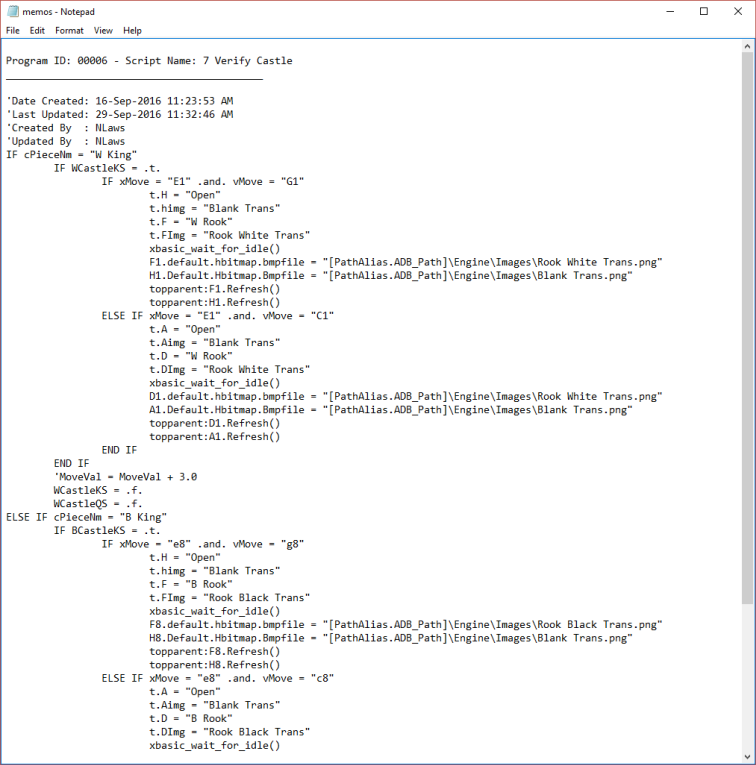
This code creates this text file.
Write Code Library to file
'Date Created: 24-Feb-2017 07:43:42 AM
'Last Updated: 24-Feb-2017 07:56:08 AM
'Created By  : NLaws
'Updated By  : NLaws
dim tbl as P
dim fptr as P
tbl = table.current()
'Save current record if not in view mode.
if (tbl.mode_get()<> 0) then
    'parent.commit()
end if
tbl.fetch_first()
filename = A_DB_CURRENT_PATH + "memos.txt"
fptr = file.create(filename, FILE_RW_EXCLUSIVE)
fptr.close()
while .not. tbl.fetch_eof()
    fptr = file.open(filename, FILE_RW_EXCLUSIVE)
    'Next 2 lines position insertion point at end of file
    size = fptr.bytes_get()
    fptr.seek(size)
    fptr.write_line("")
    fptr.write_line("Program ID: " + word(mySelect,1,":",1)+ " - Script Name: " + word(mySelect,2,":",1))
    fptr.write_line("___________________________________________")
    fptr.write_line("")
    fptr.close()
    tbl.codememo.memo_write_to_file(filename, MEMO_APPEND)
    tbl.fetch_next()
end while
sys_open(filename)
Which creates this file
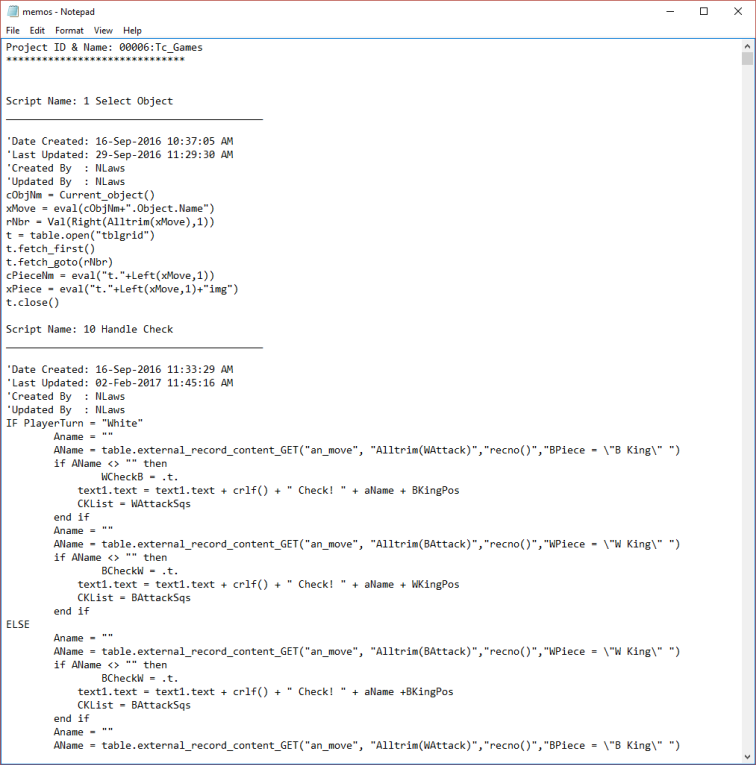
Pretty cool. Now you can build a printed library of all code in your Projects which will come in very handy in 5 years when an old customer calls and says they had a failure in the app you created for then. If the code changed and you did not write the change you know they hired someone who did not know what they were doing.
Time to start enjoying the weekend.
That’s all for today. If you are a business and need help with an Alpha Software program, contact us. Are rates are reasonable and our work is guaranteed.
Phone:713 417-6831
EMail: NLawson@cdc-takecharge.com
 Custome Database Design with Alpha Software
Leave a comment