
February 1, 2017
Hello everyone. As stated yesterday I will be looking at using the collection function in Alpha Software. When I started the discussion about the chess game I stated one of the weaknesses of the current game is handling check. In the example below, Black checks white.
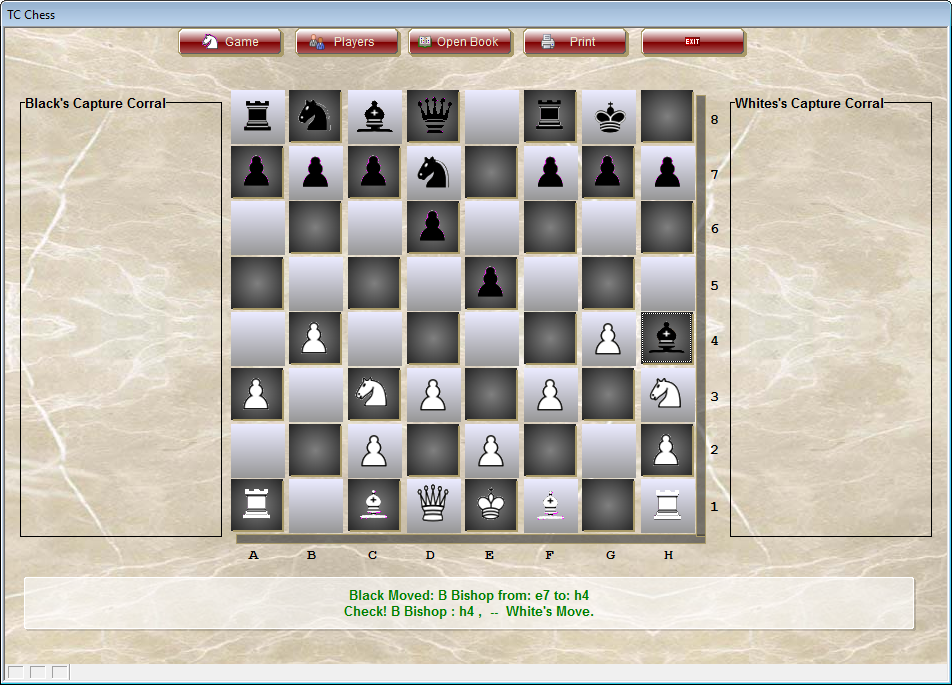
The only activity the program needs to monitor at this point is
- White King Position
- Square D2
- Square F2
White’s choices are
- Move King to D2 (only legal move for White’s King)
- Move White Knight on H3 to F2
Here is how the software see’s d2
Open–W Bishop : C1 &W Queen : D1 &W King : E1 &Open–
Here is the Blocking option on F2
Open–W King : E1 &W Knight : H3 &Open–B Bishop : H4 –
The program would see White’s move to D2 as the best move because currently black has no move to D2 and if the Knight stays in it’s current position it protects F3 and G5 both of which are potential attack points for black. As you can see our problem is not with black checking white but the reverse. Lest look at the opposite scenario.
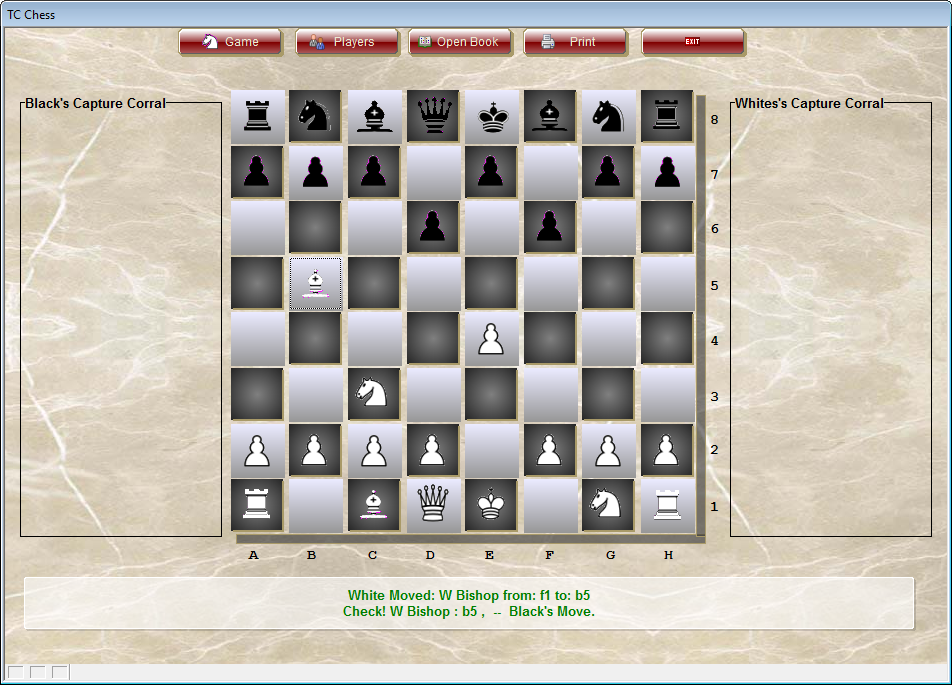
In this example we have several options for Black.
- Pawn on C7 moves to C6 for Block
- Bishop on C8 moves to D7 for Block
- Queen on D8 moves to D7 for Block
- Knight on B8 moves to C6 for Block
- King on E8 moves to F7
The current code rates the Queen on D8 move as the best move because it improves the Queens control over the board. Obviously this is wrong because even a beginner player would move the Pawn on C7 to C6 threatening the Knight and protecting the King, also, if you select the king to move the program allows you to move to both F7 and D7 which is illegal since the King would still be in check. Both of these problems stem from the same issue in the current code which is the program does not see pass move 2. The routine I outlined yesterday goes a long way towards fixing that. Lets look at the following 7 squares
- B5 – W Bishop-W Knight : c3 ,-c6,d7,e8,c4,d3,e2,f1,a4,a6-Capture-B Pawn : b7 ,–
- C7 – Open—B Pawn-B Queen : d8 ,-c6,c5,b6-
- C6 – Open—W Bishop : B5 &Open—B Pawn : B7 -B Knight : B8 -B Pawn : C7 –
- D8 – Capture—B Queen-B King : e8 ,-d7-
- D7 – Open—W Bishop : B5 &Open—B Knight : B8 -B Bishop : C8 -B Queen : D8 -B King : E8 –
- E8 – Capture—B King-B Queen : d8 ,-f7,d7-
- F7 – Capture—Open—B King : E8 –
If you focus on B5 you will see an error which needs to be addressed. White Knight cannot be captured by B Pawn on B7 (Pawns can only capture diagonally). If the computer selects B7 to move it knows not to allow B5 as an option, so I need to add that code to my sqdata routine. Now look at E8, we still see that the King can move to d7 and it cannot. This is where I am trying to use the Collection Function
To determine all squares around the King which may or may not be under attack by white we need to know each square the King can move to and which squares can be blocked or captured by black to eliminate check. The program knows the attacking Bishop is on B5 and the King is on E8 so now we need to figure which squares are controlled by white between the attacking piece and the King.
A collection will allow us to look at the position of the attacking piece and extrapolate the square name of the next square between the attacking piece and the King. We simply need some logic which tells the program if the attacking piece is above, below, left or right of the King. If we use two collections one finding the letter of the square (a thru h) and the other the number (1 thru 8) we can then string them together to get the required list of squares. Here is the code.
dim nxsq as C
dim CheckList as C
dim colA as u
colA.SET(“a”,”a”)
colA.SET(“b”,”b”)
colA.SET(“c”,”c”)
colA.SET(“d”,”d”)
colA.SET(“e”,”e”)
colA.SET(“f”,”f”)
colA.SET(“g”,”g”)
colA.SET(“h”,”h”)
dim colZ as u
colZ.SET(“h”,”h”)
colZ.SET(“g”,”g”)
colZ.SET(“f”,”f”)
colZ.SET(“e”,”e”)
colZ.SET(“d”,”d”)
colZ.SET(“c”,”c”)
colZ.SET(“b”,”b”)
colZ.SET(“a”,”a”)
We know we have at least two objects in this action The attacking square and the square under attack. Depending where each is located on the board, we need to find the squares that link the two together. For example, if the attacking square is on b5 and the square under attack is on e8 we know b5 is below and to the left of e8. These values will be assigned to variables ( ASq and BSq).In this case (see image above) we know the attacking piece is a Bishop and it moves diagonal on it’s color. B is less than E and 8 is greater than 5 So the collection we use is colA (ascending order) which makes our squares b5, c6, d7 and e8. Using the following array
for i = anbr to bnbr STEP 1 ‘Where anbr is the number portion of our square name. We find our starting position colA.SET(“b”,”b”)
CheckList = CheckList + colA.NEXT(Left(Alltrim(ASq),1))+str(i)+”,” ‘ I then assign that value to a variable called sn (square name).
sn = colA.NEXT(Left(Alltrim(ASq),1))+str(i) ‘ I then assign that value to a variable called sn (square name).
Next
ASq is now updated with sn and the process repeats itself making CheckList = b5,c6,d7,e8 . With this string the program can now test each of theses squares for the best move to get out of check. In this example I am only showing one possible option. All options would need to be laid out in the code for it to work correctly. So what would be a real world application for a collection. I have used it for tracking ticket numbers insuring no tickets are missing. All you need to do that is get the first ticket number and the last. Use an array to build your collection then step through your table to verify each ticket number is accounted for.
That’s all for today. If you are a business and need help with an Alpha Software program, contact us. Are rates are reasonable and our work is guaranteed.
Phone:713 417-6831
EMail: NLawson@cdc-takecharge.com
 Custome Database Design with Alpha Software
Leave a comment