
January 30, 2017
Good morning everyone. Picking up where we left off last week we were examining why the current logic for our chess program was weak and ineffective. As I was reviewing the existing code for this post, I once again got drawn into the development of the game. I actually started this post on January 25th but put it aside to follow my new thoughts on the chess program. I had a productive week and came up with a list of all moves for both black and white based on each square on the board. The next step I was going to take is setting the point value for each square based on offense and defense as well as material gain and loss per square. It was Friday and I did my due diligence and saved and backed up the application. Today I opened it to start this post and all my work was gone. I opened the back up and it was not there either.
Now I have seen this before on clients working on a network where one workstation will have the application stuck in memory and the update is applied. The workstation is then closed rewriting the original code over the update. I have not however ever seen it happen on a local system with only one user. As they say, no sense crying over spilled milk so I guess the rest of the day will be spent trying to rebuild 4 days of work.
January 31,2017
Good morning, I have recreated most of what I did last week, but for some reason it is not working exactly as before. Last week I tested the code by playing a game and the program won in twelve moves. That sounds impressive, but I purposely played a very weak game as the opponent. Yesterday I played the exact game as white but the computer changed it’s move on move eight allowing white to avoid check mate. This tells me the logic is flawed. So let’s look at what I have so far.
The image below shows how the application sees the board at the start of a game.
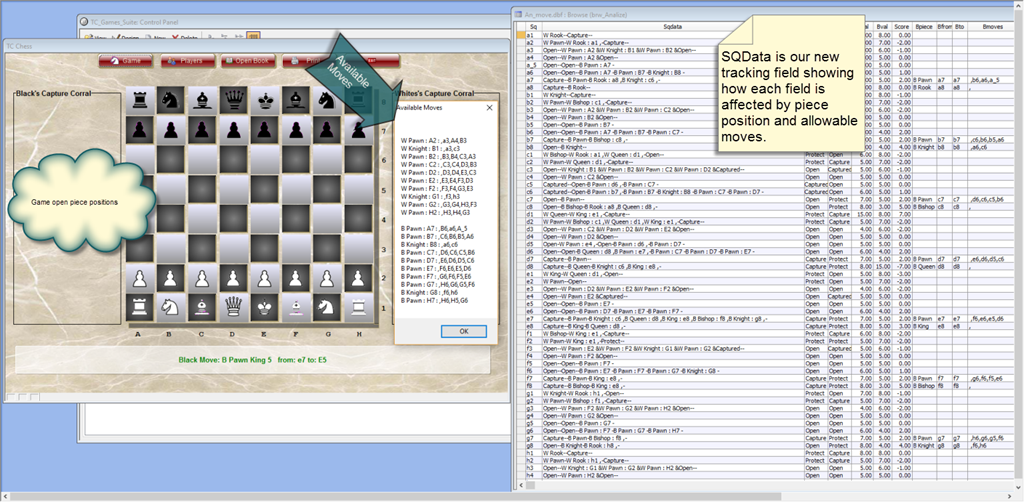
Here is how it works. When a new game is started the Available Moves list is created in the background and is updated as each player takes a turn. Looking at the list closely we see it consist of three values per line.
- The piece which can move
- It’s starting position
- Where it can move to
The new code I wrote parses this list using the values showing where the piece can move to. These values are separated by a comma and are equal to the square names on our board. In order to extract and test each value I needed to use several functions.
- For each … Next
- Occurs
- Array
- Word
- fetch
- Batch_Begin
- Batch_End
- Change_Begin
- Change_End
Here is the code as it currently exist and is part of a sub routine called Post Final Values;
dim SHARED CanMove as C
IF Playerturn = "White" THEN
    PlayerTurn = "Black"
ELSE
    PlayerTurn = "White"
END IF
script_play("ActiveCHPiece")
IF Playerturn = "White" THEN
    PlayerTurn = "Black"
ELSE
    PlayerTurn = "White"
END IF
script_play("ActiveCHPiece")

dim cnt as N
dim xdata as C
tam = table.open("an_move")
tam.fetch_first()
tam.batch_begin()
while .not. tam.fetch_eof()
    tam.change_begin()
    tam.sqdata = if(tam.WPiece = " ",Alltrim(tam.WStatus),Alltrim(tam.WPiece))+"-"+Alltrim(tam.WPrtk)+"-"
        for each sqd in WCanMove
            Cnt = Occurs(",",sqd)
            for i = 1 to Cnt + 1
                if tam.Sq = word(sqd,i+1,",",1)
                    xdata = word(sqd,1,":",1)+":"+word(sqd,2,":",1)
                    tam.sqdata = Alltrim(tam.sqdata)+Var->xdata+"&"
                end if
            Next i
        Next
    tam.change_end(.t.)
tam.fetch_next()
end while
tam.fetch_first()
while .not. tam.fetch_eof()
    tam.change_begin()
    tam.sqdata = Alltrim(tam.sqdata) + if(tam.BPiece = " ",Alltrim(tam.BStatus),Alltrim(tam.BPiece))+"-"+Alltrim(tam.BPrtk)+"-"
        for each sqd in BCanMove
            Cnt = Occurs(",",sqd)
            for i = 1 to Cnt + 1
                if tam.Sq = word(sqd,i+1,",",1)
                    xdata = word(sqd,1,":",1)+":"+word(sqd,2,":",1)+"-"
                    tam.sqdata = Alltrim(tam.sqdata)+Var->xdata
                end if
            Next i
        Next
    tam.change_end(.t.)
tam.fetch_next()
end while
tam.batch_end()
tam.close()
I originally wrote the routine ‘ActiveChPiece’ as a means of controlling each players move choice, thus insuring game rules are not violated. I found that by passing variables to the routine first for White then Black I could build a list of all available moves as seen in the image above. Now lets examine the code which builds ‘SQData’. I set a pointer to my an_move table and use the fetch function to move through the table and the change function to modify the field data. Initially I set SQData to equal values form the an_move table. Next I use the Occur function to count the number of commas in each value of our For each …Next function. that answer is set the the variable CNT which is used by the array to set the place holder for our word function. Our matching field value now holds all information for the selected square. If we look at a single value, square c3, we see
Open–W Knight : B1 &W Pawn : B2 &W Pawn : C2 &W Pawn : D2 &Captured–
The program understands the;
- square is open for a white piece to move to.
- It is protected by the
- White Night on B1
- White Pawn on B2
- White Pawn on D2
- The square can be occupied by
- White Knight on B1 can move to the square
- White Pawn on C2 can move to the square
Finally it knows the piece can be captured, but currently there are no threats from black.
I have removed the ranking of each square since my logic appears to be flawed but I am sure you can see that with some tweaking I can re-create a winning algorithm and put this project to rest. I said in an earlier post I would be showing how to use a collection in xBasic and it will be our next post
That’s all for today. If you are a business and need help with an Alpha Software program, contact us. Are rates are reasonable and our work is guaranteed.
Phone:713 417-6831
EMail: NLawson@cdc-takecharge.com
 Custome Database Design with Alpha Software
Leave a comment