
January 20th, 2017
Hello everyone. This morning I had an online training session with the client who received the receivables upgrade and it went very well. I left the session telling the person to send an email with all adjustments or changes they wished to see no matter how small and I just got a response this afternoon stating it’s perfect as is. I mention this not to toot my own horn, (well maybe a little) but to reinforce my belief that doing more than expected during the development process pays off in spades. Making the application simple and intuitive to use and feature rich not only reduces support calls but also gets them thinking of other things they would like the application to do. This in turn generates more revenue.
Speaking of ‘spades’; today I am taking another look at the black jack game I developed and featured on this blog. (If you have not been following you can click on categories in the menu then select Black Jack an all of the post for that project will display). This morning while waiting for the training session to begin, I played the game for a little and noticed the scorecard did not show who won correctly and end the round. I thought for sure I had addressed this but apparently not correctly. As a reminder here is an image of our game board showing how it works.
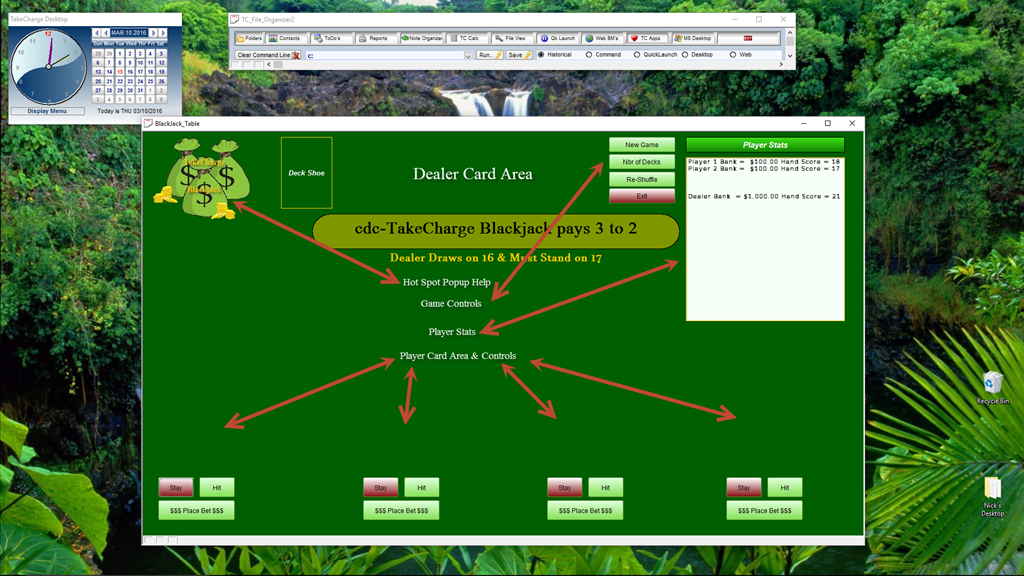
In the image the player stats window (scorecard) continuously updates as each hand progresses and is supposed to display the winner or winners if more than one player beats the dealer. This only worked if the dealer hit Black Jack (21).
To understand when the scorecard updates we must examine each of the controls.
- Deal Cards
- Player 1 Hit
- Player 1 Stay
- Player 2 Hit
- Player 2 Stay etc.
- Dealer Draw
Lets start with the Deal Cards
'Date Created: 15-Mar-2016 11:54:34 AM
'Last Updated: 25-Apr-2016 12:09:36 PM
'Created By : NLaws
'Updated By : NLaws

dim SHARED xPos as N
xPos = 1
script_play("OnePlayer")
if xNbrofPlayers = 2 then
 script_play("PlayerTwo")
else if xNbrofPlayers = 3 then
 script_play("PlayerTwo")
 sleep(5/10)
 script_play("PlayerThree")
else if xNbrofPlayers = 4 then
 script_play("PlayerTwo")
 sleep(5/10)
 script_play("PlayerThree")
 sleep(5/10)
 script_play("PlayerFour")
end if
script_play("Dealer")

xPos = 2
script_play("OnePlayer")
if xNbrofPlayers = 2 then
 script_play("PlayerTwo")
else if xNbrofPlayers = 3 then
 script_play("PlayerTwo")
 sleep(5/10)
 script_play("PlayerThree")
else if xNbrofPlayers = 4 then
 script_play("PlayerTwo")
 sleep(5/10)
 script_play("PlayerThree")
 sleep(5/10)
 script_play("PlayerFour")
end if
script_play("Dealer")
xPos = 3


BlackJackTable2:Cardback.Object.Visible = .f.
Button17.Hide()
parentform.Repaint()
This script is attached to the onPush event of button17 which is hidden until New Hand is pushed. The first thing this code does is check the number of players which is set when the game is started. The variable xNbrofPlayers calls the proper script to run which in turn deals the cards to the proper position on the screen and sends the values to the scorecard. Below is the code for the first player position OnePlayer;
'Date Created: 30-Mar-2016 10:48:15 AM
'Last Updated: 18-Jan-2017 01:41:24 PM
'Created By : NLaws
'Updated By : NLaws

dim SHARED sCount as N
sCount = 1

BlackJackTable2:Cardback.Object.Always_on_top = .t.
BlackJackTable2:Cardback.Object.Left = 2.7
BlackJackTable2:Cardback.Object.Top = .1
BlackJackTable2:Cardback.Object.Visible = .t.
xbasic_wait_for_idle()

dim stepL as N
dim stepD as N
StepL = .188
StepD = .108

continue:
if gCard + (xNbrofPlayers * 3) < 50 * xNbrofPlayers then
 gCard = gCard + 1
else
 script_play("ShuffleDeck")
 goto continue
end if

nextstep:
if sCount < 50 then
 if xPos = 1 then
 BlackJackTable2:Cardback.Object.Left = BlackJackTable2:Cardback.Object.Left + StepL
 BlackJackTable2:Cardback.Object.Top = BlackJackTable2:Cardback.Object.Top + StepD
 else
 BlackJackTable2:Cardback.Object.Left = BlackJackTable2:Cardback.Object.Left + StepL-.012
 BlackJackTable2:Cardback.Object.Top = BlackJackTable2:Cardback.Object.Top + StepD
 end if
 sCount = sCount + 1
 xbasic_wait_for_idle()
 parentform.Refresh_Layout()
 sleep(.5/10)
 goto nextstep
else
 goto done
end if
done:
xbasic_wait_for_idle()
dim xcard as C
dim delt as C
delt = table.external_record_content_get("tc_gamedeck", "Alltrim(Cards) + '-of-' + Alltrim(Suits) + ':' + CardValue", "positionindeck","positionindeck = Var->gCard")
xcard = word(delt,1,":",1)
if xPos = 1 then
 topparent:P1pos1.Default.Hbitmap.Bmpfile = "[PathAlias.ADB_Path]\TC_CardGames\Cards\\"+Alltrim(xCard)+".png"
 topparent:P1pos1.Object.Always_on_top = .t.
 BlackJackTable2:p1pos1.Refresh()
 p1Score = p1Score + val(word(delt,2,":",1))
else
 topparent:P1pos2.Default.Hbitmap.Bmpfile = "[PathAlias.ADB_Path]\TC_CardGames\Cards\\"+Alltrim(xCard)+".png"
 topparent:P1pos2.Object.Always_on_top = .t.
 BlackJackTable2:p1pos2.Refresh()
 if p1score > 10 .and. xcard = "Ace" then
 p1Score = p1Score + 1
 else
 p1Score = p1Score + val(word(delt,2,":",1))
 end if
 t = table.current()
 t.change_begin()
 t.player1Score = p1Score
 t.change_end(.t.)
end if
text35.text = text35.text + "Player 1 Score = " + p1Score + crlf()
if p1Score = 21 then
 text35.text = text35.text + "Black Jack Player 1 Wins"
end if
parentform.Repaint()
Now this code works fine and does as intended. Our problem occurs when the user makes a decision.
On our board each player has two buttons in front of them. Hit and Stay. Hit tells the program to deliver another card and adds the value of the card to the current player score which in this example is p1Score. Stay ends the player turn and moves to the next player in the list and when all players have stayed the dealer draws. Here is the dealer draw code;
'Date Created: 21-Apr-2016 07:42:11 AM
'Last Updated: 18-Jan-2017 01:57:19 PM
'Created By  : NLaws
'Updated By  : NLaws
nextcard:
if dScore <= 16 then
    dim SHARED sCount as N
    sCount = 1

    BlackJackTable2:Cardback.Object.Always_on_top  = .t.
    BlackJackTable2:Cardback.Object.Left  = 2.7
    BlackJackTable2:Cardback.Object.Top  = .1
    BlackJackTable2:Cardback.Object.Visible  = .t.
    xbasic_wait_for_idle()

    dim stepL as N
    StepL = .13

    continue:
    if gCard < 52 * xNbrofPlayers then
        gCard = gCard + 1
    else
        script_play("ShuffleDeck")
        goto continue
    end if

    nextstep:
    if sCount < 15 then
        if xPOS = 3 then
            BlackJackTable2:Cardback.Object.Left  = BlackJackTable2:Cardback.Object.Left + StepL+.03
        else if xPos = 4 then
            BlackJackTable2:Cardback.Object.Left  = BlackJackTable2:Cardback.Object.Left + StepL+.04
        else if xPos = 5 then
            BlackJackTable2:Cardback.Object.Left  = BlackJackTable2:Cardback.Object.Left + StepL+.05
        else if xPos = 6 then
            BlackJackTable2:Cardback.Object.Left  = BlackJackTable2:Cardback.Object.Left + StepL+.06
        end if
        sCount = sCount + 1
        xbasic_wait_for_idle()
        parentform.Refresh_Layout()
        sleep(.5/10)
        goto nextstep
    else
        goto done
    end if
    done:
    xbasic_wait_for_idle()
    dim xcard as C
    dim delt as C
    delt = table.external_record_content_get("tc_gamedeck", "Alltrim(Cards) + '-of-' + Alltrim(Suits) + ':' + CardValue", "positionindeck","positionindeck = Var->gCard")
    xcard = word(delt,1,":",1)
    dScore = dScore + val(word(delt,2,":",1))

    if xPos = 3 then
        topparent:DealerP3.Default.Hbitmap.Bmpfile  = "[PathAlias.ADB_Path]\TC_CardGames\Cards\\"+Alltrim(xCard)+".png"
        topparent:DealerP3.Object.Always_on_top  = .t.
        BlackJackTable2:DealerP3.Refresh()
    else if xPos = 4
        topparent:DealerP4.Default.Hbitmap.Bmpfile  = "[PathAlias.ADB_Path]\TC_CardGames\Cards\\"+Alltrim(xCard)+".png"
        topparent:DealerP4.Object.Always_on_top  = .t.
        BlackJackTable2:DealerP4.Refresh()
    else if xPos = 5
        topparent:DealerP5.Default.Hbitmap.Bmpfile  = "[PathAlias.ADB_Path]\TC_CardGames\Cards\\"+Alltrim(xCard)+".png"
        topparent:DealerP5.Object.Always_on_top  = .t.
        BlackJackTable2:DealerP5.Refresh()
    else if xPos = 6
        topparent:DealerP6.Default.Hbitmap.Bmpfile  = "[PathAlias.ADB_Path]\TC_CardGames\Cards\\"+Alltrim(xCard)+".png"
        topparent:DealerP6.Object.Always_on_top  = .t.
        BlackJackTable2:p1pos6.Refresh()
    end if
    BlackJackTable2:Cardback.Object.Visible  = .f.
    t = table.current()
    t.change_begin()
    t.DEALERSCORE = dScore

    t.change_end(.t.)
    xPos = xPos + 1
    text35.text = text35.text + "Dealer Score = " + dScore + crlf()
    if dScore <= 16 then
        goto nextcard
    else if dScore = 21 then
        text35.text = text35.text + "Black Jack Dealer Wins"
        goto newhand
    else if dScore >= 22 then
        text35.text = text35.text + crlf()+"Black Jack Dealer Busted"
        goto newhand
    else if dScore >= p1Score then
        text35.text = text35.text + crlf() + "Black Jack Dealer Wins"
        goto newhand
    else if dScore <= p1Score then
        text35.text = text35.text + crlf() + "Black Jack Player 1 Wins"
        goto newhand
    end if
    parentform.Repaint()
end if
end
newhand:
This script originally ended with
if dscore = 21 then
text35.text = text35.text + crlf() + “Black Jack the Dealer Wins.”
Now you can see it ends with several conditions (highlighted in green text),and each score variable was declared locally rather than shared so the score analysis did report to the scorecard but no decisions were determined on player position. Now I declare the variables as shared on form initiate.
dim SHARED p1Score as N
dim SHARED p2Score as N
dim SHARED p3Score as N
dim SHARED p4Score as N
dim dscore as N
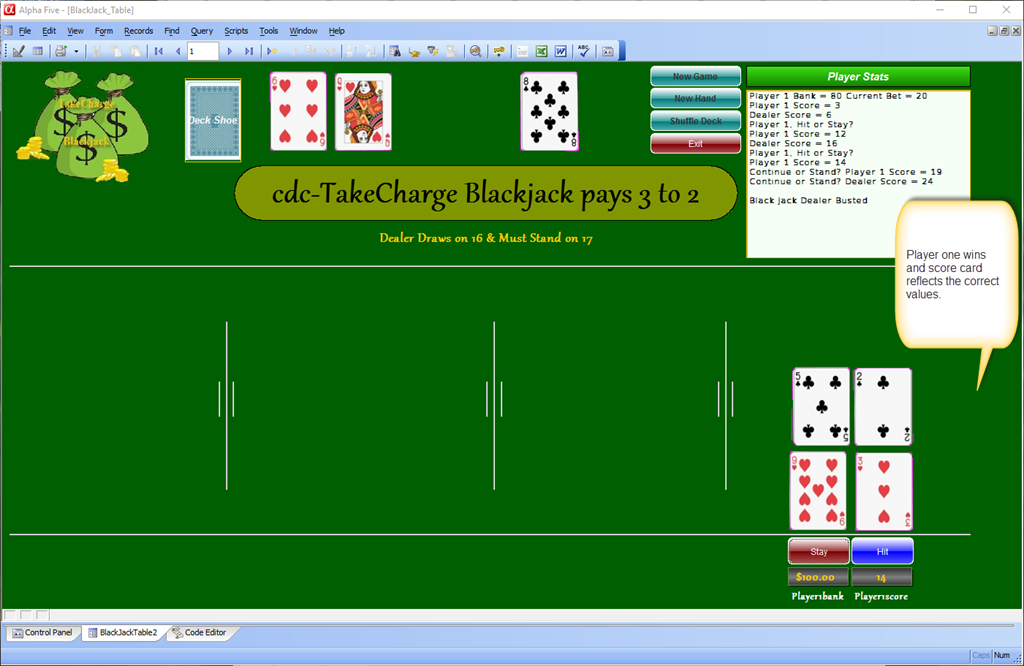
As you can see above, the scorecard is now correct. There is still work to do here which is to further show which players the dealer beat which I will do but not here and now.
To sum up; if you are like me new projects are fun and exciting but when it comes to the tedious details and checking of the final work I would rather do anything else which leads to some personal projects never being completed. (Customer projects always get completed because they pay for the program and my time.)
I hope everyone has a great weekend.
That’s all for today. If you are a business and need help with an Alpha Software program, contact us. Are rates are reasonable and our work is guaranteed.
Phone:713 417-6831
EMail: NLawson@cdc-takecharge.com
 Custome Database Design with Alpha Software
Leave a comment