
January 19, 2017
Hello everyone. The last two days have been busy with typical duties related to a small software business. My arrangement with my customers is they can go under contract and get free support for programming issues as well as a discount for new programming needs. Normally all goes well but some days get very busy with support calls and small request like new reports or a change on a form etc..
One customer I have with 4 locations started accepting electronic payments through smart phones and they needed it added to their pay type tracking in both their data tables, imports from their POS system and on their reports. Now this was simple enough to do, but it was time consuming. Another client received Parts Price List from two of their vendors and both changed the file format of the price list meaning the import needed to be modified. In addition to the new import the user requested the part numbers being imported from one vendor be modified to match the internal part number format in their inventory system. This code will be the focus of our post today.
To import the price list which comes in an Excel Spreadsheet (workbook), I used the AlphaDAO connection. This is very fast and easy to use. See Below
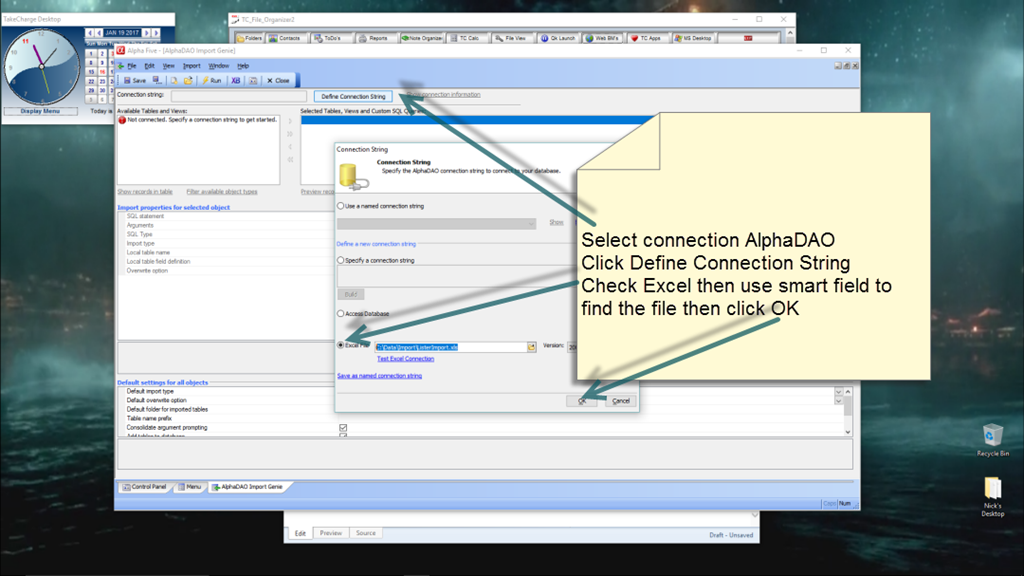
Once the connection is made simply follow the on screen wizard to complete the process. A great thing about this import method is much of the command string can be supplied by variables; such as..
- Filename
- Tab Name
- Local Table Name and definition
Knowing that, I created a wizard for them to use which allows them to fill in the variables and then run the import. The only time it fails is if the vendor changes the format which cannot be passed using variables. This is what happened in the example above which is why they contacted me. (It’s good to be needed.) In order to use the variables in the connection string you must convert the string to xBasic first then apply the variables in place of the actual command line. For example I set a variable equal to the variable field on our wizard which stores the tab name in the spreadsheet.
dim xObjName as C
xObjName = Var->xTabName+” $”
Next I pass that value to the import command in my xbasic script
dim a_import[0] as p
a_import[].ObjectName = Var->xObjname
This process allows them to control the values in the spreadsheet most often changed thus removing the need for them to call me for support.
The second part of their request was to change the format of the imported part number from the vendor so it matches their internal inventory format for part numbers.
Each time this vendor sends a price list update it includes close to 60 thousand records. This currently forces my customer to manually correct the part number for each part they order from the vendor. That is time consuming and lends itself to human error mistakes. To fix this issue, once the parts are imported to a result table I used the following;
- padl function
- Alltrim function
- Len function
- Left function
- Right Function
- High level Update Operation
Here is the update routine which fixes the part number format.
xbasic_wait_for_idle()
a_tbl = table.open("prices_")
update.fields = 1
update.field1 = "PART_NO"
update.expr1 = "padl(left(Alltrim(Part_No),len(Alltrim(Part_No))-4)+\"-\"+Right(Alltrim(Part_No),4),8,\"0\")"
a_tbl.update()
a_tbl.close()
UI_MSG_BOX("MESSAGE", "Part Number conversion complete"+crlf()+"Click OK to Continue.")

xbasic_wait_for_idle()
Basically what happens is all numbers get a dash before the last four digits of the number and the left is padded with a zero for each placeholder up to eight characters. The result would look like this
001-2345
012-3456
123-4567
The import, the Part number conversion, the appending to the Parts table and the update of parts already in circulation takes less than two minutes. Needless to say the customer is very happy.
That’s all for today. If you are a business and need help with an Alpha Software program, contact us. Are rates are reasonable and our work is guaranteed.
Phone:713 417-6831
EMail: NLawson@cdc-takecharge.com
 Custome Database Design with Alpha Software
Leave a comment