
January 11, 2017
Hello everyone and Happy New Year.
This is the first in our series of developer diary entries and to start our series off I will look at fetching records in a set. Currently I am working on an major upgrade for a customer’s existing database. One of the modules is used to record payments by their customers. Like most businesses, they receive;
- Down Payments
- Partial Payments
- Single Payments
- Multiple Payments
Our original design allowed the accounting clerk to search for a customer by name, filter their open invoices and tag each invoice in the list to be paid by double clicking the invoice in the browse. Once the invoices were selected the user would click a button to pop up a dialog box which displayed only the tagged list and included variables for identifying the batch id which matched the deposit amount of the various payments. The user fills in the batch header, verifies the invoices selected, edits the list if necessary then post payment. Now this system works well and has greatly reduced errors in their receivables module but it is tedious due the the number of steps to complete the process. So now our new process will attempt to reduce the steps and forms the accounting person needs to use.
Our new system now has a logical field for tagging the invoice to be paid and no longer requires the user to search for the customer open tickets first. The logical field already existed in the table so I did not need to change the table, I simply re-purposed the field.The accounting clerk has payment details from their customer which states the invoices to be paid so searching by invoice number eliminates the need to first find the customer thus saving a step. Our set for our receivables module
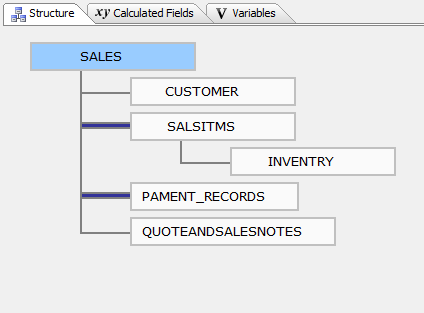
is shown above. Currently the sales table (parent) has over 80 thousand records and salsitms has over 250 thousand. I mention this because processing speed was becoming an issue. This is where fetching records in a set comes in.
if I was fetching records in a child table (salsitms) I would use the form tables method to fetch through the child table and make changes as needed. Remember, salsitms has over 250 thousand records but in the set the records displayed are controlled by the parent. What that means is each time the routine below is run, the only records processed are the records in the table which match the key value in the set. The example below runs in less than a second
parentform.commit()
Dim SHARED vTs as C
vTs = time("yy-MM-dd 0h:0m")
PartSales:Tables:salsitms.Batch_Begin()
PartSales:Tables:salsitms.Fetch_First()
while .NOT. PartSales:Tables:salsitms.Fetch_Eof()
    if PartSales:Tables:salsitms.PLISTTS = "" .and. (PartSales:Tables:salsitms.QTY_ORDERD - PartSales:Tables:salsitms.BACKORDER) > 0 .and. PartSales:Tables:salsitms.QTY_ORDERD > 0 then
        PartSales:Tables:salsitms.change_begin()
        PartSales:Tables:salsitms.PLISTTS = vTs
        PartSales:Tables:salsitms.change_end(.t.)
    end if
    PartSales:Tables:salsitms.Fetch_Next()
end while
PartSales:Tables:salsitms.Batch_End()
PartSales:browse1.commit()
xbasic_wait_for_idle()
This however will not work at the parent level. Our browse list from Sales is an embedded list of parent records and all 80 thousand plus records are in the queue. This makes the processing run slow. If records were being entered one by one, and sometimes they are, only a posting rule would be needed to mark the invoice paid. For our batch process I needed a different option. Look at the code below.
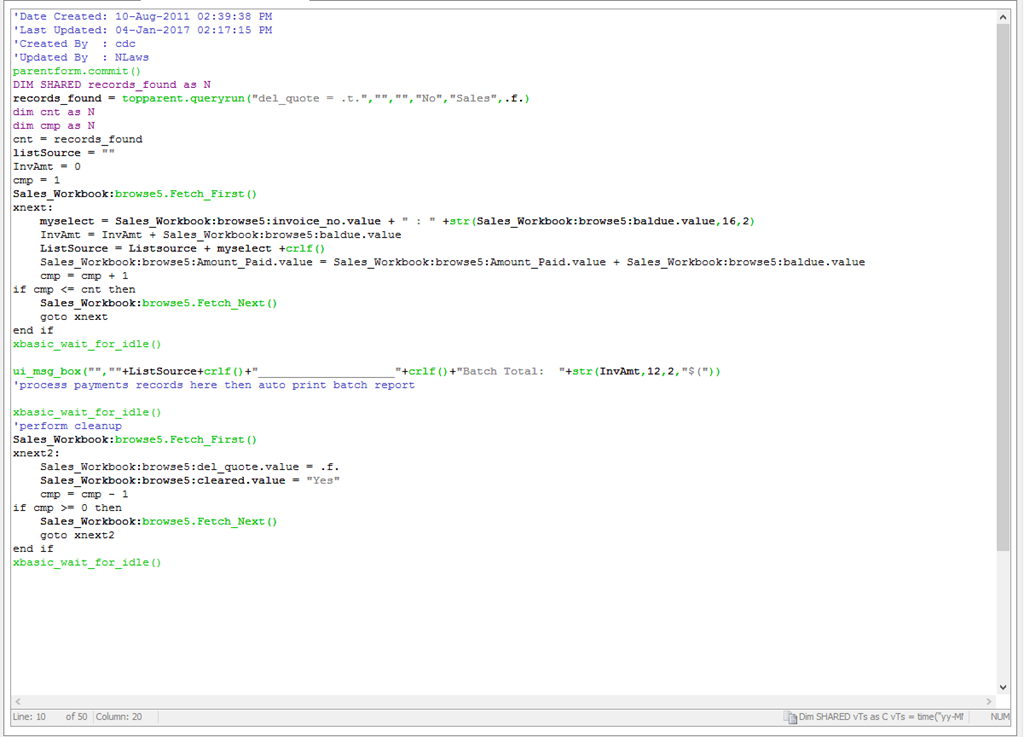
The first thing I do is query the records based on the user input of invoice selection. This sets the records in the browse to only the values selected by the query. Next I set two numeric variables ‘Cnt and Cmp’ to control the step thorough of our browse on our form. (broswe5) Our routine will continue to branch until cmp = cnt. Once the process is complete I use the tagged values to build our payment record detail and print a batch report. That code is not shown here but below is a message box showing the results of our test.
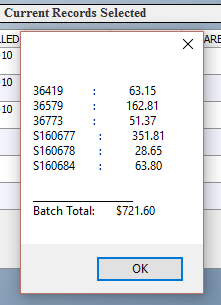
Invoice numbers are on the left and amount paid is on the right. This example took about 2 seconds to run.
After the payments are processed the code runs some cleanup on the sales table and it is done.
If you have been following my blog for a while you know this process of branching could also have been done with an array. I have provided many examples of array’s in this blog so if you wish to see how one is done, expand the toolbar to the right and click the select categories then choose Arrays’.
As a recap my goal was to reduce the steps needed by the user to apply payments in a batch process and to speed up the processing. The original procedure required eight steps and ten to fifteen minutes to process an average batch and the new procedure requires three steps and takes less than five minutes to do the same. Mission accomplished!
That’s all for today. If you are a business and need help with an Alpha Software program, contact us. Are rates are reasonable and our work is guaranteed.
Phone:713 417-6831
EMail: NLawson@cdc-takecharge.com
 Custome Database Design with Alpha Software
Leave a comment