
Currently I am still working on the routine for editing scripts and weighing the best possible solutions. So in the meantime, lets look at some of the Modules which will accompany our application.
One module which I left out of the original list is an email manager. If you are developing for clients, a common method of updating the application is by email so a means of tagging and zipping files as well as linking them to an email is an important part of our package. The choices for email are internal, using the Alpha5 email client and external. One consideration is Windows 10 no longer supports MAPI due to security issues. So in order to use the external client you will need a third party app installed such as Thunderbird. My though is if you are doing that, why use Alpha5 to control your email?
My decision is now clear. I will use Alpah5 email client to send files but I do not intend to receive emails in Alpha5; they will still be received in my email account.
Email Send Form:

In the above image, I have sent a reminder written in my Note Manager module and passed it to the body of my custom email client. currently my client receives the message as Rich text but also stores it as plain text and HTML. Soon I plan to adjust the form allowing the user to see the email in any of the three formats.
In addition to sending messages to the email body, the user can also send a note as an attachment. Finally looking at the buttons at the top of the Send Form you will notice a button labeled Action. This button allows the user to select files and automatically zip them, insert reports into the body of the email or as an attachment.
Today we are looking at the code to email a note as the body on an email and or as an attachment.
Email Note as body:
'Date Created: 02-Jan-2009 02:42:12 PM
'Last Updated: 27-May-2016 10:58:44 AM
'Created By  : User
'Updated By  : NLaws
parentform.commit()

‘Declare our variables
dim SHARED xEm as C
dim SHARED xSubj as C
dim SHARED xBody as C
dim SHARED attachments as C
dim bin as B
dim fld as P
dim rtf_Text as C
dim htm_text as C
dim plain_text as C

‘Set initial values
xEM = ""
xSubj = "Per our conversation"

‘Open our master table and fetch the current record number then the field value for our note.
rNbr = recno("act_memos")
tbl = table.open("act_memos")
tbl.fetch_goto(rNbr)
fld = tbl.field_get("cont_memo")
f = tbl.field_get("Cont_Memo")
r = rtf.create("")
r.Binary_Text = f.value_get()
bin = r.Binary_Text

‘Open our target table and enter a new record and assign the necessary values
t = table.open("em_send")
t.enter_begin()
t.to_name = Var->xEm
t.subject = Var->xSubj
t.body_rtf = tbl.cont_memo
t.body_html = *bin_to_html(fld.value_get() )
plain_text = *BIN_TO_PLAIN(bin)
t.body = plain_text
t.attachments = Var->attachments
t.enter_end()

‘Close our target table
t.close()

‘Close our master table
tbl.close()

‘Open our Send Email form
form.load("SendEmail","popup","","center","center")
SendEmail.Activate()
SendEmail.fetch_last()
SendEmail.Show()
SendEmail.Commit()
form.close()
Notice that the body_rtf is a richtext memo field as is cont_memo so no data conversion is required. For HTML we use the function
*bin_to_html()
and for plain text we use
*Bin_to_plain()
All that is left now is to add a conditional object to our form and a radio choice variable allowing the user to switch views easily.
Email Attachment:
'Date Created: 24-May-2016 01:31:09 PM
'Last Updated: 25-May-2016 07:48:19 AM
'Created By  : NLaws
'Updated By  : NLaws
parentform.commit()

‘Declare our variables

DIM SHARED xFileName as C
DIM SHARED xPath as c
DIM SHARED exchoice as C
DIM SHARED varC_result as C
DIM SHARED sachoice as C

‘Set the default values

sachoice = ""
xPath = a5.Get_Path()+chr(92)+"Documents\\"
xFileName = "TC_Quick Reminder "+time("MM-dd-yy h-0m am")
heading_string = "Click OK to Send this note to your email manager as Attachment."
footer_string = "Click Cancel to do nothing."
ok_button_label = "&OK"
cancel_button_label = "&Cancel"

‘Build our dialog box for converting and saving our note as a document.
Delete XdialogStyle
dim XDialogStyle as p
XDialogStyle.AccentColor = "#223+218+204"
XDialogStyle.Color = "#153+51+0"
varC_result = ui_dlg_box("Reminder To Email Dialog",<<%dlg%
{Windowstyle=Gradient Radial Bottom Right}
{region}
{Region}
{text=80,2:heading_string};
{Endregion};
{line=1,0};
{Region}
Save As::| [.65xFileName];
{Endregion};
{line=1,0};
{Region}
{sp=4}<%B=T%32,1OK> <%B=T%33,1CANCEL>;
{Endregion};
{sp=30}{text=52,1:footer_string};
{endregion};
%dlg%,<<%code%
if a_dlg_button = "OK" then
    sachoice =  xFileName
else
    sachoice = ""
end if
%code%)

if sachoice = "" then
    End
else
    dim SHARED xEm as C
    dim SHARED xSubj as C
    dim SHARED xBody as C
    dim SHARED attachments as C
    xEM = ""
    xSubj = "Per our conversation"
    xbody = "Please see Attached."
    record_number = current_record_number()
    query.filter = "recno() = " + record_number
    query.order = ""
    attachments = :Report.SaveAs("Quick Note Report","PDF",query.filter,query.order,xPath+chr(92)+Alltrim(Var->xFileName)+".pdf",.F.)
    xbasic_wait_for_idle()
    form.load("SendEmail","popup","","center","center")
    SendEmail.Activate()
    SendEmail.New_record()
    SendEmail.Show()
    SendEmail:to.text = Var->xEm
    SendEmail:subject.text = Var->xSubj
    SendEmail:body_rtf.value = Var->xBody
    SendEmail:attachments.text = Var->attachments
    SendEmail.Commit()
    form.close()
end if
Because we are not coverting memo data we are using a simpler method to create our SendEmail record. Here we open our form SendEmail, Activate it then set it to New record. We then assign our variables to the fields on the form and commit the record. Done. Here is an image of both the dialog form and the completed SendEmail form.
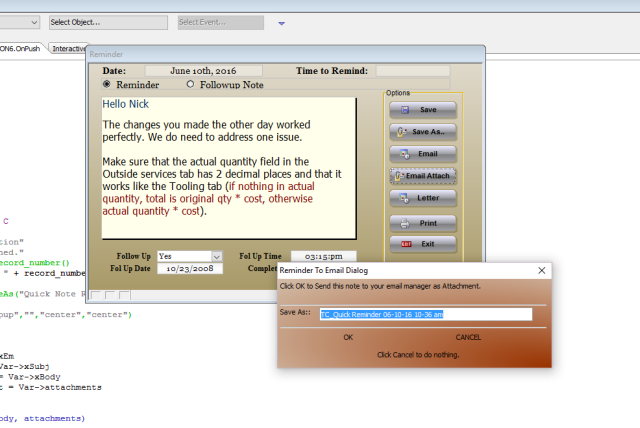
and
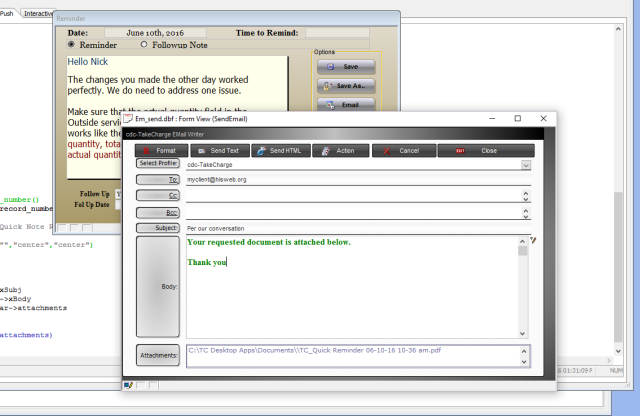
As you can see, it is fairly simple to build your own email manager. There is one more piece of code we need to review in this process which is the email send.
'Date Created: 14-Dec-2006 09:56:34 AM
'Last Updated: 31-Mar-2011 03:14:36 PM
'Created By  :
'Updated By  : cdc
parentform.commit()
dim tbl as P
dim bin as B

tbl = table.current()
bin = tbl.body_rtf
tbl.change_begin()
tbl.SENT_DATE = Date()
tbl.RECEIVE_DATE = date()
tbl.RECEIVE_TIME = Time()
tbl.SORT_DATE = date()
tbl.SORT_TIME = time()
tbl.body = rtf_to_text(bin)
tbl.BODY_HTML = "<table><tr><td>" + *bin_to_html(bin) + "</td></tr></table>"
tbl.change_end(.t.)
parentform.Refresh_Layout()

tbl = table.open("a_email",FILE_RW_EXCLUSIVE)
tbl.zap(.t.)
tbl.close()

dim param_to as c
dim param_subject as c
dim param_cc as c
dim param_bcc as c
dim message_text as c
dim param_message as c
dim param_msg_html as C
dim attachment_list as c
dim param_attachments as c
Dim message_type as c
message_type = ""

parentform.commit()
tbl = table.current()
if is_object(topparent.this) then
    form_name = topparent.name()+".this"
else
    form_name = ""
end if
param_to = tbl.to
param_subject = tbl.subject
param_cc = tbl.cc
param_bcc = tbl.bcc
message_text = tbl.Body
param_message = message_text
param_msg_html = tbl.Body_html
attachment_list = tbl.attachments
param_attachments = attachment_list
send_result = email_send(param_to,param_subject,param_message,param_attachments,param_cc,param_bcc,.t.,"text",param_msg_html,Var->emProfile,.f.,.t.)
if send_result = 1 then
    ui_msg_box("Notice","E-mail message sent.",UI_INFORMATION_SYMBOL)
    script_play("Store_Email")
else
    ui_msg_box("Error","E-mail message was not sent.",UI_STOP_SYMBOL)
end if
topparent.close()
if Var->vWatch =1 then
   Var->vWatch = 0
else if Var->vWatch = 0 then
    Var->vWatch = 1
end if
Basically we take the information in our SendEmail form and pass it to the internal email client function email_send() and the rest is history.
There is more we could review today but it is the weekend and I have commitments. With that said, have a great weekend.
 Custome Database Design with Alpha Software
Leave a comment