
Hello everyone
We completed our Magic Cube programming lesson an I must say my granddaughter was over the other day and she played with it on my SurfacePro tablet and matched the moves on her real cube for hours so I guess that means it was a success. Now lets move on to something more challenging. Blackjack! The second program I ever wrote back in 1988 was a Blackjack game written in Basic. Unfortunately it was on a laptop that died and the game was lost about five years ago. Now we will create a better version of that simple and fun game which kept me entertained for hours when traveling.
As always we should start with a design document. This is especially true in this case since we will be modifing the standard type of blackjack program to work with database tables rather then list and arrays stored in memory.

In the above image we have the starting form with a popup window showing our design document. I decided to incorporate the design document into our actual application so we can easily refer back to it as we progress. Here is the actual document.
TakeCharge Black Jack Design Document
Purpose of Application:
To create a card game application for the purpose of demonstrating the use of xBasic and database tables for reading data into array’s and list to be viewed, analyzed and modified; then written back to the table.
Game Requirements:
The application will generally follow Vegas rules which include but are not limited to:
- Dealer stands on 17
- Dealer draws on 16
- Ace value is 1 unless paired with a face card then 11
- Winning hand pays 1 for 1
- Black Jack pays 3 to 2 (1.5 x bet)
- Push (tie) goes to the house
- Player Cards Delt up
- Dealer Cards 1 up rest down
additional rules include;
- option to play by home rules
- Push player keeps chips but chips stay in play
- Auto shuffle deck when cards in deck are less than nbr of active players
Programming Requirements:
The application will require:
- Four tables
- A card shuffle routine
- Bank Tracker
- Hand score tracker
- Number of Players control (1 to 4)
- Player Name Control
- Master Deck
- Card images
- Number of Decks control (1 to 4)
- Game Table form
- Pop up help
- Win History Reader Board form
- Card move Animation Control
- Turn Dealer Cards Control
- Split Control (player choice)
- Card depleation from deck Control
Additional requirements may be added as development continues.
The next image shows the proposed layout of our form.
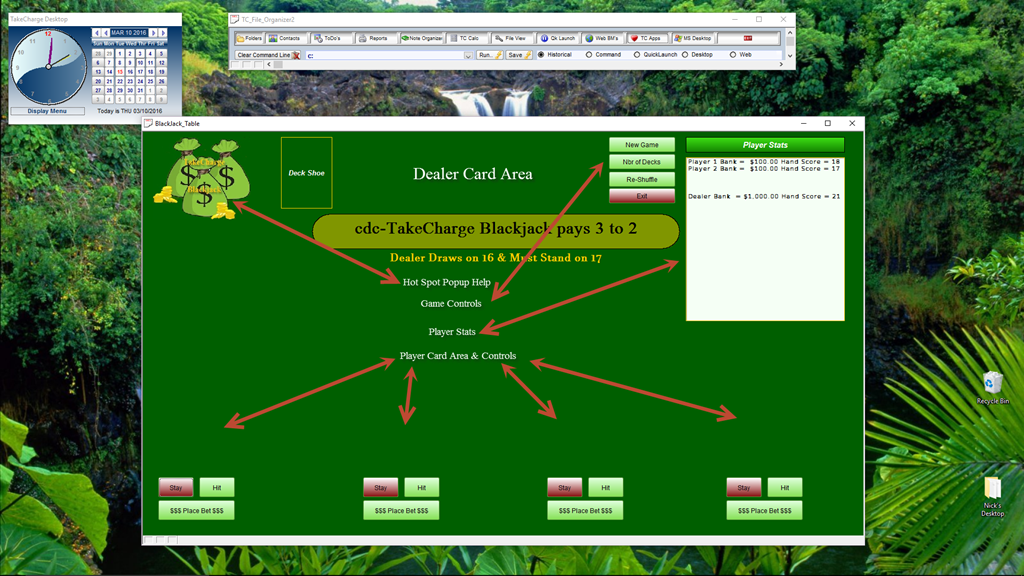
So far I have simply created the form and placed the objects I think I will need based on our design document.
The only code written thus far is the ‘Nbr of Decks’ button. Now that may seen like an unusual place to start so let me explain why. Blackjack is played between two people, the dealer or house and the player. The game is based on one deck of 52 cards but more decks can be used in fact; in Vegas they will always use more than one deck and typically there is more that one player at a time. Knowing that, we need a routine to build our playing deck based on a variable number of decks. We also are faced with manually entering a record value for each card or write a routine to build our deck. I chose the latter.
If we were writing this application to work normally, we would write an array to represent each suit and an array to represent each card per suit. What I did is build an array nestled in an array and as I step through the array I populate my initial card table. Here is the code.
'Date Created: 10-Mar-2016 12:04:03 PM
'Last Updated: 10-Mar-2016 12:04:03 PM
'Created By  : NLaws
'Updated By  : NLaws
parentform.commit()
t = table.open("tc_gamedeck")
t.zap(.t.)
t.close()
xretry:
dim xDecks as N
dim i as N
dim ii as N
dim xSuit as C
dim xPosInDeck as N
dim prmpt_title as c
dim prmpt_prompt as c
dim prmpt_default as c
prmpt_title = "Deck Selector"
prmpt_prompt = "Enter the Number of Decks 1 to 4"
prmpt_default = "1"
DIM SHARED xDecks AS C

xDecks = ui_get_number(prmpt_title,prmpt_prompt,prmpt_default)
if xDecks < 1 .or. xDecks > 4 then
    ui_msg_box("SORRY!","Wrong Amount Please Try again.")
    goto xretry
end if
t = table.open("tc_gamedeck")
for i = 1 to 4
    if i = 1 then
        xSuit = "Hearts"
        xPosInDeck = 0
    else if i = 2 then
        xSuit = "Clubs"
        xPosInDeck = 13
    else if i = 3 then
        xSuit = "Diamonds"
        xPosInDeck = 26
    else
        xSuit = "Spades"
        xPosInDeck = 39
    end if
    for ii = 1 to 13
        if ii = 1 then
            t.enter_begin()
            t.suits = xSuit
            t.cards = "Ace"
            if ii <= 10 then
                t.cardvalue = ii
            else
                t.cardvalue = 10
            end if
            t.nbrofdecks = xDecks
            t.cardstoplay = xDecks
            t.positionindeck = ii + xPosInDeck
            t.enter_end(.t.)
        else if ii = 2 then
            t.enter_begin()
            t.suits = xSuit
            t.cards = "Two"
            if ii <= 10 then
                t.cardvalue = ii
            else
                t.cardvalue = 10
            end if
            t.nbrofdecks = xDecks
            t.cardstoplay = xDecks
            t.positionindeck = ii + xPosInDeck
            t.enter_end(.t.)
        else if ii = 3 then
            t.enter_begin()
            t.suits = xSuit
            t.cards = "Three"
            if ii <= 10 then
                t.cardvalue = ii
            else
                t.cardvalue = 10
            end if
            t.nbrofdecks = xDecks
            t.cardstoplay = xDecks
            t.positionindeck = ii + xPosInDeck
            t.enter_end(.t.)
        else if ii = 4 then
            t.enter_begin()
            t.suits = xSuit
            t.cards = "Four"
            if ii <= 10 then
                t.cardvalue = ii
            else
                t.cardvalue = 10
            end if
            t.nbrofdecks = xDecks
            t.cardstoplay = xDecks
            t.positionindeck = ii + xPosInDeck
            t.enter_end(.t.)
        else if ii = 5 then
            t.enter_begin()
            t.suits = xSuit
            t.cards = "Five"
            if ii <= 10 then
                t.cardvalue = ii
            else
                t.cardvalue = 10
            end if
            t.nbrofdecks = xDecks
            t.cardstoplay = xDecks
            t.positionindeck = ii + xPosInDeck
            t.enter_end(.t.)
        else if ii = 6 then
            t.enter_begin()
            t.suits = xSuit
            t.cards = "Six"
            if ii <= 10 then
                t.cardvalue = ii
            else
                t.cardvalue = 10
            end if
            t.nbrofdecks = xDecks
            t.cardstoplay = xDecks
            t.positionindeck = ii + xPosInDeck
            t.enter_end(.t.)
        else if ii = 7 then
            t.enter_begin()
            t.suits = xSuit
            t.cards = "Seven"
            if ii <= 10 then
                t.cardvalue = ii
            else
                t.cardvalue = 10
            end if
            t.nbrofdecks = xDecks
            t.cardstoplay = xDecks
            t.positionindeck = ii + xPosInDeck
            t.enter_end(.t.)
        else if ii = 8 then
            t.enter_begin()
            t.suits = xSuit
            t.cards = "Eight"
            if ii <= 10 then
                t.cardvalue = ii
            else
                t.cardvalue = 10
            end if
            t.nbrofdecks = xDecks
            t.cardstoplay = xDecks
            t.positionindeck = ii + xPosInDeck
            t.enter_end(.t.)
        else if ii = 9 then
            t.enter_begin()
            t.suits = xSuit
            t.cards = "Nine"
            if ii <= 10 then
                t.cardvalue = ii
            else
                t.cardvalue = 10
            end if
            t.nbrofdecks = xDecks
            t.cardstoplay = xDecks
            t.positionindeck = ii + xPosInDeck
            t.enter_end(.t.)
        else if ii = 10 then
            t.enter_begin()
            t.suits = xSuit
            t.cards = "Ten"
            if ii <= 10 then
                t.cardvalue = ii
            else
                t.cardvalue = 10
            end if
            t.nbrofdecks = xDecks
            t.cardstoplay = xDecks
            t.positionindeck = ii + xPosInDeck
            t.enter_end(.t.)
        else if ii = 11 then
            t.enter_begin()
            t.suits = xSuit
            t.cards = "Jack"
            if ii <= 10 then
                t.cardvalue = ii
            else
                t.cardvalue = 10
            end if
            t.nbrofdecks = xDecks
            t.cardstoplay = xDecks
            t.positionindeck = ii + xPosInDeck
            t.enter_end(.t.)
        else if ii = 12 then
            t.enter_begin()
            t.suits = xSuit
            t.cards = "Queen"
            if ii <= 10 then
                t.cardvalue = ii
            else
                t.cardvalue = 10
            end if
            t.nbrofdecks = xDecks
            t.cardstoplay = xDecks
            t.positionindeck = ii + xPosInDeck
            t.enter_end(.t.)
        else if ii = 13 then
            t.enter_begin()
            t.suits = xSuit
            t.cards = "King"
            if ii <= 10 then
                t.cardvalue = ii
            else
                t.cardvalue = 10
            end if
            t.nbrofdecks = xDecks
            t.cardstoplay = xDecks
            t.positionindeck = ii + xPosInDeck
            t.enter_end(.t.)
        end if
    Next ii
Next i
t.close()
Lets break this down. First thing I did was clear our gamedeck table. Next I used an Alpha Software built in get number dialog box. For our game, we restrict the number of decks to a range of one to four. Therefor I needed some simple error checking with branching to insure the number entered by the user is in fact one to four.
prmpt_title = “Deck Selector”
prmpt_prompt = “Enter the Number of Decks 1 to 4”
prmpt_default = “1”DIM SHARED xDecks AS C
xDecks = ui_get_number(prmpt_title,prmpt_prompt,prmpt_default)
if xDecks < 1 .or. xDecks > 4 then
ui_msg_box(“SORRY!”,”Wrong Amount Please Try again.”)
goto xretry
end if
I open my table using table.open() method then build my arrays. My first array is (i) has only four steps each representing a suit, Hearts, Clubs, Diamonds, Spades. As I step through the Array I set the value of the variable xSuit and the variable xPosInDeck. xPosInDeck represents a value added to the array (ii) value and uses this to assign the starting position of each card. Next I construct my next array (ii) with 13 steps. Here we simply do a table enter begin, assign values to each field in our table then close with table enter end. Notice that the field t.cardvalue is represented by an if statement. Each card has a value based on it’s face value except for Jack, Queen, and King. They each have a value of ten. The if statement uses ii as a test and if less than or equal to 10 the cardvalue equals ii otherwise it equals 10. After all suits are created and (i) is done we close the table. (t.close())
Here is the end result of this code using 1 as the number of decks.
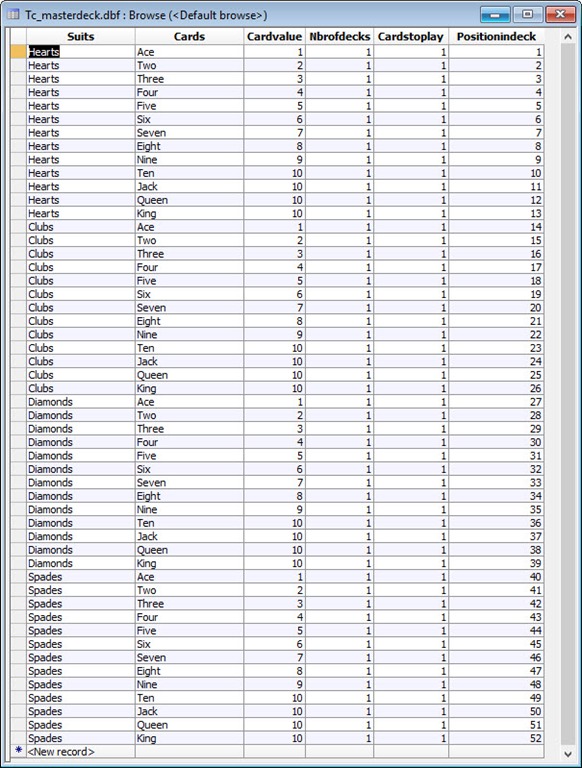
I wanted you to see this because many times when you develop an application for a business, they will want you to provide a certain amount of beginning data derived from their business model. Not all data is repetitive, but much is. Using a routine like this will save you tons of time and aggravation.
This looks like a good place to stop for today. In our next session we will look at the code needed for
- New Game
- Controlling the Number of Players
- Shuffling the deck
I hope you will be able to stop by. Have a great day.
 Custome Database Design with Alpha Software
Leave a comment