
We left off with the code for locking cells and in this lesson we will look at the next four buttons on our form:
- Fill in Block Values
- Swap Cells
- Clear Selection Que
- Lock UnLock Cell
Before we do , watch this short video to see each of them in action.
As I said, it was pretty short but to the point.
Fill in Block Values:
The on Push event for this button runs each of the Random scripts for each block.
parentform.Commit()
 script_play("Random3")
 xbasic_wait_for_idle()
 script_play("Random4")
 xbasic_wait_for_idle()
 script_play("Random5")
 xbasic_wait_for_idle()
 script_play("Random6")
 xbasic_wait_for_idle()
 script_play("Random7")
 xbasic_wait_for_idle()
 script_play("Random8")
 xbasic_wait_for_idle()
 script_play("Random9")
 xbasic_wait_for_idle()
 script_play("Random10")
 xbasic_wait_for_idle()
 script_play("Random11")
 dim text as c
 dim text2 as c
 dim text3 as c
 text = "Each block has one of each value filled in. "
 text2 = "However, they may be in the wrong position."
 text3 = "Click on two cells you wish to change then click 'Swap Cells' to change."
 font_color = "Dark Teal"
 dim formatted_text as c
 formatted_text = "{font=Tahoma,9,B}"+"{C="+font_color+"}" + text
 dim formatted_text2 as c
 formatted_text2 = "{font=Tahoma,9,B}"+"{C="+font_color+"}" + text2
 dim formatted_text3 as c
 formatted_text3 = "{font=Tahoma,9,B}"+"{C="+font_color+"}" + text3
 'Dialog Starts Here
 dim xdialogStyle as p
 xdialogStyle.color = "white"
 xdialogStyle.accentcolor = "Gray-80"
 ui_dlg_box("TakeCharge Puzzle Generator",<<%dlg%
 {windowstyle=Gradient Radial Top Left}
 {lf=2};
 {blueframe=1,1:It's your choice!}
 {region}
 {lf};
 {sp=4}{text=%O={@@}%80,1:formatted_text};
 {sp=4}{text=%O={@@}%80,1:formatted_text2};
 {sp=4}{text=%O={@@}%80,1:formatted_text3};
 {lf};
 {endregion};
 {lf};
{sp=2}<%I=$$code.execution.done;B=T;O={J=C} {I=1}  OK ; %78,1OK>
 %dlg%)
 End
After the last block is complete, it displays a dialog box informing the user the game is ready to play. Each of the Random scripts are the same except they point to different fields; so I will show the code for Random3 only.
Random3:
dim nbrtrys as N
 nbrtrys = 0
 tbl = table.open("sudokupuzzlesolver")
 doover:
 step1:
 if sk1 = "T" Then
 goto step2
 end if
 rd1:
 update.fields = 1
 update.field1 = "B1S1v"
 update.expr1 = "round(Rand()*9,0)"
 tbl.update()
 if tbl.b1s1v = tbl.b1s2v .or.tbl.b1s1v = tbl.b1s3v .or. tbl.b1s1v = tbl.b1s4v .or.tbl.b1s1v = tbl.b1s5v .or.tbl.b1s1v = tbl.b6s2v .or. tbl.b1s1v = tbl.b1s7v .or.tbl.b1s1v = tbl.b1s8v .or.tbl.b1s1v = tbl.b1s9v then
 goto rd1
 end if
step2: if sk2 = "T" then goto step3 end if rd2: update.fields = 1 update.field1 = "B1S2v" update.expr1 = "round(Rand()*9,0)" tbl.update() if tbl.b1s2v = tbl.b1s1v .or. tbl.b1s2v = tbl.b1s3v .or.tbl.b1s2v = tbl.b1s4v .or. tbl.b1s2v = tbl.b1s5v .or.tbl.b1s2v = tbl.b1s6v .or. tbl.b1s2v = tbl.b1s7v .or. tbl.b1s2v = tbl.b1s8v .or. tbl.b1s2v = tbl.b1s9v then goto rd2 end ifstep3: if sk3 = "T" then goto step4 end if rd3: update.fields = 1 update.field1 = "B1S3v" update.expr1 = "round(Rand()*9,0)" tbl.update() if tbl.b1s3v = tbl.b1s1v .or. tbl.b1s3v = tbl.b1s2v .or. tbl.b1s3v = tbl.b1s4v .or. tbl.b1s3v = tbl.b1s5v .or. tbl.b1s3v = tbl.b1s6v .or. tbl.b1s3v = tbl.b1s7v .or. tbl.b1s3v = tbl.b1s8v .or. tbl.b1s3v = tbl.b1s9v then goto rd3 end ifstep4: if sk4 = "T" then goto step5 end if rd4: update.fields = 1 update.field1 = "B1S4v" update.expr1 = "round(Rand()*9,0)" tbl.update() if tbl.b1s4v = tbl.b1s1v .or. tbl.b1s4v = tbl.b1s2v .or. tbl.b1s4v = tbl.b1s3v .or. tbl.b1s4v = tbl.b1s5v .or. tbl.b1s4v = tbl.b1s6v .or. tbl.b1s4v = tbl.b1s7v .or. tbl.b1s4v = tbl.b1s8v .or. tbl.b1s4v = tbl.b1s9v then goto rd4 end ifStep5: if sk5 = "T" then goto step6 end if rd5: update.fields = 1 update.field1 = "B1S5v" update.expr1 = "round(Rand()*9,0)" tbl.update()if tbl.b1s5v = tbl.b1s1v .or. tbl.b1s5v = tbl.b1s2v .or. tbl.b1s5v = tbl.b1s3v .or. tbl.b1s5v = tbl.b1s4v .or. tbl.b1s5v = tbl.b1s6v .or. tbl.b1s5v = tbl.b1s7v .or. tbl.b1s5v = tbl.b1s8v .or. tbl.b1s5v = tbl.b1s9v then goto rd5 end ifStep6: if sk6 = "T" then goto step7 end if rd6: update.fields = 1 update.field1 = "B1S6v" update.expr1 = "round(Rand()*9,0)" tbl.update()if tbl.b1s6v = tbl.b1s1v .or. tbl.b1s6v = tbl.b1s2v .or. tbl.b1s6v = tbl.b1s3v .or. tbl.b1s6v = tbl.b1s4v .or. tbl.b1s6v = tbl.b1s5v .or. tbl.b1s6v = tbl.b1s7v .or. tbl.b1s6v = tbl.b1s8v .or. tbl.b1s6v = tbl.b1s9v then goto rd6 end ifStep7: if sk7 = "T" then goto step8 end if rd7: update.fields = 1 update.field1 = "B1S7v" update.expr1 = "round(Rand()*9,0)" tbl.update() if tbl.b1s7v = tbl.b1s1v .or. tbl.b1s7v = tbl.b1s2v .or. tbl.b1s7v = tbl.b1s3v .or. tbl.b1s7v = tbl.b1s4v .or. tbl.b1s7v = tbl.b1s5v .or. tbl.b1s7v = tbl.b1s6v .or. tbl.b1s7v = tbl.b1s8v .or. tbl.b1s7v = tbl.b1s9v then goto rd7 end ifStep8: if sk8 = "T" then goto step9 end if rd8: update.fields = 1 update.field1 = "B1S8v" update.expr1 = "round(Rand()*9,0)" tbl.update() if tbl.b1s8v = tbl.b1s1v .or. tbl.b1s8v = tbl.b1s2v .or. tbl.b1s8v = tbl.b1s3v .or. tbl.b1s8v = tbl.b1s4v .or. tbl.b1s8v = tbl.b1s5v .or. tbl.b1s8v = tbl.b1s6v .or. tbl.b1s8v = tbl.b1s7v .or. tbl.b1s8v = tbl.b1s9v then goto rd8 end ifStep9: if sk9 = "T" then goto finish end if rd9: update.fields = 1 update.field1 = "B1S9v" update.expr1 = "round(Rand()*9,0)" tbl.update() if tbl.b1s9v = tbl.b1s1v .or. tbl.b1s9v = tbl.b1s2v .or. tbl.b1s9v = tbl.b1s3v .or. tbl.b1s9v = tbl.b1s4v .or. tbl.b1s9v = tbl.b1s5v .or. tbl.b1s9v = tbl.b1s6v .or. tbl.b1s9v = tbl.b1s7v .or. tbl.b1s9v = tbl.b1s8v then goto rd9 end if finish: if tbl.b1s1v+tbl.b1s2v+tbl.b1s3v+tbl.b1s4v+tbl.b1s5v+tbl.b1s6v+tbl.b1s7v+tbl.b1s8v+tbl.b1s9v = 45 then update.fields = 9 update.field1 = "B1S1" update.expr1 = "if(B1s1v=vl1,cl1,if(b1s1v=vl2,cl2,if(b1s1v=vl3,cl3,if(b1s1v=vl4,cl4,if(b1s1v=vl5,cl5,if(b1s1v=vl6,cl6,if(b1s1v=vl7,cl7,if(b1s1v=vl8,cl8,if(b1s1v=vl9,cl9,b1s1)))))))))" update.field2 = "B1S2" update.expr2 = "if(B1s2v=vl1,cl1,if(b1s2v=vl2,cl2,if(b1s2v=vl3,cl3,if(b1s2v=vl4,cl4,if(b1s2v=vl5,cl5,if(b1s2v=vl6,cl6,if(b1s2v=vl7,cl7,if(b1s2v=vl8,cl8,if(b1s2v=vl9,cl9,b1s2)))))))))" update.field3 = "B1S3" update.expr3 = "if(B1s3v=vl1,cl1,if(b1s3v=vl2,cl2,if(b1s3v=vl3,cl3,if(b1s3v=vl4,cl4,if(b1s3v=vl5,cl5,if(b1s3v=vl6,cl6,if(b1s3v=vl7,cl7,if(b1s3v=vl8,cl8,if(b1s3v=vl9,cl9,b1s3)))))))))" update.field4 = "B1S4" update.expr4 = "if(B1s4v=vl1,cl1,if(b1s4v=vl2,cl2,if(b1s4v=vl3,cl3,if(b1s4v=vl4,cl4,if(b1s4v=vl5,cl5,if(b1s4v=vl6,cl6,if(b1s4v=vl7,cl7,if(b1s4v=vl8,cl8,if(b1s4v=vl9,cl9,b1s4)))))))))" update.field5 = "B1S5" update.expr5 = "if(B1s5v=vl1,cl1,if(b1s5v=vl2,cl2,if(b1s5v=vl3,cl3,if(b1s5v=vl4,cl4,if(b1s5v=vl5,cl5,if(b1s5v=vl6,cl6,if(b1s5v=vl7,cl7,if(b1s5v=vl8,cl8,if(b1s5v=vl9,cl9,b1s1)))))))))" update.field6 = "B1S6" update.expr6 = "if(B1s6v=vl1,cl1,if(b1s6v=vl2,cl2,if(b1s6v=vl3,cl3,if(b1s6v=vl4,cl4,if(b1s6v=vl5,cl5,if(b1s6v=vl6,cl6,if(b1s6v=vl7,cl7,if(b1s6v=vl8,cl8,if(b1s6v=vl9,cl9,b1s6)))))))))" update.field7 = "B1S7" update.expr7 = "if(B1s7v=vl1,cl1,if(b1s7v=vl2,cl2,if(b1s7v=vl3,cl3,if(b1s7v=vl4,cl4,if(b1s7v=vl5,cl5,if(b1s7v=vl6,cl6,if(b1s7v=vl7,cl7,if(b1s7v=vl8,cl8,if(b1s7v=vl9,cl9,b1s7)))))))))" update.field8 = "B1S8" update.expr8 = "if(B1s8v=vl1,cl1,if(b1s8v=vl2,cl2,if(b1s8v=vl3,cl3,if(b1s8v=vl4,cl4,if(b1s8v=vl5,cl5,if(b1s8v=vl6,cl6,if(b1s8v=vl7,cl7,if(b1s8v=vl8,cl8,if(b1s8v=vl9,cl9,b1s8)))))))))" update.field9 = "B1S9" update.expr9 = "if(B1s9v=vl1,cl1,if(b1s9v=vl2,cl2,if(b1s9v=vl3,cl3,if(b1s9v=vl4,cl4,if(b1s9v=vl5,cl5,if(b1s9v=vl6,cl6,if(b1s9v=vl7,cl7,if(b1s9v=vl8,cl8,if(b1s9v=vl9,cl9,b1s9)))))))))" tbl.update() tbl.close()'If the Operation is run from within a Form or Browse, then refresh the window if is_object(topparent.this) then if topparent.Class() = "form" .or. topparent.class() = "browse" then topparent.Refresh_layout() end if end if End end if var->nbrtrys = var->nbrtrys+1 goto doover
This may look complicated, but it is fairly simple. We know each value in our bloock must be unique and we know clue cells cannot be moved. So we first check to see which cells are blank and then use rand()*9 to enter a unique value. Each cell must be tested against all other cells including the clue cells. Once a value is entered, the code branches to the next cell and repeats. This goes on until each cell has a unique value. Then control is passed to the next script and the process runs again on the new block.
Swap Cells:
Since each cell in each block has a value but they may be in the wrong place we need a trigger event to swap cell values so the user does not have to manually type the value in each cell. The process starts with the onArrive event for each cell.
parentform.commit()
 CC = "SK1"
 if SK1 = "T" then
 goto done
 end if
 if b1v = "" then
 b1v = this.field_get().initial_value_get()
 b1n = this.field_get().name_get()
 else if b1v <> "" then
 b2v = this.field_get().initial_value_get()
 b2n = this.field_get().name_get()
 end if
 done:
We start by recording the associated variable name in another variable for later use. Next we test the value of the variable to see if it is a clue or not. If “T” then we end the selection. Otherwise we set the field value to variable b1v and if b1v is not blank we set the value to b2v. Now when we run the onPush event of our button the swap is run.
parentform.commit()
 dim tbl as P
 dim fld as P
 dim vfirst as C
 dim vlast as C
 dim nfirst as C
 dim nlast as C
 vfirst = b1v
 vlast = b2v
 nfirst = b1n
 nlast = b2n
 if b1n = "" .or. b2n = "" then
 goto done
 end if
 tbl = table.open("sudokupuzzlesolver")
 tbl.change_begin()
 fld = tbl.field_get(var->nfirst)
 fld.value_put(var->vlast)
 tbl.change_end(.T.)
 tbl.close()
 tbl = table.open("sudokupuzzlesolver")
 tbl.change_begin()
 fld = tbl.field_get(var->nlast)
 fld.value_put(var->vfirst)
 tbl.change_end(.T.)
 tbl.close()
 b1v = ""
 b1n = ""
 b2v = ""
 b2n = ""
 sys_send_keys("{F5}")
enddone: ui_msg_box("OOPS", "This cell is locked or you have not selected a cell. Please reselect the blocks you wish to switch.")
Once b1v and b2v are assigned we simply use table open to edit the field values swapping one for two and two for one. If the user selects a cell then changes their mind and selects another they must click the Clear Selection Que first.
Clear Selection Que:
parentform.commit()
 b1v = ""
 b1n = ""
 b2v = ""
 b2n = ""
This simply resets B1 and B2 back to nul.
Our final onPush event we will review for today is the onPush event for Lock Unlock Cell.
Lock Unlock Cell:
if cc = "SK1" then
 if SK1 = "F" then
 SK1 = "T"
 else if SK1 = "T" then
 SK1 = "F"
 end if
 end if
 if cc = "SK2" then
 if SK2 = "F" then
 SK2 = "T"
 else if SK2 = "T" then
 SK2 = "F"
 end if
 end if
 if cc = "SK3" then
 if SK3 = "F" then
 SK3 = "T"
 else if SK3 = "T" then
 SK3 = "F"
 end if
 end if
 if cc = "SK4" then
 if SK4 = "F" then
 SK4 = "T"
 else if SK4 = "T" then
 SK4 = "F"
 end if
 end if
 if cc = "SK5" then
 if SK5 = "F" then
 SK5 = "T"
 else if SK5 = "T" then
 SK5 = "F"
 end if
 end if
 if cc = "SK6" then
 if SK6 = "F" then
 SK6 = "T"
 else if SK6 = "T" then
 SK6 = "F"
 end if
 end if
 if cc = "SK7" then
 if SK7 = "F" then
 SK7 = "T"
 else if SK7 = "T" then
 SK7 = "F"
 end if
 end if
 if cc = "SK8" then
 if SK8 = "F" then
 SK8 = "T"
 else if SK8 = "T" then
 SK8 = "F"
 end if
 end if
 if cc = "SK9" then
 if SK9 = "F" then
 SK9 = "T"
 else if SK9 = "T" then
 SK9 = "F"
 end if
 end if
 if cc = "SK10" then
 if SK10 = "F" then
 SK10 = "T"
 else if SK10 = "T" then
 SK10 = "F"
 end if
 end if
 if cc = "SK11" then
 if SK11 = "F" then
 SK11 = "T"
 else if SK11 = "T" then
 SK11 = "F"
 end if
 end if
 if cc = "SK12" then
 if SK12 = "F" then
 SK12 = "T"
 else if SK12 = "T" then
 SK12 = "F"
 end if
 end if
 if cc = "SK13" then
 if SK13 = "F" then
 SK13 = "T"
 else if SK13 = "T" then
 SK13 = "F"
 end if
 end if
 if cc = "SK14" then
 if SK14 = "F" then
 SK14 = "T"
 else if SK14 = "T" then
 SK14 = "F"
 end if
 end if
 if cc = "SK15" then
 if SK15 = "F" then
 SK15 = "T"
 else if SK15 = "T" then
 SK15 = "F"
 end if
 end if
 if cc = "SK16" then
 if SK16 = "F" then
 SK16 = "T"
 else if SK16 = "T" then
 SK16 = "F"
 end if
 end if
 if cc = "SK17" then
 if SK17 = "F" then
 SK17 = "T"
 else if SK17 = "T" then
 SK17 = "F"
 end if
 end if
 if cc = "SK18" then
 if SK18 = "F" then
 SK18 = "T"
 else if SK18 = "T" then
 SK18 = "F"
 end if
 end if
 if cc = "SK19" then
 if SK19 = "F" then
 SK19 = "T"
 else if SK19 = "T" then
 SK19 = "F"
 end if
 end if
 if cc = "SK20" then
 if SK20 = "F" then
 SK20 = "T"
 else if SK20 = "T" then
 SK20 = "F"
 end if
 end if
 if cc = "SK21" then
 if SK21 = "F" then
 SK21 = "T"
 else if SK21 = "T" then
 SK21 = "F"
 end if
 end if
 if cc = "SK22" then
 if SK22 = "F" then
 SK22 = "T"
 else if SK22 = "T" then
 SK22 = "F"
 end if
 end if
 if cc = "SK23" then
 if SK23 = "F" then
 SK23 = "T"
 else if SK23 = "T" then
 SK23 = "F"
 end if
 end if
 if cc = "SK24" then
 if SK24 = "F" then
 SK24 = "T"
 else if SK24 = "T" then
 SK24 = "F"
 end if
 end if
 if cc = "SK25" then
 if SK25 = "F" then
 SK25 = "T"
 else if SK25 = "T" then
 SK25 = "F"
 end if
 end if
 if cc = "SK26" then
 if SK26 = "F" then
 SK26 = "T"
 else if SK26 = "T" then
 SK26 = "F"
 end if
 end if
 if cc = "SK27" then
 if SK27 = "F" then
 SK27 = "T"
 else if SK27 = "T" then
 SK27 = "F"
 end if
 end if
 if cc = "SK28" then
 if SK28 = "F" then
 SK28 = "T"
 else if SK28 = "T" then
 SK28 = "F"
 end if
 end if
 if cc = "SK29" then
 if SK29 = "F" then
 SK29 = "T"
 else if SK29 = "T" then
 SK29 = "F"
 end if
 end if
 if cc = "SK30" then
 if SK30 = "F" then
 SK30 = "T"
 else if SK30 = "T" then
 SK30 = "F"
 end if
 end if
 if cc = "SK31" then
 if SK31 = "F" then
 SK31 = "T"
 else if SK31 = "T" then
 SK31 = "F"
 end if
 end if
 if cc = "SK32" then
 if SK32 = "F" then
 SK32 = "T"
 else if SK32 = "T" then
 SK32 = "F"
 end if
 end if
 if cc = "SK33" then
 if SK33 = "F" then
 SK33 = "T"
 else if SK33 = "T" then
 SK33 = "F"
 end if
 end if
 if cc = "SK34" then
 if SK34 = "F" then
 SK34 = "T"
 else if SK34 = "T" then
 SK34 = "F"
 end if
 end if
 if cc = "SK35" then
 if SK35 = "F" then
 SK35 = "T"
 else if SK35 = "T" then
 SK35 = "F"
 end if
 end if
 if cc = "SK36" then
 if SK36 = "F" then
 SK36 = "T"
 else if SK36 = "T" then
 SK36 = "F"
 end if
 end if
 if cc = "SK37" then
 if SK37 = "F" then
 SK37 = "T"
 else if SK37 = "T" then
 SK37 = "F"
 end if
 end if
 if cc = "SK38" then
 if SK38 = "F" then
 SK38 = "T"
 else if SK38 = "T" then
 SK38 = "F"
 end if
 end if
 if cc = "SK39" then
 if SK39 = "F" then
 SK39 = "T"
 else if SK39 = "T" then
 SK39 = "F"
 end if
 end if
 if cc = "SK40" then
 if SK40 = "F" then
 SK40 = "T"
 else if SK40 = "T" then
 SK40 = "F"
 end if
 end if
 if cc = "SK41" then
 if SK41 = "F" then
 SK41 = "T"
 else if SK41 = "T" then
 SK41 = "F"
 end if
 end if
 if cc = "SK42" then
 if SK42 = "F" then
 SK42 = "T"
 else if SK42 = "T" then
 SK42 = "F"
 end if
 end if
 if cc = "SK43" then
 if SK43 = "F" then
 SK43 = "T"
 else if SK43 = "T" then
 SK43 = "F"
 end if
 end if
 if cc = "SK44" then
 if SK44 = "F" then
 SK44 = "T"
 else if SK44 = "T" then
 SK44 = "F"
 end if
 end if
 if cc = "SK45" then
 if SK45 = "F" then
 SK45 = "T"
 else if SK45 = "T" then
 SK45 = "F"
 end if
 end if
 if cc = "SK46" then
 if SK46 = "F" then
 SK46 = "T"
 else if SK46 = "T" then
 SK46 = "F"
 end if
 end if
 if cc = "SK47" then
 if SK47 = "F" then
 SK47 = "T"
 else if SK47 = "T" then
 SK47 = "F"
 end if
 end if
 if cc = "SK48" then
 if SK48 = "F" then
 SK48 = "T"
 else if SK48 = "T" then
 SK48 = "F"
 end if
 end if
 if cc = "SK49" then
 if SK49 = "F" then
 SK49 = "T"
 else if SK49 = "T" then
 SK49 = "F"
 end if
 end if
 if cc = "SK50" then
 if SK50 = "F" then
 SK50 = "T"
 else if SK50 = "T" then
 SK50 = "F"
 end if
 end if
 if cc = "SK51" then
 if SK51 = "F" then
 SK51 = "T"
 else if SK51 = "T" then
 SK51 = "F"
 end if
 end if
 if cc = "SK52" then
 if SK52 = "F" then
 SK52 = "T"
 else if SK52 = "T" then
 SK52 = "F"
 end if
 end if
 if cc = "SK53" then
 if SK53 = "F" then
 SK53 = "T"
 else if SK53 = "T" then
 SK53 = "F"
 end if
 end if
 if cc = "SK54" then
 if SK54 = "F" then
 SK54 = "T"
 else if SK54 = "T" then
 SK54 = "F"
 end if
 end if
 if cc = "SK55" then
 if SK55 = "F" then
 SK55 = "T"
 else if SK55 = "T" then
 SK55 = "F"
 end if
 end if
 if cc = "SK56" then
 if SK56 = "F" then
 SK56 = "T"
 else if SK56 = "T" then
 SK56 = "F"
 end if
 end if
 if cc = "SK57" then
 if SK57 = "F" then
 SK57 = "T"
 else if SK57 = "T" then
 SK57 = "F"
 end if
 end if
 if cc = "SK58" then
 if SK58 = "F" then
 SK58 = "T"
 else if SK58 = "T" then
 SK58 = "F"
 end if
 end if
 if cc = "SK59" then
 if SK59 = "F" then
 SK59 = "T"
 else if SK59 = "T" then
 SK59 = "F"
 end if
 end if
 if cc = "SK60" then
 if SK60 = "F" then
 SK60 = "T"
 else if SK60 = "T" then
 SK60 = "F"
 end if
 end if
 if cc = "SK61" then
 if SK61 = "F" then
 SK61 = "T"
 else if SK61 = "T" then
 SK61 = "F"
 end if
 end if
 if cc = "SK62" then
 if SK62 = "F" then
 SK62 = "T"
 else if SK62 = "T" then
 SK62 = "F"
 end if
 end if
 if cc = "SK63" then
 if SK63 = "F" then
 SK63 = "T"
 else if SK63 = "T" then
 SK63 = "F"
 end if
 end if
 if cc = "SK64" then
 if SK64 = "F" then
 SK64 = "T"
 else if SK64 = "T" then
 SK64 = "F"
 end if
 end if
 if cc = "SK65" then
 if SK65 = "F" then
 SK65 = "T"
 else if SK65 = "T" then
 SK65 = "F"
 end if
 end if
 if cc = "SK66" then
 if SK66 = "F" then
 SK66 = "T"
 else if SK66 = "T" then
 SK66 = "F"
 end if
 end if
 if cc = "SK67" then
 if SK67 = "F" then
 SK67 = "T"
 else if SK67 = "T" then
 SK67 = "F"
 end if
 end if
 if cc = "SK68" then
 if SK68 = "F" then
 SK68 = "T"
 else if SK68 = "T" then
 SK68 = "F"
 end if
 end if
 if cc = "SK69" then
 if SK69 = "F" then
 SK69 = "T"
 else if SK69 = "T" then
 SK69 = "F"
 end if
 end if
 if cc = "SK70" then
 if SK70 = "F" then
 SK70 = "T"
 else if SK70 = "T" then
 SK70 = "F"
 end if
 end if
 if cc = "SK71" then
 if SK71 = "F" then
 SK71 = "T"
 else if SK71 = "T" then
 SK71 = "F"
 end if
 end if
 if cc = "SK72" then
 if SK72 = "F" then
 SK72 = "T"
 else if SK72 = "T" then
 SK72 = "F"
 end if
 end if
 if cc = "SK73" then
 if SK73 = "F" then
 SK73 = "T"
 else if SK73 = "T" then
 SK73 = "F"
 end if
 end if
 if cc = "SK74" then
 if SK74 = "F" then
 SK74 = "T"
 else if SK74 = "T" then
 SK74 = "F"
 end if
 end if
 if cc = "SK75" then
 if SK75 = "F" then
 SK75 = "T"
 else if SK75 = "T" then
 SK75 = "F"
 end if
 end if
 if cc = "SK76" then
 if SK76 = "F" then
 SK76 = "T"
 else if SK76 = "T" then
 SK76 = "F"
 end if
 end if
 if cc = "SK77" then
 if SK77 = "F" then
 SK77 = "T"
 else if SK77 = "T" then
 SK77 = "F"
 end if
 end if
 if cc = "SK78" then
 if SK78 = "F" then
 SK78 = "T"
 else if SK78 = "T" then
 SK78 = "F"
 end if
 end if
 if cc = "SK79" then
 if SK79 = "F" then
 SK79 = "T"
 else if SK79 = "T" then
 SK79 = "F"
 end if
 end if
 if cc = "SK80" then
 if SK80 = "F" then
 SK80 = "T"
 else if SK80 = "T" then
 SK80 = "F"
 end if
 end if
 if cc = "SK81" then
 if SK81 = "F" then
 SK81 = "T"
 else if SK81 = "T" then
 SK81 = "F"
 end if
 end if
 b1v = ""
 b1n = ""
 b2v = ""
 b2n = ""
 sys_send_keys("{F5}")
First we check which variable the user is working with by checking the value of ‘CC’. when the correct one is found we change the value from “F” to “T”. Once that is done the rest of the code in our application knows the cell is locked because all code checks the SK value first before executing.
Now lets review the Bubble help procedure.
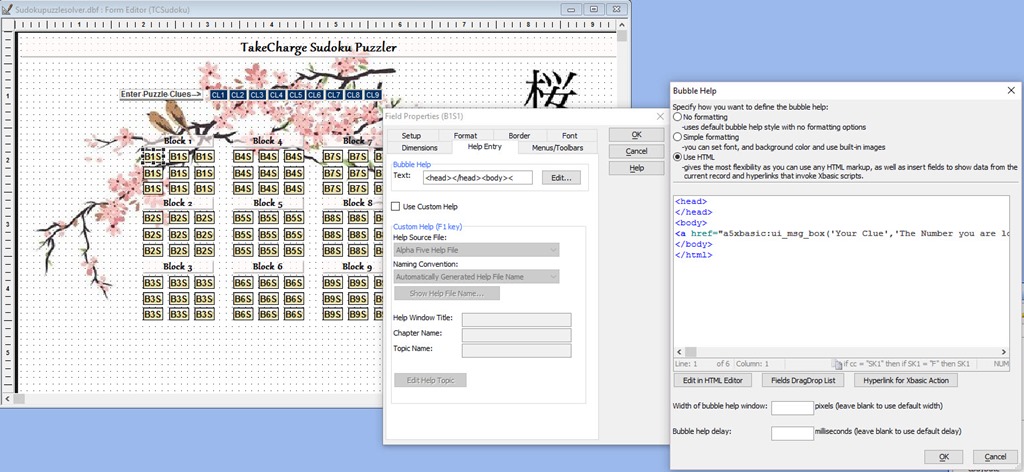
When doing bubble help, one of the options is using HTML. When you do so, you can use the wizard to create a hyperlink in the HTML help window. Here is the actual code.
<head>
 </head>
 <body>
 <a href="a5xbasic:ui_msg_box('Your Clue','The Number you are looking for is: '+lookup('currentpuzzlesolution','.t.','b1s1'))">Show Clue</a><html>
 </body>
 </html>
As I stated in the video, this simple routine has tremendous application in many business applications so I hope you give it a try. As you can see we again use the lookup function to retrieve a value stored in an external table and insert into our HTML page. That alone should stir your thought processes on how you can use this feature on a custom HTML page with data stored in a dbf table.
Well that is all for today. Next we will look at the code for our final buttons on the form then we will look at the process for creating custom Sudoku games.
 Custome Database Design with Alpha Software
Leave a comment