
For our final lesson on designing for the Surface Pro 4 we will examine the purchase and sale transaction form. On our main form we have two buttons ,

Record Purchase and Record Sale. The name clearly identifies the action that will be taken and the form for the most part is straight forward. The reason for the review is to demonstrate how to use a single form to perform two functions.
Let me start by telling you of a project I took over from several different developers over several years. The application started as a means of writing quotes for service repairs of large engines. Later it added quotes for Part Orders and finally it started Invoicing for both and Inventory tracking. Each developer along the way kept adding fields to the original tables to meet the needs of the new design request and they created new forms for each process they added. On the surface that sounds OK but since each new form was on the same table and set; design support and new design became redundant. Each change had to be done four times. As you can imagine, mistakes were made and the customer became unhappy.
Once I saw the setup I designed one form which worked for all modules. This form had all common fields and fields unique to the modules were placed on a conditional object which was controlled by a variable during ONInit of the form.
Here I am doing the same thing as an example for all of you.
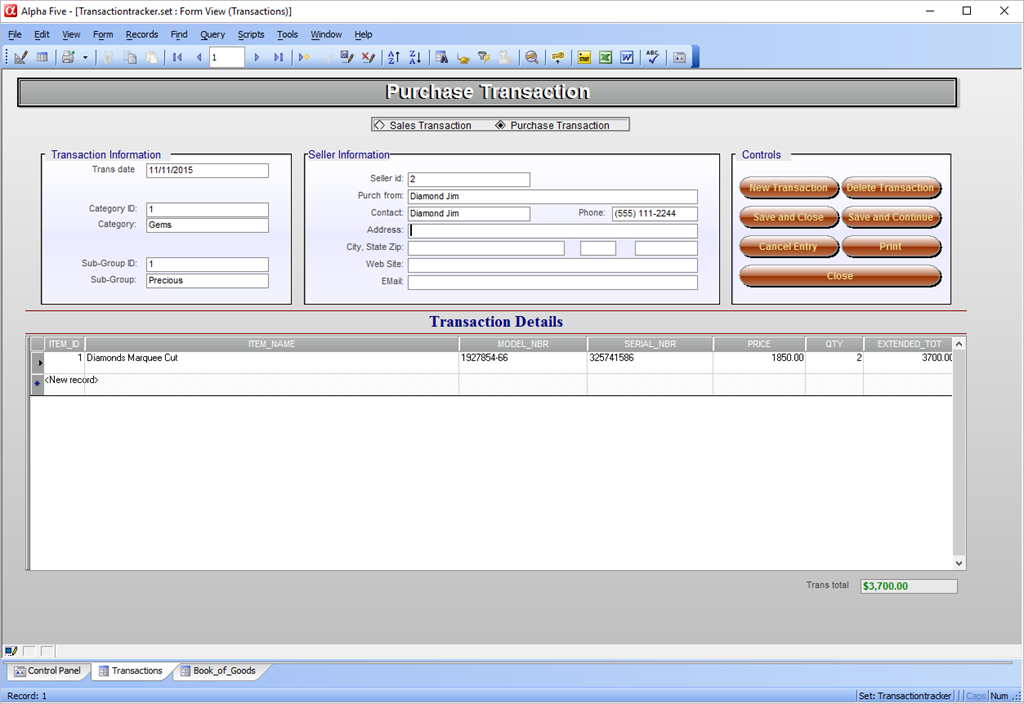
The above image is the Purchase Transaction form and below is the Sales Transaction form.
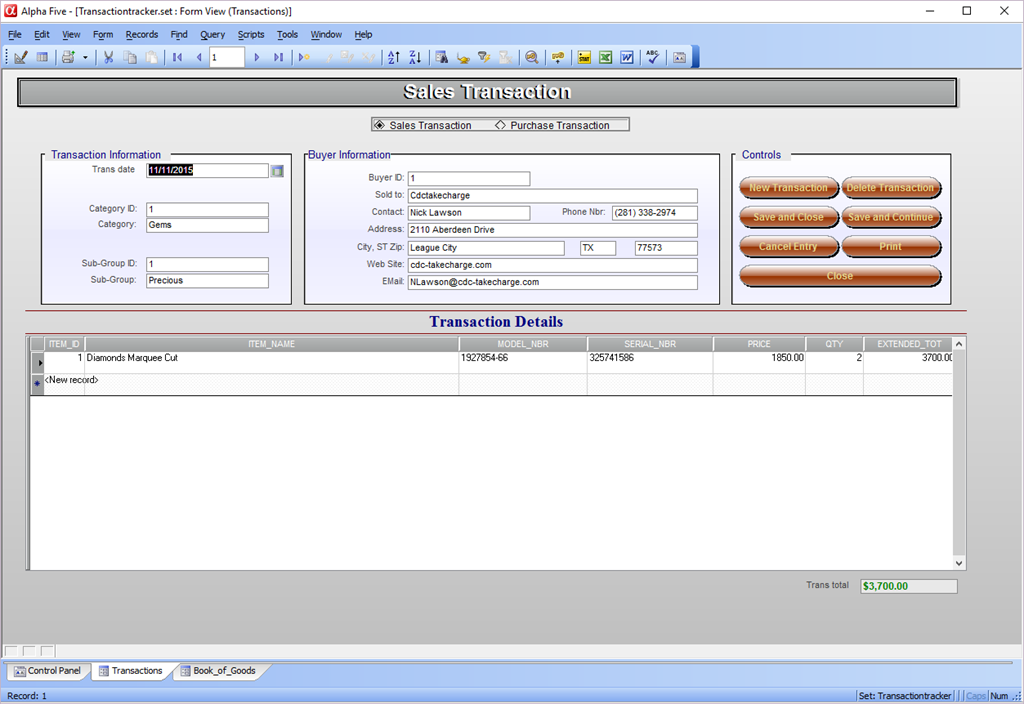
When the user selects Record Purchase the form is displayed in New Record entry mode and the middle entry box displays Seller information. If the user selects Record Sale the form is displayed as a sales transaction form and the middle entry box displays Buyer Information. The form is further controlled by filtered index’s on the set Header and by code.
The onPush event code for each of the buttons on the form is the same regardless of the form state and the only consideration to the form differences is posting transaction detail values back to inventory. Here I am using our variable to determine which posting operation to run. (see code below)
Process Transaction script:
if xTranType = "Purchase Transaction" then
    a_tbl = table.open("collectable_inventory")
    post.t_db = "transaction_detail"
    post.m_key = "Item_Id"
    post.t_key = "Trans_Id"
    post.m_filter = ""
    post.t_filter = "Trans_Type=\"Purchase Transaction\".and.Pstd<>.t."
    post.m_count = 2
    post.m_field1 = "Qty_On_Hand"
    post.m_exp1 = "Qty_On_Hand+@TRANSACTION_DETAIL->Qty"
    post.m_field2 = "Purchase_Price"
    post.m_exp2 = "@TRANSACTION_DETAIL->Price"
    post.t_count = 1
    post.t_case1 = "POSTED"
    post.t_field1 = "@TRANSACTION_DETAIL->PSTD"
    post.t_exp1 = ".t."
    a_tbl.post()
    a_tbl.close()
else
    a_tbl = table.open("collectable_inventory")
    post.t_db = "transaction_detail"
    post.m_key = "Item_Id"
    post.t_key = "Trans_Id"
    post.m_filter = ""
    post.t_filter = "Trans_Type=\"Sales Transaction\".and.Pstd<>.t."
    post.m_count = 1
    post.m_field1 = "Qty_On_Hand"
    post.m_exp1 = "Qty_On_Hand-@TRANSACTION_DETAIL->Qty"
    post.t_count = 1
    post.t_case1 = "POSTED"
    post.t_field1 = "@TRANSACTION_DETAIL->PSTD"
    post.t_exp1 = ".t."
    a_tbl.post()
    a_tbl.close()
end if
as you can see, purchases add to inventory and sales subtract and we use Alpha Software’s routine for posting back to the transaction table and set the field PSTD to true. This insures records are not posted twice by mistake.
There you have it we said we wanted an application which would work with the Surface Pro 4 and we have one. This application is very simple in concept and design but it gets the job done and that is something all developers must think about. First and foremost, the applications we design must work and must meet the original design document requirements. Also, it needs to be simple for the end user to learn and use and finally it should be easy to support. This application accomplishes all of that. What you design for your customers or for yourself will probably be different and only limited by your imagination I am sure that as you progress through the development you will choose to use some of the principles we discussed in this lesson.
This is my last post for 2015. I hope to see all of you again in the New Year. Have a happy and safe New Year’s celebration.
 Custome Database Design with Alpha Software
Leave a comment