
Welcome back
Today as stated in the previous lesson I am going to show how to develop the tables for our Collectibles application. Now I know even the beginners know how to create a table in design mode so I won’t go over the very basic steps, rather we will look at the thought behind table and set relationships
Most of the time you will be designing an application for yourself, your company or for redesign of an existing application. If you are designing for yourself, you know what data you need to collect, track and display. If you are designing for your company or someone else, they will tell you generally what data they want to collect, track and display; making design fairly simple. If you are creating an application for a business which you know nothing about and have no one to guide you then determining what tables you need and what fields need to be in each table can be tricky.
I find the best solution is to create one table with every possible field I can imagine included. (It’s easy to imagine if you start with a design document). Below is the original table I created for our collectibles project.
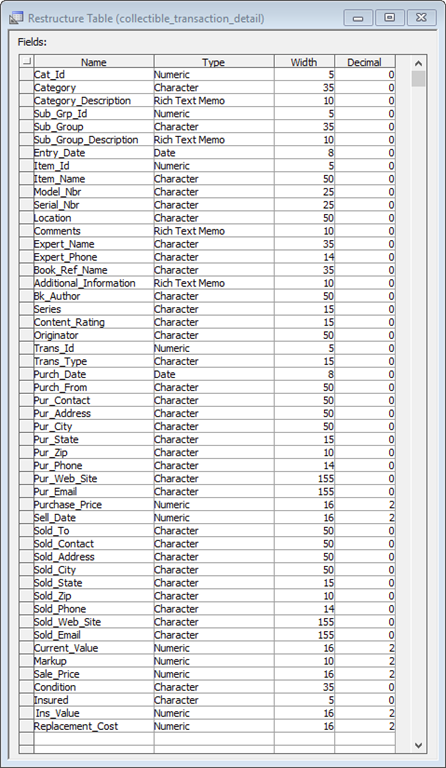
Outside of actually collecting things and putting them some place, I know nothing about managing a collection. So I did some research and this list is what I came up with. Our next image is our list broken into various tables.
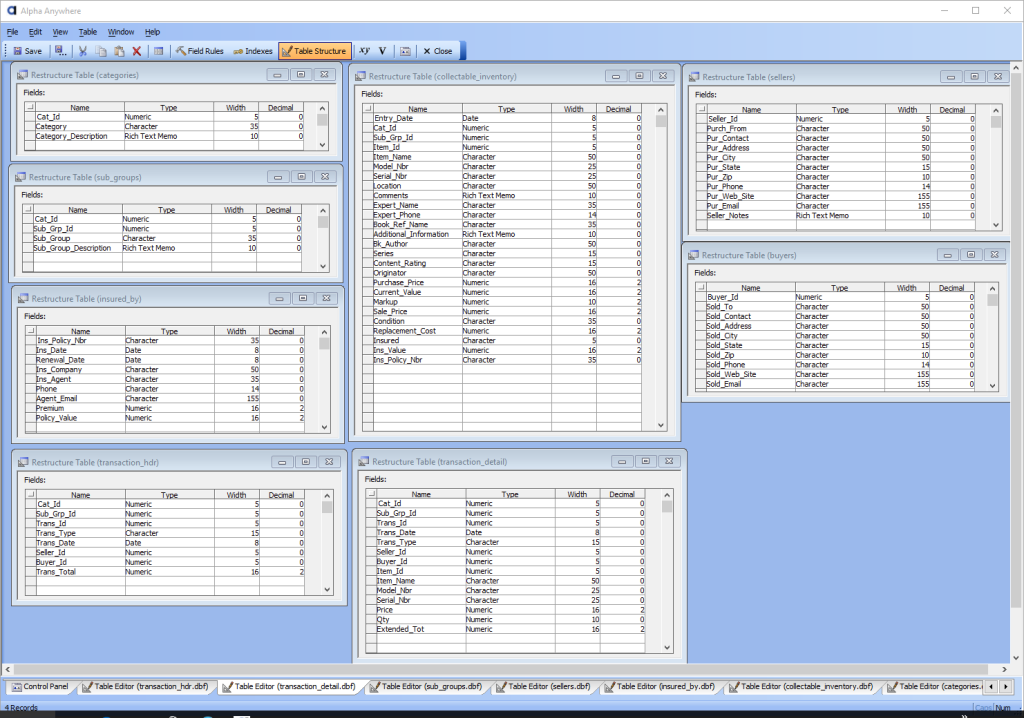
I created each table by looking at the original list and determined what data would be repeated for each transaction. For example, Our collectibles manager will track collectible’s in the area of
- Gems
- Coins
- Crystal
- Books
- Other.
So, naturally having a category table makes sense and each table which deals directly with a transaction would link back to categories. As I divided up the original table into smaller tables it helped me realize additional information would be needed if the application was to work correctly. Such as, an insurance table and for books, the ability to sort and query by author and series as well as title. As we progress, there may be additional information we need to track and we may decide some information is not actually needed.
If you go into a project knowing there will be changes, it will help you to not program yourself into a corner. If you need more, add it in. If you don’t need it, take it out. and if it don’t work, change it. Finally remember the world has waited billions of years for your application. Don’t be in a hurry. You will know when it is right and when it is, stop developing and bring it to market.
Once we have our tables we then need to determine what tables need to be linked and under what relationship. To determine this we need to look at the data entry process, screen query’s and reporting. For this application, I thought in terms of a ledger of collectibles so our form will go old school and look like a book.
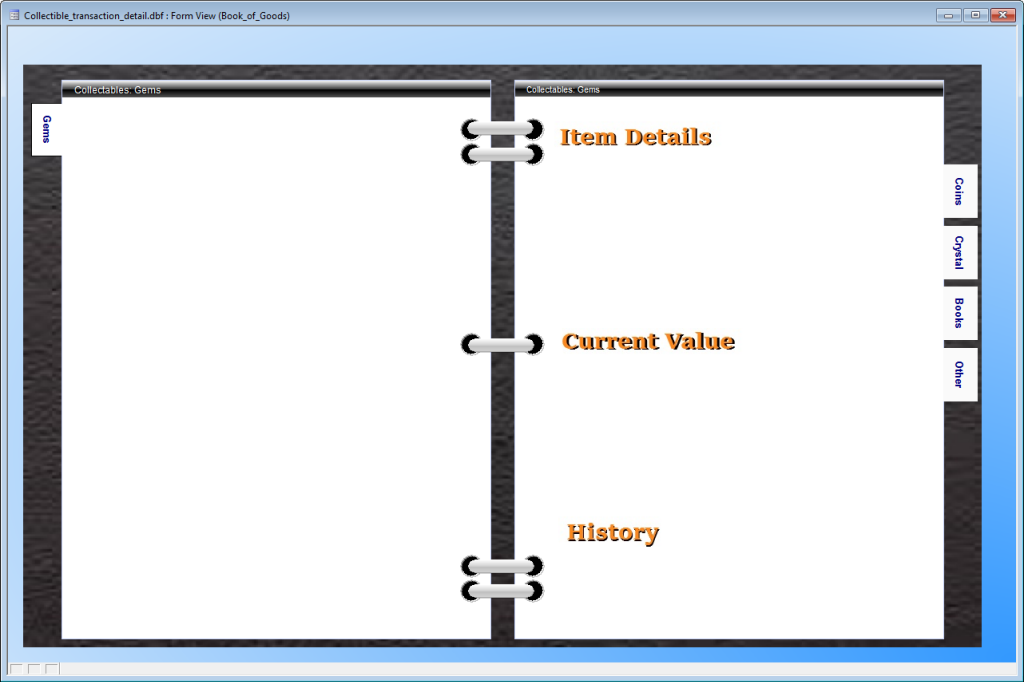
As you can see, each tab in our book will be a category and on the left will be our set navigator browse and control buttons (not designed yet) and on the right will be our details of the selected record. To be able to do that I created the following set.
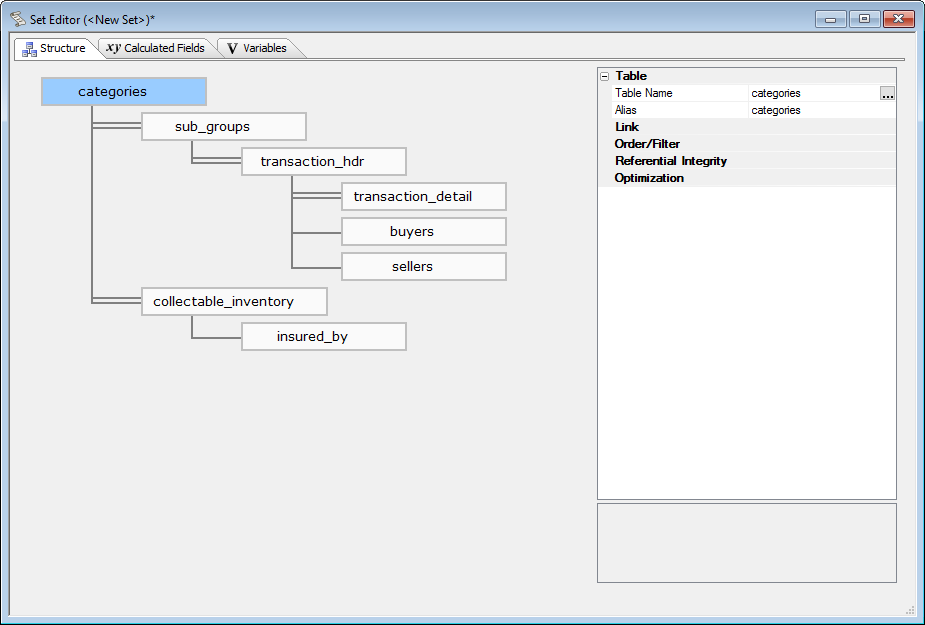
This set is designed to allow the best possible data queries and on screen views not data entry. So data entry will be controlled by buttons on the form which will pop up fast and simple data entry forms and we will use field rules to control the actual data entry.
So, lets summarize. When creating a new application, start by building one table of all possible fields you will need. (A Design Document listing all expectations for your application will help you do this.) Next break the table down so that information is not repeated in detail records. Finally decide how the tables will be used and build a set to control the form view and data entry.
Well that’s all for today. In our next lesson we will look at building our desktop form as well as the data entry screens and tweak our tables and set if necessary. If you have questions or suggestions leave a comment and I will get back to you. As always I know your time is important and I appreciate you spending some of it with me. Have a great day and I hope you will join us for lesson 3.
 Custome Database Design with Alpha Software
Leave a comment