
Hello everyone
In our lesson on super controls I suggested we might be able to create web pages using the HTML memo field on a form in Alpha Software in conjunction with an activeX web component for viewing our design . If you are creating a Alpha Software Web Application then the HTML memo field will work in the design process but not as well as the Alpha Anywhere Development Server which will step you through the entire process. I also discovered the HTML memo editor inserts code specific to Alpha Software into the header which affects the rendering of the page. In essence, it will not work. So what to do.
Back at the beginning of our session on Building a Better Desktop I listed several free software programs as an add-on for Microsoft. One of which is Notepad++. If you recall Notepad++ allows the user to write HTML scripting and has syntax help as well as browser run previewer for most popular browsers. So this is what we will use to write our website and in Alpha Software we will build a project manager to document and control the process.
Our Home Page:
The image below is how our home page will look after it is designed in HTML5 using CSS3 for styling.
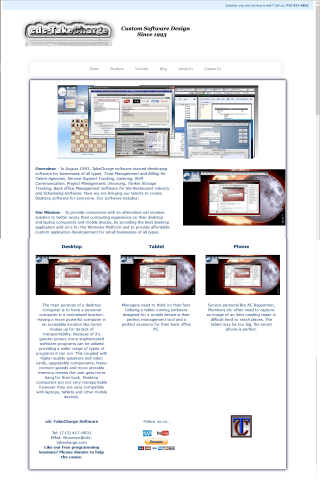 I copied and pasted the page in two parts since it would actually scroll out of view. You can see the page is very modern and clean in design and incorporates several HTML5 features. Our page is divided into seven elements. They are:
- Header with a graphical banner
- Subtle Menu Bar with drop shadow and Glass Buttons
- Wrapper to contain our text area with drop shadow
- Centered Banner
- Text area with Sidebar
- Three columns
- Footer with three columns
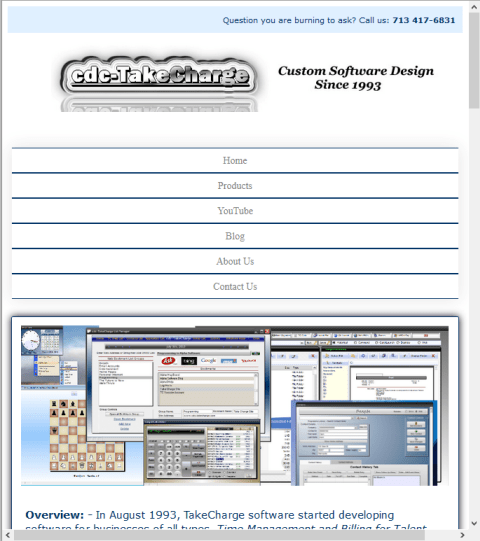
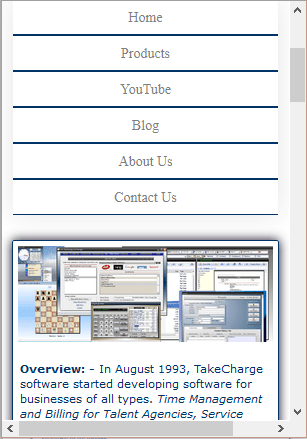
As a web page this looks great (at least I think so) and displays well on a desktop. However, in today’s day and age most people will see your web page from a tablet or smart phone which means our design must be responsive. This means the page will automatically resize and format based on the media screen size.
Here is a tablet view of our page.
and a smart phone view.
So lets get started on the HTML5 code.
Important!! Word Press will not display HTML code snippets correctly as text. To solve this I removed the ‘<‘ before each tag that was affected. for example <sometag> became sometag>. If you wish to use this code you will need to replace each missing ‘<‘. Sorry for the trouble, Feel free to complain to Word Press
First we will look at the header.
!DOCTYPE html>
html lang="eng">
head>
    meta charset="utf-8"/>
    title>cdcTakeCharge Software</title>
    meta name="viewport" content="width=divice-width, initial-scale=1.0">
style>

/style>

/head>
Notice we start by declaring our doc type as HTML. Do this to ensure your page renders correctly. The rest is just instructions for your browser. We also included a style section and for our web page we will put all styling here rather than in a style sheet.
Next we have our body. Now the body is the entire page and each element is called out as a div. By doing this each div and sub elements on each div can be named in out style section allowing for individual property control.
body>
    div id="callout"
        Question you are burning to ask?    Call us: <b> 713 417-6831</b>
    /div
    header>
        a href="#"><img src="images/TCNewLogoPencilWhite.jpg" alt="TCNewLogoPencilWhite" title="TCNewLogoPencilWhite"/></a>
    /header>
    br>
The callout is the blue line at the top of the page with the Company Phone Nbr. The “#” in a href is just a place holder since I have no navigation yet and we have not added any styling so the items are just on the page. Now we add the Navigation and banner.
        nav>
            ul>
                li class="active"><a href="Home">Home</a></li>
                li> <a href="Products">Products</a></li>
                li> <a href="YouTube">YouTube</a></li>
                li> <a href="Blog">Blog</a></li>
                li> <a href="About Us">About Us</a></li>
                li> <a href="Contact Us">Contact Us</a></li>
            /ul>
        /nav>
Basically each button calls it’s own page and are justified left. Now we want to set our sub elements of our div. This is done by assigning them to a class. The first class is banner. Our banner image is added and centered on the page.
        div id="wrapper">
        div class="banner">
            a href="#"><center><img src="'image name'" alt="'TakeCharge Custom Apps'" title="'TakeCharge Custom Apps'"/></center></a>*/
        /div>
We know our page will have a left column with a side bar so we add those next. Left column is a section and our sidebar is aside. As a sub section of aside we div our image for the sidebar.
        section class="left-col">
            p><b>Overview: - </b>
                In August 1993, TakeCharge software started developing software for businesses of all types. <i>Time Management and Billing for Talent Agencies, Service Support Tracking, Catering, Shift Communication, Project Management, Invoicing, Tanker Storage Tracking, Back office Management Software for the Restaurant industry and Scheduling Software.</i> Now we are bringing our talents to create Desktop software for everyone. Our Software includes:</p>
            p><b>Our Mission: - </b>
                To provide consumers with an alternative yet intuitive solution to better enjoy their computing experience on their desktop and laptop computers and mobile divices, by providing the best desktop application add-on's for the Windows Platform and to provide affordable custom application developement for small businesses of all types.</p>
        /section>
        aside class="sidebar">
            div class="KeyList">
                 img src="images/KeyList_Builder.png" alt="Jot-It Note Organizer" title="Jot-It Note Organizer"/>
        /aside>
Two points of interest here one, I also added a little in line formatting to the text and two I auto closed our aside sub element image by including the ‘/’ at the end of our tag. Below our left column and sidebar we want three columns with text and images. Here is the initial code.
        div class="section">
            h3>Desktop</h3>
            img src="images/KeyList_Builder.png" alt="Jot-It Note Organizer" title="Jot-It Note Organizer"/>
            p>The main purpose of a desktop computer is to have a personal computer in a centralized location. Having a more powerful computer in an accessible location like home  makes up for its lack of transportability. Because of it's greater power, more sophisticated software programs can be utilized providing a wider range of types of programs it can run. This coupled with higher quality speakers and video cards, upgradable components, faster connect speeds and more storable memory means the user gets more bang for their buck. Desktop computers are not very transportable however they are very compatible with laptops, tablets and other mobile devices.</p>
        /div>
        div class="section">
            h3>Tablet</h3>
            img src="images/KeyList_Builder.png" alt="Jot-It Note Organizer" title="Jot-It Note Organizer"/>
            p>Managers need to think on their feet. Utilizing a tablet running software designed for a mobile device is their perfect management tool and a perfect accesory for their back office PC. </p>
        /div>
        div class="section">
            h3>Phone</h3>
            img src="images/KeyList_Builder.png" alt="Jot-It Note Organizer" title="Jot-It Note Organizer"/>
            p>Service personel like AC Repairmen, Plumbers etc often need to capture an image of an item needing repair in difficult hard to reach places. The tablet may be too big, the smart phone is perfect.</p>
        /div>
Notice each section is the same in format. Each is listed separately so that when we apply our style they will line up as columns rather then vertical. The actual text and images will change as the page is further developed.
Now on to the footer.
        footer>
            div class="section">
                p><b>cdc-TakeCharge Software</b></p>
                p>Tel:   (713) 417-6831<br>
                    EMail: NLawson@cdc-takecharge.com</p>
            /div>
            div class="section">
                p>Follow us on..</p>
                    ul>
                        li> a href="#"> img src="images/wordpresslogo.png"/></li>
                        li> a href="#"> img src="images/youtubelogo.png"/></li>
                    /ul>
            /div>
            div class="section">
                img src="images/MyBox2.jpg" alt="TC Suite" title="TC Suite"/>
            /div>
        /footer>
Again we will ultimately have three columns so we repeat what we did above and only change the text and images. That’s it for our HTML5 code. Initially I set the wrapper to include the entire page. Later I moved it below the header and nav bar only because I like it there.
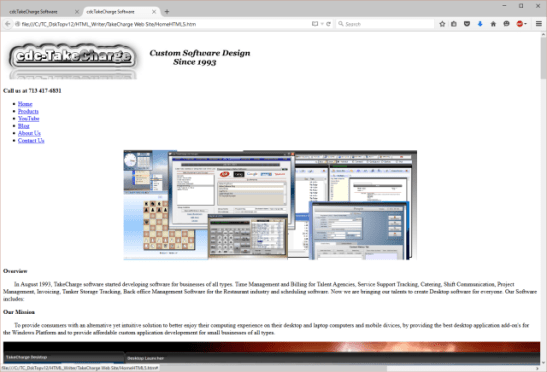
As you can see, it is very plain vanilla. Lets look at styling one div section at a time.
We start with body
body {
    font-family: Verdana, Tahoma, Arial, San-Serif;
    font-size: 14px;
    overflow: auto;
}
Here we set our font and font size. Noticed I named a couple font types to insure the page displays correctly.
Now we have our header and paragraph styles.
h1, h2, h3 {
    text-align: center;
    color: #003366;
}
p {
    padding: 2%;
    color: #003366;
}
Our headers h1 h2 and h3 all receive the same format so I can do them collectively by using a ‘,’ to separate each. I am using the HEX color name since all major browsers read it correctly.
We now set some global properties for our images
img {
    padding: 2%;
    text-align: center;
    max-width: 100%;
    height: auto;
    width: auto;
}
I use text-align: center to insure it does not float around the screen.
Wrapper and callout are elements directly on our page so they are identified in style with a pound sign (#).
#wrapper {
    margin: 0 auto;
    max-width: 1020px;
    width: 98%;
    background: #FFFFFF;
    border: 1px solid #003366;
    border-radius: 2px;
    box-shadow: 0 0 10px rgba(12, 3, 25, 8);
}
#callout {
    width: 100%;
    height: auto;
    background: #E0F0FF;
    overflow: hidden;
}
#callout p {
    text-align: right;
    font-size: 11px;
    padding: 0.1% 1.5% 0 0;
}
Box shadow gives that cool drop shadow look and I had to use HTML5 color code to get the shade I wanted. This will not display right is Alpha Software but neither does some of the other formatting. Now I could add Microsoft’s equivalent code after my code so that it does display and maybe I will later.
Now we will look at the style for header and Nav.
header {
    margin: 0 auto;
    width: 96%;
    min-height: 110px;
    padding-left: 50px;
    text-align: left;
}
nav {
  max-width: 1020px;
  margin: 0 auto;
  width: 96%;
  mask-image: linear-gradient(90deg, rgba(255, 255, 255, 0) 0%, #ffffff 25%, #ffffff 75%, rgba(255, 255, 255, 0) 100%);
  padding: 15px 0;
}
nav ul {
  text-align: center;
  background: linear-gradient(90deg, rgba(255, 255, 255, 0) 0%, rgba(255, 255, 255, 0.2) 25%, rgba(255, 255, 255, 0.2) 75%, rgba(255, 255, 255, 0) 100%);
  width: 98%;
  box-shadow: 0 0 25px rgba(0, 0, 0, 0.1), inset 0 0 1px rgba(255, 255, 255, 0.6);
}
nav ul li {
  display: inline-block;
}
nav ul li a {
  padding: 20px;
  font-family: "Roboto";
  color: rgba(0, 0, 0, 0.5);
  text-shadow: 1px 1px 1px rgba(255, 255, 255, 0.4);
  font-size: 15px;
  text-decoration: none;
  display: block;
}
nav ul li a:hover {
  padding: 19px;
  font-size: 16px;
  box-shadow: 0 0 10px rgba(0, 0, 0, 0.1), inset 0 0 1px rgba(255, 255, 255, 0.6);
  background: rgba(255, 255, 255, 0.1);
  color: rgba(0, 0, 0, 0.7);
}
The header is standard but the nav bar and buttons are custom. Again to get the desired effect, I had to use HTML5 elements meaning rgba color and Linear-gradient background. The effect I think is worth it. When I first started to lay out the page my columns section did not display correctly and I did not know why. After searching the internet I found an article which discussed ‘clearfix’ and how it is used to fix formatting issues. My columns were not displaying because section was styled for our left-col class. Clearfix is the answer.
.clearfix {
    clear: both;
}
Now I div it above each section in the body which needs fixing.
You will see this in the final code.
Lets finish with the final sections in our style for our desktop view.
.left-col {
    width: 55%;
    Float: left;
    margin: -2% 1% 1% 1%;
}
.sidebar {
    width: 40%;
    float: right;
    margin: 1%;
    text-align: center;
}
.keyList {
    float: left;
    margin: 5px;
    max-width: 340px;
    width: 98%;
    height: auto;
    padding: 2%
}
.section {
    width: 29%;
    float: left;
    margin: 2% 2%;
    text-align: center;
}
footer {
    width: 100%;
    overflow: hidden;
}
footer p, footer h3 {
    color: #003366;
}
footer p a {
    text-decoration: none;
}
ul {
    list-style-type: none;
    margin: 0;
    padding: 0;
}
li{
    display: inline;
}
ul li img {
    height: 25px;
}
Finding the right value for width, margin and padding is trial and error. Add a value then preview the page. Change and test again until it looks good to you. So now our page is done, but if viewed in a tablet or phone the page is not user friendly. We fix this by adding media styling to our style section.
  /*----------------Tablet & Smart Phone Webpage Styles----------------*/
@media screen and (max-width: 478px) {
    body {
        font-size: 11px;
    }
}
@media screen and (max-width: 740px) {
    nav {
        width: 100%;
        margin-bottom: 10px;
    }
    nav ul {
        list-style: none;
        margin: 0 auto;
        padding-left: 0;
    }
    nav ul li {
        text-align: center;
        margin-left: 0 auto;
        width: 100%;
        border-top: 1px solid #003366;
        border-right: 0px solid #003366;
        border-bottom: 1px solid #003366;
        border-left: 0px solid #003366;
    }
    nav ul li a {
        padding: 8px 0;
        font-size: 14px;
    }
    .banner {
        float: left;
        width: 96%;
        margin: 0;
    }
    .left-col{
        width: 96%;
    }
    .sidebar {
        float: left;
        width: 96%;
        margin: 0;
    }
    .section {
        float: left;
        width: 96%;
        margin: 0;
    }
}

</style>
Here I use @media to tell what formatting to display then again I just tweak it until it looks good.
To wrap things up I am including the final code in body with all tweaks so you can see the finished product. If you like the look and want to use it just copy it out and put it in your own editor.
</head>

<body>
    div id="callout">
        p>Question you are burning to ask?    Call us: <b> 713 417-6831</b></p>
    /div>
    <header>
        a href="#"><img src="images/TCNewLogoPencilWhite.jpg" alt="TCNewLogoPencilWhite" title="TCNewLogoPencilWhite"/></a>
    </header>
    <br>
    <nav>
        <ul>
            <li class="active"><a href="Home">Home</a></li>
            <li> <a href="Products">Products</a></li>
            <li> <a href="YouTube">YouTube</a></li>
            <li> <a href="Blog">Blog</a></li>
            <li> <a href="About Us">About Us</a></li>
            <li> <a href="Contact Us">Contact Us</a></li>
        </ul>
        div class="clearfix"></div>
    </nav>
    div id="wrapper">
        div class="banner">
            <a href="#"><center><img src="images/TCBanner.png" alt="TakeCharge Custom Apps" title="TakeCharge Custom Apps"/></center></a>
        /div>
        section class="left-col">
            p><b>Overview: - </b>
                In August 1993, TakeCharge software started developing software for businesses of all types. <i>Time Management and Billing for Talent Agencies, Service Support Tracking, Catering, Shift Communication, Project Management, Invoicing, Tanker Storage Tracking, Back office Management Software for the Restaurant industry and Scheduling Software.</i> Now we are bringing our talents to create Desktop software for everyone. Our Software includes:</p>
            p><b>Our Mission: - </b>
                To provide consumers with an alternative yet intuitive solution to better enjoy their computing experience on their desktop and laptop computers and mobile divices, by providing the best desktop application add-on's for the Windows Platform and to provide affordable custom application developement for small businesses of all types.</p>
        /section>
        aside class="sidebar">
            div class="KeyList">
                img src="images/KeyList_Builder.png" alt="Jot-It Note Organizer" title="Jot-It Note Organizer"/>
            /div>
        /aside>
        div class="clearfix">
        /div>
        div class="section">
            <h3>Desktop</h3>
            img src="images/KeyList_Builder.png" alt="Jot-It Note Organizer" title="Jot-It Note Organizer"/>
            p>The main purpose of a desktop computer is to have a personal computer in a centralized location. Having a more powerful computer in an accessible location like home  makes up for its lack of transportability. Because of it's greater power, more sophisticated software programs can be utilized providing a wider range of types of programs it can run. This coupled with higher quality speakers and video cards, upgradable components, faster connect speeds and more storable memory means the user gets more bang for their buck. Desktop computers are not very transportable however they are very compatible with laptops, tablets and other mobile devices.</p>
        /div>
        div class="section">
            <h3>Tablet</h3>
            img src="images/KeyList_Builder.png" alt="Jot-It Note Organizer" title="Jot-It Note Organizer"/>
            p>Managers need to think on their feet. Utilizing a tablet running software designed for a mobile device is their perfect management tool and a perfect accesory for their back office PC. </p>
        /div>
        div class="section">
            <h3>Phone</h3>
            img src="images/KeyList_Builder.png" alt="Jot-It Note Organizer" title="Jot-It Note Organizer"/>
            p>Service personel like AC Repairmen, Plumbers etc often need to capture an image of an item needing repair in difficult hard to reach places. The tablet may be too big, the smart phone is perfect.</p>
        /div>
        div class="clearfix">
        /div>
        <footer>
            div class="section">
                p><b>cdc-TakeCharge Software</b></p>
                p>Tel:   (713) 417-6831<br>
                    EMail: NLawson@cdc-takecharge.com<br>
                    <b>Like our free programming lessions? Please donate to help the cause.</b></p>
                    /div>
            div class="section">
                p>Follow us on..</p>
                    <ul>
                        <li><a href="https://cdctakecharge.wordpress.com/"><img src="images/wordpresslogo.png"/></li>
                        <li><a href="https://www.youtube.com/user/cdcTakeCharge"><img src="images/youtubelogo.png"/></li>
                    </ul>
                    <form action=
                            This section removed since
                              it points to paypal
</form> /div> div class="section"> img src="images/TCLogo8.png" alt="TC Suite" title="TC Suite"/> /div> </footer> div class="clearfix"> /div> /div> p style="text-align: center">Copyright © 2012 cdc-TakeCharge Software ™<br> No material may be reproduced without written permission</p> </body> </html>
Well that’s it for today. For those who are curious, I spent three hours gathering the information I needed for my page and the writing of the HTML5 and two hours doing the style section. (Not including the 45 minutes searching for clearfix). I hope you found this post interesting. My next post will look at our project manager for our web application. I should have it up soon. Until then, I would like to say thanks again for stopping by and remember, if you need help with an Alpha Software application or wish to inquire about a custom application for your business go to our website
and inquire or contact
NLawson@cdc-TakeCharge.com
Have a great day.
 Custome Database Design with Alpha Software
Leave a comment