
Hello everyone
Today we will look at using xBasic to control multiple browses on a single form designed on a set with one to many links to five separate tables.
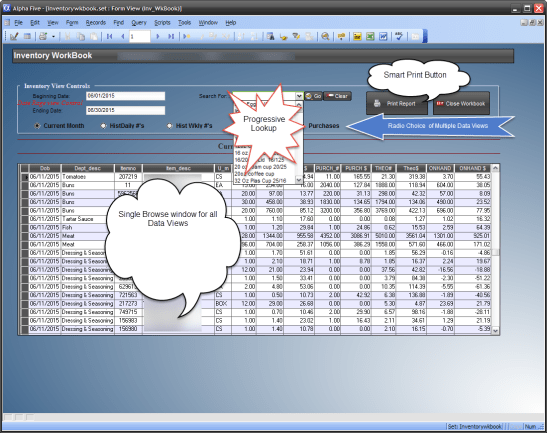 This example comes from our Managers Workbook in our Restaurant Back Office software application and is written in version 8 of Alpha Software.
Purpose of the Form:
Inventory is a major expense for restaurants and controlling inventory is critical to the profitability and success of the restaurant. Because of that most restaurants count a small group of the most expensive inventory items daily, expand that count to include other key items weekly and finally count all inventory monthly. They also need to track purchases and the projected inventory on hand to help them order correctly. This form allows the user to see each of inventory key values by day, week, month and when it was purchased as well as print historical counts for each count cycle and a running monthly inventory analysis total at any time in the month. Lets look at how it is done.
Set Design:
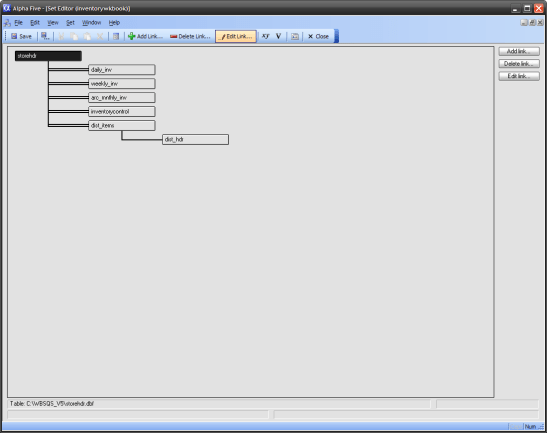
StoreHdr is our parent table and as you can imagine, it contains all licensing information for the customer. It also has a field called LinkVal which is used to link each of the inventory tables in a one to many relationship. This set structure is simple and there are no filter restrictions put on any of the child tables. Each of the inventory tables with the exception of dist_items are identical in design. All adjustments to inventory are recorded in inventorycontrol and at the end of the day, daily inventory counts are appended to daily_inv, at the end of the week, weekly to weekly_inv and at the end of the month or period the month end is appended to arc_mnthly_inv.
Form Design:
Our form consist of the following objects:
- Text Banner
- Simple frame object
- Four variables
- vRptStart
- vRptEnd
- xDept
- xCntView
- Conditional Object
- Four Action Buttons
- Five Embedded Browse Views
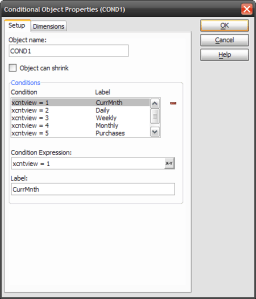
vRptStart and vRptEnd are date variables with the object properties set as calendar. If the user changes either of the date fields the embedded browse for the selected table is automatically refreshed. Each of the embedded browse objects are on their own unique page of our conditional object and xCntView is a numeric variable which has the object properties set as a user defined radio choice.
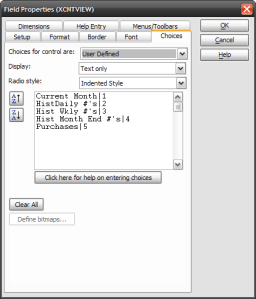
When the user selects a choice the conditional object is refreshed showing the embedded browse. xDept is a character variable which is a progressive look up returning Item description from inventorycontrol. The values in this field exist in each of the tables which allows the user to drill down the browse view of each table from a single selection.
xBasic ties it all together:
When our form loads the onInit event of our form runs the following xBasic code.
xDept = ""
ui_freeze(.t.)

vRptStart = Date_FirstDayofMonth()
vRptEnd = Date_LastDayofMonth()
text2.text = "Current Monthly View - "
ui_freeze(.f.)
Our conditional object is set to page 1 which is our current month inventory view and the date range is the first to the last day of the month.
The on Change event for our Radio Choice is
xCntView.refresh()
ui_freeze(.t.)
if xCntView = 2 then
    DIM records_found as N
    records_found = topparent.queryrun("(Daily_Inv->DOB >= Var->vRptStart .AND. Daily_Inv->DOB <= Var->vRptEnd) .AND. (Daily_Inv->Dv = \"D\"  )","","","No","Daily_Inv",.f.)
    text2.text = "Current Daily View  Range - "+ DTOC(vRptStart) + "to" + DTOC(vRptEnd) + " - " + Var->xDept
else if xCntView = 3 then
    DIM records_found as N
    records_found = topparent.queryrun("(Weekly_Inv->DOB >= Var->vRptStart .AND. Weekly_Inv->DOB <= Var->vRptEnd) .AND. (Weekly_Inv->Wv = \"W\"  )","","","No","Weekly_Inv",.f.)
    text2.text = "Current Weekly View  Range - "+ DTOC(vRptStart) + "to" + DTOC(vRptEnd) + " - " + Var->xDept
else if xCntView = 4 then
    t = table.open("arc_mnthly_inv")
    t.query_detach_all()
    t.fetch_last()
    if t.Dob = Var->vRptStart .and. t.DOB <= Var->vRptEnd then
        'use existing dates
    else
        dim usedate as D
        useDate = Date_FirstDayofMonth(t.Dob)
        Var->vRptStart = Date_FirstDayofMonth(Var->useDate)
        vRptStart.refresh()
    end if
    t.close()
    DIM records_found as N
    records_found = topparent.queryrun("(Arc_Mnthly_Inv->DOB >= Var->vRptStart .AND. Weekly_Inv->DOB <= Var->vRptEnd) .AND. (Arc_Mnthly_Inv->Mv = \"M\"  )","","","No","Arc_Mnthly_Inv",.f.)
    text2.text = "Archive Month View - "+ DTOC(vRptStart) + "to" + DTOC(vRptEnd) + " - " + Var->xDept
else if xCntView = 5 then
    DIM records_found as N
    records_found = topparent.queryrun("(Delv_date >= Var->vRptStart  )  .and. (Delv_date <= Var->vRptEnd  )","","","No","Dist_Items",.f.)
    text2.text = "Receivable View - "+ DTOC(vRptStart) + "to" + DTOC(vRptEnd) + " - " + Var->xDept
else
    Var->vRptStart = Date_FirstDayofMonth()
    Var->vRptEnd = Date_LastDayofMonth()
    vRptStart.refresh()
    vRptEnd.refresh()
    text2.text = "Current Monthly View - "
end if
cond1.refresh()
xDept.Activate()
ui_freeze(.f.)
The xBasic code in this event is actually the key to the entire form working correctly. The primary function I use is
queryrun().
Rather than using <Cross Level> for the level designation of our set I specifically name the child table. This makes the code more portable since each table has the same field names. If you remember back to the set design, each table is linked by the same link value which shows all records. Now our query will filter the selected table very fast even though there are tens of thousands of records in the tables. Finally any changes to the variable objects used in the query filter will automatically rerun the query for the table. Cool!!!
The onChange event of both the start date and end date calendar objects is the same
xCntView.refresh()
ui_freeze(.t.)

if xCntView = 2 then
    text2.text = "Current Daily View  Range - "+ DTOC(vRptStart) + "to" + DTOC(vRptEnd)
else if xCntView = 3 then
    text2.text = "Current Weekly View  Range - "+ DTOC(vRptStart) + "to" + DTOC(vRptEnd)
else if xCntView = 4 then
    text2.text = "Archive Month View - "+ DTOC(vRptStart) + "to" + DTOC(vRptEnd)
else
    text2.text = "Current Monthly View - "
end if
cond1.refresh()
xDept.Activate()
ui_freeze(.f.)
You can see this code only sets the text object text and refreshes the conditional object. If the user is on one of the count views the selected table will be re-queried as stated above.
Our action button on Push event for searching the selected table for a specific item is
parentform.commit()

xDept.refresh()
xCntView.refresh()
ui_freeze(.t.)
if xCntView = 2 then
    if xDept.text = "" then
        DIM records_found as N
        records_found = topparent.queryrun("(Daily_Inv->DOB >= Var->vRptStart .AND. Daily_Inv->DOB <= Var->vRptEnd) .AND. (Daily_Inv->Dv = \"D\"  )","","","No","Daily_Inv",.f.)
    else
        DIM records_found as N
        records_found = topparent.queryrun("(Alltrim(Item_desc) = Alltrim(Var->xDept)  ) .and. (DOB >= Var->vRptStart .AND. DOB <= Var->vRptEnd)","","","No","Daily_Inv",.f.)
    end if
    text2.text = "Current Daily View  Range - "+ DTOC(vRptStart) + "to" + DTOC(vRptEnd) + " - " + Var->xDept
else if xCntView = 3 then
    if xDept = "" then
        DIM records_found as N
        records_found = topparent.queryrun("(Weekly_Inv->DOB >= Var->vRptStart .AND. Weekly_Inv->DOB <= Var->vRptEnd) .AND. (Weekly_Inv->Wv = \"W\"  )","","","No","Weekly_Inv",.f.)
    Else
        DIM records_found as N
        records_found = topparent.queryrun("Alltrim(Item_desc) = Alltrim(Var->xDept) .and. (DOB >= Var->vRptStart .AND. DOB <= Var->vRptEnd)","","","No","Weekly_Inv",.f.)
    end if
    text2.text = "Current Weekly View  Range - "+ DTOC(vRptStart) + "to" + DTOC(vRptEnd) + " - " + Var->xDept
else if xCntView = 4 then
    t = table.open("arc_mnthly_inv")
    t.query_detach_all()
    t.fetch_last()
    if t.Dob = Var->vRptStart .and. t.DOB <= Var->vRptEnd then

    else
        dim usedate as D
        useDate = Date_FirstDayofMonth(t.Dob)
        Var->vRptStart = Date_FirstDayofMonth(Var->useDate)
        vRptStart.refresh()
    end if
    t.close()
    if xDept = "" then
        DIM records_found as N
        records_found = topparent.queryrun("(Arc_Mnthly_Inv->DOB >= Var->vRptStart .AND. Weekly_Inv->DOB <= Var->vRptEnd) .AND. (Arc_Mnthly_Inv->Mv = \"M\"  )","","","No","Arc_Mnthly_Inv",.f.)
    else
        DIM records_found as N
        records_found = topparent.queryrun("Alltrim(Item_desc) = Alltrim(Var->xDept) .and. (DOB >= Var->vRptStart .AND. DOB <= Var->vRptEnd)","","","No","Arc_Mnthly_Inv",.f.)
    end if
    text2.text = "Archive Month View - "+ DTOC(vRptStart) + "to" + DTOC(vRptEnd) + " - " + Var->xDept
else if xCntView = 5 then
    if xDept = "" then
        DIM records_found as N
        records_found = topparent.queryrun("(Delv_Date >= Var->vRptStart  )  .and. (Delv_Date <= Var->vRptEnd  )","","","No","Dist_Items",.f.)
    else
        DIM records_found as N
        records_found = topparent.queryrun("Alltrim(Item_desc) = Alltrim(Var->xDept) .and. (Delv_Date >= Var->vRptStart .AND. Delv_Date <= Var->vRptEnd)","","","No","Dist_Items",.f.)
    end if
    text2.text = "Receivable View - "+ DTOC(vRptStart) + "to" + DTOC(vRptEnd) + " - " + Var->xDept
else
    Var->vRptStart = Date_FirstDayofMonth()
    Var->vRptEnd = Date_LastDayofMonth()
    vRptStart.refresh()
    vRptEnd.refresh()
    text2.text = "Current Monthly View - "
end if
cond1.refresh()
xDept.Activate()
ui_freeze(.f.)
Examine the code and you will see it matches the onChange code for our Radio Choice expect it starts the filter with
Alltrim(Item_Desc) = Alltrim(Var->xDept).
The final object to discuss is the Smart Print Button. It simply prints one of five reports based on which page of the conditional object is displayed and passes the current query to the selected report.
Well that’s all for today. I hope you found this session helpful and informative
Thanks again for stopping by and Remember, if you need help with an Alpha Software application or wish to inquire about a custom application for your business go to our website
and inquire or contact
NLawson@cdc-TakeCharge.com
Have a great day.
 Custome Database Design with Alpha Software
Leave a comment