
Hello everyone
Today we will continue our session on incorporating xBasic into our form design in Alpha Software by looking at the Application Launcher module in our TakeCharge Desktop v2 software written in Alpha Software v5.
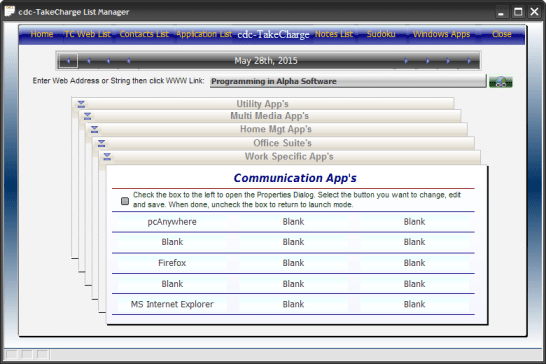
Before we get into the details of how this module works, I have included a short video demonstrating how it works with a quick overview of the code we will examine below. Please take a minute to watch the video then follow along.
I hope you enjoyed the show. To create the Application Launcher module I needed the following.
- DBF table – Applicationlist.dbf
- Text objects
- Button Objects
- Conditional Object
- Variables
- xDialog box
- Check box variable
The structure of our applicationlist table is simple
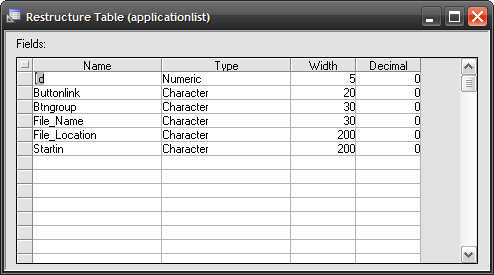
In the video we showed that each of the 15 buttons on the form could run up to six applications. This is done by using ButtonLink to identify which button on the form runs which application and BtnGroup to control the button object text that is displayed when a index card is selected. File Name, File Location and Startin are used to store the needed information for launching an external application using
sys_shell() and..
dir_put()
The index cards on the screen consist of a frame a text object for each card and a few lines drawn on the form to give the appearance of stacked cards. The code to reposition the cards is
'Date Created: 19-Sep-2007 04:44:56 PM
'Last Updated: 20-Sep-2007 11:32:49 AM
'Created By  : Owner
'Updated By  : Owner
if TakeCharge_Navigator:crdbk1.text = "Work Specific App's" Then
    TakeCharge_Navigator:crdfront.text = "Work Specific App's"
    TakeCharge_Navigator:crdbk1.text = "Communication App's"
    TakeCharge_Navigator:crdbk2.text = "Office Suite's"
    TakeCharge_Navigator:crdbk3.text = "Home Mgt App's"
    TakeCharge_Navigator:crdbk4.text = "Multi Media App's"
    TakeCharge_Navigator:crdbk5.text = "Utility App's"
tbl = table.open("applicationlist")
tbl.batch_begin()
tbl.fetch_first()
while .NOT. tbl.fetch_eof()
    if tbl.ButtonLink = "W1" then
        TakeCharge_Navigator:C1.text = Alltrim(tbl.File_name)
    end if
    if tbl.ButtonLink = "W2" then
       TakeCharge_Navigator:C2.text = Alltrim(tbl.File_name)
    end if
    if tbl.ButtonLink = "W3" then
       TakeCharge_Navigator:C3.text = Alltrim(tbl.File_name)
    end if
    if tbl.ButtonLink = "W4" then
       TakeCharge_Navigator:C4.text = Alltrim(tbl.File_name)
    end if
    if tbl.ButtonLink = "W5" then
       TakeCharge_Navigator:C5.text = Alltrim(tbl.File_name)
    end if
    if tbl.ButtonLink = "W6" then
       TakeCharge_Navigator:C6.text = Alltrim(tbl.File_name)
    end if
    if tbl.ButtonLink = "W7" then
       TakeCharge_Navigator:C7.text = Alltrim(tbl.File_name)
    end if
    if tbl.ButtonLink = "W8" then
       TakeCharge_Navigator:C8.text = Alltrim(tbl.File_name)
    end if
    if tbl.ButtonLink = "W9" then
       TakeCharge_Navigator:C9.text = Alltrim(tbl.File_name)
    end if
    if tbl.ButtonLink = "W10" then
       TakeCharge_Navigator:C10.text = Alltrim(tbl.File_name)
    end if
    if tbl.ButtonLink = "W11" then
       TakeCharge_Navigator:C11.text = Alltrim(tbl.File_name)
    end if
    if tbl.ButtonLink = "W12" then
       TakeCharge_Navigator:C12.text = Alltrim(tbl.File_name)
    end if
    if tbl.ButtonLink = "W13" then
       TakeCharge_Navigator:C13.text = Alltrim(tbl.File_name)
    end if
    if tbl.ButtonLink = "W14" then
       TakeCharge_Navigator:C14.text = Alltrim(tbl.File_name)
    end if
    if tbl.ButtonLink = "W15" then
       TakeCharge_Navigator:C15.text = Alltrim(tbl.File_name)
    end if
    tbl.Fetch_Next()
    end while
    tbl.Batch_End()
tbl.close()
else
script_play("AssignbuttonName")
    TakeCharge_Navigator:crdfront.text = "Communication App's"
    TakeCharge_Navigator:crdbk1.text = "Work Specific App's"
    TakeCharge_Navigator:crdbk2.text = "Office Suite's"
    TakeCharge_Navigator:crdbk3.text = "Home Mgt App's"
    TakeCharge_Navigator:crdbk4.text = "Multi Media App's"
    TakeCharge_Navigator:crdbk5.text = "Utility App's"

end if
Each button object in the left upper corner of a card has the same code with the exception of the lines at the top of the onPush event
if TakeCharge_Navigator:crdbk1.text = "Work Specific App's" Then
    TakeCharge_Navigator:crdfront.text = "Work Specific App's"
    TakeCharge_Navigator:crdbk1.text = "Communication App's"
    TakeCharge_Navigator:crdbk2.text = "Office Suite's"
    TakeCharge_Navigator:crdbk3.text = "Home Mgt App's"
    TakeCharge_Navigator:crdbk4.text = "Multi Media App's"
    TakeCharge_Navigator:crdbk5.text = "Utility App's"
The text for each card object is changed based on the card selected, giving the appearance of the cards being repositioned. Notice also that I explicitly declared the text property ‘text’. There was no real reason to do so , it could have just as easily been written as
crdfront.text = "Work Specific App's"
Once I assigned the proper text to the text objects I fetch through the applicationlist table to assign the text objects of our buttons on our front card with the proper application name. You will notice each of the buttons are named C with a number assigned 1 through 15. This code is written out for each button but could have been done using an array and our favorite function
eval() – an example of this is our Clock Calendar lesson
Next when a button on the face card is pushed I run the following code.
if TakeCharge_Navigator:crdfront.text = "Communication App's" then
    vBN = "C1"
else if    TakeCharge_Navigator:crdfront.text = "Work Specific App's" then
    vBN = "W1"
else if TakeCharge_Navigator:crdfront.text = "Office Suite's" then
    vBN = "S1"
else if TakeCharge_Navigator:crdfront.text = "Home Mgt App's" then
    vBN = "H1"
else if TakeCharge_Navigator:crdfront.text = "Multi Media App's" then
    vBN = "M1"
else if TakeCharge_Navigator:crdfront.text = "Utility App's" then
    vBN = "U1"
end if
if TakeCharge_Navigator:checkbox1.value = "P" then
   fileopen = " "
   Aname = " "
   CLine = " "
   Startin = " "
   script_play("ButtonEditDialog")
   TakeCharge_Navigator:c1.text = AName
   end
else if TakeCharge_Navigator:c1.text = "Blank" then
   fileopen = " "
   Aname = " "
   CLine = " "
   Startin = " "
   script_play("ButtonEditDialog")
   TakeCharge_Navigator:c1.text = AName
   end
else
script_play("RunApp")
end if
Here I simply check to see if our checkbox variable is set to ‘P’ or if the button text is labeled ‘Blank’ and if so I run the script ‘ButtonEditDialog’, if not I run ‘RunApp’
The buttoneditdialog script is a simple xDialog box which prompts for input from the user. Here is the code.
tbl = table.open("applicationlist")
tbl.batch_begin()
tbl.fetch_first()
while .NOT. tbl.fetch_eof()
    if tbl.Buttonlink = vBN
        AName = Alltrim(tbl.File_name)
        CLine = Alltrim(tbl.File_location)
        Startin = Alltrim(tbl.Startin)
    end if
    tbl.Fetch_Next()
    end while
    tbl.Batch_End()
tbl.close()
dim fileopen as C
fileopen = CLine
result=ui_dlg_box("Take Charge Button Properties Dialog",<<%dlg%
{background=Gray-25}
{font=Times New Roman,9}
{sp=6}If you are re-assigning the button action, click ClearDialog first ;
{sp=20}then select the new application.;
{line=1,0};
{font=Ariel,9}
Use the smart button to locate the file you want to assign to the button.;
Click Save.  Now you can change the application name and add;
paramaters to the command line if necessary. Click close when done.;
{line=1,0};
{SP}<*70Clear&Dialog>;
{region1}
{endregion};
{font=Times New Roman,8}
{line=1,0};
{endregion1};
{region=a}
Select Application:| [%fExecutable files(*.exe) %.50fileopen];
{endregion};
{line=1,0};
{region=a}
Application Name:| [.50AName];
{endregion};
{line=1,0};
{region=a}
Command Line:| [.50CLine];;
{endregion};
{line=1,0};
{region=a}
Start In:| [.50Startin];
{endregion};
{font=Ariel,8}
{line=1,0};
{SP}<*35&Save><*35&CloseDialog>;
%dlg%,<<%code%
if a_dlg_button = "Clear&Dialog" then
   a_dlg_button = ""
   fileopen = " "
   Aname = " "
   CLine = " "
   Startin = " "
end if
if a_dlg_button = "&Save" then
    a_dlg_button = ""
    if AName = " " then
        Aname = file.filename_parse(fileopen,"n")
        CLine = fileopen
        Startin = file.filename_parse(fileopen,"dp")
    end if
end if
If a_dlg_button = "&CloseDialog" then
end if
%code%)
tbl = table.open("applicationlist")
tbl.batch_begin()
    tbl.fetch_first()
    while .NOT. tbl.fetch_eof()
        if tbl.Buttonlink = vBN then
            tbl.change_begin()
            tbl.File_name = Alltrim(AName)
            tbl.File_location = Alltrim(CLine)
            tbl.Startin = Alltrim(Startin)
            tbl.change_end(.t.)
        end if
    tbl.Fetch_Next()
    end while
tbl.Batch_End()
tbl.close()
End
I start by reading in the existing field information for the button stored in our applicationlist table; then the dialog box is drawn and displayed on the screen. The user is prompted to use the smart button to search for the desired application and to provide the additional information if they so choose. Save fills in any blank fields with default data and Close Dialog commits the change to our table. As I said simple and straight forward.
Our runapp script is
tbl = table.open("applicationlist")
tbl.batch_begin()
tbl.fetch_first()
while .NOT. tbl.fetch_eof()
    if tbl.Buttonlink = vBN
        AName = tbl.File_name
        CLine = tbl.File_location
        Startin = tbl.Startin
    end if
    tbl.Fetch_Next()
    end while
    tbl.Batch_End()
tbl.close()
dir_put(Startin)
sys_shell(CLine,1)
Again I use the table fetch method to pull the necessary stored data for the selected button on the selected card and run the application using sys_shell.
Well there you have it. Using some simple xBasic code in conjunction with table fetch and a basic xDialog box I have created a cool looking application launcher which is user definable and easy to use.
Thanks again for stopping by and Remember, if you need help with an Alpha Software application or wish to inquire about a custom application for your business go to our website
and inquire or contact
NLawson@cdc-TakeCharge.com
Have a great day.
 Custome Database Design with Alpha Software
Leave a comment