
Hello Everyone
In this session we will look at an application I originally designed in Alpha Software v5. (Author’s Note: For those who have pointed out the displayed button styles were not available in version 5, the app was written is version 5 and continually updated through version 8 of Alpha Software taking advantage of the GUI enhancements when able. I apologize to those I misled. ) I chose this app because it relies heavily on xBasic to control the many views and demonstrates it’s versatility. Watch this short video to see the original application in action, then follow along below as we lift the hood and look at the underlying engine.
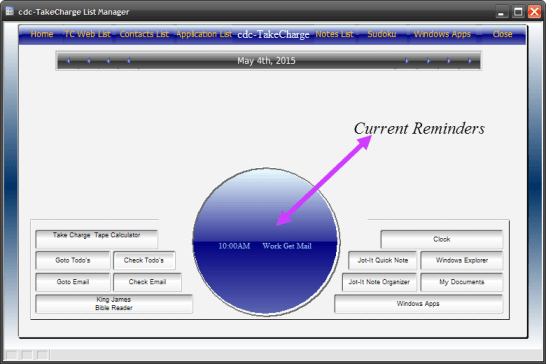
Well I hope you found the video interesting. Lets start by looking at our Navigator form.
 As you can see this is a great looking form for it’s day and it is very versitle. It is designed using buttons, hot spots, text objects conditional objects and of course xBasic. The center of our screen is a conditional object. With the following pages.
- Main Menu
- Address Book
- Calander
- Note Manager
- Launch Bar
- King James Bible
- Games
- Windows Browser
When the form loads, the Main Menu is displayed. and to events are fired. OnInit and OnTimer. OnInit sets the default conditions of the form and the form object properties. The Code looks like this.
'Date Created: 24-Aug-2007 02:14:52 PM
'Last Updated: 31-Jan-2011 02:55:28 PM
'Created By  : Owner
'Updated By  : cdc
commType = "DT"
ui_freeze(.t.)
TakeCharge_Navigator:crdfront.text = "Communication App's"
TakeCharge_Navigator:crdbk1.text = "Work Specific App's"
TakeCharge_Navigator:crdbk2.text = "Office Suite's"
TakeCharge_Navigator:crdbk3.text = "Home Mgt App's"
TakeCharge_Navigator:crdbk4.text = "Multi Media App's"
TakeCharge_Navigator:crdbk5.text = "Utility App's"
script_play("assignbuttonName")
script_play("AssignMSDTbuttonName")
vAppView = 1
cDayDate = Date()
TakeCharge_Navigator:cdaydate.refresh()
var->JeDate = var->cDayDate
TakeCharge_Navigator:remindmessage.font.color = "Green"
TakeCharge_Navigator:remindmessage.font.size = 10
dim rec_count as N
rec_count = tablecount("reminders","DOB = Var->cDayDate")
topparent.queryrun("DOB = Var->cDayDate","Right(Alltrim(Time_Start),2)+Left(Time_Start,2)","","No","Reminders",.f.)
TakeCharge_Navigator:remindmessage.text = "Hello: "+crlf()+"You have "+Alltrim(str(rec_count))+" reminders scheduled for " + time("Weekday, Month X",cDayDate)+"."
TakeCharge_Navigator:remindmessage.refresh()
TakeCharge_Navigator:Scr_cond.Refresh()
ui_freeze(.f.)
if vFldWatch =1 then
    vFldWatch = 0
else if vFldWatch = 0 then
    vfldWatch = 1
end if
if scdv =1 then
    scdv = 0
else if scdv = 0 then
    scdv = 1
end if
Notice the creation date August 2007 that was 7.5 years ago. Here we are using xBasic to set the property values of text and button objects, checking for scheduled appointments and or reminders and displaying the result of the search in our text display portal. The variable for our Calendar is cDayDate and it is set to the current system date. Finally our variable controlling our conditional object is set to 1 (vAppView = 1) our watch variables are changed and the form is refreshed.
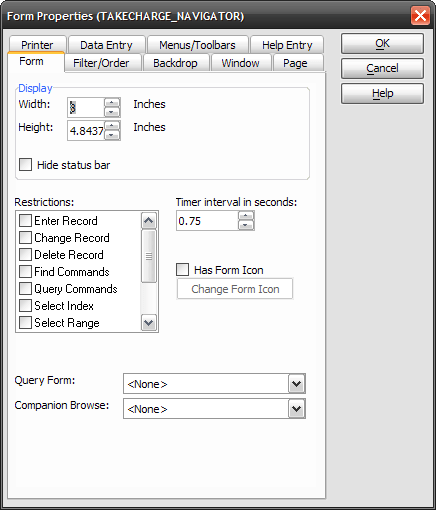
Our on Timer event is set to control a couple different functions and is set to fire every .75 seconds.
Here is the code
'Date Created: 24-Aug-2007 05:18:37 PM
'Last Updated: 27-Nov-2010 09:28:29 AM
'Created By  : Owner
'Updated By  : User
if vAppView <> 1 .and. vAppView <> 5 then
    end
end if
if RmdView = "Clock" then
    ui_freeze(.t.)
    TakeCharge_Navigator:remindmessage.text = "It is:"+crlf()+time("Weekday Month dd,yyyy 0h:0m:0sAM")
    TakeCharge_Navigator:remindmessage.Refresh()
    ui_freeze(.f.)
    Clk_cnt = Clk_cnt - 1
    if Clk_cnt = 0 then
        RmdView = "Rmdr"
        TakeCharge_Navigator:remindmessage.font.color = "Green"
        TakeCharge_Navigator:remindmessage.font.size = 10
        dim rec_count as N
        rec_count = tablecount("reminders","DOB = Var->cDayDate")
        topparent.queryrun("DOB = Var->cDayDate","Right(Alltrim(Time_Start),2)+Left(Time_Start,2)","","No","Reminders",.f.)
        TakeCharge_Navigator:remindmessage.text = "Hello: "+crlf()+"You have "+Alltrim(str(rec_count))+" reminders scheduled for " + time("Weekday, Month X",cDayDate)+"."
        TakeCharge_Navigator:remindmessage.refresh()
        TakeCharge_Navigator:Scr_cond.Refresh()
    end if
end if
if usepl = .t. then
    Clk_cnt = Clk_cnt - 1
    if Clk_cnt <= 0 then
        duration = TakeCharge_Navigator:activex1.activex.currentMedia.duration
        newtime = stoptime+round(duration,0) + 2
        if toseconds(Time()) >= newtime then
            'ui_msg_box("", "Send new tape at : "+str(newtime) + "Current Time is : " +str(toseconds(time())))
            script_play("usePlayList")
        end if
    end if
    if Clk_cnt <= -10 then
        Clk_cnt = 5
    end if
end if
if cDayDate <> Date() then
    cDayDate = Date()
    ActDate = Date()
    if dow(cDayDate) = 1 then
        MonDate = cDayDate-6
    else
        MonDate = cDayDate-dow(cDayDate)+2
    end if
    JorDate = Date()
    InvDate = Date()
    script_play("SetWklyCal")
end if
Lets examine what is going on here. First we determine if the timer should be running at all by identifying which page view our conditional object is on. If it doesn’t equal one or five then the code ends. Next it checks if RmdView = “Clock” If it does, a digital clock shows in the portal viewer. Next we look at a variable called Clk_cnt which is a countdown variable. This variable is set based on user choices on the menu and will do an auto-check on reminders or count down media file playtime on our activeX object. Both will be explained in detail in a later session. Finally we look at our calendar date variable. Find Mondays Date then set our Weekly Calendar View. Again we will explain this in our session on building a calendar.
Now lets look at an action key on the Home page of our form; ‘Check Todo”s’. When the user clicks this button the system goes out and looks for any reminders schedule for the current day. If found, the message portal is updated showing the reminder, if not a No Reminder Scheduled message appears.
 The code in the onPush event is;
'Date Created: 24-Aug-2007 05:21:02 PM
'Last Updated: 04-Feb-2008 11:03:44 AM
'Created By  : Owner
'Updated By  : Owner
ui_freeze(.t.)
parentform.commit()
script_play("SetWklyCal")
Rmdview = "Rmdr"
rec_count = tablecount("reminders","DOB = Var->cDayDate")
topparent.queryrun("DOB = Var->cDayDate","Right(Alltrim(Time_Start),2)+Left(Time_Start,2)","","No","Reminders",.f.)

if rec_count = 0 then
    TakeCharge_Navigator:cdaydate.refresh()
    TakeCharge_Navigator:remindmessage.font.color = "Green"
    TakeCharge_Navigator:remindmessage.font.size = 8
    TakeCharge_Navigator:remindmessage.text = "Hello: "+crlf()+"You have "+Alltrim(str(rec_count))+" reminders scheduled for " + time("Weekday, Month X",cDayDate)+"."
    TakeCharge_Navigator:remindmessage.refresh()
else
TakeCharge_Navigator:btnrmd.Activate()
    TakeCharge_Navigator:remindmessage.font.color = "Pale Blue"
    TakeCharge_Navigator:remindmessage.font.size = 8
    TakeCharge_Navigator:remindmessage.text = ""
    rtbl = table.open("reminders")
    rtbl.fetch_first()
    rtbl.batch_begin()
    while .not. rtbl.fetch_eof()
        if rtbl.Dob = var->cDayDate then
            TakeCharge_Navigator:remindmessage.text = TakeCharge_Navigator:remindmessage.text + Crlf() +rtbl.Time_start+" "+Alltrim(rtbl.Task_Short)+" "+Alltrim(rtbl.Task_long)
        end if
    rtbl.fetch_next()
    end while
    rtbl.batch_end()
    rtbl.close()
    TakeCharge_Navigator:remindmessage.refresh()
end if
ui_freeze(.f.)
First we make sure our weekly view is current based on the selected date then we do a tablecount for reminders scheduled in that week. if the count is greater then zero we use the table open method to fetch through the table and build our text message which is then displayed in our message portal. Once done, we close our table and refresh our text object.
Well we have looked at a lot today so we will stop here and let it sink in. Our next session will look at the activeX component. I hope you will stop back to see how it was done.
Thanks again for stopping by and Remember, if you need help with an Alpha Software application or wish to inquire about a custom application for your business go to our website
and inquire or contact
NLawson@cdc-TakeCharge.com
Have a great day.
 Custome Database Design with Alpha Software
Leave a comment