
Hello everyone
Designing forms in Alpha Software is very easy using the Drag and Drop tools and simple set design wizard. Forms designed this way are bound to the underlying table which is OK based on the use of the form. For example, data entry forms should be bound to the table so as to take advantage of the new record and built in tab features for field navigation; but what if you are designing a form whose sole purpose is to query and display multiple data views. This is where using xBasic to control object properties on a form really shines.
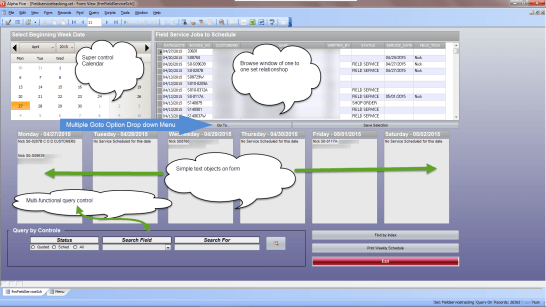
In the image above as you can see there is a lot going on. This is a Field Scheduler form I recently designed for a customer. Their business has expanded to include equipment service in the field for customers. As this side of the business has grown they now need a means of scheduling and controlling work in the field.
This form is bound to a one to one set of sales to customer and fieldservice and fieldservicelog. The browse window allows for easy access to open tickets and easy scheduling. The Super Control Calendar allows the user to simply select the beginning week date and all tickets scheduled for that week instantly show up in the below text objects. The Query Controls quickly queries the set by Customer, Field Tech, Written By, Service Date and Order Creation Date. In addition they can use the Goto Drop down menu to quickly switch to the Field Service Ticket form and the Original Order.
All of these controls are managed with xBasic. If we relied solely on high-level form design (which we could have), use of the form would be bulky and slow across their network. On the other hand, using xBasic to control the object properties and all queries, the form and it’s function is eloquent and fast.
Super Control:
The super control is called Calendar xDialog1 and has two user definable property boxes. First is settings

All we need to set here is the binding to a variable actDate and to select dropdowns and Week begins on Monday.
Panel 2 is Events
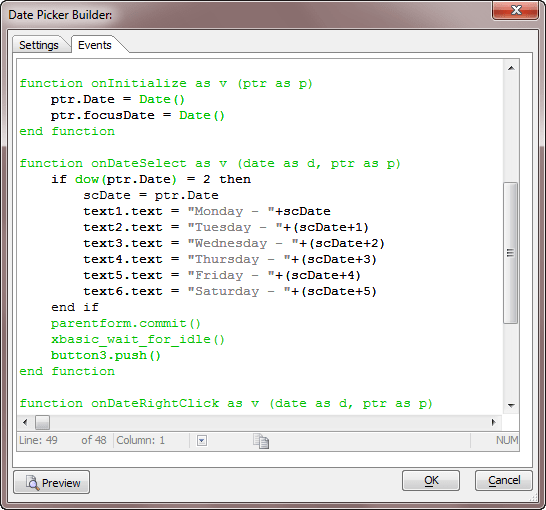
Here we add our own code to run when the built in functions fire based on user interaction. In the onDateSelect function we use another function DOW() which returns the day in the week number. Monday is two. If dow(prt.Date) = 2 then we run our code. Notice that we push button3 at the end of our code. Button3 is a hidden button on our form which contains a fair amount of code which I did not trust to run correctly as part of the super control function. Doing it this way, the super control simply pushes the button and the onPush event of the button runs the code. Here it is.
'Date Created: 18-Apr-2015 11:06:55 AM
'Last Updated: 28-Apr-2015 01:28:04 PM
'Created By  : cdc
'Updated By  : cdc

MonL.text = "No Service Scheduled for this date"
TueL.text = "No Service Scheduled for this date"
WedL.text = "No Service Scheduled for this date"
ThrL.text = "No Service Scheduled for this date"
FriL.text = "No Service Scheduled for this date"
SatL.text = "No Service Scheduled for this date"
xbasic_wait_for_idle()


'__________Old Code_________________________
dim mrec_count as N
dim trec_count as N
dim wrec_count as N
dim threc_count as N
dim frec_count as N
dim srec_count as N

MSch = MonL.text
TSch = TueL.text
WSch = WedL.text
ThSch = ThrL.text
FSch = FriL.text
SSch = SatL.text

mrec_count = tablecount("fs_Log","DTOC(Service_Date) = '" +DTOC(Var->scDate)+ "'")
trec_count = tablecount("fs_Log","DTOC(Service_Date) = '" +DTOC(Var->scDate+1)+ "'")
wrec_count = tablecount("fs_Log","DTOC(Service_Date) = '" +DTOC(Var->scDate+2)+ "'")
threc_count = tablecount("fs_Log","DTOC(Service_Date) = '" +DTOC(Var->scDate+3)+ "'")
frec_count = tablecount("fs_Log","DTOC(Service_Date) = '" +DTOC(Var->scDate+4)+ "'")
srec_count = tablecount("fs_Log","DTOC(Service_Date) = '" +DTOC(Var->scDate+5)+ "'")

if mrec_count >=1 then
    MonL.text = ""
    Msch = ""
    t = table.open("fs_Log")
    t.fetch_first()
    while .not. t.fetch_eof()
        if t.service_date = Var->scDate then
            MonL.text = MonL.text+Alltrim(t.Field_Tech)+" "+Alltrim(t.invoice_no)+" "+t.name+crlf()+crlf()
            MSch = MSch+Alltrim(t.Field_Tech)+" "+Alltrim(t.invoice_no)+" "+t.name+crlf()+crlf()
        end if
    t.fetch_next()
    wend
    t.close()
end if
xbasic_wait_for_idle()
if trec_count >=1 then
    TueL.text = ""
    TSch = ""
    t = table.open("fs_Log")
    t.fetch_first()
    while .not. t.fetch_eof()
        if t.service_date = Var->scDate+1 then
            TueL.text = TueL.text+Alltrim(t.Field_Tech)+" "+Alltrim(t.invoice_no)+" "+t.name+crlf()+crlf()
            TSch = TSch+Alltrim(t.Field_Tech)+" "+Alltrim(t.invoice_no)+" "+t.name+crlf()+crlf()
        end if
    t.fetch_next()
    wend
    t.close()
end if
xbasic_wait_for_idle()
if wrec_count >=1 then
    WedL.text = ""
    WSch = ""
    t = table.open("fs_Log")
    t.fetch_first()
    while .not. t.fetch_eof()
        if t.service_date = Var->scDate+2 then
            WedL.text = WedL.text+Alltrim(t.Field_Tech)+" "+Alltrim(t.invoice_no)+" "+t.name+crlf()+crlf()
            WSch = WSch+Alltrim(t.Field_Tech)+" "+Alltrim(t.invoice_no)+" "+t.name+crlf()+crlf()
        end if
    t.fetch_next()
    wend
    t.close()
end if
xbasic_wait_for_idle()
if threc_count >=1 then
    ThrL.text = ""
    ThSch = ""
    t = table.open("fs_Log")
    t.fetch_first()
    while .not. t.fetch_eof()
        if t.service_date = Var->scDate+3 then
            ThrL.text = ThrL.text+Alltrim(t.Field_Tech)+" "+Alltrim(t.invoice_no)+" "+t.name+crlf()+crlf()
            ThSch = ThSch+Alltrim(t.Field_Tech)+" "+Alltrim(t.invoice_no)+" "+t.name+crlf()+crlf()
        end if
    t.fetch_next()
    wend
    t.close()
end if
xbasic_wait_for_idle()
if frec_count >=1 then
    FriL.text = ""
    FSch = ""
    t = table.open("fs_Log")
    t.fetch_first()
    while .not. t.fetch_eof()
        if t.service_date = Var->scDate+4 then
            FriL.text = FriL.text+Alltrim(t.Field_Tech)+" "+Alltrim(t.invoice_no)+" "+t.name+crlf()+crlf()
            FSch = FSch+Alltrim(t.Field_Tech)+" "+Alltrim(t.invoice_no)+" "+t.name+crlf()+crlf()
        end if
    t.fetch_next()
    wend
    t.close()
end if
xbasic_wait_for_idle()
if srec_count >=1 then
    SatL.text = ""
    SSch = ""
    t = table.open("fs_Log")
    t.fetch_first()
    while .not. t.fetch_eof()
        if t.service_date = Var->scDate+5 then
            SatL.text = SatL.text+Alltrim(t.Field_Tech)+" "+Alltrim(t.invoice_no)+" "+t.name+crlf()+crlf()
            SSch = SSch+Alltrim(t.Field_Tech)+" "+Alltrim(t.invoice_no)+" "+t.name+crlf()+crlf()
        end if
    t.fetch_next()
    wend
    t.close()
end if
xbasic_wait_for_idle()
frmFieldServiceSch.Refresh_Layout()
If you break this code down it is simple. ScDate is a variable we get when the user selects a Monday date on the Super Control. ScDate is Monday, ScDate+1 is Tuesday etc. We then use the tablecount function to determine the number of service request scheduled for each day of the week. The table open method is used to open fs_log which is a table that stores the fieldservice information. Using t.fetch_first.. while .not. And Next. We build our text and variable strings for each day in the week. At the end we refresh the layout and it is done.
If you refer back to the image of the form, you can see there is still plenty going on. I cannot however show the code to you since it is specific to the customer. I will instead give a broad overview of each object control and the xBasic code.
Goto Dropdown Menu – Uses the ui_popup_styled_menu to display our goto choices. When the user selects a form the called form is Activated, queried and displayed.
Save Schedules – Saves the parent set and builds the fs_log table.
Query Controls – Uses crosslevel queryrun function to filter the records based on the user field choice.
That’s it for this session. By using xBasic combined with simple form objects and Alpha Software’s drag drop form design tools we have created a powerful and fast scheduling tool for a service industry.
That’s it for today. I hope you find this article helpful and useful. In our next session we will continue our look at using xBasic as a means of supercharging our form design. I hope to see you then. Thanks again for stopping by and Remember, if you need help with an Alpha Software application or wish to inquire about a custom application for your business go to our website
and inquire or contact
NLawson@cdc-TakeCharge.com
Have a great day.
 Custome Database Design with Alpha Software
Leave a comment