
Hello everyone and welcome back. Today we will continue to examine how xBasic can be used to dynamically control and modify the design elements in our application. In our last lesson we looked at controlling the WindowBar as a means of design control. Today we will look at the masking function, OnFetch event and conditional objects. If you have been following along and saw our lesson to Creating a Messaging System you saw us use Wingdings as the font for our password field. Now this solution is very simplistic, but not secure at all so we will look at the current method and an alternative method for you to try.
Masking Fields
Typically masking is used to convert raw text into formatted text, for example 1234567891 can be converted to
(123) 456-7891
by using a mask
mask(“1234567891”,”( )| – “)
What we will do is create our own unique mask by using a conditional object and displaying what we want. As you will see, this is easily done with xBasic code and a conditional object.
The Administration form for our log in module allows the administrator to enter new users, delete users and lookup or change passwords for users. As a default the user password field uses the WingDing font as a mask for the actual password.

The code attached to the OnPush event of the Show Password button is
IF is_admin = .T. THEN
if Administration:button1.text = “Show Password” then
topparent:Tr_password.Font.Name = “Arial”
Administration:button1.text = “Mask Password”
else
topparent:Tr_password.Font.Name = “Wingdings”
Administration:button1.text = “Show Password”
end if
else
ui_msg_box(“Sorry!”, “You are not authorized”)
end if
The is_Admin variable was declared as global on the OnPush event of the Log-In form and is used to allow only Administrators the ability to unmask the password field. If the button1 text is equal to Show Password then the font for the field is Arial otherwise it is Wingdings. I stated above this is very unsecured because anyone with a lick of sense can type out the alphabet in word using the Wingding font then they have a encryption key to unmask the field. So now lets look at another option.
Our new option will use a conditional object and some simple xBasic code to display either a text box with asterix or the actual password field. The new code is as follows;
IF is_admin = .T. THEN
if Administration:button1.text = “Show Password” then
wdv = 2
Administration:button1.text = “Mask Password”
else
wdv = 1
Administration:button1.text = “Show Password”
end if
cond1.refresh()
else
ui_msg_box(“Sorry!”, “You are not authorized”)
end if
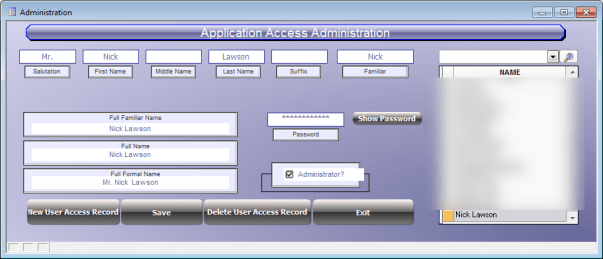 Here we use the same conditions with a change in action. now we are changing the value of the variable ‘wdv’ which is a global variable for controlling the view of conditional objects. The default value is 1 and when the button is pushed it changes to 2 or back to 1 causing the conditional object to redisplay the correct view. One shows condition one which has a text field on the conditional page. Two shows the actual password field on the conditional page. Now this is more secure because the passwords are stored in the table which is not available for view by the users even administrators. Additionally we add the following code to the on fetch event of the record to insure the field is masked as the user navigates through records.
ui_freeze(.t.)
wdv = 1
Administration:button1.text = “Show Password”
cond1.refresh()
ui_freeze(.f.)
Just a minor change in approach makes a huge differance in the level of security.
Well that’s it for today’s session. Thanks again for stopping by and Remember, if you need help with an Alpha Software application or wish to inquire about a custom application for your business go to our website
and inquire or contact
NLawson@cdc-TakeCharge.com
Have a great day.
 Custome Database Design with Alpha Software
Leave a comment