
Hello Everyone
Today we are looking at the changes to our code affecting WhitesBoard and BlacksBoard. These two routines provide a list of each piece on the board which is available to move and where it can move to. The changes I made process these list to create values needed in scoring the game as well as scoring each players move. Before we get into the code, lets look at the information we need to score each move.
After much research and reading many articles, I have decided to use the approach which assigns values to the piece the position and mobility. The values I will track during each move are;
- Number of Pieces in Play (count)
- Pieces in Play (Value of all pieces)
- Column’s owned by each player (center columns higher)
- Rank of each piece
- Whether pawns are doubled (negative value)
- Blocked Pieces (negative value)
- Isolated Pieces (negative value)
- Mobility (available squares in move list)
Lets look at the value assigned for each.
Piece Values
- Queen = 4.5
- Bishop = 3.0 x 2
- Knight = 3.0 x 2
- Rook = 3.5 x 2
- Pawn = 1 x 8
The Piece Value only comes in play if the piece is in play. For example, At the beginning of the game only the pawns and knights can move so the value of pieces is 8 + 6 = 14
Pieces in Play at open are;
- 8 Pawns
- 2 Knights
for a total of 10
Columns
- A & H = 1.0
- B & G = 1.25
- C through F = 1.5
Everyone states the columns have greater strategic value in the center of the board, so I rated them as above. At the opening of the game, all pieces occupy a square so the value of columns is 21.
Rank
0 through 7
The only consideration in Rank is that black starts on row 8 and decreases as they advance; white increases. If we start with 0, the value of white at opening is
- Pieces in Play * Row = Rank
- 2 Knights * 0 = 0 + 8 Pawns * 1 = 8
Black is
- (8-Row) * Pieces in Play
- 2 Knights * 8-8 = 0 + 8 Pawns * 8-7 = 8
Doubled = 0
Isolated = 0
Blocked = -6 (8 Pieces on the home row – the 2 Knights which can move)
Mobility
Mobility is each square the player can move to based on pieces in play. So if you examine our list at opening;
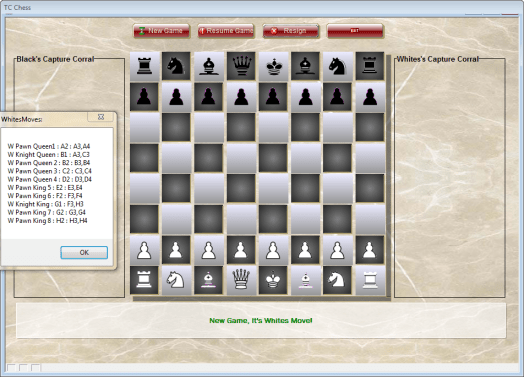 Adding up squares available to all Pawns and both Knights = 20.
The score for the game at open is Zero.
+Whites Value = 61
-Blacks Value = 61
______________
Score = 0
WhiteVal = WQna+WBshp+WKngt+WRk+WPwn+Wpip+WASqs+WBrdRank+WDbl+WBlk+WIso+WMob+xWColVal
BlackVal = BQna+BBshp+BKngt+BRk+BPwn+Bpip+BASqs+BBrdRank+BDbl+BBlk+BIso+BMob+xBColVal
xScore = WhiteVal - BlackVal
To accomplish this I had to change my variables, adding some and renaming others. Here is the new list which is declared when the form is initiated.
‘Piece Values
dim SHARED WQnA as N = 0
dim SHARED BQnA as N = 0
dim SHARED WBshp as N = 0
dim SHARED BBshp as N = 0
dim SHARED WKngt as N = 6.0
dim SHARED BKngt as N = 6.0
dim SHARED WRk as N = 0
dim SHARED BRk as N = 0
dim SHARED WPwn as N = 8
dim SHARED BPwn as N = 8‘King Varaibles
dim SHARED WKingPos as C
dim SHARED BKingPos as C
dim SHARED WCastleKS as L = .t.
dim SHARED BCastleKS as L = .t.
dim SHARED WCastleQS as L = .t.
dim SHARED BCastleQS as L = .t.
dim SHARED WCheckB as L = .f.
dim SHARED BCheckW as L = .f.‘Selection Variables
dim SHARED PlayerTurn as C
dim SHARED cObjNm as C
Dim SHARED cPieceNm as C
dim SHARED OppCkLoc as C = “”
dim SHARED CurrPiece as C
dim SHARED SelPiece as C‘Avail Move Variables
dim SHARED AttackSqs as C
dim SHARED BAttackSqs as C
dim SHARED WAttackSqs as C
dim SHARED WCanMove as C
dim SHARED BCanMove as C
dim SHARED MoveList as C
dim SHARED WMoveList as C
dim SHARED BMoveList as C
dim shared vMove as C
dim SHARED CKList as C‘Legal Move Variables
dim SHARED Capture as C
dim SHARED NewPOS as C
dim SHARED OrigPos as C
dim SHARED prevsq as C
dim SHARED PrevMove as C
dim SHARED PrevFrom as C
dim SHARED OPos as C
dim SHARED tmove as C
dim SHARED Status as C
dim SHARED xMoveNbr as N = 1‘Scoring Variables_______
dim SHARED Wpip as N = 10
dim SHARED Bpip as N = 10
dim SHARED WASqs as N = 0
dim SHARED BASqs as N = 0
dim SHARED MoveVal as N = 0
dim SHARED WhiteVal as N = 0
dim SHARED blackVal as N = 0
dim SHARED xScore as N = 0
dim SHARED WBrdRank as N = 8
dim SHARED BBrdRank as N = 8
dim SHARED WDbl as N = 0
dim SHARED BDbl as N = 0
dim SHARED WBlk as N = -6
dim SHARED BBlk as N = -6
dim SHARED WIso as N = 0
dim SHARED BIso as N = 0
dim SHARED WMob as N = 20
dim SHARED BMob as N = 20
dim SHARED xWColVal as N = 21
dim SHARED xBColVal as N = 21
When a new game is started opening values are assigned to the variables. The following code was added to the top of my New Game button.
PlayerTurn = "White"
xMoveNbr = 1
MoveVal = 0
xDo = "Select"

WQnA = 0
BQnA = 0
WBshp = 0
BBshp = 0
WKngt = 6.0
BKngt = 6.0
WRk = 0
BRk = 0
WPwn = 8
BPwn = 8
Wpip = 10
Bpip = 10
WASqs = 0
BASqs = 0
MoveVal = 0
WBrdRank = 8
BBrdRank = 8
WDbl = 0
BDbl = 0
WBlk = -6
BBlk = -6
WIso = 0
BIso = 0
WMob = 20
BMob = 20
xWColVal = 21
xBColVal = 21

WhiteVal = WQna+WBshp+WKngt+WRk+WPwn+Wpip+WASqs+WBrdRank+WDbl+WBlk+WIso+WMob+xWColVal
BlackVal = BQna+BBshp+BKngt+BRk+BPwn+Bpip+BASqs+BBrdRank+BDbl+BBlk+BIso+BMob+xBColVal
xScore = WhiteVal - BlackVal

WCastleKS = .t.
BCastleKS = .t.
WCastleQS = .t.
BCastleQS = .t.
BCheckW = .f.
WCheckB = .f.
WKingPos = "E1"
BKingPos = "E8"
cPieceNm = ""
xPiece = ""
xMove = ""
WCanMove = ""
BCanMove = ""
OrigPos = ""
NewPOS = ""
SelPiece = ""
CurrPiece = ""
Capture = ""
OppCkLoc = ""
tmove = ""
vMove = ""
AttackSqs = ""
WAttackSqs = ""
BAttackSqs = ""
MoveList = ""
WMoveList = ""
BMoveList = ""
WCanMove = ""
BCanMove = ""
CkList = ""
PrevFrom = ""
PrevMove = ""
OPos = ""
In doing my research, I found everyone referring to a MinMax Algorithm. White is Max and Black in Min. So, if Score is > Zero White is winning, < Zero, Black is winning and 0 is a draw. With that in mind, here is part of the code that adds up the score and it is at the bottom of the WhitesBoard & BlacksBoard scripts
Added to WhitesBoard
WCanMove = remove_blank_lines(WCanMove)

Wpip = *count(WCanMove)

dim tlist as C
for each x in WCanMove
    WASqs = 0
    tlist = word(x,3,":",1)
    tlist = comma_to_crlf(tlist)
    for each move in tlist
        tASq = tASq+1
    Next
    WASqs = WASqs + tAsq
Next
Added to BlacksBoard
BCanMove = remove_blank_lines(BCanMove)

Bpip = *count(BCanMove)

dim tlist as C
for each x in BCanMove
    BASqs = 0
    tlist = word(x,3,":",1)
    tlist = comma_to_crlf(tlist)
    for each move in tlist
        tASq = tASq+1
    Next
    BASqs = BASqs + tAsq
Next
(Other changes have been made to WhitesBoard and BlacksBoard. Once the Scripts are complete I will re-post each in it’s entirety.)
So far the code only calculates two values, Pieces in Play and Mobility. By modifying the code slightly we can get the value of Pieces, Rank, Blocked, Squares and Isolated. See if you can come up with the proper changes to calculate those values.
Well that’s it for today’s session. The next session will look at the rest of the code for controlling and tracking each players move as well as how to build an opening book. We are getting close to the end.
Thanks again for stopping by and Remember, if you need help with an Alpha Software application or wish to inquire about a custom application for your business go to our website
and inquire or contact
NLawson@cdc-TakeCharge.com
Have a great day.

 Custome Database Design with Alpha Software
Leave a comment