
Hello Everyone
Today I will focus on a very cool function in Alpha Software called
KeyList_Build()
and to do so, I will be demonstrating it’s use in our upgraded Note Organizer Module. Below is a short video which shows the keylist_build function in action. Please watch the video to see how it works then continue on to see the actual code.
As you can see the keylist_build function has some very cool features and is fairly simple to use. Lets examine the New Note Dialog.
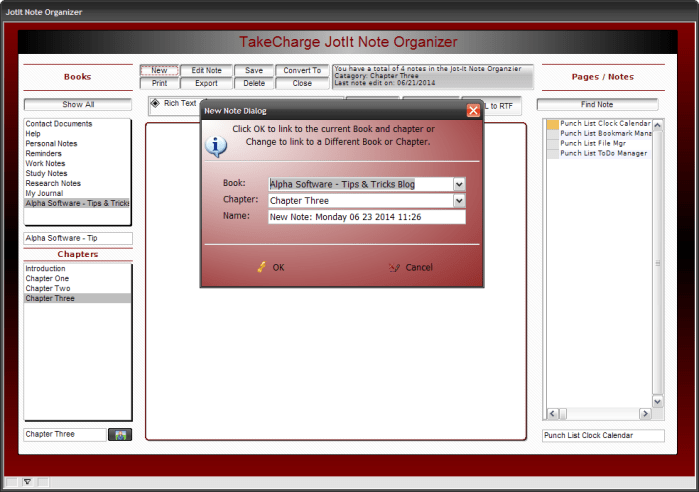 As you can see from the image above the xDialog box has three variable fields
- Prompt_var_3 – Book Name
- Prompt_var_4 – Chapter Name
- Prompt_var_5 – Note Name
Var’s 3 and 4 our keylist builds in the form of combo record list. Look at the entire code for the New Note button and see if you can spot where we build the keylist for each variable..
'Date Created: 17-Jul-2008 03:36:53 PM
'Last Updated: 20-Jun-2014 03:20:33 PM
'Created By  : User
'Updated By  : cdc
dim SHARED mychoice as C
style = <<%str%
menu.v_item_min_leftx=.25
color.menu_v_background=Dirty White
color.menu_v_left=Dark Red
color.menu_v_right=White
font.menu=Tahoma,8,0
%str%
vMenuItems = <<%a%
{I=$$code.variable.set}New Note
{I=$$edit.import}Import from File
%a%
mychoice = ui_popup_styled_menu(vMenuItems, style)
if mychoice = "New Note" Then

    dim tbl as p
    tbl = table.current()
DIM form_name as C
if is_object(topparent.this) then
    form_name = topparent.name()+".this"
else
    form_name = ""
end if
dim flag_ok_selected as l
flag_ok_selected = .f.
DIM SHARED Prompt_var_3 as C
DIM SHARED Prompt_var_4 as C
DIM  SHARED Prompt_var_5 as C
DELETE expression_result
expression_result = eval("Books",form_name)
Prompt_var_3 = convert_type(expression_result,"C")
DELETE expression_result
expression_result = eval("Jotitwbname",form_name)
Prompt_var_4 = convert_type(expression_result,"C")
DIM  ui_get_parameters_result as C
xdialogStyle.color = "White"
xdialogStyle.accentcolor = "Dark Red"
Prompt_var_3_rl_def = "ke=jot_itbooks,{keylist_build(\"H=.05,1:55[Books]\",''+books,left(''+books,55))}{unique_key_value()}"
Prompt_var_4_rl_def = "ke=jot_it,{keylist_build(\"H=.05,1:35[Jotitwbname]\",''+jotitwbname,left(''+jotitwbname,35))}{unique_key_value()}"
Prompt_var_5 = "New Note: "+time("Weekday MM dd yyyy 0h:0m")
ok_button_label = "&OK"
cancel_button_label = "&Cancel"
ui_get_parameters_result = ui_dlg_box("New Note Dialog",<<%dlg%
{font=tahoma,10}
{position=remember}
{windowstyle=Gradient Radial Top Left}
   Click OK to link to the current Book and chapter or;
{image=$sys_information}  Change to link to a Different Book or Chapter. ;
{line=1,0};
{lf};
{region}
  Book:| [%@Prompt_var_3_rl_def%.55prompt_var_3];
  Chapter:| [%@Prompt_var_4_rl_def%.55Prompt_var_4];
  Name:| [.55Prompt_var_5];
{lf};
{endregion};
{line=1,0};
{region}
{lf};
<%I=$$code.execution.done;B=T;O={J=C} {I=1}  OK ; %35,1OK> <%I=$$generic.edit.cancel;B=T;O={J=C} {I=1}  Cancel ; %35,1Cancel>;
{endregion};
%dlg%,<<%code%
    if a_dlg_button = "ok" then
        flag_ok_selected = .t.
    end if

    %code%)
    if ui_get_parameters_result <> "OK" then
        end
    end if
    tbl.enter_begin()
    tbl.ID = 1
    tbl.Books = prompt_var_3
    tbl.CREATED_DATE = Date()
    tbl.REVISION_DATE = Date()
    tbl.JOTITWBNAME = prompt_var_4
    tbl.JOTIT_NAME = prompt_var_5
    rnbr = tbl.recno()
    JotItOrganizer:jibooks.value = Prompt_var_3
    JotItOrganizer:jicategory.value = Prompt_var_4
    tbl.enter_end(.t.)
    t = table.open("jot_itbooks")
    t.fetch_first()
    while .not. t.fetch_eof()
        if t.books = books.text then
            t.close()
            goto finish
        else
        end if
    t.fetch_next()
    end while
    t.enter_begin()
    t.id = 1
    t.books = prompt_var_3
    t.enter_end(.t.)
    t.close()
    finish:

else
    dim tbl as p
    dim filename as C
    dim rtf_text as C
    dim rtf_bin as B
    dim Plain_Text as C
    filename = UI_GET_FILE("Choose File", "(TEXT *.txt)", "", "X")
    if (filename = "") then
        end
    end if
    tbl = table.current()
    tbl.enter_begin()
    tbl.ID = 1
    tbl.CREATED_DATE = Date()
    tbl.Books = prompt_var_3
    tbl.REVISION_DATE = Date()
    tbl.JOTITWBNAME = "Quick Note - Import"
    tbl.JOTIT_NAME = file.filename_parse(filename,"NE")
    rnbr = tbl.recno()
    tbl.enter_end(.t.)
    jicategory.value = tbl.jotitwbname

    plain_text = file.to_string(filename)

    vVerses = *plain_to_rtf(plain_text)
    insert_text_in_rtf_memo(tbl, "Jotit_body", crlf()+VAR->plain_text, -1,"","")

    JotItOrganizer:jotit_body.refresh()
    vVerses = ""
end if
JIBooks = table.external_record_content_GET("Jot_itBooks", "Books","Recno()")
DocView = table.external_record_content_GET("Jot_it", "alltrim(jotitwbname)","jotitwbname","")
if wdv = 0 then
    wdv = 1
else
    wdv = 0
end if
if scdv = 0 then
    scdv = 1
else
    scdv = 0
end if
jicategory.Activate()
book.text = prompt_var_3

dim rec_count as N
dim lastedit as C
dim bookname as C
jicategory.text = prompt_var_4
parentform.commit()
bookname = jicategory.text
lastedit = tablemax("jot_it",".t.","revision_date")
rec_count = topparent.queryrun("Jotitwbname = Var->bookname","","","No","Jot_it",.f.)
text2.text = "You have a total of "+Alltrim(str(rec_count))+" notes in the Jot-It Note Organzier Catagory: "+Alltrim(var->bookname)+crlf()+"Last note edit on: "+var->lastedit
DIM records_found as N
records_found = topparent.queryrun("jotit_name = Var->Prompt_var_5","","","No","",.f.)
The first part of the script is the popup menu the user sees when they click the button. then if the user selects New Note it branches to the xDialog code which creates the box above. First the code sets an object pointer to the calling form so we can use values on the form as default values for our two variables.
DIM form_name as C
if is_object(topparent.this) then
    form_name = topparent.name()+".this"
else
    form_name = ""
end if
I assign those values to our combo list vars then build the record list.
Prompt_var_3_rl_def = "ke=jot_itbooks,{keylist_build(\"H=.05,1:55[Books]\",''+books,left(''+books,55))}{unique_key_value()}"
Prompt_var_4_rl_def = "ke=jot_it,{keylist_build(\"H=.05,1:35[Jotitwbname]\",''+jotitwbname,left(''+jotitwbname,35))}{unique_key_value()}"
The Note name variable is a simple character variable which is assigned a unique name by using a time stamp.
Prompt_var_5 = "New Note: "+time("Weekday MM dd yyyy 0h:0m")
An important thing you should notice is the default values are assigned before the keyList_build is assigned and both are created before the xDialog is declared.
ui_get_parameters_result = ui_dlg_box("New Note Dialog",<<%dlg%
{font=tahoma,10}
{position=remember}
{windowstyle=Gradient Radial Top Left}
   Click OK to link to the current Book and chapter or;
{image=$sys_information}  Change to link to a Different Book or Chapter. ;
{line=1,0};
{lf};
{region}
  Book:| [%@Prompt_var_3_rl_def%.55prompt_var_3];
  Chapter:| [%@Prompt_var_4_rl_def%.55Prompt_var_4];
  Name:| [.55Prompt_var_5];
{lf};
{endregion};
{line=1,0};
{region}
{lf};
<%I=$$code.execution.done;B=T;O={J=C} {I=1}  OK ; %35,1OK> <%I=$$generic.edit.cancel;B=T;O={J=C} {I=1}  Cancel ; %35,1Cancel>;
{endregion};
%dlg%,<<%code%
Now all that is left is to perform the action based on the user choice. They have three options;
- New Book with New Chapter and New Note
- Selected or Existing Book with New Chapter and New Note
- Selected Book and Selected Chapter and New Note
I use the table method to add records to required tables and pass the variable values to the correct fields. then the form is refreshed and queried down to the newly created record.
In our example, we use it to create combo edit record list but it can be used to create a combo list which does not allow new values and you can create a simple list object as well.
Alpha Software provides these examples:
Advanced Record Lists
Advanced record lists give you more control over the data that is displayed in the record list and the formatting of the record list. In addition, you are not restricted to showing data from the primary table of the session. You can display data from any table.
The syntax for an advanced record list-combo box control is:
|
[%K=Table,{keylist_expression}{filter_expression}%.Size VariableName] |
The syntax for an advanced record list-edit combo box control is:
|
[%KE=Table,{keylist_expression}{filter_expression}%.Size VariableName] |
The syntax for an advanced list box-record list control is:
|
[%KL=Table,{keylist_expression}{filter_expression}%.Size VariableName] |
As you can see they are exactly the same except for the beginning; K= builds a combo drop down list, Ke= builds an editable combo drop down list and Kl= builds a list object.
if you want to see more examples, go to Alpha Software help and search on KeyList_Build.
Our video also shows our delete note dialog box
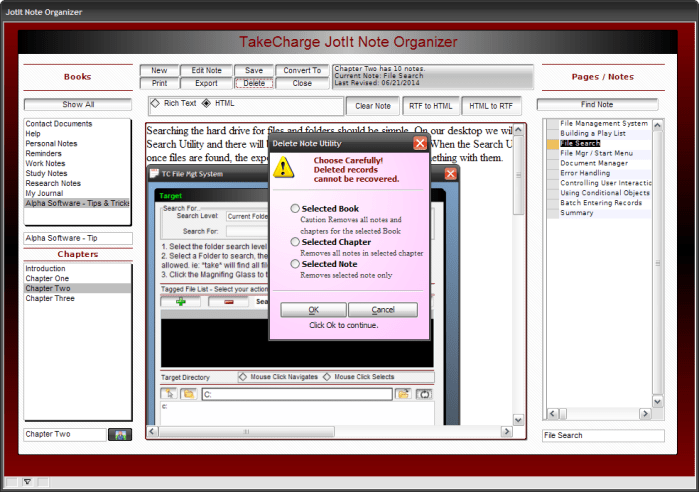 This dialog is very straight forward and easy to do. the code is listed below.
'Date Created: 06-Sep-2008 11:46:12 AM
'Last Updated: 21-Jun-2014 11:07:20 AM
'Created By  : User
'Updated By  : cdc
'parentform.commit()
DIM SHARED vselected as C
DIM SHARED varC_result as C
vselected = ""
heading_string = "Choose Carefully! Deleted records cannot be recovered."
footer_string = "Click Ok to continue."
ok_button_label = "&OK"
cancel_button_label = "&Cancel"
Delete XdialogStyle
dim XDialogStyle as p
XDialogStyle.AccentColor = "Pink"
XDialogStyle.Color = "White"
varC_result = ui_dlg_box("Delete Note Utility",<<%dlg%
{Windowstyle=Gradient Radial Top Left}
{font=tahoma,8,B}
{color=Dark Red}
{region}
{image=$sys_warning}  {text=25,3:heading_string};
{endregion};
{region}
{color=Black}
{font=tahoma,8,B}
{line=1,0};
{lf};
{SP=5}(vselected:Selected Book);
{color=Gray-80}
{font=Times New Roman,8}
   Caution Removes all notes and;
   chapters for the selected Book;
{color=Black}
{font=tahoma,8,B}
{SP=5}(vselected:Selected Chapter) ;
{color=Gray-80}
{font=Times New Roman,8}
   Removes all notes in selected chapter;
{color=Black}
{font=tahoma,8,B}
{SP=5}(vselected:Selected Note);
{color=Gray-80}
{font=Times New Roman,8}
   Removes selected note only
{lf};
{color=Black}
{font=tahoma,8}
{line=1,0};
{endregion};
{region}
{endregion};
{region}
{SP=2}<*17=ok_button_label!OK><18=cancel_button_label!CANCEL>;
    {text=25,1:footer_string};
{endregion};
%dlg%,<<%code%
if a_dlg_button = "OK" then
    if vselected = "Selected Note" then
        a_tbl = table.open("jot_it")
        a_tbl.delete_range("recno()=Var->rNbr")
        a_tbl.close()
    else if vselected = "Selected Chapter"
        a_tbl = table.open("jot_it")
        a_tbl.delete_range("Jotitwbname=Var->JiCategory")
        a_tbl.close()
    else if vselected = "Selected Book"
        a_tbl = table.open("jot_it")
        a_tbl.delete_range("Books=Var->jibooks")
        a_tbl.close()
        a_tbl = table.open("jot_itbooks")
        a_tbl.delete_range("Books=Var->jibooks")
        a_tbl.close()
    end if
done:
end if
if a_dlg_button = "Cancel" then

end if
%code%)
if vselected = "" then
    end
end if
JIBooks = table.external_record_content_GET("Jot_itBooks", "Books","Recno()")
DocView = table.external_record_content_GET("Jot_it", "alltrim(jotitwbname)","jotitwbname","")
if wdv = 0 then
    wdv = 1
else
    wdv = 0
end if
if scdv = 0 then
    scdv = 1
else
    scdv = 0
end if
jicategory.Activate()
'rnbr = recno("jot_it")
dim SHARED rec_count as N
dim SHARED lastedit as C
rec_count = tablecount("jot_it",".t.")
lastedit = tablemax("jot_it",".t.","revision_date")
text2.text = "You have a total of "+Alltrim(str(rec_count))+" notes in the Jot-It Note Organzier."+crlf()+"Last edited on: "+var->lastedit
DIM records_found as N
records_found = topparent.queryrun(".t.","Books","","No","",.f.)
browse2.activate()
browse2.fetch_first()
I have posted several examples of record delete code before so I will not go through the explanation again
Well that’s it for today’s session. On our next session I will finalize the file utility screen adding sorting and queries to the file folders. Hope you will stop back to follow along. If you have any ideas or would like to see features in the New PC Desktop, drop me a line and I will look at it. Thanks again for stopping by and Remember, if you need help with an Alpha Software application or wish to inquire about a custom application for your business go to our website
and inquire or contact
NLawson@cdc-TakeCharge.com
Have a great day.
 Custome Database Design with Alpha Software
Leave a comment