
Hello Everyone,
At the end of our last session I said we would look at our Search feature on our new File Manager, but in preparing I realized I already have a session devoted to that exact subject. The link below will take you to the original blog session if you wish to see it or the video attracted to it.
https://cdctakecharge.wordpress.com/2013/07/30/pc-desktop-new-search-features/
As a substitute, I thought I would address a similar problem people have contacted me about which is fetching and sorting data based on form values and or xDialog queries, To do this we will look at an application I wrote some time ago, in fact it was written in Alpha5 v5. The TakeCharge Jotit Note Organizer.
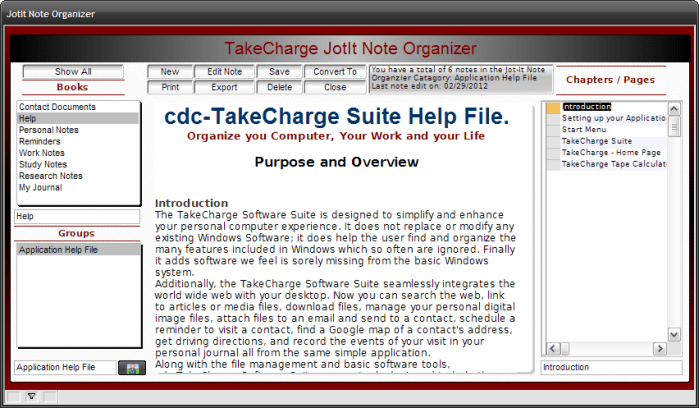
I initially wrote this app as a means of building a code library for code which could be shared among all of the business applications I was developing. As time went on, it became more versatile and took on a life of it’s own.
Watch this short video below which demonstrates it use and gives an overview of the code that makes it run. Then return to see the details and the actual code. Enjoy.
Well, I hope you enjoyed the video. As I stated, this app was written in version 5 and has not been updated at all. So for our next session, we will update the features and bring it up to version 11 of Alpha Software, but for now lets look at the current code.
Form OnInit Event
JIBooks = table.external_record_content_GET("Jot_itBooks", "Books","Recno()")
DocView = table.external_record_content_GET("Jot_it", "alltrim(jotitwbname)","jotitwbname","")
if wdv = 0 then
    wdv = 1
else
    wdv = 0
end if
if scdv = 0 then
    scdv = 1
else
    scdv = 0
end if
JotitOrganizer:jicategory.Activate()
rnbr = recno("jot_it")
dim SHARED rec_count as N
dim SHARED lastedit as C
rec_count = tablecount("jot_it",".t.")
lastedit = tablemax("jot_it",".t.","revision_date")
JotItOrganizer:text2.text = "You have a total of "+Alltrim(str(rec_count))+" notes in the Jot-It Note Organzier."+crlf()+"Last edited on: "+var->lastedit
To start with, we build two list which are
- Books – Values stored in the table Jot_itBooks
- Doc Views – All records containing note fields in the Jotit table.
To do this we are using ‘external object records get’ function for both and passing the values to our two variables, JIBooks and DocView. The scope of these variables is session and they are defined as part of the form. (In design mode, select form then variables.) We then change the value of each of our watch variables so the list will display correctly. Below that is some coding to build our display box at the top of the note organizer page which shows the user the current records in the query and the last date edited for the selected record in the list.
In order to see records by a specific book the user would select it in the list and the app will re query the table and rebuild the Category List. Here is the code.
JIBooks OnChange Event
parentform.commit()

dim SHARED rec_count as N
dim SHARED lastedit as C
dim SHARED bookname as C
DocView = table.external_record_content_GET("Jot_it", "alltrim(jotitwbname)","jotitwbname","Books = Var->JiBooks")

if wdv = 0 then
    wdv = 1
else
    wdv = 0
end if

bookname = JotItOrganizer:jicategory.value
rec_count = topparent.queryrun("Books = Var->JiBooks","","","No","Jot_it",.f.)
lastedit = tablemax("jot_it",".t.","revision_date")
JotItOrganizer:text2.text = "You have a total of "+Alltrim(str(rec_count))+" notes in the Jot-It Note Organzier Catagory: "+Alltrim(var->bookname)+crlf()+"Last note edit on: "+var->lastedit
We start by insuring the parent record is saved then we declare a few variables for our display box. (Note: I set the scope on these variables to shared but they don’t need to be. Once they do their job they don’t need to hang around because they will be recreated the next time JIBooks changes). We then rebuild our Category variable DocView, which also queries the underling table jotit.dbf. See below.
 In the above example Categories, Groups has only one value so all the pages are displayed for that value. Other books may have multiple groups and the user would then select the group they want and the pages would be further filtered. Here is the code.
Groups OnChange Event
parentform.commit()
dim SHARED rec_count as N
dim SHARED lastedit as C
dim SHARED bookname as C
bookname = JotItOrganizer:jicategory.value
rec_count = topparent.queryrun("Jotitwbname = Var->bookname","","","No","Jot_it",.f.)
lastedit = tablemax("jot_it",".t.","revision_date")
JotItOrganizer:text2.text = "You have a total of "+Alltrim(str(rec_count))+" notes in the Jot-It Note Organzier Catagory: "+Alltrim(var->bookname)+crlf()+"Last note edit on: "+var->lastedit
Notice that I use topparent.queryrun to filter the underlying table matching all records to the selection in Group or Category.
The last selection the user makes is the page they want to display. I used the onfetch event of the browse to rebuild our user text display box at the top of the form.
Browse OnFetch Event
rnbr = recno("jot_it")
tbl = table.open("jot_it")
tbl.fetch_goto(rnbr)
bookname = tbl.Jotitwbname
notename = tbl.Jotit_name
clastedit = tbl.Revision_date
jicategory = bookname
tbl.close()
JotItOrganizer:text2.text = Alltrim(bookname)+" has "+Alltrim(str(rec_count))+" notes."+crlf()+"Current Note: "+Alltrim(notename)+crlf()+"Last Revised: "+ clastedit
JotItOrganizer:jicategory.refresh()
rnbr is a global variable I use to assign record numbers for any form or record I wish to fetch throughout the entire application so it is declared in the autoexec script of our application. Once the record number for the table I want is known, (jot_it.dbf) I use the fetch_goto() function with table open to point the the selected record. Now it is simple to assign the field values to our variables and rebuild our text box at the top of our form. Since jot_it is the current talbe I did not need to use table.open() I could have and should have used table.current(). Since I did use table.open() I must then follow with table.close(). Table.close() is not required when using the current table and in fact will return an error if included.
So this group of routines basically gives an example of how variables can be used to drill down a large list of records to a specific record one step at a time through user interaction. What if however, you want to present a list of choices and the user selects all then the requested record based on the user choices is displayed. Our xDialog box does just that.

Export Button OnPush Event
parentform.commit()
AName = ""
t = table.current()
AName = Alltrim(t.Jotitwbname)+" - "+Alltrim(t.Jotit_name)
rnbr = recno("jot_it")
DIM SHARED SaveType as N
DIM SHARED nType AS N
DIM SHARED saction AS N
Dim SHARED SelFldr AS C
DIM SHARED vSavePath as c
DIM SHARED Fname as C
DIM choice_list as c
choice_list = <<%txt%
Acrobat PDF File
Rich Text File
Plain Text File
Batch File
Windows Script File
Htm File
HTML File
%txt%
SaveType = 1
nType = 1
saction = 1
vSavePath = a5.get_path()+chr(92)+"Documents"
Fname = Aname + ".pdf"
dim xdialogStyle as p
xdialogStyle.color = "White"
xdialogStyle.accentcolor = "Dark Tan"
dim text as c
dim text2 as C
text = "Select the Export Wizard defaults or change as you need."
font_color = "Gray-80"
dim formatted_text as c
formatted_text = "{font=Times New Roman,8}"+"{C="+font_color+"}" + text
dir_put(a5.Get_Path()+"\Documents")
curdir = file.dir_get()
spaceavail = bytes_to_mega(file.drive_space_avail(vSavePath),2)
spacetotal = bytes_to_mega(file.drive_space_total(vSavePath),2)
dim sa as C
dim st as C
sa = spaceavail
st = spacetotal

ui_dlg_box("Export Wizard:",<<%dlg%
{image=$sys_warning}
{windowstyle=Gradient Radial Top Left}
{sp=1}{text=%O={@@}%30,1:formatted_text};
{region1}
{'%o={f=Tahoma,8}{C=Black}Current Directory:%} |{text=45curdir};
{'%o={f=Tahoma,8}{C=Dark Red}Size of Drive:%}|{text=12st};
{'%o={f=Tahoma,8}{C=Dark Green}Available Free Space:%} |{text=12sa};
{endregion};
{line=1,0};
{ymargin=1,1}
{xmargin=1,1}
{ysize=1}
{blueframe=1,1: Export File Naming }
{region}
Export Type:| [.45,5SaveType^#Choice_List!SaveType];
Export Folder:<%T=Change the folder to save Export to.;I=$$database.open;B=T;O={J=C} {I=1}; %3,1SelFldr!SelFldr>| [.45vSavePath] ;
Export File Name:| [.45Fname];
{endregion};
{lf};
{ymargin=1,1}
{xmargin=1,1}
{ysize=1}
{blueframe=1,1: Export Action }
{region}
Notes to Export:  | (nType={Current Note,All Notes in Category});
| {line=1};
Export Action:| (saction={Save Export,Save Export and Print Saved File,Save Export and EMail});{endregion};
{endregion};
{region}
 <%I=$$code.execution.done;B=T;O={J=C} {I=1}  OK ; %20,1OK><%I=$$generic.edit.cancel;B=T;O={J=C} {I=1}  Cancel ; %20,1Cancel><%I=$a5_exit;B=T;O={J=C} {I=1}  Exit ; %20,1Exit>;
{endregion};
%dlg%,<<%code%
if a_dlg_button = "SelFldr" then
    a_dlg_button = ""
    sel = ui_browse_for_folder("Select the Folder for Export.")
    if sel <> "" then
        SelFldr = sel
        vSavePath = Alltrim(SelFldr)
    end if
end if
if a_dlg_button = "SaveType" then
    a_dlg_button = ""
    if Right(Left(Alltrim(Fname),-3),1) = "." then
        Fname = Left(Alltrim(Fname),-4)
    else if Right(Left(Alltrim(Fname),-4),1) = "." then
        Fname = Left(Alltrim(Fname),-5)
    else
        Fname = Fname
    end if
    if SaveType = 1 then
        Fname = Alltrim(Fname)+".pdf"
    else if SaveType = 2 then
        Fname = Alltrim(Fname)+".rtf"
    else if SaveType = 3 then
        Fname = Alltrim(Fname)+".txt"
    else if SaveType = 4 then
        Fname = Alltrim(Fname)+".bat"
    else if SaveType = 5 then
        Fname = Alltrim(Fname)+".wfs"
    else if SaveType = 6 then
        Fname = Alltrim(Fname)+".htm"
    else if SaveType = 7 then
        Fname = Alltrim(Fname)+".html"
    end if
end if
if a_dlg_button = "OK" then
    if nType = 1 then
        parentform.commit()
        AName = ""
        t = table.current()
        AName = Alltrim(t.Jotitwbname)+" - "+Alltrim(t.Jotit_name)

        rnbr = current_record_number()
        query.filter = "recno() = " + rnbr
        query.order = ""
        goto srpt
    else if nType = 2 then
        AName = Alltrim(t.Jotitwbname)
        query.filter = "Alltrim(Jotitwbname) = AName"
        query.order = ""
        goto srpt
    end if
    srpt:
    if SaveType = 1 then
        :Report.SaveAs("FileExport","PDF",query.filter,query.order,vSavePath+chr(92)+Aname+".pdf",.F.)
    else if SaveType = 2 then
        :Report.SaveAs("FileExport","RTF",query.filter,query.order,vSavePath+chr(92)+Aname+".rtf",.F.)
    else if SaveType = 3 .or. SaveType = 4 .or. SaveType = 5 .or. SaveType = 6 then
        :Report.SaveAs("FileExport","TXT",query.filter,query.order,vSavePath+chr(92)+Aname+".txt",.F.)
        filename = vSavePath+chr(92)+Aname+".txt"
        newfile = vSavePath+chr(92)+Aname+file.filename_parse(Fname,"E")
        if (newfile = "") then
            end
        end if
        file.rename(filename, newfile)
    else if SaveType = 7 then
        :Report.SaveAs("FileExport","HTML",query.filter,query.order,a5.get_path()+chr(92)+"Documents"+chr(92)+Aname+".html",.F.)
    end if
    if saction = 1 then

    else if saction = 2 then
        printfile:
        if file.exists(vSavePath+chr(92)+Aname+file.filename_parse(Fname,"E")) then
            sys_print(vSavePath+chr(92)+Aname+file.filename_parse(Fname,"E"))
        else
        goto printfile
        end if
    else
    tbl = table.open("em_send",FILE_RW_EXCLUSIVE)
    tbl.zap(.t.)
    tbl.enter_begin()
    sendfile:
    if file.exists(vSavePath+chr(92)+Aname+file.filename_parse(Fname,"E")) then
        tbl.Attachments = vSavePath+chr(92)+Aname+file.filename_parse(Fname,"E")
    else
    goto sendfile
    end if
    tbl.enter_end(.t.)
    tbl.close()
    DIM Shared varP_SendEmail as P
    DIM layout_name as c
    layout_name = "SendEmail"
    varP_SendEmail = :Form.load(layout_name,"popup")
    varP_SendEmail.show()
    form.close()
    end if
end if
%code%)
The first thing you will notice is I use table.current as the table pointer and the declared variables have a scope of shared which in this case they must or they will not work correctly. Our first user control is choice_list which allows the user to set the Export Type. Next we show the directory the file will be saved to
vSavePath = a5.get_path()+chr(92)+"Documents"
And we supply a folder lookup smart button so the user can change the path if they so choose.
Export to.;I=$$database.open;B=T;O={J=C} {I=1}; %3,1SelFldr!SelFldr
Next is a text box which shows the Filename to be created based on the settings so far and if the user so chooses, they can change the file name to what ever they wixh.
Export File Name:| [.45Fname]
Now the user selects a radio choice variable to tell the application if the current note is to be exported or all notes in the selected group are to be exported.
Notes to Export: | (nType={Current Note,All Notes in Category});
And the last choice for the user is what to do after the note is exported.
Export Action:| (saction={Save Export,Save Export and Print Saved File,Save Export and EMail});{endregion};
The rest of the code, which I will not repeat here, simply runs an if else statement (I could of used a Case statement) which sets the query and order for the reports then based on the extension uses an if else statement to determine the file saveas finally uses saction to either save only, print or email.
When you look at it like we just did, there is nothing advanced about the xDialog or the code to perform the action. It is simply built on a series of conditiohns. Once they are all known, the action takes place.
Well that’s it for today’s session. On our next session I will start the upgrade process for the TakeCharge Note Organizer. Hope you will stop back to follow along. If you have any ideas or would like to see features in the Organizer, drop me a line and I will look at it. Thanks again for stopping by and Remember, if you need help with an Alpha Software application or wish to inquire about a custom application for your business go to our website
and inquire or contact
NLawson@cdc-TakeCharge.com
Have a great day.
 Custome Database Design with Alpha Software
Leave a comment