
Hello Everyone Today we are looking at how to design a custom form query for the simple form we created in the last session. Alpha Software provides a Query by Form option on the drop down Query Menu.This option will display the query toolbar and blanks all fields on the form allowing the user to enter values in any field to search for with or without wildcard characters. Also, if you click the A/Z button in the toolbar a check box appears next to each field allowing you to select the order of the displayed results. Pretty nice.
How would that work if you have a form like the one below?
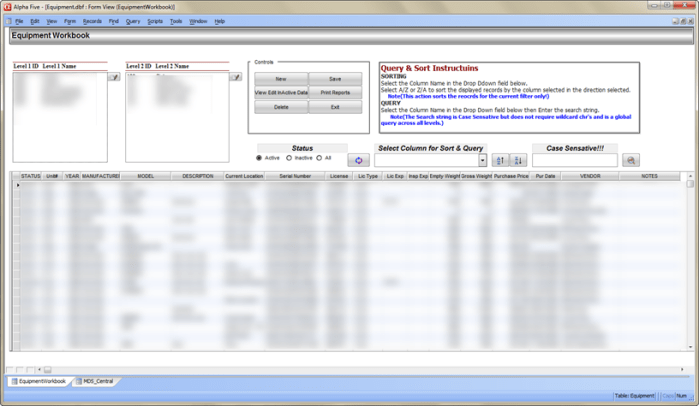 The answer is it would not work at all. The Query form does not work with a browse and since there are no fields on our form it would not work. Now we could place a conditional object on the form showing the browse on one page and fields on the other then using a custom query form button switch the page showing the fields. A lot of work. Likewise we could pop up a form solely for the purpose of querying our form, again a lot of work.
My solution is simple. On the form above you will see a field with the label.
Select Column for Sort & Query
This is a variable which I declare in the SHARED section of the form variables and it is Character. The variable is called ‘fld_name. The properties of the field is combo list and the choices are Field List for the current table. To the right is two sort buttons, A/Z and Z/A, then another variable called xLoc. This is just a character field variable where the user enters search text. Finally we have our query action button. Below the code is listed for each object.
'Sort Records A to Z by Column
DIM records_found as N
records_found = topparent.queryrun(".t.","eval(Var->fld_name)","","Yes","",.t.)

'Sort Records Z to A by Column
DIM records_found as N
records_found = topparent.queryrun(".t.","invert(eval(Var->fld_name))","","Yes","",.t.)

'Query Table by Column

if Var->fld_name = "L2_ID" .or. Var->fld_name = "Year" .or. Var->fld_name = "Empty_Weight" .or. Var->fld_name = "Gross_Weight" .or. Var->fld_name = "Purchase_Price" .or. Var->fld_name = "Hours_Odomter" then
 topparent.queryrun("*any(str(eval(Var->fld_name)),Var->xLoc)","invert(unit_number)","","No","",.f.)
else if Var->fld_name = "Purchase_Date" .or. Var->fld_name = "InActive_Date" then
 topparent.queryrun("*any(DTOC(eval(Var->fld_name)), Var->xLoc))","invert(unit_Number)","","No","",.f.)
else
 topparent.queryrun("*any(eval(Var->fld_name), Var->xLoc))","invert(unit_Number)","","No","",.f.)
end if
The trick to making this code work is my favorite function eval(). The value of All character variables are enclosed in quotes. The user selects a field name from the drop down list of Var->fld_name. Eval() removes the quotes and converts the value to code for Alpha Software. Lets look closer at the Sort A/Z code
DIM records_found as N
records_found = topparent.queryrun(".t.","eval(Var->fld_name)","","Yes","",.t.)
We are running the code topparent.query telling it to show all records. See the word “Yes”; this tells Alpha Software to add this query to the current query which means we will see all records based on the current selection of records only and we will see them in ascending order of the selected field column displayed in Var->fld_name. If I did not use the eval function, I would have to write those two lines of code for each field in the browse naming the fields explicitly. Sort Descending works the same way only we invert our eval().
Our code for the Query is slightly different. The eval function will convert the variable value to an actual field name which means our filter must compare characters to characters, numbers to numbers or dates to dates. Or, we do as I did and convert the field value to character since the function
*any()
returns a character string. Notice that for the query we do not apply the current record view to the new query so our result will display all matching records regardless of Parent or Child levels.
I hope you can see the potential for building a query form this way and I am sure with some creative thinking you can come up with some very cool query forms of your own.
Well that’s it for today’s session. Hope you will stop back. Thanks again for stopping by and Remember, if you need help with an Alpha Software application or wish to inquire about a custom application for your business go to our website
and inquire or contact
NLawson@cdc-TakeCharge.com
Have a great day.
 Custome Database Design with Alpha Software
Leave a comment