
Hello Everyone
When you look at the title you might ask yourself why would I want to do that? The answer is in a flat table all data is easily sorted, queried or viewed without the restrictions imposed by the rules of the set. Many would say why not just build another data view to handle and special data views the user may need? I say why build forms you don’t need?
First lets review what a set is. A set in a group of tables linked together for the purpose of reporting, viewing and entering data as if the fields in the linked tables were in a single table. These tables are linked by a common field or expression and the set controls data entry by insuring the link value of the child record is automatically entered when a new record is started in the child table. Sets are also a good way of grouping data for reports. By having a parent child relationship in a set, the data in the parent only needs to be entered once and it becomes available to all linking records in the child automatically
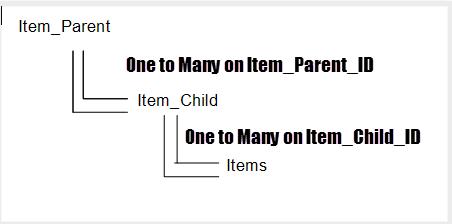
As an example, lets look at a group of tables (3 to be exact) and how they would look as a set.
- Item_Parent – Has a Parent_Item_Id Field and a Parent_Item_Name Field
- Item_Child – Has a Child_Item_Id Field, Child_Item_Name Field and Parent_Item_Id Field
- Items – Has Multiple Fields with Child_Item_Id as the linking value
The Set would be Linked as follows
 An actual form for this style set could look like this.
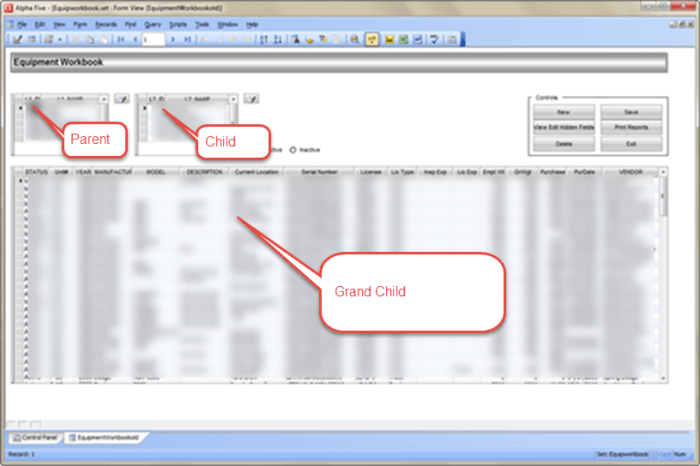 When the user selects a value in the Parent browse, the Child browse is refreshed automatically selecting the first record in the child browse which then displays all Grand Child records associated with the Child ID. On the surface, this looks good and simple to setup and use, but what if the user needed to see not only the records by the associated child and parent but also by like values stored in different child and parent links. By default this would not be possible in this setup. Your choices then become make another set switching the relationship or to display a xdialog box showing those values or to use flat tables for your form design.
The next image shows the same form using flat tables and controlling the view with list.
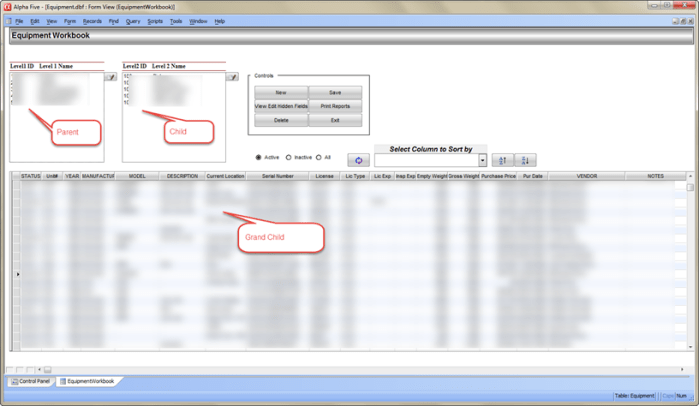 We will use the same three tables, but they are not joined in a set. Again, the data in the parent and child tables only need to be entered once and they will be available to the grand child table through List. As you can see the forms are very similar. This form is attached to the grand child table and uses list to display the data needed from the Parent and Child tables. Since there is no set to control the data display we use the list values in parent to display the list values in the Child list and the list value in the Child to display the Grand Child records. In addition, the user can now query the data and display it in a way they want regardless of the parent and child list. If you wish to see the code for controlling the list objects, contact me through my web site or the email address listed below.
Well that’s it for today’s session. I hope you found it informative. In our next session I will show how to write a custom form query for our form shown above. Hope you will stop back. Thanks again for stopping by and Remember, if you need help with an Alpha Software application or wish to inquire about a custom application for your business go to our website
and inquire or contact
NLawson@cdc-TakeCharge.com
Have a great day.
 Custome Database Design with Alpha Software
Leave a comment