
Hello Everyone
Today we will be looking at our Web Bookmark Manager.
Our Bookmark manager is designed on our weblist table and has three separate yet related functions.
- Provide a method for managing our Web Bookmark Menu
- Provide a means of searching the Web using the major search engines
- Provide a Browser interface for all browser applications
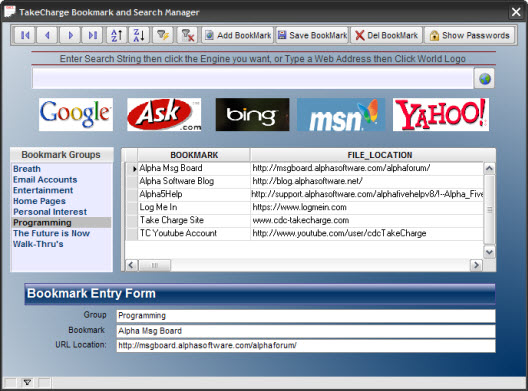 As you can see the design is simple and straight forward and still meets the look and feel of our overall design. Before we continue, watch this short video to see how it works then come back to see what makes it work.
Well I hope you liked the video. Lets look at the code for searching by a specific search engine. Google.
 parentform.commit()
wsstring = Web_Manager:tcask_search.text
URL_var = "http://www.google.com/search?site=web&hl=en&q="+Alltrim(wsstring)
sys_open(URL_var)
- First we commit the record then we assign our search field to our search variable wsstring.
- Next we pass the variable to our URL_var.
- Finally we use sys_open to perform the search.
Each Search Engine works the same way they just have slightly different syntax. To get the proper syntax, open your browser, Navigate to the search engine you want, enter a search string then click search. You will see the search syntax in the address bar of your browser. Copy the string to your code page of your button or hot spot and paste in . The last step is to replace everything to the right of q= with
+Alltrim(varname)
That’s it
Now lets look at the code for Show Passwords
if xCon = 1 then
 DIM SHARED pass AS C
 pass = ui_get_password("Security Alert!","Enter Password","","*")
 if Pass <> "I left this blank"
  goto Noaccess
 End if
 xcon = 2
 Web_Manager:Button13.Default.Hbitmap.Bmptag  = "$$generic.locked"
 Web_Manager:Button13.text = "Hide Passwords"
else
 xcon = 1
 Web_Manager:Button13.Default.Hbitmap.Bmptag  = "$$generic.unlocked"
 Web_Manager:Button13.text = "Show Passwords"
end if
Web_Manager:cond1.refresh()
noaccess:
When you look at this code, you can see it is very simple. I use the ui_get password function to prompt for a password. (I will not keep this, I have my own password routine I use for my applications.) The rest is simply a branching off of the xCon variable. I use what we discussed in a previous lesson on controlling object properties to change the text and bitmap for the button.
Not much to it but very effective.
The last code we will look at today is attached to the on push event of our globe button.
 parentform.commit()
if Web_Manager:tcask_search.text = "" .or. (left(Web_Manager:tcask_search.text,4) <> "HTTP" .and. left(Web_Manager:tcask_search.text,4) <> "www.") then if left(wsstring,4) = "HTTP" then
  URL_var = Alltrim(wsstring)
 else
  URL_var = "HTTP://"+Alltrim(wsstring)
 end if
else
 wsstring = Web_Manager:tcask_search.text
 if left(wsstring,4) = "HTTP" then
  URL_var = Alltrim(wsstring)
 else
  URL_var = "HTTP://"+Alltrim(wsstring)
 end if
end if
sys_open(URL_var)
The only thing special about this code is the first condition. Here we check the state of tcask_search.text to determine if the user wants to open a web page, a bookmark or search string. URL_var is set based on that condition and the sub set of conditions. Final step is sys_open(URL_var) and away it goes.
Again, very simple.
Well that’s it for today’s session. I hope you found it informative. Thanks again for stopping by and Remember, if you need help with an Alpha Software application or wish to inquire about a custom application for your business go to our website
and inquire or contact
NLawson@cdc-TakeCharge.com
If you have a question about this lesson or are unsure of how to proceed with any of the functions or code displayed, contact me at the email address above and I will get back to you as soon as I can.
Have a great day.
 Custome Database Design with Alpha Software
Leave a comment