
Hello everyone
Along with error handling and event trapping the programmer also needs to control user interaction with the program. Now this presents itself in many ways which include but are not limited to;
- Data Entry Forms
- Conditional Objects
- Field Rules
- Controlling Object Properties
- Using Forms as Dialog boxes
- xDialog Boxes
I will discuss each generally but our focus today will be on xDialog boxes and using Forms as Dialog boxes.
Data Entry Form
In a database, data is stored in a table simular to a spreadsheet. The columns are fields and the rows are records. A person could enter data in a browse and sometimes it is warranted but in most cases as a programmer you will want to design a form to help control data entry. With a form, you can set the order of data entry, show and hide objects, disable fields and more. All of these procedures if done correctly will enhance the user experience and keep the application healthy.
Conditional Objects
Anyone who has followed this blog, knows I have discussed conditional objects often because they are a great tool for controlling input and the amount of data on a form.
Field Rules
Alpha Software has an excellent process for managing field rules. Below is the opening paragraphs for Overview of Field Rules in their help.
Overview of Field Rules
Alpha Five offers great flexibility for controlling data entry in your database. You can create Field Rules to govern how you enter data in a table or set, and help ensure that data entry is accurate, consistent, and complete. You use Field Rules to control the information that you can enter in a field.
For example, you have a phone number field in a customer table, and you want to require that a phone number be entered for each new customer in a specific format, (000) 000-0000. Here you would use mask and template field rules to define the format of the phone number. You would then specify the field as required to force field entry in order to save a new record.
With sets, you can define and modify Field Rules for all fields in the set’s component tables simultaneously. However, the rules defined for each field are stored only at the table level; a set does not have its own Field Rules.
It states very clearly that the purpose of Field Rules is to govern data entry. With that said, many things you can do in field rules can be done directly in the object properties which is what I prefer to do because it affords greater control.
Controlling Object Properties
Just about every blog article I have written discusses object properties and how to manage them. Based on User input you can have objects enable, disable, change color or blink and much more than we can mention today.
xDialog boxes and Forms as Dialog boxes
First we should ask what is a dialog box? The definition of dialog is an exchange of ideas or information. When a programmer presents a dialog box to the user it is to provide information, ask a question or present an option. All of which are critical to the overall health and useability of the application.
If you play RPG computer games you are presented with dialog boxes all the time. When your character interacts with the NPC (Non Playable Character) character, you are responding to a dialog box. The dialog choices you make determine what quest you can go on or not, how your character is perceived and grows in the game and whether or not you will have the information to complete a quest.
Another dialog box you will find in games are puzzles or lock boxes. Many times your character will be stopped until they can pick a lock or solve a puzzle. This is a dialog box presented in a different package.
Alpha Software allows for many various dialog boxes as well and which ones you use and how you use them is somewhat controlled by the type of application you are creating but as a developer, you can create your own using built in tools.
Creating a form and using it as a dialog is a good way to control the data entry or to prompt for information. For example say you want to open a dialog box which allows the user to enter a new record.
 In the above example, I am presenting a form as a dialog for the user to enter a new application . I used a form as a dialog because the sole purpose of the form is to enter a new application and it has the dual ability to enter many application at one time which simplifies the user input. The code to do this is listed below.
form.load(“AppLookupDialog”,”dialog”,””,”center”,”center”)
AppLookupDialog.Activate()
AppLookupDialog:button1.Disable()
AppLookupDialog.New_Record()
AppLookupDialog.Show()
form.close()
Notice on the first line I am loading the form as a dialog. There are two things you need to know when you do this. First is when you load a form with this method, closing the form does not actually close it, it just hides it. The calling object code must also close the form which is the last line of code. Second, when you open the form as a dialog the user must complete the expected action before they will be given access back to the application. Now this can be a problem with todays computer user because they want to click on a million things at once and this can cause the application to lock up. You can get around this by loading the form as a popup instead which is what I normally do.
Here is another form as a dialog which only accepts one record at a time because that is the user input control I need for this particular function.
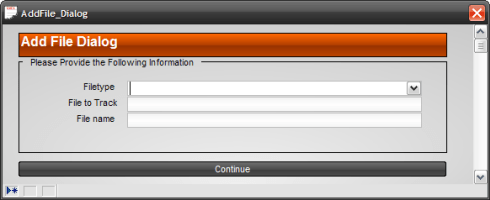 As you can see from these two examples using a form as a dialog is easy and very versitle. All data entry and object controls are at your disposal and can make some attractive and powerful dialogs.
Creating a dialog box using xDialog is also a good way to control user input.

This example is an xDialog box which presents the user with three radio choice options. The box is specific and to the point. Since it is an xDialog it is not bound to a table and has a very small footprint. By following some simple guide lines you can create powerful and attractive dialog boxes using xDialog.
This next example shows an xDialog box which has default values and uses a smart field object for getting a choice from the user.
 As you can see the boxes are very uniform in apperance even though they do quite different things. This is one of the key features I like about xDialog. With just a little practice you can make Dialog boxes which give your application a very professional look and feel. As a final means of driving this point home, I present a message box which looks like the user input boxes as well.
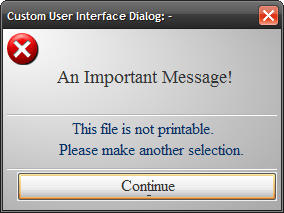
I will not present the code for all of these boxes, but below is the code for the message box which is the basic framework.
dim xdialogStyle as p
ok_button_label = “Con&tinue”
xdialogStyle.color = “White”
xdialogStyle.accentcolor = “Gray-40”
ui_dlg_box(“Custom User Interface Dialog: – “,<<%dlg%
{font=Times New Roman,14}{color=Gray-80}
{image=$sys_error}{sp=10};
An Important Message!;
{windowstyle=Gradient Radial Top Left}
{lf};
{line=1};
{region}
{font=Times New Roman,12}{color=Dark Teal}
This file is not printable.;
Please make another selection.;
{endregion};
{line=1};
{font=Times New Roman,12}{color=Gray-80}
{sp=2}<*50=ok_button_label!CONTINUE>;
%dlg%)
Listsource = “”
You can see the code is simple and with just a few adjustments you can solicit any kind of user input you need. Below is a video showing how the dialog boxes are used and presents the code for the File ReName Dialog.
I hope the video showed how the use of dialog boxes easily controls the user interaction with your application. Now there are other methods of controlling user interaction specifically, high level user interactions (UI functions). Go the Alpha Softwares help and search on ui for a complete list of ui functions.
Thanks again for stopping by and Remember, if you need help with an Alpha Software application or wish to inquire about a custom application for your business go to our website
and inquire or contact
NLawson@cdc-TakeCharge.com
Have a great day.
 Custome Database Design with Alpha Software
Leave a comment