
Hello everyone.
As I stated at the end of the last session, we are finally going to look at the Document Manager.
For a long time now business has used Document Managers to control the flow of information through their staff and offices. No one however, has created a Document Manager for the personal computer at least as far as I can tell by doing a Google Search. Well now that has changed because we are going to do one.
As Always, we start with a design document to paint a general picture of what we want so lets begin.
Design Document for Document Manager
Because there are a multitude of applications to manage and edit all types of files I feel it is important to have our Document Manager handle the selection and tracking of when the user uses various applications to edit or view their files. In the same vain I believe our Document Manager should keep track of where the files are on the hard drive and the last time they were edited or viewed. If we are going to do that, we should also provide the ability to copy, move, delete, zip email and finally print the documents from our manager. Finally, why stop with documents when we can tract and manage all types of files.
Now that we know what the Document Manager should do, lets look at how we will do it.
The tables we will need are;
Document Table
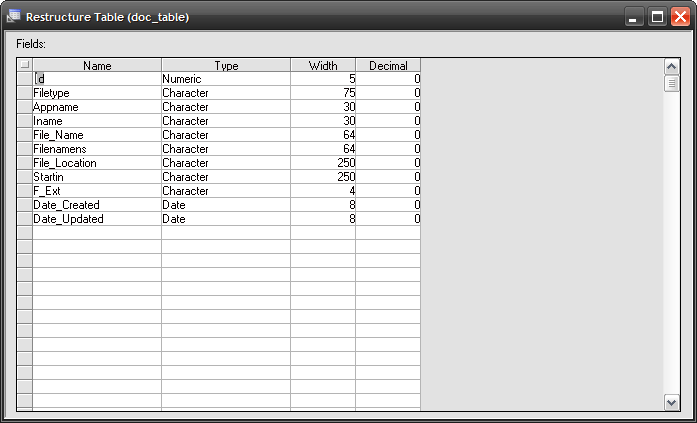
The Document table will store all files the user wishes to track. Their Location, Name, Date Created, Date Updated, File Type, Extension and Start In Location.
And we need an App table
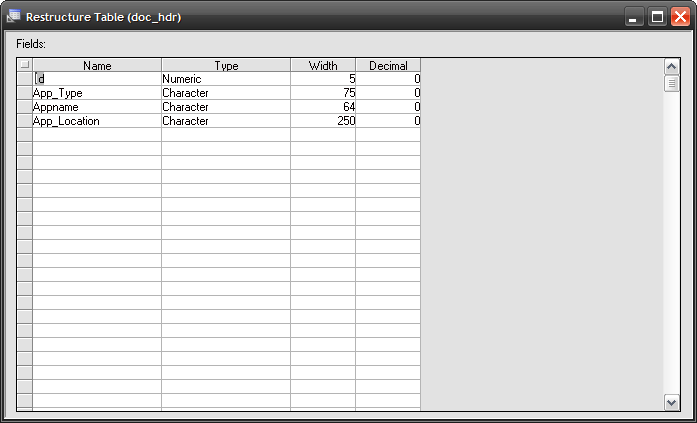
The App Table will store the names of each application the user uses to manage his documents and files, their location and Type of Application ie: Word Processor, Graphics, Video Player etc.
Watch this short video to see our first design of our Document Manager ( Now called File Organizer) and how it should work.
As you can see from the video we have the ability to meet all of the needs of our design document and only need to finalize the object code for each button and it is done. Currently the form looks like this.
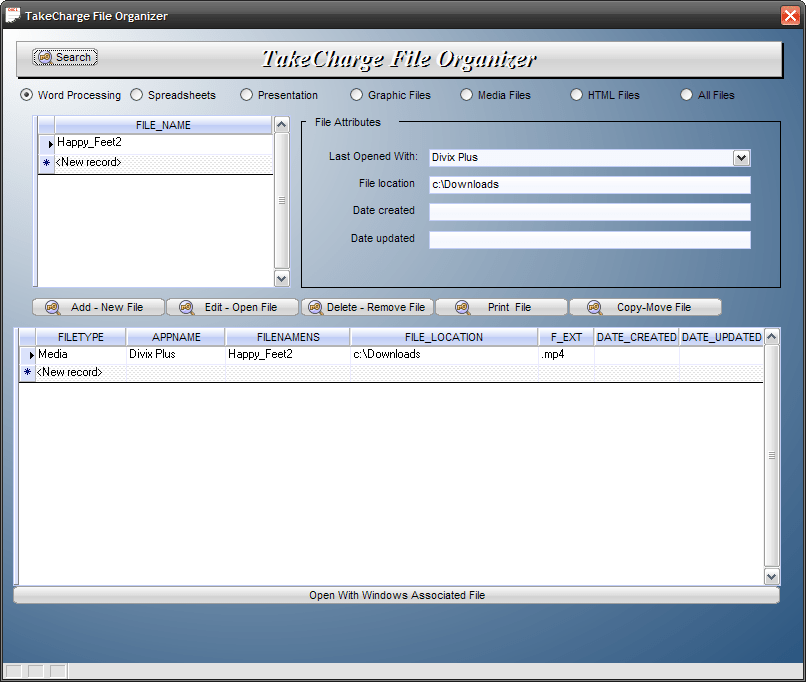
Most likely this will change because I don’t like the action buttons spread out on the form and currently not all utilities are present on the form. Once the re-design is complete, I will post the new image and discuss the changes.
Now lets look at the code for the edit open button on the form.
dim SHARED opnvar as C
opnvar = tablemax("doc_hdr","Appname = '"+Doc_Manager:APPNAME.TEXT+"'","App_Location")
sel_file = RTrim(Doc_Manager:file_location.text)+chr(92)+RTrim(Doc_Manager:FileNameNS.text)+Doc_Manager:f_ext.text
CLine = RTrim(opnvar)+" "+RTrim(sel_file)
sys_shell(Cline,1)
Notice that the openvar variable uses the text value of objects on the form as part of the filter. To accomplish this I must properly quote the text value in the filter part of the function as if it were a variable
“Appname = ‘”+Doc_Manager:APPNAME.TEXT+”‘”
Now the function returns the location of the calling application I wish to use for the opening of my file. The code then builds the variable sel_file and combines the two together for the Variable CLine which is then used in the function sys_shell(). Sys_Shell() opens the file in the app specified. Very easy, very cool.
On our next secession we will look at the additional utilities needed and the redesign of the File Organizer Form.
I hope you enjoyed this session as Much as I enjoyed writing it. OH, as a teaser for all you graphic nuts I will be doing a lesson on how to make a game which is similar to Pipes on the Android phone. Stay tuned!!!
Thanks again for stopping by and Remember, if you need help with an Alpha Software application or wish to inquire about a custom application for your business go to our website
and inquire or contact
NLawson@cdc-TakeCharge.com
Have a great day.
 Custome Database Design with Alpha Software
Leave a comment