
Hello Everyone
I’m sure most everyone saw the title, thought boring and clicked away. Hopefully you did not and will read this short but important entry.
In the software world when someone says Design Document, programmers shudder. At the beginning of this blog I wrote of the value of a design document. What programmers need to understand is the document is written for the level of the audience. For example, if you are in a company and you are part of a development team you would have a design document showing what needs to be done, by whom and when. If you are working independently (like me) my design document may only be a note on a pad.
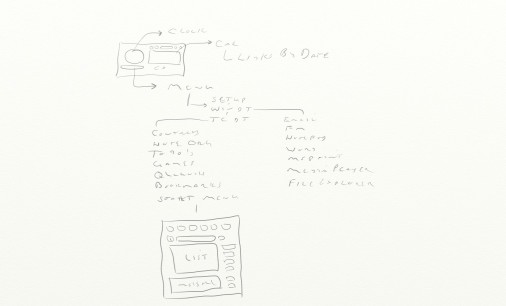
The image above is a simple design doc showing what my intent was for my desktop start menu. The only person reading it is me so it only needs to show in broad strokes what I expect to accomplish. If I was working with a group the High Level Design Doc might look like this.
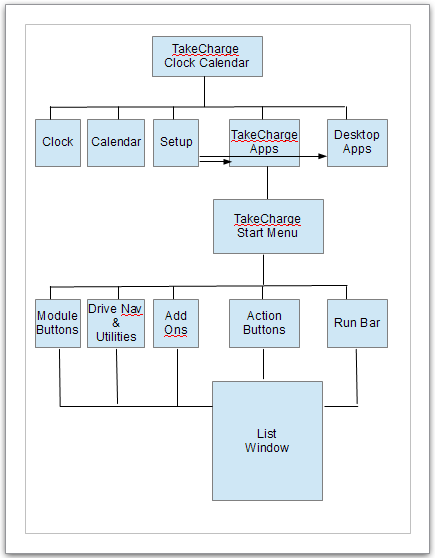
This diagram would require supporting documents with additional diagrams for each sub level of the design. Since it is just me (and all of you) we will use the sketch as our diagram.
When the desktop loads we need a front end form for our app. This will be our Clock Calendar. On the clock Calendar we need several things.
- An Analog Clock – Could be digital, but Analog is cooler
- A push button calendar with navigation buttons and links to activities and to do’s by date
- Current Date with hot spot to return to that date
- Display Menu Button
- Setup Link
- Windows Desktop Sub Menu Link
- TakeCharge Desktop Sub Menu Link
- TakeCharge Start Menu Link
- Exit
Our ultimate goal is to create the start menu, but before we do we must define the drop down menu components. Each of the next few entries will look at the design requirements for each element of the drop down menu and follow with the design of the Setup Wizard. Once that is finished we will proceed with the Start Menu
Hopefully you can see that the design document is only intended as a road map to help you get to your expected destination and the amount of detail is determined by the person reading the map. If you have no map at all you may still find your way, but you will make many wrong turns and find yourself on several dead-end streets.
This looks like a good point to stop for today. Our next entry will look at the drop down menu function and how we are using it in our application.
Remember, if you need help with an Alpha Software application or wish to inquire about a custom application for your business go to our website
and inquire or contact
NLawson@cdc-TakeCharge.com
Have a great day.
 Custome Database Design with Alpha Software
Leave a comment