
Hello Everyone
The main purpose of a desktop computer is to have a personal computer in a centralized location. Having a more powerful computer in an accessible location like home makes up for its lack of transportability. Because of it’s greater power, more sophisticated software programs can be utilized providing a wider range of types of programs it can run. This coupled with higher quality speakers and video cards, upgradable components, faster connect speeds and greater memory storage means the user gets more bang for their buck. Desktop computers are not very transportable however they are very compatible with laptops, tablets and mobile devices. Lets look in more detail at the current desktop.
When the desktop PC boots up, the user is presented with a desktop screen which in most cases is covered with little icons allowing the user to have direct access to the files and folders on the PC. It’s obvious the consumer likes this since it is one feature which transferred to tablets and smart phones. I however prefer a list or menu system. If you look at the image below you will see my desktop.
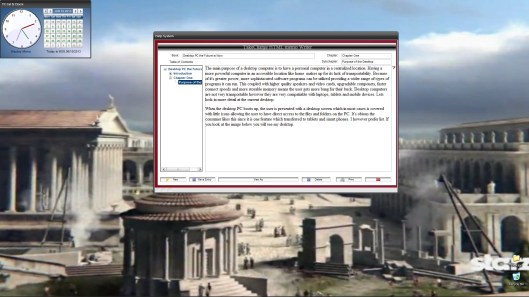
As you can see, I have my TakeCharge Clock Calendar Desktop Widget and only two folders in the lower right corner of the screen. The Desktop Widget provides a drop down menu for simple access to all applications and services on my pc. This leaves my desktop free to display the image of my choice clean, and clutter free. The HTML Memo Writer is an application I wrote which allows me to write locally and then transfer my document to whichever blog or web forum I choose. This particular desktop is on Windows XP and I have a similar look on my Windows7 Desktop.
With Windows8 Microsoft is attempting to set the desktop free. The image below is a Google search for Windows8 desktops.
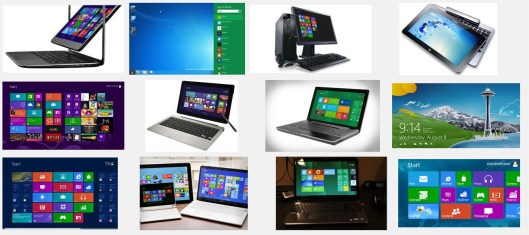
As you can see, the configuration ranges from minimal to side bar to multiple tiles. Basically what ever you want. The sliding tiles are live links to any web page you want, keeping the information flow to your PC as current as it can be. Now I think this is great, but what you don’t see is the underlying desktop is still the same. So, when you are not using your tiles or you are using a different version of Windows the desktop software still needs to be addressed.
Current Desktop Software
When you buy a new PC it comes with some basic desktop software. These are:
- Notepad
- File Manager
- Internet Explorer
- Media Player
- Word
- MS Paint
- Clock
- Start Menu
- and several more including basic utilities for managing the hardware and some games.
Most of these programs have been around in one form or another since Windows first started and I believe they will continue to play an important role in all future desktops from Microsoft; however, I believe they will continue to change and get redesigned to meet future needs.
One complaint I have is Microsoft has never (with the exception of Internet Explorer and Media Player) given their desktop programs prominence on their desktop. In my opinion, the desktop applications should be provided as a suite just like Office or Works and promoted as a value to their system. If you look at the image below
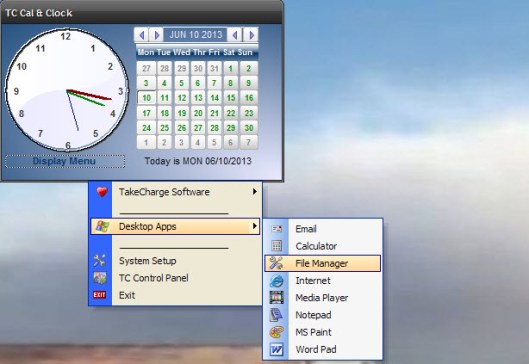
you will see that on the drop down menu of the TakeCharge Desktop Clock Calendar Widget, Microsoft’s Desktop Apps have high prominence because I use these programs often as I am sure others do and more would if they knew they existed and could find them. Now lets look at each individual application.
Notepad
Notepad is a simple text editor which can save files under several file extensions. Also, Notepad has no format tags which makes it perfect for writing html, sys files, bat files, ini’s logs etc. I use notepad to create and test html calls and page designs as well as some scripting routines. I also use it to easily modify xml files. Notepad has changed over the years and added new features but basically it is the same as when first introduced and I expect it will stay that way. Notepad should stay in our new desktop.
File Manager
Windows File Manager changed when Windows 95 was released to Windows Explorer. The application works as a file and folder utility as well as a Navigation system and application launcher. With each release of Windows, the Explorer features change adding new features and removing others. This has caused a real love hate relationship for most users. As a person who supports many users I am often asked to find files lost when someone was trying to drag and drop files between folders and to recover files deleted when the directory tree had focus rather than the files or folders in the view-pane.
I have not seen but have been told the Explorer in Windows8 is now called File Explorer and once again works with a tag system. Simply put, you tag the files and folders you wish to work with then click a command function and the wizard does the rest. It is my belief our desktop would be improved with a file folder utility app which has a limited job description.
- Find / Search Files and Folders
- Perform basic utilities
- Launch applications
- Open files in associated applications
- Protect the user from themselves. (Drag and Drop will not be included)
Internet Explorer
You either love it or hate it. Our desktop will automatically work with the user defined favorite browser but still provide access to Internet Explorer.
Media Player
The Media player will be available and have easy access, but media files will open based on the user preferred application
Word
I love Word. It is an easy to use word processor with all the important features for most documents. We will include Word, but add some desktop features to enhance its functionality.
MS Paint
Personally I have no feelings one way or the other about MSPaint. I may have the desktop give the user the ability to substitute some other freeware paint program as part of the setup.
Clock
I feel Microsoft has totally ignored the potential of the clock as a desktop application. We will not do the same.
Start Menu
The Start Menu has also gone under many changes since inception but still lacks some basic features that would make it excel. We will offer a replacement for the Start Menu.
Keep in mind, we are not writing a new OS we are creating an Add-On Desktop application. Our Desktop will highlight the best parts of Windows from XP up and offer alternatives for the weaker parts of Windows. We will still provide links to all parts of Windows and let the user decide which they wish to use.
This looks like a good point to stop for today. Next we will look at a broad stroke view of the functionality of our New Desktop.
Remember, if you need help with an Alpha Software application or wish to inquire about a custom application for your business go to our website
and inquire or contact
NLawson@cdc-TakeCharge.com
Have a great day.
 Custome Database Design with Alpha Software
Leave a comment