
Hello everyone
Today we are continuing our lesson plan on controlling graphics in Alpha Software just using objects on a form and xBasic code. As I was preparing the CAD application lesson I thought of a more practical application for managing objects and graphics on the screen which is building a bar graph.
Bar Graphs in Alpha Software
If you go to your help file and search on Bar Graph you will see a few examples of graphs and charts which require either Microsoft Office or SimpleChart installed. If you are designing a run-time app you will need to purchase a copy of SimpleChart for distribution with your app. A third option is to use objects on a form and control them with xBasic.
Bar Graphs by TakeCharge Software
The short video below shows an interactive bar graph which can be completly designed by using objects on a form and some reasonably simple xBasic code. Watch the video then continue below for an overview of what was done.
As you can see from the video, this solution will work in many ways and you only need some imagination and patience. Now lets look at some of the things we did.
The Interactive Graph Form
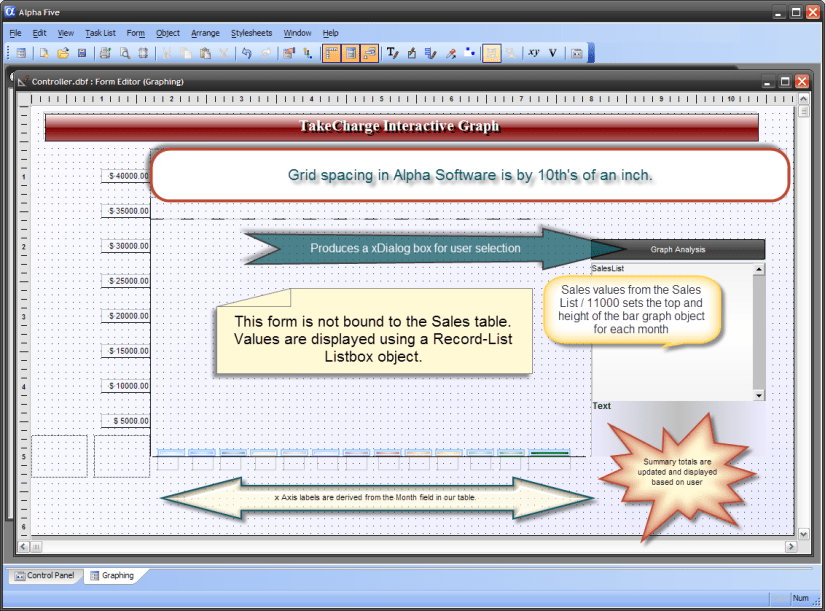
We use the grid spacing in Alpha Software for determining the height of each bar graph object. The bottom position of the graph (X Axis) is five inches from the top of the form and each inch is divided by tenths. If you divide Sales by 11000 and subtract the result from the top property of the graph for the given month an add the result to the height, you get a bar which visually represents the sales for the month. Now repeat that process for each month to be displayed and you have your graph. Next build a user dialog box so they can select the view they want then use what you have learned in lessons 1 through 4 to animate and manipulate the graph display
Build your own.
If you have been following along on the lesson plan you should be able to complete the graph on your own. Even if you are not sure try to complete it and send me your results to
NLawson@cdc-takecharge.com
and I will review them for you . If it is right Great!! if not I will red line your code and show you the solution in a return email.
Well that’s it for today. I hope you found this lesson helpful and I hope you enjoy the rest of this series. I look forward to seeing your solutions.
Remember, if you need help with an Alpha Software application or wish to inquire about a custom application for your business go to our website
and inquire or contact
NLawson@cdc-TakeCharge.com
Have a great day.
 Custome Database Design with Alpha Software
Leave a comment