
Hello Everyone
In the last lesson I said we will take what we learned and use it to create the beginning of a pong game. Now the pong game on the surface is very simple. You have a ball, a paddle and movement. When the ball hits the paddle, it bounces. If it misses the paddle, you lose. Simple concept not so simple code.
Lets look at the components. On the screen you have a ball, a paddle and four edges of the page.
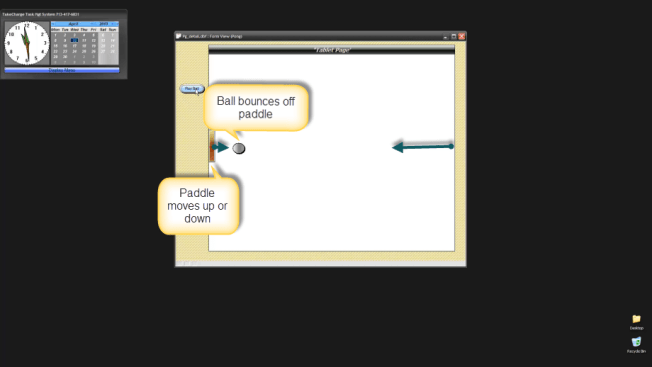
When the ball strikes the paddle, it bounces at the same angle it strikes at. For example, it hits straight on then it bounces back to it’s original position. If it hits the paddle at an angle, it will bounce in the opposite direction at the same angle and the same occurs when it hits three of the four sides of the page. If the ball goes beyond the paddle, the game stops.
To make all of this happen, we need to know;
- The top position of the paddle at all times relative to the top of the form.
- The length of the paddle.
- The bottom position of the paddle at all times relative to the top of the form.
- The width of the paddle.
- The position of the ball from the left of the form at all times.
- The position of the ball from the top of the form at all times.
- Slope the ball is traveling at all times
In today’s lesson we will address points one through five. Watch this short video to see the game in action and get an overview of what we will discuss.
First lets look at our variables. They have changed slightly from the previous lesson.
xBounce = "Bounce"
xDir = "Left"
dl = ""
xLen = 0
Along with these variables we set some local variables on the on push event of our play pong button.
xBounce = "Bounce"
xDir = "Left"
dl = "Bounce Ball"
xLen = 0
topparent:Ball1.Object.Left = 4.1
'topparent:Ball1.Object.Top = 2.8
topparent:Text1.Object.Top = 2.7
xBTop = topparent:Ball1.Object.Top
xTxtTop = topparent:Text1.Object.Top
xTxtBot = xTxtTop+topparent:Text1.Object.Height
topparent:Ball1.Object.Visible  = .t.
topparent:Text1.Object.Visible  = .t.
You can see we are assigning a starting position for our ball both from the top and left side of the page and we assign the starting position of our paddle from the top of the page as well as the bottom position of the paddle from the top of the page. Now lets look at the code that moves the paddle up and down.
'Date Created: 06-Apr-2013 05:32:07 PM
'Last Updated: 08-Apr-2013 02:06:57 PM
'Created By  : cdc
'Updated By  : cdc
if A_USER.KEY.value = "{UP}" then
    A_USER.KEY.handled = .T.
    if A_USER.KEY.event = "down" then
        if topparent:Text1.Object.Top  >= 1.25
            topparent:Text1.Object.Top  = topparent:Text1.Object.Top - .15
        end if
    end if
else if A_USER.KEY.value = "{DOWN}" then
    A_USER.KEY.handled = .T.
    if A_USER.KEY.event = "down" then
        if topparent:Text1.Object.Top  <= 6.25
            topparent:Text1.Object.Top  = topparent:Text1.Object.Top + .15
        end if
    end if

end if
This code is the same as the form on key event in the previous lesson except the keys are now up and down rather than left and right. This code defines the movement and sets the top and bottom boundaries of our page. The on timer code does the rest of the work.
'Date Created: 06-Apr-2013 03:59:12 PM
'Last Updated: 08-Apr-2013 03:24:26 PM
'Created By  : cdc
'Updated By  : cdc
if dl = "Bounce Ball" then
    xBPos = topparent:Ball1.Object.Left
    if xBPos <=1 then
        topparent:Ball1.Object.Visible  = .f.
        dl = ""
    end if
    if xDir = "Left" then
        xBPos = topparent:Ball1.Object.Left
        xBTop = topparent:Ball1.Object.Top+.15
        xTxtTop = topparent:Text1.Object.Top
        xTxtBot = xTxtTop+topparent:Text1.Object.Height
        if ( xBPos > 1.0 .and. xBPos <=1.3 ).and. ( xBTop >= xTxtTop ) .and. ( xBTop <= xTxtBot ) then
            xDir = "Right"
        else
            xBPos = xBPos-.21
            topparent:BALL1.Object.Left = xBPos
        end if
    else
        if xBPos >= 7.9 then
            xDir = "Left"
        else
            xBPos = xBPos+.21
            topparent:BALL1.Object.Left = xBPos
        end if
    end if
end if
end
The first thing we do is determine if the ball occupies the space closer to the left edge of the page then the paddle. If so, the game ends.
    xBPos = topparent:Ball1.Object.Left
    if xBPos <=1 then
        topparent:Ball1.Object.Visible  = .f.
        dl = ""
    end if
Next we look at the left direction of the ball movement. Notice that the ball1.object.top has .15 added to it’s position. This is because the ball is .30 inch’s in height. Adding .15 makes the center of the ball surface the strike point. This will be important when we write our angle code. Now we need to determine what to do if the ball and the paddle meet on the left side of the screen. This is where the top, bottom, length and width of the paddle come into play. Using those values we can determine if the ball strikes the paddle and where on the paddle it strikes.
        if ( xBPos > 1.0 .and. xBPos <=1.3 ).and. ( xBTop >= xTxtTop ) .and. ( xBTop <= xTxtBot ) then
            xDir = "Right"
        else
            xBPos = xBPos-.21
            topparent:BALL1.Object.Left = xBPos
        end if
Finally we set the boundary for the right side of the page and the distance the ball will move to the right.
if xBPos >= 7.9 then
xDir = “Left”
else
xBPos = xBPos+.21
topparent:BALL1.Object.Left = xBPos
end if
We now have the basic frame work of our pong game. Next we will look at how to create the angles the ball will bounce.
Well that’s it for today. I hope you found this lesson helpful and I hope you enjoy the rest of this series.
Remember, if you need help with an Alpha Software application or wish to inquire about a custom application for your business go to our website
and inquire or contact
NLawson@cdc-TakeCharge.com
Have a great day.
 Custome Database Design with Alpha Software
Leave a comment