
Hello everyone
Today we will be looking at our main form for our reader, the objects on the form, the properties of the objects and the code which makes them work. First take a minute to watch this short video which gives an overview of what we will discuss in the blog.
I hope you found the video informative. To start, we will look at our form.
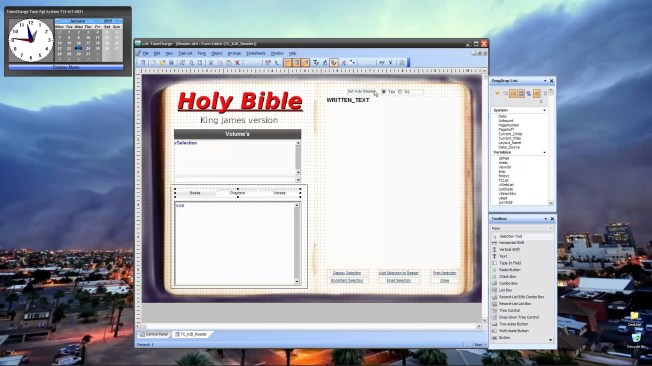
When designing the form, I set the background to BMP image. This is done as follows
- Right click on the white area of the ‘Forms’ tab of your application control panel.
- Select New and a New Form Dialog will appear
- Select the table you want to attach the form to (Reader)
- On the next window, select Blank Form
- Next choose a style sheet
- Click Finish
- A blank form appears on the screen, Name it (I used TC_KJB_Reader).
- Right click on the form and select Properties. A Properties dialog box will appear.
- Select the backdrop tab
- Check the option Use Bitmap ( You will need to find a public domain image of an open book or design your own.)
- Set Display mode to stretch
- Set Load from File and point to the image file you downloaded or created.
- Size your form so the image has the proper aspect ratio.
- Click on the Window tab
- Click on Current Size and position
- UnCheck everything under Window Style except has caption.
- Save your changes.
Typically I do not use a background image but since we are doing a reader, we might as well. Notice we set the size and position of our form. This is to insure the image does not get distorted and that any objects we place above the image stay in place. For example, we placed the memo field on the right page of the image. If the form was sizable, and the user made the form bigger, the memo field would no longer appear on the right page. If you choose to not use an image for the background simply skip steps 9 through 16.
Next we will define two session variables for our form.
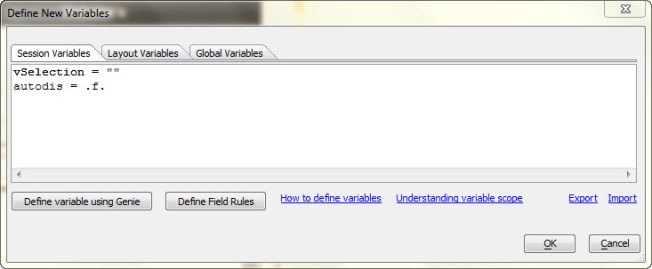
- Select Form from the menu above the design window.
- Select Variables from the drop down menu.
- Choose session variable tab and create the two variables you see above; as I did.
In this window, you do not need to declare you variable types but you do need to set a value for each. If you are not sure how, use the help at the bottom of the form.
We will use some additional variables which will be declared on the code page or in our start up autoexec script. An autoexec script will run automatically when the application is loaded. All Global variables declared in the autoexec script will be available to all forms, windows, reports, object code and calculations. follow the steps below to create an autoexec script.
- Select view from the menu above your form design window.
- Select Code Editor from the drop down menu.
- The first drop down under the tool bar should say ‘Scripts/Functions’ if not, change it.
- Click the first icon on the left in the tool bar (New Script Using XBasic Editor)
- You will see an Untitled script page.
- Declare your Global Variables
- dim Global vce as C
- dim Global Verse_Name as C
- dim Global vBooks as C
- dim Gloobal cdv as N
- dim Global scdv as N
Save your script as Autoexec. Run your script to create the variables since we will be using them soon.
Now we are going to create a conditional object on our form. If you look at the image of our form above, you will see a box around our Multi-state button and the list box below it. That is the conditional object . You can create this object by dragging it from the toolbox on the side of your screen. When placed on the form, it is given a default name of ‘COND1’. I left the name the same you may wish to change it if you like. To make the Conditional object work the way we want, follow the steps below.
- Right click on the object
- Select Properties from the Right Click Menu
- On the Condition expression enter ‘vSelection <> “Key Word Search”‘ Set the label to Verses
- Click New Condition and on the Condition expression set vSelection = “Key Word Search”‘ and make the label Search
- Click OK to save and close the dialog

Next we want to drag our objects to our form from the drag drop list. Scroll down the drag drop list to the variable section select
- vSelection
- vBooks
- vce
- After placing those three on the form, drag a second occurrence of vce to the form. This will be our Progressive look up.
Building List
We are going to make vSelection into a List box object with choices derived from a user list and values from the verse table. To do this, we must first create a control line feed list using our global variable called Verse_Name. Now this name does not reflect the values in the list and typically as a rule of thumb you should name your variables similar to the values they represent . The OnInit event of our form is where we populate the list Verse_Name.
TC_KJB_Reader:vbooks0.text = ""
dim SHARED vList as C

Verse_Name = "All"+crlf()+word_unique(table.external_record_content_get("verses","Volumn","recno()",""), crlf())+crlf()+"Life Issues"+crlf()+"Key Word Search"+crlf()
vList = word_unique(table.external_record_content_get("verses","Bookname","recno()",""), crlf())
Var->vce = "Books"

if cdv = 1 then
    cdv = 0
else
    cdv = 1
end if
if scdv = 1 then
    scdv = 0
else
    scdv = 1
end if
vSelection = "All"
As you can see, Verse_Name is a combination of text values and table values seperated by a control line feed. You will also notice we wrap our table values in word_unique. This insures no duplicates show up in the list. The other list box (vBooks) on our form is created from the variable vList and is also populated during the OnInit Event. Once our list are created, we set a new value for our watch variables which causes both list to refresh on our form. Our progressive look up is a combo box which uses vBooks as the list to progressively view. To insure the progressive look up field is blank we set the form object vBook0 text value to blank
TC_KJB_Reader:vbooks0.text = “”
Finally we set our multi-state button to “Books” and vSelection to “All”. Now when our form loads, it is ready for user input with all records available for view.
On Change Events
Now that we have created our list and set the initial view of our data we need to create the code which controls our data when the user changes a list value or pushes the display selection button. Lets start with our first list vSelection.
The On Change event for our list provides a filter value which changes the data displayed in our vBook list.
if vSelection = "All" then
    if Vce = "Books" then
        vList = word_unique(table.external_record_content_get("verses","Bookname","recno()",".t."), crlf())
    else if Vce = "Chapters" then
        vList = word_unique(table.external_record_content_get("verses","Bookname+Chapter","recno()",".t."), crlf())
    else if Vce = "Verses" then
        vList = word_unique(table.external_record_content_get("verses","vLink","recno()",".t."), crlf())
    end if
    goto display
end if

if Vce = "Books" then
    vList = word_unique(table.external_record_content_get("verses","Bookname","recno()","Volumn = Var->vSelection"), crlf())
else if Vce = "Chapters" then
    vList = word_unique(table.external_record_content_get("verses","Bookname+Chapter","recno()","Volumn = Var->vSelection"), crlf())
else if Vce = "Verses" then
    vList = word_unique(table.external_record_content_get("verses","vLink","recno()","Volumn = Var->vSelection"), crlf())
end if

if vSelection = "Life Issues" then
vList = <<%Str%
Illness|NA
Illness.Psalms 23|BC__ Psalms 23
Illness.Psalms 27: 13-14|BCVR Psalms 27 13-14
Illness.Psalms 73:26-28|BCVR Psalms 73 26-28
Illness.Psalms 91|BC__ Psalms 91
Illness.Psalms 103|BC__ Psalms 103
Illness.Isaiah 40:31|BCV_ Isaiah 40 31
Illness.Matthew 8:17|BCV_ Matthew 08 17
Illness.John 14:1-6|BCVR John 14 01-06
Illness.John 16:33|BCV_ John 16 33
Illness.Philippians 4:7|BCV_ Philippians 04 07
Illness.1 Thessalonians 4:13-18|BCVR 1 Thessalonians 04:13-18
Illness.James 5:15|BCV_ James 05 15
Financial.1 Samuel 2:7-8|BCVR 1 Samuel 02 07-08
Financial.Psalms 50:10-15|BCVR Psalms 50 10-15
Financial.Psalms 73|BC__ Psalms 73
Financial.Proverbs 11:4|BCV_ Proverbs 11 04
Financial.Proverbs 11:25|BCV_ Proverbs 11 25
Financial.Proverbs 30:8-9|BCVR Proverbs 30 08-09
Financial.Ecclesiastes 5:10-20|BCVR Ecclesiastes 05 10-20
Financial.Jeremiah 9:23-24|BCVR Jeremiah 09 23-24
Financial.Malachi 3:8-10|BCVR Malachi 03 08-10
Financial.Matthew 6:19-21|BCVR Matthew 06 19-21
Financial.Mark 4:1-20|BCVR Mark 04 01-20
Financial.Mark 10:17-31|BCVR Mark 10 17-31
Financial.Luke 16:19-31|BCVR Luke 16 19-31
Financial.2 Corinthians 9:6-14|BCVR 2 Corinthians 09 06-14
Financial.Philippians 4:11-13|BCVR Philippians 04 11-13
Financial.Philippians 4:19|BCV_ Philippians 04 19
Financial.1 Timothy 6:10|BCV_ 1 Timothy 06 10
Financial.James 1:9-11|BCVR James 01 01-11
Financial.James 2:1-7|BCVR James 02 01-07
Financial.1 John 5:14-15|BCVR 1 John 05 14-15
Depression.Psalms 16:11|BCV_ Psalms 16 11
Depression.Psalms 34|BC__ Psalms 34
Depression.Psalms 40:1-3|BCVR Psalms 40 01-03
Depression.Psalms 42:5|BCV_ Psalms 42 05
Depression.Psalms 55|BC__ Psalms 55
Depression.Psalms 62|BC__ Psalms 62
Depression.Psalms 138:7|BCV_ Psalms 138 07
Depression.Psalms 139|BC__ Psalms 139
Depression.Proverbs 3:5-6|BCVR Proverbs 03 05-06
Depression.Proverbs 15:13|BCVR Proverbs 15 13
Depression.Isaiah 53:4-5|BCVR Isaiah 53 04-05
Depression.Isaiah 61:1-3|BCVR Isaiah 61 01-03
Depression.Matthew 11:28-30|BCVR Matthew 11 28-30
Depression.Romans 8|BC__ Romans 08
Depression.Romans 12:1-2|BCVR Romans 12 01-02
Depression.1 Corinthians 10:13|BCV_ 1 Corinthians 10 13
Depression.2 Corinthians 4:8-9|BCVR 2 Corinthians 04 08-09
Depression.Galatians 2:20|BCV_ Galatians 02 20
Depression.Colossians 1:11-13|BCVR Colossians 01 11-13
Depression.Peter 1:13-16|BCVR Peter 01 13-16
Loneliness.Psalms 23|BC__ Psalms 23
Loneliness.Psalms 27:10-14|BCVR Psalms 27 10-14
Loneliness.Psalms 38:21|BCV_ Psalms 38 21
Loneliness.Ecclesiastes 4:9-11|BCVR Ecclesiastes 04 09-11
Loneliness.Isaiah 58:10|BCV_ Isaiah 58 10
Loneliness.Matthew 28:20|BCV_ Matthew 28 20
Loneliness.Romans 8:28-39|BCVR Romans 08 28-39
Loneliness.Hebrews 13:1-6|BCVR Hebrews 13 01-06
Loneliness.1 John 2:9|BCV_ 1 John 02 09
Fear.Psalms 34:4|BCV_ Psalms 34 04
Fear.Psalms 42:5|BCV_ Psalms 42 05
Fear.Psalms 56:3-4|BCVR Psalms 56 03-04
Fear.Psalms 91|BC__ Psalms 91
Fear.Psalms 118:6|BCV_ Psalms 118 06
Fear.Proverbs 1:32-33|BCVR Proverbs 01 32-33
Fear.Isaiah 41:8-10|BCVR Isaiah 41 08-10
Fear.Isaiah 43:1-2|BCVR Isaiah 43 01-02
Fear.Jeremiah 29:11|BCV_ Jeremiah 29 11
Fear.Matthew 10:26-31|BCVR Matthew 10 26-31
Fear.Luke 12:4-7|BCVR Luke 12 04-07
Fear.Luke 12:32|BCV_ Luke 12 32
Fear.John 14:1|BCV_ John 14 01
Fear.John 14:27-31|BCVR John 14 27-31
Fear.Romans 8:31-39|BCVR Romans 08 31-39
Fear.1 Thessalonians 5:9-11|BCVR 1 Thessalonians 05 09-11
Fear.Peter 5:6-7|BCVR Peter 05 06-07
Worry.Psalms 46|BC__ Psalms 46
Worry.Psalms 50:15|BCV_ Psalms 50 15
Worry.Psalms 127:1-2|BCVR Psalms 127 01-02
Worry.Isaiah 26:3|BCV_ Isaiah 26 03
Worry.Matthew 6:25-34|BCVR Matthew 6 25-34
Worry.Matthew 11:25-30|BCVR Matthew 11 25-30
Worry.Matthew 18:12-14|BCVR Matthew 18 12-14
Worry.John 10:11|BCV_ John 10 11
Worry.John 10:27-30|BCVR John 10 27-30
Worry.John 14:13|BCV_ John 14 13
Worry.John 14|BC__ John 14
Worry.John 27|BC__ John 27
Worry.John 16:33|BCV_ John 16 33
Worry.Romans 8|BC__ Romans 08
Worry.2 Corinthians 2:14|BCV_ 2 Corinthians 02 14
Worry.Philippians 4:4-8|BCVR Philippians 04 04-08
Worry.Hebrews 12:3-6|BCVR Hebrews 12 03-06
Worry.Peter 5:6-8|BCVR Peter 05 06-08
Worry.1 John 5:14|BCV_ 1 John 05 14
Trouble.Job 42:1-6|BCVR Job 42 01-06
Trouble.Psalms 23:4|BCV_ Psalms 23 04
Trouble.Psalms 27:1|BCV_ Psalms 27 01
Trouble.Psalms 34:19|BCV_ Psalms 34 19
Trouble.Psalms 46:1-3|BCVR Psalms 46 01-03
Trouble.Psalms 50:15|BCV_ Psalms 50 15
Trouble.Psalms 91|BC__ Psalms 91
Trouble.Psalms 103:15-19|BCVR Psalms 103 15-19
Trouble.Isaiah 40:29-31|BCVR Isaiah 40 29-31
Trouble.Isaiah 66:13|BCV_ Isaiah 66 13
Trouble.Matthew 6:19-34|BCVR Matthew 06 19-34
Trouble.John 14:27|BCV_ John 14 27
Trouble.John 16:33|BCV_ John 16 33
Trouble.2 Corinthians 1:3-4|BCVR 2 Corinthians 01 03-04
Trouble.2 Corinthians 4:7-10|BCVR 2 Corinthians 04 07-10
Trouble.2 Corinthians 4:17-18|BCVR 2 Corinthians 04 17-18
Trouble.Hebrews 12:1-9|BCVR Hebrews 12 01-09
Trouble.James 1:2-4|BCVR James 01 02-04
Trouble.1 Peter 5:6-11|BCVR 1 Peter 05 06-11
Decision.Joshua 1:1-9|BCVR Joshua 01 01-09
Decision.Joshua 24:15|BCV_ Joshua 24 15
Decision.Judges 21:25|BCV_ Judges 21 25
Decision.1 Kings 18:21|BCV_ 1 Kings 18 21
Decision.Psalms 37:5|BCV_ Psalms 37 05
Decision.Psalms 119:9|BCVR Psalms 119 09
Decision.Psalms 119:105|BCV_ Psalms 119 105
Decision.Proverbs 3:5-6|BCVR Proverbs 03 05-06
Decision.Matthew 6:24|BCV_ Matthew 06 24
Decision.Matthew 7:12-14|BCVR Matthew 07 12-14
Decision.Matthew 17:20|BCV_ Matthew 17 20
Decision.Matthew 26:41|BCV_ Matthew 26 41
Decision.Ephesians 2:8-10|BCVR Ephesians 08 08-10
Decision.Ephesians 4:11-14|BCVR Ephesians 04 11-14
Decision.Hebrews 13:9|BCV_ Hebrews 13 09
Decision.James 1:5-8|BCVR James 01 05-08
Decision.James 1:5-16|BCVR James 01 05-16
Decision.1 Peter 3:12|BCV_ 1 Peter 03 12
Bereavement.Psalms 46|BC__ Psalms 46
Bereavement.Psalms 55:22|BCV_ Psalms 55 22
Bereavement.Isaiah 25:8|BCV_ Isaiah 25 08
Bereavement.Isaiah 61:1-3|BCVR Isaiah 61 01-03
Bereavement.Matthew 5:4|BCV_ Matthew 05 04
Bereavement.Luke 6:21|BCV_ Luke 06 21
Bereavement.Luke 7:11-17|BCVR Luke 07 11-17
Bereavement.John 11:25|BCV_ John 11 25
Bereavement.John 14:1-3|BCVR John 14 01-03
Bereavement.John 14:27|BCV_ John 14 27
Bereavement.John 16:20|BCV_ John 16 20
Bereavement.1 Corinthians 15:20-22|BCVR 1 Corinthians 15 20-22
Bereavement.2 Corinthians 1:3-4|BCVR 2 Corinthians 01 03-04
Bereavement.2 Corinthians 5:1-8|BCVR 2 Corinthians 05 01-08
Bereavement.Philippians 1:21-23|BCVR Philippians 01 21-23
Bereavement.Philippians 3:20|BCV_ Philippians 03 20
Bereavement.1 Thessanlonians 4:13-18|BCVR 1 Thessalonians 04 13-18
Bereavement.Revelation 14:13|BCV_ Revelation 14 13
Death.Psalms 23|BC__ Psalms 23
Death.Psalms 138:7|BCV_ Psalms 138 07
Death.Daniel 12:13|BCV_ Psalms 12 13
Death.John 6:47|BCV_ Psalms 06 47
Death.John 11:25-27|BCVR John 11 25-27
Death.John 14:2-3|BCVR John 14 02-03
Death.John 17|BC__ John 17
Death.John 20|BC__ John 20
Death.Romans 8|BC__ Romans 08
Death.Romans 14:8|BCV_ Romans 14 08
Death.1 Corinthians 15|BC__ 1 Corinthians 15
Death.2 Corinthians 4:17-18|BCVR 2 Corinthians 04 17-18
Death.1 Thessalonians 4:13-18|BCVR 2 Thessalonians 04 13-18
Death.Revelation 21:1-4|BCVR Revelation 21 01-04
Sin.Genesis 3|BC__ Genesis 03
Sin.Genesis 6:5-6|BCVR Genesis 06 05-06
Sin.Genesis 6:11|BCV_ Genesis 06 11
Sin.Genesis 19|BC__ Genesis 19
Sin.Exodus 20|BC__ Exodus 20
Sin.Psalms 51|BC__ Psalms 51
Sin.Psalms 130|BC__ Psalms 130
Sin.Matthew 5:48|BCV_ Matthew 05 48
Sin.Matthew 26:69-75|BCVR Matthew 26 69-75
Sin.Romans 3:23-24|BCVR Romans 03 23-24
Jesus Christ.Genesis 3:15|BCV_ Genesis 03 15
Jesus Christ.Psalms 22|BC__ Psalms 22
Jesus Christ.Isaiah 7:14|BCV_ Isaiah 07 14
Jesus Christ.Isaiah 53|BC__ Isaiah 53
Jesus Christ.Luke 2|BC__ Luke 02
Jesus Christ.Luke 9:28-36|BCVR Luke 09 28-36
Jesus Christ.Luke 9:22-24|BCVR Luke 09 22-24
Jesus Christ.John 11|BC__ John 11
Jesus Christ.John 14|BC__ John 14
Jesus Christ.John 15|BC__ John 15
Jesus Christ.John 19:21|BCV_ John 19 21
Jesus Christ.Ephesians 1:15-23|BCVR Ephesians 01 15-23
%str%

end if
display:
if scdv = 1 then
    scdv = 0
else
    scdv = 1
end if
Most of the code here is building our Life Issues list. As I stated in the video this is a lot of code to look at so we will do it as a separate lesson. Lets look at the first two section of code colored blue. First we look at the value for vSelection. If it equals “All” then we want to show all records based on the Multi-Sate Button value. After this portion of code is run, we use a go to statement to bypass the rest of the code and refresh our list. If vSelection does not equal “All” then we skip the first part of the code and build our list based on the Multi-State button filtered by the value of vSelection on the Volumn field. (Yes I know I spelled Volume wrong.)
Multi-State button
The Multi-State button basically runs the same code, but does not address the Life Style Issues. The code is here.
if vSelection = "All" then
    if Vce = "Books" then
        vList = word_unique(table.external_record_content_get("verses","Bookname","recno()",".t."), crlf())
    else if Vce = "Chapters" then
        vList = word_unique(table.external_record_content_get("verses","Bookname+Chapter","recno()",".t."), crlf())
    else if Vce = "Verses" then
        vList = word_unique(table.external_record_content_get("verses","vLink","recno()",".t."), crlf())
    end if
    goto display
end if

if Vce = "Books" then
    vList = word_unique(table.external_record_content_get("verses","Bookname","recno()","Volumn = Var->vSelection"), crlf())
else if Vce = "Chapters" then
    vList = word_unique(table.external_record_content_get("verses","Bookname+Chapter","recno()","Volumn = Var->vSelection"), crlf())
else if Vce = "Verses" then
    vList = word_unique(table.external_record_content_get("verses","vLink","recno()","Volumn = Var->vSelection"), crlf())
end if

display:
if scdv = 1 then
    scdv = 0
else
    scdv = 1
end if
vBooks
vBooks test to see if the variable autodis is set to true. If it is the pushes button 1 and displays the selection in the memo field.
if autodis = .t. then
    TC_KJB_Reader:button1.push()
    TC_KJB_Reader:vbooks.Activate()
end if
Button 1 On Push
The final code we will look at today is the on push event for button 1. This code looks at the value of the variable vce and determines if the selection value is stored in the books, chapters or verses table then runs a posting rule from the proper table filling in the memo field with the requested selection.
parentform.commit()
ui_freeze(.t.)
if vce = "Books" then
    tbl = table.open("reader")
    post.t_db = "books"
    post.m_key = "ID"
    post.t_key = "ID"
    post.m_filter = ""
    post.t_filter = "BookName = var->vBooks"
    post.m_count = 2
    post.m_field1 = "WRITTEN_TEXT"
    post.m_exp1 = "@Books->Kjbible_by_book"
    post.m_field2 = "BOOKTITLE"
    post.m_exp2 = "@Books->Bookname"
    post.t_count = 0
    tbl.post()
    tbl.close()
else if vce = "Chapters" then
    tbl = table.open("reader")
    post.t_db = "chapters"
    post.m_key = "ID"
    post.t_key = "ID"
    post.m_filter = ""
    post.t_filter = "Bookname+padl(Alltrim(Str(Chapter_Nbr,3,0,'B')),3,'000') = var->vBooks"
    post.m_count = 2
    post.m_field1 = "WRITTEN_TEXT"
    post.m_exp1 = "@Chapters->Kjb_By_Bookandchapter"
    post.m_field2 = "BOOKTITLE"
    post.m_exp2 = "@chapters->Bookname"
    post.t_count = 0
    tbl.post()
    tbl.close()
else if vce = "Verses" then
    tbl = table.open("reader")
    post.t_db = "verses"
    post.m_key = "Id"
    post.t_key = "Id"
    post.m_filter = ""
    post.t_filter = "vLink = var->vBooks "
    post.m_count = 2
    post.m_field1 = "Written_Text"
    post.m_exp1 = "@verses->Kjb_By_Verse"
    post.m_field2 = "BOOKTITLE"
    post.m_exp2 = "@Verses->Bookname"
    post.t_count = 0
    tbl.post()
    tbl.close()
end if
if vSelection = "Life Issues" Then
'ui_msg_box("Hello", ""+Var->vBooks)
    tbl = table.open("reader")
    tbl.change_begin()
    tbl.Written_text = " "
    tbl.change_end(.t.)
    tbl.close()
    script_play("DisplayLifeIssue")
end if

parentform.Refresh_Layout()
ui_freeze(.f.)
There you have it. Now our application will display bible verses by books of the bible, book and chapter of the bible and by individual verses. It also has an option for auto display as you scroll through the list.
Well that’s it for today. Lesson three will be posted in a few days. Remember, if you need help with an Alpha Software application or wish to inquire about a custom application for your business go to our website
and inquire or contact
NLawson@cdc-TakeCharge.com
Have a great day.
 Custome Database Design with Alpha Software
Leave a comment