
Hello everyone
As I mentioned in the last post we would discuss how to build a data analyzer for our Powerball Game. The principles we will discuss go beyond our game and can be used in all types of database applications. When designing an application for a business regardless of the development platform or the business, the major thing the application must do is data analysis. Alpha Software makes this very easy with it’s built in query functions and the xBasic language. In the above video, we look at how to build query’s, search data strings and find results based on user input for our Powerball Number Generator game. I encourage you to watch the video before continuing.
Lets get started. First lets discuss our Analyzer form.
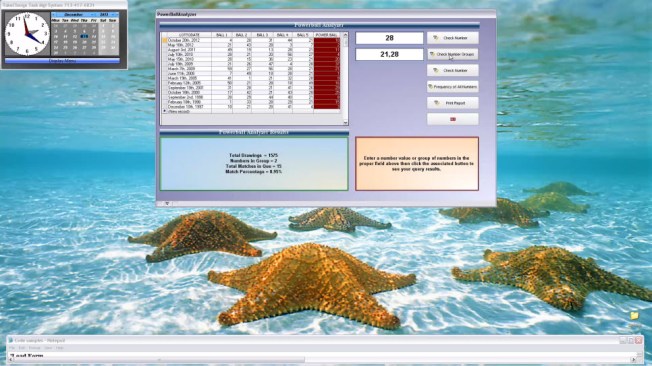
This form is not finished yet and the final appearance may change but for now we want to focus on the browse window and the two variables to the right of the browse.
The browse window list all drawings for Powerball since the game began. When the application is opened, all drawings are displayed. To the right we have two variables and single click buttons to perform queries on the list in the browse. Below the browse is a standard text object which will display some data analysis based on the specific search.
The first search allows the user to check a specific number to see how many times it has been selected since the beginning of Powerball. We use the following code to accomplish the query.
DIM records_found as N
records_found = topparent.queryrun("act_1 = val(Var->vSrchNbr) .or. act_2 = val(Var->vSrchNbr) .or. act_3 = val(Var->vSrchNbr) .or. act_4 = val(Var->vSrchNbr) .or. act_5 = val(Var->vSrchNbr)","invert(cdate(lottodate))","","No","",.f.)
PowerBallAnalyzer:browse1.refresh()
text1.text = "Total Drawings  = "+nTotDraws+crlf()+"Total Matches in Que = "+records_found+crlf()+"Match Percentage = "+str(records_found/nTotDraws*100,10,2,"%")
- Notice that we are using Alpha Software’s Object Query function and the object is ‘topparent’. We can do this because the form is bound to our historical data table.
- The first part of the queryrun statement is the filter and as you can see we are checking to see if any of the actual numbers drawn match the value entered by the user in our variable box. By using the ‘.or.’ condition we are specifing that the value can be present on any ball on any drawing date.
- The queryrun not only performs the query, but it returns the number of matching records found. We assign this number to records found and use it in the text box message displayed as the last line of code.
Our text string has a couple points of interest.
- nTotDraws is a Session variable which holds the total number of records in our historical database. This variable is set oninit of the form.
- Crlf() inserts a line break in our text string.
- The precent of matches is simply records_found divided by nTotDraws.
- Finally we format the answer using Alpha Software’s string formatting function.
Next we have a variable which allows the user to enter a list of numbers separated by a comma. The list will accept two to five unique numbers. When the user enters the numbers they want to check and clicks the button to the right, the application will run a query which counts the number of entries in the string and returns a list of all drawings which has the expected value regardless of which of the actual balls they fall on. The code is listed below.
parentform.commit()
dim xcnt as C
dim SHARED N1 AS N
DIM SHARED N2 AS N
DIM SHARED N3 AS N
DIM SHARED N4 AS N
DIM SHARED N5 AS N

N1 = val(word(vSrchString,1,",",1))
N2 = val(word(vSrchString,2,",",1))
N3 = val(word(vSrchString,3,",",1))
N4 = val(word(vSrchString,4,",",1))
N5 = val(word(vSrchString,5,",",1))

list = comma_to_crlf(vSrchString)
xcnt = line_count(list)

if xcnt = "2" then
    DIM records_found as N
    records_found = topparent.queryrun("(N1 = act_1 .or.  N1 = act_2 .or. N1 = act_3 .or. N1 = act_4 .or. N1 = act_5 )  .and. (N2 = act_1 .or.  N2 = act_2 .or. N2 = act_3 .or. N2 = act_4 .or. N2 = act_5 )","","","No","",.f.)
else if xcnt = "3" then
    DIM records_found as N
    records_found = topparent.queryrun("(N1 = act_1 .or.  N1 = act_2 .or. N1 = act_3 .or. N1 = act_4 .or. N1 = act_5 )  .and. (N2 = act_1 .or.  N2 = act_2 .or. N2 = act_3 .or. N2 = act_4 .or. N2 = act_5 ) .and. (N3 = act_1 .or.  N3 = act_2 .or. N3 = act_3 .or. N3 = act_4 .or. N3 = act_5 )","","","No","",.f.)
else if xcnt = "4" then
    DIM records_found as N
    records_found = topparent.queryrun("(N1 = act_1 .or.  N1 = act_2 .or. N1 = act_3 .or. N1 = act_4 .or. N1 = act_5 )  .and. (N2 = act_1 .or.  N2 = act_2 .or. N2 = act_3 .or. N2 = act_4 .or. N2 = act_5 ) .and. (N3 = act_1 .or.  N3 = act_2 .or. N3 = act_3 .or. N3 = act_4 .or. N3 = act_5 ) .and. (N4 = act_1 .or.  N4 = act_2 .or. N4 = act_3 .or. N4 = act_4 .or. N4 = act_5 )","","","No","",.f.)
else if xcnt = "5" then
    DIM records_found as N
    records_found = topparent.queryrun("(N1 = act_1 .or.  N1 = act_2 .or. N1 = act_3 .or. N1 = act_4 .or. N1 = act_5 )  .and. (N2 = act_1 .or.  N2 = act_2 .or. N2 = act_3 .or. N2 = act_4 .or. N2 = act_5 ) .and. (N3 = act_1 .or.  N3 = act_2 .or. N3 = act_3 .or. N3 = act_4 .or. N3 = act_5 ) .and. (N4 = act_1 .or.  N4 = act_2 .or. N4 = act_3 .or. N4 = act_4 .or. N4 = act_5 ) .and. (N5 = act_1 .or.  N5 = act_2 .or. N5 = act_3 .or. N5 = act_4 .or. N5 = act_5 )","","","No","",.f.)
end if
PowerBallAnalyzer:browse1.refresh()
text1.text = "Total Drawings  = "+nTotDraws+crlf()+"Numbers in Group = "+str(xcnt)+crlf()+"Total Matches in Que = "+records_found+crlf()+"Match Percentage = "+str(records_found/nTotDraws*100,10,2,"%")
The point of interest in this code is the use of the ‘.or.’ and ‘.and.’ condition in the query filter. Basically we are telling the system to find any value on any ball on any drawing date and all values in the list must exist in the displayed drawing.
There you have it. A fairly simple solution for a complex query.
Well that’s it for today. I hope you found this lesson helpful. Remember, if you need help with an Alpha Software application or wish to inquire about a custom application for your business go to our website
and inquire or contact
NLawson@cdc-TakeCharge.com
Have a great day.
 Custome Database Design with Alpha Software
Leave a comment