
Hello Everyone
Today’s lesson will cover three topics;
- Error Trapping and how to handle errors
- Restricting data entry based on data values stored in a table.
- Conditional Object as a means of form layout control.
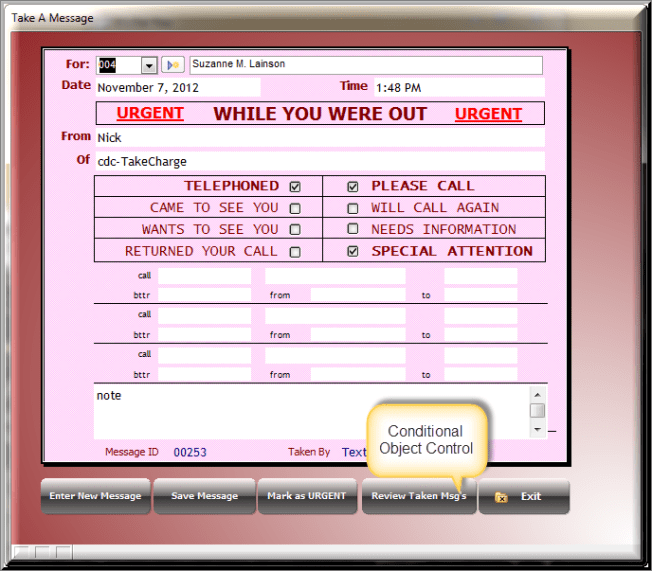
The form we will be using for our demonstration today are the Take Message form and the Administrator form

Let’s look at the Error Trapping first.
Error trapping is an important and necessary part of programming for all applications. No matter how smart we are or how complete we believe our application is, it is not complete if no error trapping is present to handle errors when they occur. Lets face it, if there is a way to break it, your users will find it and may actually invent some cleaver or unexpected error.
On our exit button we have included error handling to manage an error we know will occur. The code is as follows.
on error goto justclose
DIM mode as c
mode = parentform.mode_get()
'If the form is in Enter or Change mode, first save the changes before closing the form
if mode = "ENTER" .or. mode = "CHANGE" then
   parentform.commit()
   'Check to see if the record was successfully saved
   if parentform.mode_get()<>"VIEW" then
      ui_msg_box("Unable to save your changes","Please correct and save, or discard your changes", UI_STOP_SYMBOL)
   end if
end if
dim newuserid as C
newuserid = Administration:tr_id.text
Take_Message:for.text = Var->newuserid
'Close the form
justclose:
parentform.close()
If you watched the video above, ( please do!! ) I explained the form close will return the user to the previous screen. If they arrived at the Administrator form from the Take Message form and are creating a new user then when the form is closed it assigns the new user to the for field on the Take Message form. This is done with this snippet of code.
dim newuserid as C
newuserid = Administration:tr_id.text
Take_Message:for.text = Var->newuserid
If they arrive at the Administrator form from the Main Menu then when they close the form this code will error out because the Take Message form is not open. The error trapping redirects the code to the label
justclose
skipping the error allowing the form to close properly. Now this is a very simple example but even more complex examples do the same thing. An error occurs and the on error event trapper either over rides the error or request input from the user to determine how to proceed.
Now lets look at restricting data. For this demo we created a button on the Administrator form called show password. In the video it shows that if the user is an administrator, they can click the button and the password will be unmasked and display in the field. Also the button will change to Mask Password so when clicked again, it re-mask the password field. The code is here.
if Administration:tr_administrator.value = .t. then
    if Administration:button1.text = "Show Password" then
        topparent:Tr_password.Font.Name  = "Arial"
        Administration:button1.text = "Mask Password"
    else
        topparent:Tr_password.Font.Name  = "Wingdings"
        Administration:button1.text = "Show Password"
    end if
else
    ui_msg_box("Sorry!", "You are not authorized")
end if
Here we nested two If else statements. the first checks to see if the user has administrator privileges and if so changes the font name and reassigns the button text. otherwise it pops up the restricted message. Again this is a very simple example, but as we stated in the last lesson. Simple coding is easier to debug and control; so ‘Keep it Simple’.
Finally we are looking at the conditional object.
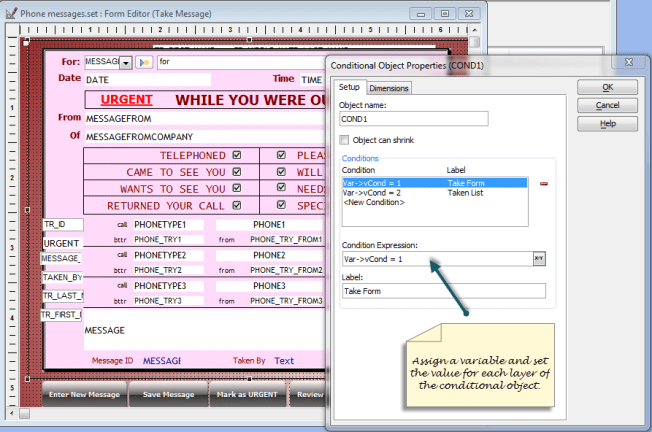
Currently we only need two layers for our object, the first of which holds the Take Message objects as shown above and the other a browse list showing all messages taken by the user and all messages for the user.
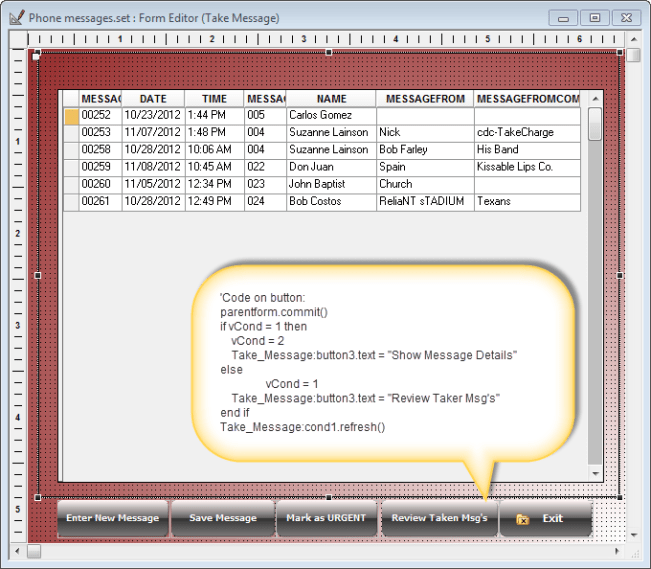
As you can see from the code called out in the text image the on push event of the button simply switches the layer of the conditional object. This can be done this way because there are only two layers. If there were more, the code would be different.
Well that’s it for today. I hope you found this lesson helpful. Remember, if you need help with an Alpha Software application or wish to inquire about a custom application for your business go to our web site
and inquire or contact
NLawson@cdc-TakeCharge.com
Have a great day.
 Custome Database Design with Alpha Software
Leave a comment