
Hello everyone
If you watched the above video, you saw an example of changing object properties on a form using xBasic code. We have discussed this before using a more complex system to control object properties so now I want to show you a simple method for doing the same.
Remember from our previous discussion on object properties, you can call the object out in the code page using Relative or Explicit syntax. We are using the relative method in this example.
On our form;
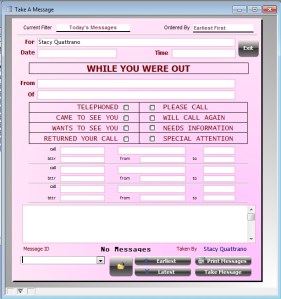
we have to do several small things to insure the state of the object properties is correct during all stages of the form while it is on the screen. The above image shows us in the process of entering a new record. All fields are blank except the For field. The text for each of the message option labels in the center of the form is normal. This is achieved by entering the following code on the On Enter event of the form.
'On Enter event

topparent:Takenbyid.value = var->user_id
topparent:text6.font.bold = .F.
topparent:text7.font.bold = .F.
topparent:text8.font.bold = .F.
topparent:text9.font.bold = .F.
topparent:text10.font.bold = .F.
topparent:text11.font.bold = .F.
topparent:text12.font.bold = .F.
topparent:text13.font.bold = .F.
We are naming each text object and setting the font.bold property value to False. Next we go to the OnChage event for each of the check boxes and add the following code.
'On Change event of checkbox object
if this.value
    topparent:Text6.Font.Bold  = .t.
Else
    topparent:Text6.Font.Bold  = .F.
end if
parentform.commit()
‘this’ is a relative way of expressing the current object which has focus. Using if this.value we are saying; If the current object is checked then the text will be set to bold otherwise leave it normal. At the bottom of the code I have a parentform.commit() included. Since we are working on the review message form, we want the state of the form to always be in view mode, therefore each change is follow by a commit.
Each message we view may have different options selected so we need to have an on fetch event which will handle this.
'On Fetch event
t = table.current()
if t.telephoned then
    topparent:text6.font.bold = .T.
else
    topparent:text6.font.bold = .F.
end if

if t.came_to_see_you then
    topparent:text7.font.bold = .T.
else
    topparent:text7.font.bold = .F.
end if

if t.wants_to_see_you then
    topparent:text8.font.bold = .T.
else
    topparent:text8.font.bold = .F.
end if

if t.returned_your_call then
    topparent:text9.font.bold = .T.
else
    topparent:text9.font.bold = .F.
end if

if t.please_call then
    topparent:text10.font.bold = .T.
else
    topparent:text10.font.bold = .F.
end if

if t.will_call_again then
    topparent:text11.font.bold = .T.
else
    topparent:text11.font.bold = .F.
end if

if t.needs_information then
    topparent:text12.font.bold = .T.
else
    topparent:text12.font.bold = .F.
end if

if t.needs_special_attention then
       topparent:text13.font.bold = .T.
else
    topparent:text13.font.bold = .F.
end if

if t.urgent then
   topparent:text31.object.visible = .T.
   topparent:text32.object.visible = .T.
else
   topparent:text31.object.visible = .F.
   topparent:text32.object.visible = .F.

end if
Here we look at each checkbox object on the form and if the value is true then we set the text object bold property to true as well. Notice at the top of the OnFetch event we have
‘t = table.current()’.
Using this allows us to evaluate the field content for each of the check box fields in the parent table. Since we are looking at objects in the parent table, we are able to use
tbl.current()
and we do not need to include
t.close
at the end of our script. Otherwise we would have to use
t = table.open(C table name)
and name the table we wish to view and when we were done we would have to use
t.close()
to properly end the script.
That’s it and as you can see this is a very simple example and very effective. I hope you found this example helpful. Let us know.
 Custome Database Design with Alpha Software
Leave a comment