
Hello Everyone
Today we are going to examine the code on the Review Message Form of our TC Message Center application. On this form there are two text boxes which display the current state of the data view and also are used to process changes made by the user to change the data view. At the bottom of the form are two Multi-State Buttons. Button one controls the filter for the data selected by user name and Multi-State button two controls the ascending or descending order of the selected data. See Below:
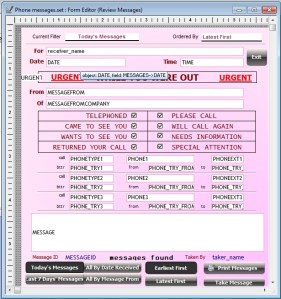
These Multi-State buttons are variables and the values of the variables are set based on which of the buttons is depressed. Additionally, the choice made by the user passes those values to locally run scripts which then displays the data in the order expected by the end user.
This all sounds pretty ambitious but it is actually fairly simple. Before we continue however, I have made some changes to the objects on the form and this affects how the code is written to a small extent.
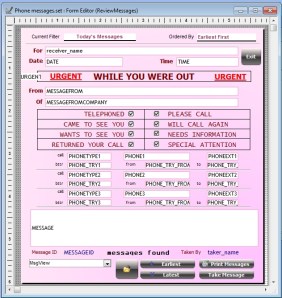
First I replaced Multi-State button 1 with a combo list variable and I replaced Multi-State button 2 with two separate action buttons. Personally I am not a big fan of Multi-State buttons which is why I changed them so if you wish to keep the Multi-State Buttons, you can. The principles are the same. The variables needed for our data control are;
- MsgView – Session Character variable used in our combo control on the form
- dspl_msg_filter – Local Character Variable used to pass the filter values
- dspl_msg_order – Local Character Variable used to pass the Order values
There are other variables but these are the ones we will deal with today. The two text objcets we are using are;
- text28 – Text field showing Current filter
- text30 – Text field showing Current Order
The scripts we will examine are;
- Chng Msgs Dsply Ordr() – Sets the data display order
- Pop Msgs Summary Dlg() – Sets the data filter for the selected user
Chng Msgs Dsply Ordr
When the user clicks the button labeled Earliest or Latest we set the variable dspl_msg_order then call the script Chng Msgs Dsply Ordr. Earliest sets dspl_msg_order to 1 and Latest sets it to 2. Chng Msgs Dsply Ordr code is as follows.
DIM window_name as C
window_name = ":"+"ReviewMessages"
DIM varP_Rvw_Msgs as p
'Get a pointer to the specified window
varP_Rvw_Msgs = obj(window_name)
'Check if the specified window exists
if .not. is_object(varP_Rvw_Msgs) then
    ui_msg_box("Error","The window '"+window_name+"' does not exists.",ui_stop_symbol)
    end
end if

DIM Shared rtrv_msgs_filter AS c
'Get the order expression
rtrv_msgs_filter = varP_Rvw_Msgs.filter_get()

DIM Shared rtrv_msgs_order AS c
'Get the order expression
rtrv_msgs_order = varP_Rvw_Msgs.order_get()

if dspl_msgs_order = "1" then
        rtrv_msgs_order = "cdate(Date)+str(toseconds(Time),19,5)"
        varP_Rvw_Msgs.TEXT30.value = "Earliest First"
    else
        rtrv_msgs_order = "invert(cdate(Date)+str(toseconds(Time),19,5))"
        varP_Rvw_Msgs.TEXT30.value = "Latest First"
end if

varP_Rvw_Msgs.QueryRun(rtrv_msgs_filter,rtrv_msgs_order)
varP_Rvw_Msgs.Resynch()
First we set pointers to our form, then we pull all necessary values from the form in order to set the direction of our data. Then when the user makes a choice by clicking one of our action buttons the data order is set to ascending or descending. We also change the text value for our text box showing current order.
Our drop down list works slightly differently. The OnChage event of the field sets text28 value to the user choice before the script is called because the use the text value as part of the filter process. The Action button does more as well.
'Date Created: 12-Oct-2012 10:23:09 AM
'Last Updated: 15-Oct-2012 09:36:05 AM
'Created By  : cdc
'Updated By  : cdc
'Branch command. This command sets the values of one or more flag variables. (Branch id: 'whichmessagesdialog').
DIM   whichmessagesdialog_result as C
DIM   whichmessagesdialog_ELSE as L
DIM   whichmessagesdialog_1 as L
DIM   whichmessagesdialog_2 as L
DIM   whichmessagesdialog_3 as L
DIM   whichmessagesdialog_4 as L
whichmessagesdialog_1 = .F.
whichmessagesdialog_2 = .F.
whichmessagesdialog_3 = .F.
whichmessagesdialog_4 = .F.
whichmessagesdialog_ELSE =.F.
whichmessagesdialog_result = MsgView.text
'Test to see which branch to take....
SELECT
    CASE whichmessagesdialog_result = "1"
        whichmessagesdialog_1= .T.
        script_play_local("Pop Msgs Summary Dlg")
    CASE whichmessagesdialog_result = "2"
        whichmessagesdialog_2= .T.
        script_play_local("Pop Msgs Summary Dlg")
    CASE whichmessagesdialog_result = "3"
        whichmessagesdialog_3= .T.
        script_play_local("Pop Msgs Summary Dlg")
    CASE whichmessagesdialog_result = "4"
        whichmessagesdialog_4= .T.
        script_play_local("Pop Msgs Summary Dlg")
    CASE ELSE
        whichmessagesdialog_ELSE= .T.
END SELECT
Here we set several variables to identify which data view to display then we pass those variables to our local script
Pop Msgs Summary Dlg
'Date Created: 15-Oct-2012 09:12:08 AM
'Last Updated: 15-Oct-2012 10:40:33 AM
'Created By  : cdc
'Updated By  : cdc
'Create an XDialog dialog box to prompt for parameters.

DIM SHARED Selected_Message as C
DIM SHARED varC_result as C

'DIM SHARED fltr_msgs_cnt AS C

'Create pointer to existing window
DIM Shared varP_Rvw_Msgs as P
DIM varP_form_db as P
DIM msg_id as C
DIM SHARED varC_msgs_for as C
DIM rtrv_msgs_info as C
DIM rtrv_msgs_filter as C
DIM rtrv_msgs_order as C

'holds carriage return/line feed delimited string of messages data
DIM messages_data as C

varP_Rvw_Msgs = :ReviewMessages.this

'pop up depressed buttons
'varP_Rvw_Msgs.MULSTBTN1.value = dspl_msgs_filter
'varP_Rvw_Msgs.MULSTBTN2.value = dspl_msgs_order

'get current filter, order parameters for form
rtrv_msgs_filter = varP_Rvw_Msgs.filter_get()
rtrv_msgs_order = varP_Rvw_Msgs.order_get()

'close open message summary dialog box
if varC_msgs_for <> "" then
    if ui_modeless_dlg_exist(varC_msgs_for)
        ui_modeless_dlg_close(varC_msgs_for)
    end if
end if

varC_msgs_for = alltrim(varP_Rvw_Msgs.receiver_name.text)

if dspl_msgs_filter = "1" then
    varP_Rvw_Msgs.TEXT28.text = "Today's Messages"
    varC_msgs_for = "Today's Messages for "+varC_msgs_for+" "+date()
    rtrv_msgs_info = "recno()+\"~\"+timehourstring(Time)+\"^\"+alltrim(time)+\" \"+alltrim(Messagefrom)+\" from \"+alltrim(Messagefromcompany)+SPACE(3)"+crlf()
    rtrv_msgs_filter = "date = date() .and. message_for_id ="+quote(var->user_id)
end if
if dspl_msgs_filter = "2" then
    varP_Rvw_Msgs.TEXT28.text = "Last 7 Days' Messages"
    varC_msgs_for = "Last 7 Days' Messages for "+varC_msgs_for+" "+date()
    rtrv_msgs_info = "recno()+\"~\"+date+\"^\"+timehourstring(Time)+\"^\"+alltrim(time)+\" \"+alltrim(Messagefrom)+\" from \"+alltrim(Messagefromcompany)+SPACE(3)"+crlf()
    rtrv_msgs_filter = "date >= (date() - 7) .and. message_for_id ="+quote(var->user_id)
end if
if dspl_msgs_filter = "3" then
    varP_Rvw_Msgs.TEXT28.text = "All By Date Received"
    varC_msgs_for = "All Messages By Date Received for "+varC_msgs_for+" "+date()
    rtrv_msgs_info = "recno()+\"~\"+date+\"^\"+timehourstring(Time)+\"^\"+alltrim(time)+\" \"+alltrim(Messagefrom)+\" from \"+alltrim(Messagefromcompany)"+crlf()
    rtrv_msgs_filter = "message_for_id ="+quote(var->user_id)
end if

if dspl_msgs_filter = "4" then
    varP_Rvw_Msgs.TEXT28.text = "All By Messages From"
    varC_msgs_for = "All By Messages From for "+varC_msgs_for+" "+date()
    rtrv_msgs_info = "recno()+\"~\"+alltrim(Messagefrom)+\" from \"+alltrim(Messagefromcompany)+\"^\"+date+\" at \"+alltrim(time)"+crlf()
    rtrv_msgs_order = "alltrim(Messagefrom)+\" from \"+alltrim(Messagefromcompany))"
    rtrv_msgs_filter = "message_for_id ="+quote(var->user_id)
end if

messages_data = table.external_record_content_get("messages",rtrv_msgs_info,rtrv_msgs_order,rtrv_msgs_filter)
fltr_msg_cnt = w_count(messages_data,crlf())

varP_Rvw_Msgs.QueryRun(rtrv_msgs_filter,rtrv_msgs_order)

if (fltr_msg_cnt = 0 ) then
    ui_msg_box("No Messages Found","Please make another selection.")
    stop
end if

DIM messages_tree[fltr_msg_cnt] as p
messages_tree.initialize_properties("recno~msgdata", messages_data)

ok_button_label = "&OK"
cancel_button_label = "&Cancel"
frm = ""
flag = .F.

Selected_Message = ""

ui_modeless_dlg_box(varC_msgs_for,<<%dlg%
{font=tahoma,10}
{position=remember}
{background=rose}
{can_exit=Message Detail}
{nomove}
{region}
[%S=BLRX;D="^"%.116,26Selected_Message^<messages_tree[\].msgdata!msgevent_*]
{endregion};
{region}
{justify=left}
Select Message, Then Click <Message Detail?flag>
{endregion}
%dlg%,<<%code%
'events[events.first_empty()] = a_dlg_button
if at(":",Selected_Message)>0 then
    flag = .T.
    if a_dlg_button = "msgevent_change" then
        indx = messages_tree.find(Selected_Message,"msgdata")
        gt_rn = val(messages_tree[indx].recno)
        varP_Rvw_Msgs.recno_goto(gt_rn)
    end if
    if a_dlg_button="Message Detail" then
        'varP_Rvw_Msgs.MULSTBTN1.value = 0
         ui_modeless_dlg_close(varC_msgs_for)
    end if
    a_dlg_button=""
else
    flag = .F.
    a_dlg_button=""
end if
%code%)
I know this looks like a lot of code but don’t let it throw you. It is actually fairly simple. First we set pointers to our form and set our variables based on objects on the form. Then we declare some additional variables which we will need for our xDialog box which will display our messages in a tree view. Now we pass the user selection using dspl_msg_filter which is set when the user chooses a filter view. Finally we pass all needed variables to our xDialog box and display it on the screen.
Now the user can select an order for his data and switch between filter views and the order is maintained and also, they can change the order for any selected filter view. Pretty cool!!!
Well this was a big lesson and I hope you found it useful. We will post a new lesson soon.
 Custome Database Design with Alpha Software
Leave a comment