
Hello Everyone
This is our last lesson in the series; building a better and more robust Contact Management App in Alpha Software. Our next series of lessons will focus on the xBasic language Alpha Software uses as it’s programming language and contrast it with the high level action scripts and table operations.
The short video below gives an overview of the last things we need to do for our application. Watch it then read on for specific code examples.
Basically our Contact Management App is finished in fact I already have a customer beta testing the end product to insure it does as advertised. There is however one procedure I still need to discuss. Converting the memo’s and notes to other file formats for use in other applications. To do this we will examine the buttons on the Quick Note Organizer form.
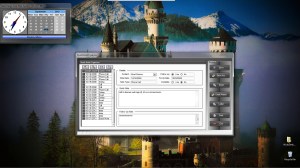
One of the buttons on our form is Save As.. This button allows us to save the note in a file format other than an Alpha Software table. Our choices are
- Rich Text
- Plain Text
- HTML
I chose these for two reasons, they are the most commonly used file formats and Alpha Software provides a third party utility which does the actual conversion saving us a tremendous amount of work. In order for this third party utility to work, you need to create a report. Below is a view of the report I created displayed in the Fire Fox browser.
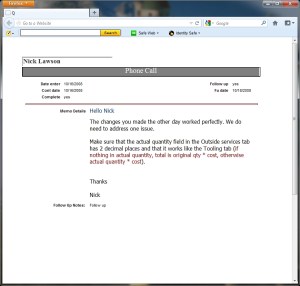
With the ever growing list of media toys for people to use; html is a perfect way to insure your note can be read on any of them.
Once you design your report you will need to write some xbasic code to convert the report to the desired format. Each code snippet is listed below.
if sachoice = "PDF" then
    record_number = current_record_number()
    query.filter = "recno() = " + record_number
    query.order = ""
    :Report.SaveAs("Quick Note Report","PDF",query.filter,query.order,a5.get_path()+chr(92)+"Documents"+chr(92)+Alltrim(Var->AName)+"-"+time("dd-MM-yyyy")+" Note.pdf",.F.)
else if sachoice = "Plain Text" then
    record_number = current_record_number()
    query.filter = "recno() = " + record_number
    query.order = ""
    :Report.SaveAs("Quick Note Report","TXT",query.filter,query.order,a5.get_path()+chr(92)+"Documents"+chr(92)+Alltrim(Var->AName)+"-"+time("dd-MM-yyyy")+" Note.txt",.F.)

else if sachoice = "Rich Text" then
    record_number = current_record_number()
    query.filter = "recno() = " + record_number
    query.order = ""
    :Report.SaveAs("Quick Note Report","RTF",query.filter,query.order,a5.get_path()+chr(92)+"Documents"+chr(92)+Alltrim(Var->AName)+"-"+time("dd-MM-yyyy")+" Note.rtf",.F.)

else if sachoice = "HTML" then
    record_number = current_record_number()
    query.filter = "recno() = " + record_number
    query.order = ""
    :Report.SaveAs("Quick Note Report","HTML",query.filter,query.order,a5.get_path()+chr(92)+"Documents"+chr(92)+Alltrim(Var->AName)+"-"+time("dd-MM-yyyy")+" Note.html",.F.)

end if
Basically they are all the same except we change the output type. Lets look at the HTML example.
First we query our report based on the current record. Next we save the report using the function
Report.SaveAs()
We name the report we are using as our templete
“Quick Note Report”
Then we name the file type we want.
“HTML”
Finally we set the path for the file and give it a unique name and tell the system to display the new file or not using a logical value ‘.T. or. F.’. You could also pop up a dialog box to prompt the user for the name if you want.
Well that’s it. We now have an application which takes up minimum space on the desktop; doubling as a clock and calendar. A complete Contacts system tracking both personal and business contacts with a Google Map interface and unlimited phone and media contact methods. We can write notes on any topic and sort to easily find any of our notes. We can use the notes as a reminder system and view them using the focus date on our desktop calendar. Finally we can email our notes, convert them to other file formats for use in other programs and make travel copies.
I hope all of you had fun following along. Let us know what you think and our next lesson series will start soon.
 Custome Database Design with Alpha Software
Leave a comment