
Hello Everyone
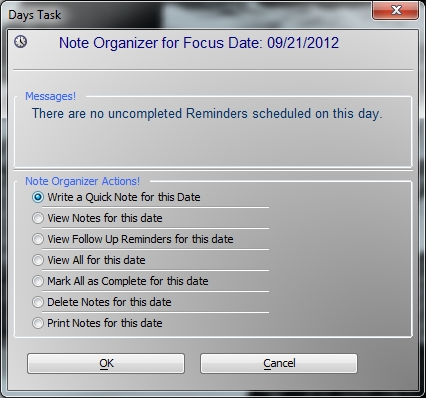
Today’s lesson will review the actions available for the user on our pop up xDialog box showing notes and reminders for our focus date.
The video above shows the code for each of the Note Organizer actions but we are going to examine more closely the function called
For Each Next..
Personally this is one of my favorite functions because it makes processing list of information very easy.
Typically you would create an array of values then step through the array in order to change or process data based on the array values. Using For Each Next you don’t need to know how to do array’s at all. In order to use For Each Next, you need the following.
- A control line feed delimited list.
- A unique variable name
- Code to process as you step through the list.
In our example we are using the activities scheduled in our activity table with the same date as our focus date on our super control calendar. We step through the table using
while .not. t.EOF
and build our list of all activity ID’s for the focus date
    dim list as C
    list = ""
    t = table.open("activity")
    t.fetch_first()
    while .not. t.fetch_eof()
        if t.cont_date = Var->DisplayDate .or. t.fu_date = Var->DisplayDate then
            list = list+t.act_id+crlf()
        end if
    t.fetch_next()
    wend
    t.close()
Next we open our act_memo table and again step through the table using the while not end of file method and compare each ID in our table to the values in our For Each Next statement.
    mt = table.open("act_memos")
    mt.fetch_first()
    while .not. mt.fetch_eof()
    for each id in list 'id is our unique variable
    if mt.act_id = id.value 'when the id in act_memo matches id.value we delete the record.
        mt.change_begin()
        mt.delete()
        mt.change_end()
    end if
    next
    mt.fetch_next()
    wend
    mt.close()
    'final step is to delete all found records in activity table
    a_tbl = table.open("activity")
    a_tbl.delete_range("Cont_Date = Var->DisplayDate .or. FU_Date = Var->DisplayDate")
    a_tbl.close()
    xbasic_wait_for_idle()
    ui_msg_box("Thank You for Waiting!","All Notes and Activities for "+DisplayDate+"have been deleted.")
That’s it. As you can see, the code is very simple and can be used in a multitude of ways.
- Perform utilities on a list of files on the users computer
- Mark or unmark records for deletion
- Build mailing list
- Process Mailing list
and the list goes on.
Well I hope you found this lesson helpful and if you did, please let us know. Thanks again for stopping by.
 Custome Database Design with Alpha Software
Leave a comment