
Hello everyone
In the previous lesson I intended to include the zip code table look-up function but forgot to include it. This short lesson will address just that routine.
If you are creating a look-up form a zip code database based on city, the return value will most likely include more than one result. For example, League City Texas has two zip codes. So, to insure the correct one is displayed you need to pop up a user dialog which allows them to select from a list. However, if only one result is found then you want the fields to populate automatically.
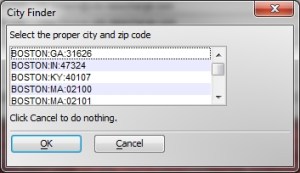
As you can see from the image above, Boston not only has several zip codes but is in more than one state.
On the on change event for the bill_city field of the company information form add the following code.
dim count as N
xCO_City = CompanyInformationForm:bill_city.text
count = dbcount("zip.dbf", "City", Var->xCO_City)
if count > 1 then
'Create an XDialog dialog box to prompt for parameters.
DIM SHARED con_city as C
DIM SHARED varC_result as C
auto_list_con_city = table.external_record_content_GET("zip", "RTrim(City)+':'+RTrim(State)+':'+RTrim(Zip)", "state","City=Var->xCO_City")

Dim format as p
Format.tab_stops=""
Format.odd_row_color="White"
Format.even_row_color="Blue White"
Format.odd_selected_color="Dark Blue"
Format.even_selected_color="Dark Blue"
Format.font="Arial,8"
Format.font_color_unselected="Black"
Format.font_color_selected="White"
Format.lastbutton="OK"
Format.group_size=1
Format.number_rows=.f.
Format.alternating_bands=.t.

'Apply 'owner draw' formatting information to the list
auto_list_con_city = a5_owner_draw_list_fmt(auto_list_con_city,Format)

temp_count = w_count(auto_list_con_city,crlf())
DELETE a_con_city
DIM a_con_city[temp_count] as c
a_con_city.initialize(auto_list_con_city)
heading_string = "Select the proper city and zip code"
footer_string = "Click Cancel to do nothing."
ok_button_label = "&OK"
cancel_button_label = "&Cancel"
Delete XdialogStyle
dim XDialogStyle as p
XDialogStyle.AccentColor = "White"
XDialogStyle.Color = "#191+191+191"
varC_result = ui_dlg_box("City Finder",<<%dlg%
{Windowstyle=Gradient Radial Bottom Right}
{region}
{text=65,1:heading_string};
{endregion};
{region}
[%d;O={@@}%.50,5con_city^#a_con_city];
{endregion};
{region}
{text=65,1:footer_string};
{endregion};
{line=1,0};
{region}
<*15=ok_button_label!OK> <15=cancel_button_label!CANCEL>
{endregion};
%dlg%,<<%code%
if a_dlg_button = "CANCEL" then
End
end if
%code%)

else
    con_city = table.external_record_content_GET("zip", "RTrim(City)+':'+RTrim(State)+':'+RTrim(Zip)", "","City=Var->xCO_City")
end if
CompanyInformationForm:state.value = word(con_city,2,":")
CompanyInformationForm:zip.value = word(con_city,3,":")
if CompanyInformationForm:shipsameas.value = .t. then
    CompanyInformationForm:ship_addre.value = CompanyInformationForm:bill_addre.text
    CompanyInformationForm:ship_addr0.value = CompanyInformationForm:bill_addr0.text
    CompanyInformationForm:ship_city.value = CompanyInformationForm:bill_city.text
    CompanyInformationForm:ship_state.value = CompanyInformationForm:state.text
    CompanyInformationForm:ship_zip.value = CompanyInformationForm:zip.text
end if
This is another perfect example of when to use a xDialog box for user input. The software makes a decision based on the search criteria and if more than one choice is available it displays the xDialog box with a list of available choices for the user.
To determine the number of available choices we use dbcount() function to return the number of records matching our filter query.
dim count as N
xCO_City = CompanyInformationForm:bill_city.text
count = dbcount("zip.dbf", "City", Var->xCO_City)
if count > 1 then
dbcount() does require an index on the table containing the records you wish to count.
Watch our short video to see how easily this is done and how well it works.
 Custome Database Design with Alpha Software
Leave a comment