
Hello everyone
Today our lesson will center on using the newly created memo writer as an E-Mail writer and exporting the users memo to their favorite external email program.
Last week we created our Note Writer (see below) and showed how to extract the data from the memo field and display the contents in a text box on another form.
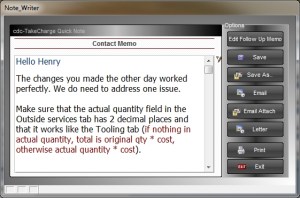
Today we will do a similar function except we will extract the data as rich text and send it to the external email client of the user.
To start we will add the following code to the on push event of the ‘Email’ button on the Note Writer form.
'Date Created: 02-Jan-2009 02:42:12 PM
'Last Updated: 27-Aug-2012 10:42:39 AM
'Created By  : User
'Updated By  : cdc
parentform.commit()
'E-Mail:
xEM = ""

'Create an XDialog dialog box to prompt for parameters.
DIM SHARED xto as C
DIM SHARED xSubj as C
DIM SHARED varC_result as C
heading_string = "Fill in the fields then click 'OK' to continue."
footer_string = "Click 'Cancel' to do nothing."
ok_button_label = "&OK"
cancel_button_label = "&Cancel"
Delete XdialogStyle
dim XDialogStyle as p
XDialogStyle.AccentColor = "White"
XDialogStyle.Color = "#51+51+51"
varC_result = ui_dlg_box("E-Mail Header Dialog",<<%dlg%
{Windowstyle=Gradient Radial Top Left}
{region}
{text=65,1:heading_string};
{endregion};
{region}
Enter E-Mail Account:| [.50xto];
Enter Subject:| [.50xSubj];
{endregion};
{region}
{text=65,1:footer_string};
{endregion};
{line=1,0};
{region}
<*15=ok_button_label!OK> <15=cancel_button_label!CANCEL>
{endregion};
%dlg%,<<%code%
'Does nothing if Cancel is selected
if a_dlg_button = "CANCEL" then
End
end if
'Assigns values to the external email client variables
xEM = xto
xSubj = xSubj
'Converts the rich text memo object to a string first then to HTML
dim xBody as C
dim rtf_Text as C
tbl = table.current()
if Note_Writer:button39.text = "Edit Follow Up Memo" then
    rtf_text = *bin_to_rtf(tbl.cont_memo)
else
    rtf_text = *bin_to_rtf(tbl.fu_memo)
end if
attachments = ""
xbody = *rtf_to_html(rtf_text)
' Calls up the default email program for the user and passes the variables to it.
email_client_external(xto,xSubj,xBody, attachments)
%code%)
The first part of the code builds an xDialog box prompting the user to provide the send to email address and a subject line for the email.
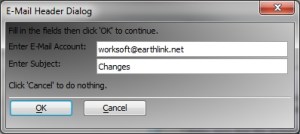
The second part in the code section points to the memo field, converts the rich text memo field (*bin_to_rtf)to a string with all rich text codes and assigns the value to rtf_text variable. We then convert rtf_text to html (*rtf_to_html). This value is assigned to the variable xbody and finally the Alpha Software function email_client_external() does the heavy lifting and creates the email.
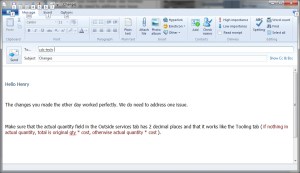
That’s it. Watch our short video to see it all come together and as always, if you find this lesson helpful let us know.
 Custome Database Design with Alpha Software
Leave a comment