
Hello everyone
Today we will discuss the various types of forms available for data entry into Alpha Software. Typically when you design your application and you build your tables and sets you will bind your forms to your set or tables and use those for data entry .
Alpha software provides additional methods for creating forms which are called xDialog. An xDialog box should be used when you are passing information back to the user or you are seeking direction from the user for example, in the image below you see a dialog box that tells the user there are no messages for the current focus date .
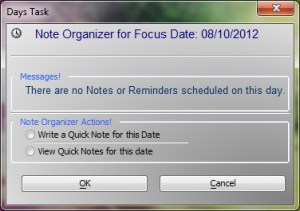
Additionally it asks the user if they would like to enter a note for the focused date or, if notes exist, would they like to view the notes for that day . You can also use an xDialogue as a menu system or command options such as ; print or preview . Looking at the image below you will notice are conditional objects’ has two list on the contact methods page as well as two buttons for editing the list.
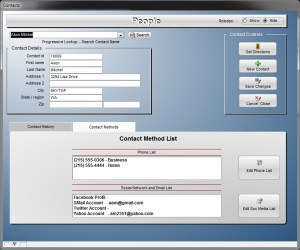
The second list we added is a list of any and all social media and e-mail accounts the contact may have. If we wish to edit the phone list we simply click the button labeled edit phone list . This will take us to a new conditional page which displays a browse of all the contacts phone accounts . Now the user can enter and add as many numbers as are available for the contact . Since our phone list and social media list are linked to the people table by contact ID in a one to many relationship , creating the browse input window makes perfect sense .
The short video below shows how we modified are set and added the new conditional pages .
As always if you find this video and tutorial lesson helpful please let us know . Our next lesson will examine the data entry process of the note itself and the option of using rich text memo fields. We hope to see you then.
 Custome Database Design with Alpha Software
Leave a comment