
Hello again.
Here in lesson two, we are discussing how to improve the overall look of your application by hiding the Alpha Software Development window from your application. This gives the appearance of having your forms and menu’s float directly on the desktop simular to the live tiles which will be in Windows 8.
The first thing we have to do is convert the existing code for the start-up autoexec script. (Naming a script ‘Autoexec’ tells Alpha Software to run the script automatically when the application loads.) The code used in the autoexec of the original Contact App is:
A5.window_title=”Contact Application” ‘ Sets the window name
dim global vc_time as c ‘ Declares a variable called vc_time
vc_time=now() ‘ Sets the value for vc_time
form.load(“People”) ‘ Loads but does not show People
form.load(“items_overdue”) ‘ Loads but does not show Items_Overdue
form.view(“Main_menu”) ‘ Displays the Navigation bar on the screen.
This code opens the application and displays as below.
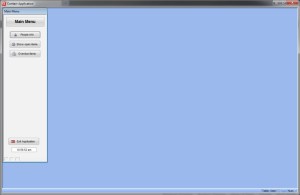
To change the application so it floats on the desktop we start with the command line of the desktop Icon.
-HIDE ‘Adding -HIDE (No space) to the command line hides Alpha 5
Since Alpha 5 is now hidden, we must tell it in the Autoexec Script to display the Navigation form as a popup. The new code looks like this:
‘Load Menu________________________________
form.load(“Main_menu”,”popup”,””,””,””) ‘Uses Form.load and sets the mode to popup
Main_Menu.Activate()
Main_Menu.Show()
In our autoexec script we load the form and set the mode to popup which allows the form to float outside the Alpha Software window. See Below:
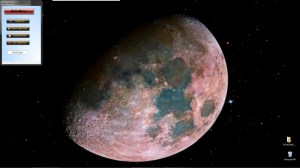
To see how the other forms are displayed on the desktop, watch our short video.
Our next lesson will discuss table and set design and how to send a report to a PDF viewer. Stay tuned and let us know if you like or find the tutorial useful and informative.
 Custome Database Design with Alpha Software
Leave a comment